The problem is that most contractors and subcontractors use these forms regularly without fully understanding how the system is designed to work. The result: rejected pay applications, stalled certifications, and cash flow gaps that compound across a project's life.
This guide breaks down AIA contract billing from the ground up — key documents, core terminology, the step-by-step process, and the failure points that delay payment most often.
Key Takeaways
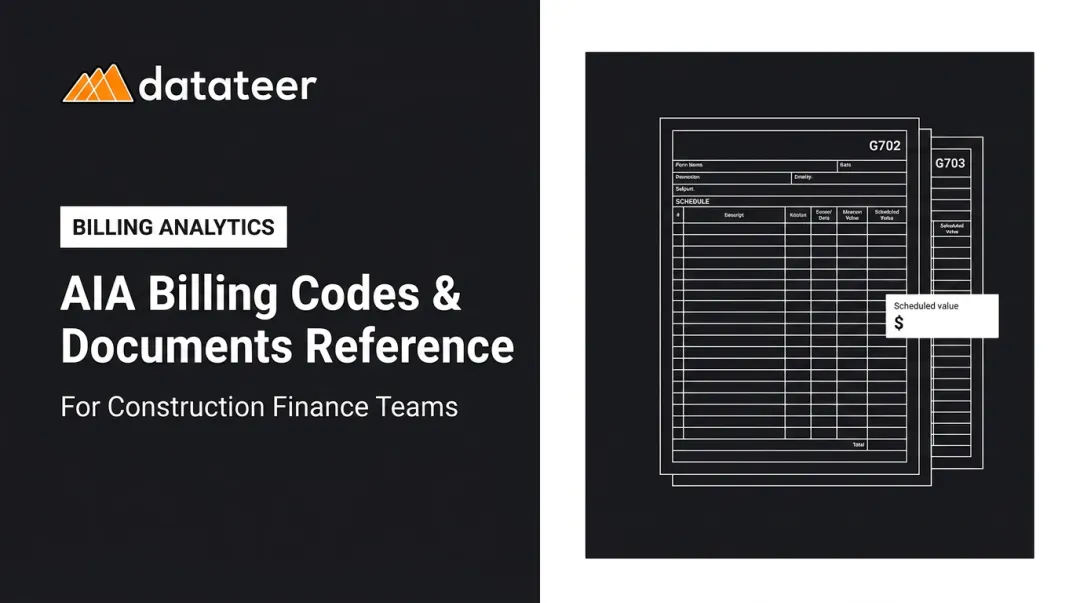
- AIA billing uses two core forms: the G702 (payment summary) and G703 (line-item detail tied to the Schedule of Values)
- Every pay application follows a defined sequence: SOV approval, G703/G702 preparation, architect certification, and payment release with retainage withheld
- Retainage (typically 5–10%) accumulates throughout the project and is released at substantial completion
- Rejected pay apps most often trace back to math mismatches between G702 and G703, unapproved change orders in the billing, or missing supporting documents
- Finance teams gain a clear edge when retainage, WIP, and cash flow data are visible in real time across all active projects
What Is AIA Contract Billing?
AIA billing is a structured, standardized method of progress billing where contractors submit formal payment applications at defined intervals using forms developed by the American Institute of Architects — not generic invoices.
The system dates to 1888, when the AIA published its first "Uniform Contract." Today, AIA contract documents are recognized throughout the design and construction industry as the benchmark across more than 200 published document types.
The G702/G703 billing forms emerged from a specific problem: before standardization, every project used custom billing formats, creating confusion, disputes, and inconsistent payment timelines. A shared, verifiable framework solved that.
What AIA Billing Is — and Isn't
AIA billing is not a one-time final invoice, a lump-sum payment request, or a substitute for a simple accounts receivable invoice. It is a progress-based system tied directly to work completed and documented against a predetermined Schedule of Values.
It remains dominant today for practical reasons:
- Integrates directly with AIA A201 General Conditions — Sections 9.2, 9.3.1, and 9.4.1 govern the SOV, pay application submission, and architect certification, giving it enforceable legal standing
- Banks financing commercial projects expect and require this format, making owner and lender familiarity a practical given
- Subcontractors billing a GC are often required to use G702/G703 when the prime contract demands consistent documentation across the project
AIA billing is required on commercial, public, design-bid-build, and lender-financed projects. Once the prime contract specifies it, the format cascades through every tier of the subcontract chain.
Key Documents: G702, G703, and the Schedule of Values
G702: Application and Certificate for Payment
The G702 is the top-level summary document — the contractor's formal payment request. It captures:
- Original contract sum and approved change orders
- Total work completed to date
- Stored materials value
- Retainage withheld (cumulative)
- Previous payments received
- Current amount due
It also contains the Architect's Certificate for Payment section, which must be signed before any payment is released. On larger projects, this section is often notarized.
G703: Continuation Sheet
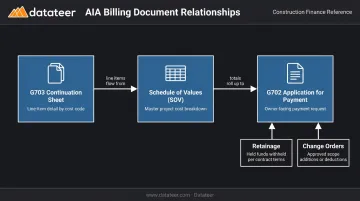
The G703 is the detailed backup that justifies the G702 summary. It lists every line item from the Schedule of Values individually, showing:
- Scheduled value per line item
- Work completed this period
- Work completed to date (cumulative)
- Stored materials
- Percentage complete per line
The G703 answers the question the G702 cannot: for what specific work?
Schedule of Values
The SOV is the foundation both forms rely on. Agreed upon before the first pay application, it breaks the total contract price into individual work components — demolition, framing, MEP rough-in, finishes, etc. — each carrying a dollar value proportional to its share of the project.
Contractors sometimes assign inflated values to early-start line items to accelerate early payments — a practice known as front-loading. AIA's own guidance confirms that architects have the right under A201 Section 9.2 to object and require revisions before approval. Expect scrutiny on the first submission.
Retainage and Change Orders
Retainage — typically 5–10% depending on the contract — is withheld from each billing period and accumulates until substantial completion. The G702 summarizes total retainage held; the G703 can show it line by line. For subcontractors in particular, this withholding creates a compounding cash flow constraint across multi-month projects.
Change orders must be approved before appearing in a billing. Stored materials require proof of purchase (invoices, delivery slips) and sometimes insurance certificates. Both are commonly mishandled, and either one will trigger a rejected pay app if the figures don't reconcile between the G702, G703, and the contract record.
How the AIA Billing Process Works Step by Step
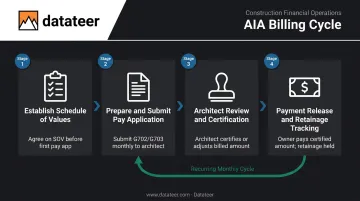
AIA billing operates as a recurring monthly cycle. Each application builds on the previous one. The process has four defined stages.
Stage 1: Establish the Schedule of Values
Before the first pay app is submitted, the contractor and owner agree on the SOV. It becomes the billing map for the entire project. Under A201-2017 Section 9.3.1, the contractor must submit the application at least ten days before each scheduled payment date.
The SOV needs enough line-item detail to allow progress verification — but not so fragmented that it creates unnecessary administrative burden. Architects flag front-loaded SOVs and require revisions, so getting this right at the start avoids architect revisions and billing delays.
Stage 2: Prepare and Submit the Pay Application
The contractor completes the G703 first, recording:
- What percentage of each SOV line item is complete this period
- Cumulative percentage complete to date
- Any stored materials (with supporting invoices)
Those totals then roll up into the G702 summary. Numbers must match exactly between both forms — rounding errors and arithmetic mistakes are among the most common rejection triggers.
Before submitting, include all required supporting documentation:
- Lien waivers from subcontractors and suppliers
- Change order log (approved orders only)
- Stored material invoices and delivery slips
- Updated insurance certificates
Stage 3: Architect Review and Certification
After submission, the architect reviews the pay application against actual field progress. They may visit the site, request clarifications, or certify a lower amount if they dispute the percentages claimed.
Under A201-2017 Section 9.4.1, the architect must either issue a Certificate for Payment or notify the contractor of reasons for withholding. If the architect doesn't act within seven days (through no fault of the contractor), A201 Section 9.7 gives the contractor the right to stop work after providing an additional seven-day written notice.
Stage 4: Payment Release and Retainage Tracking
Once certified, the owner releases payment for the certified amount minus retainage withheld for that period. Retainage accumulates across the project's life.
The final retainage release is typically the largest single payment on any project. It requires:
- A final pay application
- Full lien releases from all subs and suppliers
- Complete closeout documentation
This payout often comes months after the last crew leaves the site, making it a critical cash flow planning item for contractors managing multiple concurrent jobs.
Common Challenges in AIA Billing (and How to Avoid Them)
According to CFMA, 82% of construction companies now wait more than 30 days for payment — up from 49% just two years prior — with slow payments accounting for approximately $280 billion in wasted costs in 2024. Most of those delays start at the pay application itself.
Mismatch Between G702 and G703
Totals on the G702 summary that don't match the G703 line-item detail are the most frequent rejection cause. Math errors, retainage calculation mistakes, and unapproved change orders slipped into the billing all cause this. A reconciliation check before every submission should be non-negotiable.
Visibility Gaps Across Multiple Projects
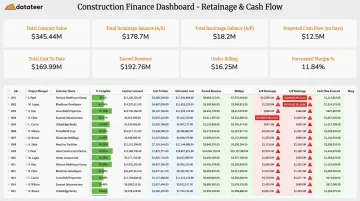
Finance teams managing several active pay apps simultaneously often lose track of how much retainage is held firm-wide, whether billing aligns with actual costs, and where cash flow exposure is growing. Manual spreadsheet processes break down fast under that load.
Teams that connect AIA billing data to real-time dashboards recover that visibility. Datateer's platform pulls billing, retainage, and WIP data directly from construction ERPs (Procore, Sage, Viewpoint, Acumatica, and others), surfacing both A/R retainage (held by owners on your firm) and A/P retainage (held by your firm on subs) across all active projects — no manual compilation required.
Overdue retainage releases are flagged automatically, and release schedules feed directly into 13-week cash flow forecasting so CFOs see the liquidity impact in time to act.
Missing Supporting Documentation
Stored materials require invoices and proof of ownership before they can be billed. Lien waivers are commonly required from subcontractors and suppliers before each pay app is processed. Missing any one document holds up the entire approval cycle. The practical fix: a standardized pre-submission checklist maintained for each billing period.
Modifying the Forms
Contractors sometimes adjust G702/G703 formats to simplify categories or align with how a project was bid. Any modifications that aren't clearly visible can create rounding discrepancies, omit required retainage columns, or fail to meet owner and lender requirements. Agree on format changes in writing before the first pay app — not after a rejection.
Frequently Asked Questions
What is AIA contract invoicing?
AIA contract invoicing is the process of submitting formal payment applications using the AIA's standardized G702 and G703 forms. These documents replace generic invoices with a verifiable, contract-linked payment record that tracks work completed, retainage held, and the current amount due.
What is the AIA billing format?
The AIA billing format centers on two documents: the G702 (Application and Certificate for Payment), which summarizes the total payment request, and the G703 (Continuation Sheet), which provides a line-by-line breakdown tied to the project's Schedule of Values.
What is the difference between the G702 and G703 forms?
The G702 is the summary-level payment request showing totals for contract value, work completed, retainage, and amount due. The G703 is the detailed backup showing each SOV line item's individual progress. Put simply: the G702 shows how much is owed; the G703 shows what work earned it.
What is retainage in AIA billing?
Retainage is a percentage — typically 5–10% — withheld from each pay application by the owner as a performance assurance mechanism. It's tracked on both the G702 and G703 throughout the project and released only after substantial completion is reached.
Can subcontractors use AIA billing forms?
Yes. Subcontractors regularly use G702/G703 forms to bill general contractors, especially when the GC needs consistent documentation to prepare its own pay application to the owner. AIA publishes a dedicated "SUBS ONLY" G702/G703 template for this use case.
What supporting documents are typically required with an AIA pay application?
Most owners require several documents alongside the G702/G703:
- Change order log (approved orders only)
- Lien waivers from subcontractors and suppliers
- Invoices or delivery slips for stored materials
- Updated insurance certificates
- Photos or site inspection reports (on some projects)