This guide is written for construction CFOs, controllers, finance managers, and CPAs serving contractors. If your firm uses percentage-of-completion revenue recognition — and most commercial contractors do — standard financial statements alone are insufficient. Long project cycles, milestone-based billing, and ASC 606 compliance requirements demand a reporting layer that your P&L simply cannot provide.
What follows is a practical breakdown of what a WIP report is, why it matters, what it contains, how to build one, and where firms most commonly go wrong.
Key Takeaways
- A WIP report tracks earned revenue, costs, and billing status across all active jobs at a specific point in time
- Its core function is identifying whether each project is overbilled or underbilled relative to actual work completed
- The most critical input — and the most commonly neglected — is the estimated cost to complete
- Bonding agents, lenders, and CPAs all rely on WIP accuracy — errors carry consequences well beyond your internal P&L
- A WIP built on outdated cost inputs can hide margin fade until there's nothing left to recover
What Is a Construction WIP Report?
A Work in Progress report is a financial schedule that tracks the cost, revenue, and billing status of every active construction project during a specific reporting period.
The income statement captures finalized period results. The balance sheet shows a snapshot of assets and liabilities. The WIP report does something neither can: it's project-level, ongoing, and forward-looking, answering a question both documents ignore — right now, on each active job, are we billing ahead of or behind the work we've actually completed?
The income statement tells you what happened. The WIP report tells you what's happening — and what's likely to happen next.
What the WIP Report Is Designed to Do
The WIP schedule serves three interconnected functions:
- Validates recognized revenue under percentage-of-completion accounting, confirming it reflects work actually performed
- Exposes billing gaps by comparing what has been earned to what has been invoiced
- Projects final profitability at current performance trends while there's still time to act
In practice, most construction finance teams run this process manually — CSV exports, VLOOKUP reconciliation, Procore-to-Sage cross-checks — turning a monthly close into a two-week grind. For firms using Datateer's WIP & Financial Truth dashboard, that process shifts to an automated report that refreshes directly from the ERP. One client put it simply: the first time they accessed their data through the platform, a single click replaced two weeks of prior work.
Why WIP Reports Are Critical in Construction Finance
Revenue Recognition Creates a Reporting Gap
Under ASC 606, construction contractors recognize revenue over time as performance obligations are satisfied — not when invoices go out. ASC 606-10-25-31 requires entities to measure progress toward complete satisfaction of each obligation to determine revenue timing.
The cost-to-cost input method — measuring progress as costs incurred relative to total expected costs — is the approach most construction firms use. But as PwC's 2024 guidance notes, input methods must be adjusted when incurred costs don't reflect actual performance, such as wasted costs or significant uninstalled materials.
Without a WIP schedule, there is no way to confirm whether a firm's recognized revenue aligns with the work actually performed. That gap is where financial surprises are born.
Overbilling and Underbilling Risk
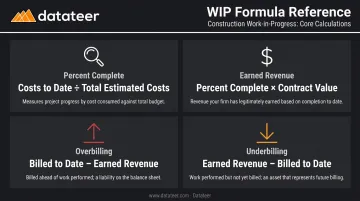
Using the formulas documented by Smith & Howard:
- Percent Complete = Costs to Date ÷ Total Estimated Costs
- Earned Revenue = Percent Complete × Contract Value
- Overbilling = Billed to Date − Earned Revenue (when billed exceeds earned)
- Underbilling = Earned Revenue − Billed to Date (when earned exceeds billed)
Overbilling example: A $2M project is 40% complete (earned revenue = $800K), but the contractor has billed $1.1M. The $300K overbilling is a contract liability — work that must still be performed for consideration already collected.
Underbilling example: The same project at 40% completion has only billed $650K against $800K earned. That $150K gap is a contract asset, but it's also a cash flow strain — real costs have been incurred without corresponding billing.
Both positions carry risk. Overbilling can mask future performance obligations; underbilling is a red flag for bonding agents, who may interpret substantial underbillings as overstated profits or unapproved change orders.
The Margin Fade Problem
Margin fade is the gradual erosion of estimated gross margin as a project progresses. A job estimated at 15% margin tracking at 8% at 60% completion signals a problem that needs immediate attention — not a footnote in next month's close.
How much you can do about it depends entirely on when you catch it:
- At 30-40% completion: Adjust labor deployment, renegotiate subcontracts, accelerate change order approvals, or revise cost-to-complete estimates
- At 90% completion: The job is effectively locked. The loss is already realized and options are limited to documentation and lessons learned
External Stakeholder Requirements
WIP reports are not just internal management tools. Multiple external parties depend on them:
- Surety underwriters use WIP schedules to evaluate working capital, net worth, and job profitability before extending bond credit. Per Surety Bond Quarterly, the WIP schedule is the source for financial data used in contractor balance sheets and income statements
- Lenders assess WIP positions when evaluating creditworthiness for lines of credit
- CPAs and auditors require accurate WIP schedules for financial statement preparation and review
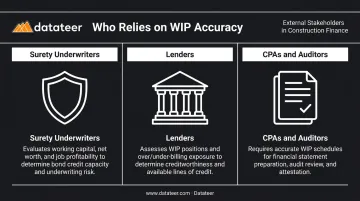
For many contractors, producing an accurate WIP is not optional — it is a condition of doing business.
Key Components of a WIP Report
Every element in a WIP report connects to every other element. Weak inputs in one column corrupt every downstream calculation.
Percentage Complete
The foundational metric: Costs to Date ÷ Total Estimated Costs.
This figure drives everything else. Its accuracy depends entirely on how current and realistic the total estimated costs figure is. Use a stale or optimistic estimate, and the percentage complete — and every metric built on top of it — will be wrong.
The cost-to-cost method is the most widely used in construction. ASC 606 also permits output methods (milestones, units delivered, surveys of completion) and other input methods (labor hours, resources consumed). The right method depends on the nature of the contract and what most faithfully depicts performance.
Earned Revenue
Earned Revenue = Percentage Complete × Total Contract Value
This is not what has been invoiced. It is the value of work the contractor has legitimately performed, regardless of billing timing. The gap between earned revenue and billed-to-date is where overbilling and underbilling positions emerge.
Overbillings and Underbillings
Under ASC 606 terminology:
| Position | What It Means | Balance Sheet Treatment |
|---|---|---|
| Overbilling (Billed > Earned) | Contractor collected more than work performed | Contract liability |
| Underbilling (Earned > Billed) | Work performed but not yet invoiced | Contract asset |
Both positions must be disclosed under ASC 606 for private companies. Tracking them at the job level is the only way to produce accurate financial statements.
Estimated Cost to Complete (ETC)
The most subjective — and most consequential — input in any WIP schedule. This is the project manager's current judgment of what it will cost to finish the job.
ETC must reflect actual field conditions, including:
- Current labor productivity rates
- Updated material pricing
- Subcontractor performance to date
- Approved and pending change orders
Firms that carry the original estimate forward without revision are not producing a WIP report. They are producing a spreadsheet of original assumptions dressed up as current data.
Profit Fade / Gain Analysis
This metric compares the original estimated profit margin to the current projected margin. A consistent downward trend, particularly on jobs at or past the midpoint, signals that costs are running ahead of projections and corrective action is needed.
Catching fade early requires visibility at the cost code level, not just the job total. Datateer's Margin Protection dashboard tracks original versus current projected margin per job and identifies the specific cost codes and phases driving deterioration — whether that's labor overrun, material price escalation, subcontractor cost increases, or change order denials.
How a WIP Report Is Prepared: Step-by-Step
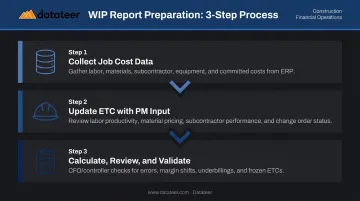
Accurate WIP preparation requires coordination across three groups: field (project managers), office (accounting), and leadership (review and validation). Weakness in any one area undermines the entire output.
Step 1: Collect All Job Cost Data from the ERP
The foundation of every WIP is actual cost data — labor, materials, subcontractor invoices, equipment, and overhead. Committed costs (approved POs, executed subcontracts) must be included even if not yet invoiced. They represent real financial obligations.
This is where most delays occur in traditional workflows. Manual export-and-spreadsheet processes introduce lag between when costs are incurred and when they appear in the WIP report. According to JBKnowledge's construction technology research, nearly half of surveyed firms transfer data manually when applications don't integrate — a process that creates both delay and error risk.
Datateer's direct integrations with 12+ construction ERPs — including Procore, Sage, Viewpoint Vista, Acumatica, Foundation, CMiC, and others — eliminate this lag by pulling cost data automatically. The platform replaces the month-end reconciliation process with automated WIP schedules that keep data current without manual exports.
Step 2: Update Estimated Costs to Complete with Project Manager Input
Accounting cannot produce a reliable WIP alone. Project managers must review each job and update their forecasts based on current field conditions:
- Current labor productivity (not original assumptions)
- Actual material pricing versus estimate
- Subcontractor performance and likely completion costs
- Status of pending and approved change orders
This field-to-office communication is the single most critical quality control step in the entire process. The ETC is a professional judgment, not a calculation — and it must be treated as such.
PMs who carry the original estimate forward without review are producing a number. That is not a forecast, and finance teams that accept it without challenge are exposing the firm to reporting risk.
Step 3: Calculate, Review, and Validate
Once PMs have committed their updated ETCs, the finance team can calculate percentage complete, earned revenue, and overbilling/underbilling for every active job.
Before the report is finalized, a CFO or controller review should specifically check for:
- Jobs showing over 100% complete — a data or ETC error
- Margins that improved significantly month-over-month without a clear explanation
- Large underbillings on near-complete jobs — often a billing oversight or cash flow risk
- Jobs with unchanged ETCs across multiple periods — a sign PMs are not engaging with the process
A calculation without a review is an incomplete process. The review step is what separates a reliable WIP report from a math exercise — and what gives leadership the confidence to act on the numbers.
Common WIP Report Mistakes to Avoid
The Frozen Estimate Problem
Carrying the original cost estimate forward without updating it as the project evolves is the most costly WIP mistake a firm can make. When ETCs are not revised to reflect actual field conditions, the percentage complete and projected profit figures no longer reflect reality. Margin fade hides behind stale assumptions until the job is too far along to recover.
Smith & Howard identifies inaccurate forecasts — not just unforeseen events — as a primary driver of profit fade. The forecast is controllable. Failing to update it is a process failure, not bad luck.
Excel and Manual Process Risk
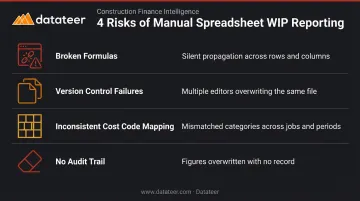
Many construction firms still build WIP schedules in spreadsheets. The risks are real and recurring:
- Broken formulas that propagate silently through rows and columns
- Version control failures when multiple people update the same file
- Inconsistent cost code mapping when projects are set up differently across periods
- No audit trail when figures are overwritten
Datateer's platform addresses this directly by standardizing cost code mapping across the firm during initial setup — automatically reconciling how data is categorized across jobs, periods, and source systems. The result is one consistent dataset across all jobs and periods, replacing a patchwork of individually-maintained spreadsheet versions.
For firms with data outside their primary ERP, CSV uploads merge directly with automated ERP feeds — a hybrid approach that fills gaps without compromising data integrity.
Inconsistent Reporting Cadence
A WIP report produced quarterly — or only at year-end — has lost most of its predictive value by the time it's read. Best practice is monthly updates aligned with the billing cycle, so overbilling and underbilling positions are identified and addressed before they compound.
Firms managing high project volumes benefit from even more frequent visibility. Datateer's standard data sync runs overnight with the option to increase frequency, replacing the traditional month-end reporting cycle with continuous in-month visibility rather than periodic snapshots.
Frequently Asked Questions
What does WIP stand for?
WIP stands for Work in Progress. In construction finance, it refers to both the accounting concept — revenue recognized as work is performed — and the schedule used to track the financial status of every active project throughout its lifecycle.
What does a WIP report look like?
It's a spreadsheet or schedule with one row per active project. Columns typically include contract value, costs to date, estimated costs to complete, percentage complete, earned revenue, billed to date, and the resulting overbilling or underbilling position.
What is the difference between overbilling and underbilling?
Overbilling means the amount invoiced exceeds earned revenue — the contractor has collected more cash than the value of work completed, which creates a contract liability on the balance sheet. Underbilling is the reverse: completed work hasn't been invoiced yet, leaving earned revenue uncollected and putting pressure on cash flow.
How often should a construction WIP report be updated?
Monthly, aligned with the billing cycle, is standard. Firms managing larger project volumes benefit from more frequent updates — ideally tied to real-time cost data from the field, not just period-end close.
What is the percentage of completion method in WIP reporting?
It's the method used to calculate how much revenue a contractor has actually earned based on project progress. The standard formula: costs incurred to date ÷ total estimated project costs × contract value. The result is earned revenue under ASC 606.
Who is responsible for preparing the WIP report?
Preparation is shared across teams: accounting pulls actual cost data and runs the calculations, project managers supply updated cost-to-complete estimates, and the CFO or controller reviews the final output for data integrity and red flags before it's finalized.