Introduction
Picture this: field crews wrap up a productive Friday. Back at the office, the construction finance manager is still reconciling last month's labor hours from a spreadsheet that hasn't been touched since a Thursday phone call. The WIP report won't be ready for another week — and by then, the project will have moved on without it.
For most construction finance teams, this is Tuesday.
Construction management software promises to close the field-office gap, but the conversation rarely gets past operational coordination — task lists, crew schedules, document sharing. For finance leaders, the gap runs deeper. According to a Dodge Construction Network study, **76% of general contractors report significant data integration challenges** affecting budget control and delivery dates.
This guide covers both layers: the operational disconnect that slows project execution, and the financial data gap that keeps CFMs buried in reconciliation work instead of advising on project outcomes. Most software guides stop at the first layer — this one doesn't.
Key Takeaways
- Field-office integration means both teams act on the same data — not a manually reconciled version from two weeks ago.
- The operational gap (schedules, documents, tasks) is only half the problem; the financial data layer is where controllers and finance teams feel the most pain.
- True integration connects field inputs → ERP → financial dashboards without manual handoffs.
- Real-time WIP visibility shifts finance from reactive reporting to proactive margin protection.
- Successful rollout starts with a process audit and clear success metrics defined before go-live.
Why Field-Office Integration Breaks Down — and What It Costs
The Root Causes of the Divide
Field teams typically operate in isolation — paper logs, standalone apps, manual time cards that never touch the back-office system until someone physically transfers the data. The result is a version gap: office teams are perpetually working from stale information while the project keeps moving.
Project managers and finance leaders end up chasing data through email threads, end-of-day calls, and spreadsheet updates. They spend more time gathering information than analyzing it. FMI research found that construction firms often spend 90% of their time collecting and preparing data and only 10% actually analyzing it — a ratio that's backwards for any function meant to drive decisions.
The Real Price of Disconnection
The operational cost is visible: change orders get delayed, materials are over-ordered as a hedge against uncertainty, and labor hours aren't reconciled until it's too late to course-correct.
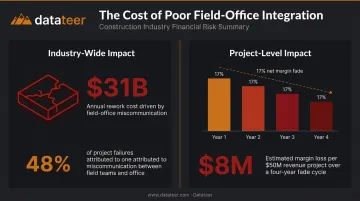
The financial damage is harder to see until it compounds. Research from PlanGrid and FMI found that poor communication and inaccurate data cost the U.S. construction industry more than $31 billion per year in rework alone, with miscommunication responsible for 48% of all jobsite rework.
The subtler danger is margin fade. Small, recurring slippages in labor productivity or material costs compound invisibly across a project. By the time month-end close surfaces the problem, the window to correct it has closed.
One FMI case study documented a large MEP contractor suffering a 17% net margin fade over four years: $8M in losses driven largely by cost overruns that went undetected across multiple reporting cycles.
When WIP reports take 10-20 days to produce after period close, finance teams are always looking backward. The data describes what happened, not what's happening.
How Construction Management Software Bridges the Operational Gap
The core mechanism is straightforward: field personnel enter time, task progress, material usage, and safety documentation into a shared platform, and that data flows immediately to project managers and office teams. No re-entry. No version gap.
Mobile-First Field Tools
Modern field apps let superintendents and crew leads submit daily reports with photos, flag issues in real time, and receive updated plan sets directly on their devices. A continuous data stream — already logged and timestamped — replaces the end-of-day phone call.
Offline capability matters here. Field crews work in low-connectivity environments — tunnels, remote sites, underground utilities. Any platform worth evaluating should store entries locally and sync automatically when connection is restored. Missed syncs are one of the most common causes of data gaps in field-office workflows.
Document Control and Task Management
Two capabilities make the biggest operational difference:
- Document control: Plan revisions made in the office propagate automatically to field devices, eliminating the "wrong drawing" problem and cutting rework at the source
- Task management: Project managers see actual vs. planned completion in real time instead of waiting for status calls — catching delays before they compound
- Schedule visibility: Early warning on slippage gives teams a recovery window that end-of-week reports simply can't provide
These gains solve the coordination problem. But field-office integration only delivers its full value when operational data connects to financial reporting — and that's where most platforms fall short.
The Financial Data Layer: Where Most Integration Efforts Fall Short
Most field-office integration discussions focus on operational workflows. The financial data layer — how field-generated costs flow into WIP reports, margin analysis, and cash flow forecasting — gets far less attention. This is where CFMs and construction finance leaders feel the deepest pain.
The ERP Reporting Gap
Construction firms typically run well-established ERPs: Procore, Sage, Viewpoint Vista, Acumatica, Foundation, CMiC, Jonas. The systems hold the data. The problem is what happens next.
Financial reporting still requires manual extraction, formatting, and reconciliation in spreadsheets. The deeper gap sits between the ERP and the executive-level financial dashboards that drive decisions. JBKnowledge's construction technology research found that 51% of accounting and ERP workflows rely on spreadsheets, and when apps don't integrate, 49% of construction teams manually transfer data as a workaround.
That manual transfer is where accuracy erodes, hours disappear, and the 10-20 day WIP lag takes hold.
What a Fully Connected Financial Layer Looks Like
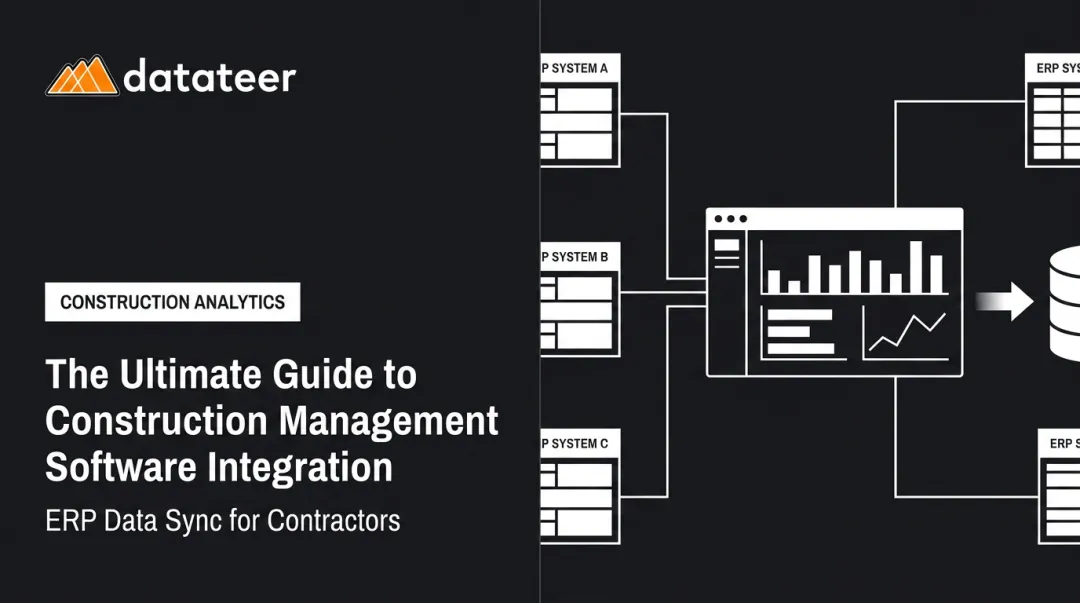
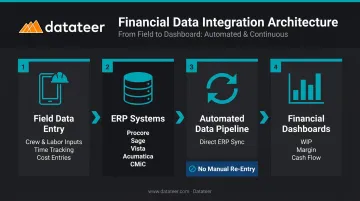
The architecture is direct: field cost data flows into the ERP → the ERP syncs automatically to financial dashboards → CFMs see WIP status, margin by project, labor efficiency, and cash flow without waiting for month-end close.
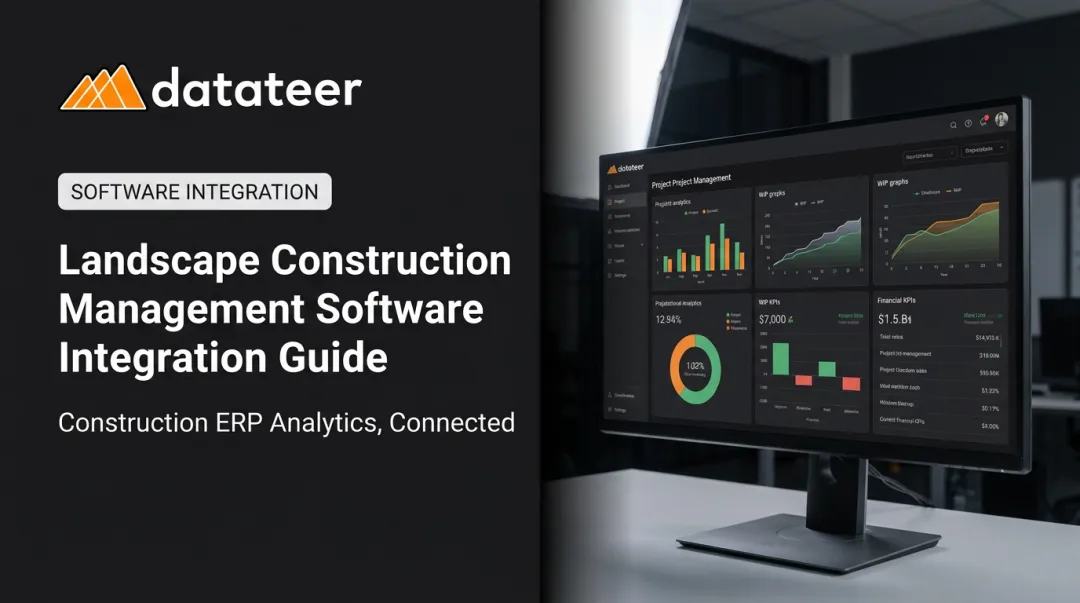
Datateer is built specifically around this architecture. The platform connects directly to 12+ construction ERPs — Procore, Sage 100/300/Intacct, Viewpoint Vista and Spectrum, Acumatica Construction, Foundation Software, CMiC, Jonas, QuickBooks, NetSuite, and others — and automates the data pipeline from ERP to executive dashboard. The result: WIP reports that previously required 10-20 days of manual work refresh in under two minutes. One client at Double L Management described it directly: "that one click replaced two weeks worth of prior work."
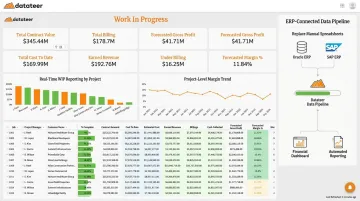
The dashboards available on day one cover the metrics CFMs care about most:
- WIP & Financial Truth — percentage complete, earned revenue, over/under-billings, projected margin per job
- Margin Protection — original estimated margin vs. current projected margin, with variance flagged by cost code
- 13-Week Cash Flow Forecasting — based on real-time project burn rates and retainage schedules
- Job-Level Cash Flow — identifies which projects are generating cash vs. consuming it
The Strategic Shift
When CFMs can identify labor slippage, budget overruns, and liquidity risks as they develop, the finance function stops being forensic. Instead of explaining what went wrong at month-end, the team intervenes while the project is still correctable.
Firms that integrate operationally but leave financial reporting on spreadsheets still carry the same blind spots — just across more projects. At scale, that exposure compounds: each new job adds another spreadsheet, another reconciliation cycle, another window for a costly surprise. Closing the financial data layer is what converts operational integration into a genuine competitive advantage.
Key Features to Evaluate in Field-Office Integration Software
Mobile Access and Offline Capability
Field crews must be able to enter data on-site in low-connectivity environments. Key questions for demos:
- Does the app store entries locally when offline?
- Does it sync automatically when connection is restored, or does it require manual intervention?
- Failed syncs are a leading cause of data gaps — verify this before selecting any platform
Direct ERP and Accounting System Integration
This is the highest-stakes feature evaluation for finance leaders. Prioritize platforms that:
- Connect to your existing ERP without manual CSV exports or middleware
- Support automated, bidirectional sync where applicable
- Cover the specific systems your firm already uses
ERP breadth matters in practice. A platform covering 12+ major construction ERPs — including Procore, Sage, Vista, Acumatica, Foundation, CMiC, and Jonas — offers more flexibility as your tech stack evolves than one built around two or three systems.
Verify ERP compatibility explicitly during demos, not after contract signing.
Automated Reporting and Financial Dashboards
The software should translate raw field and ERP data into structured reports — WIP, job cost, labor productivity — without manual formatting. Two things most teams overlook:
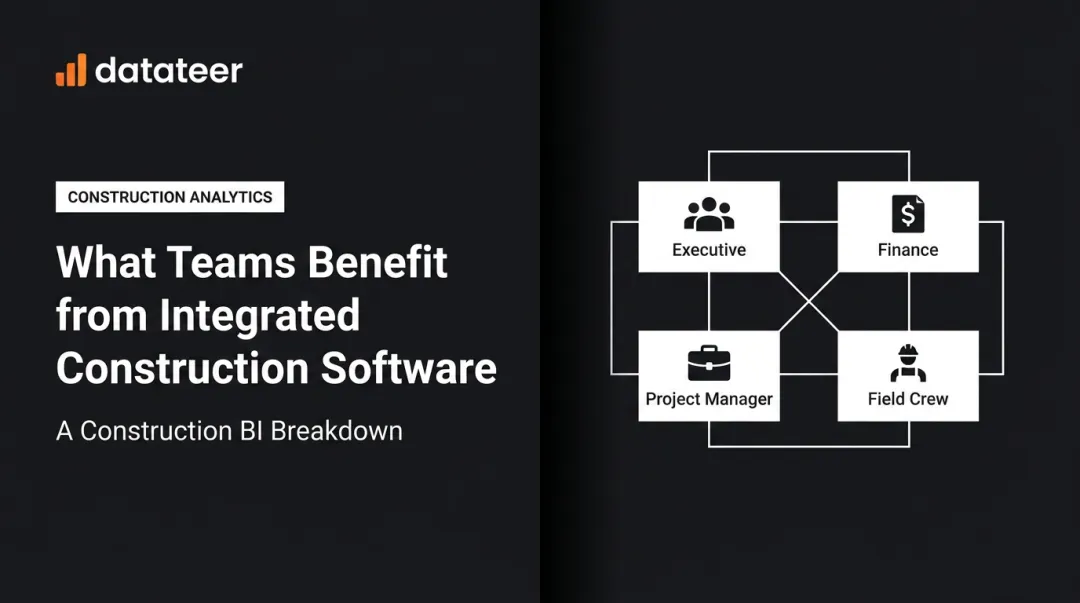
- User access model: Per-seat licensing limits who actually uses the dashboards. Platforms with unlimited user access (like Datateer's flat annual pricing) remove the adoption barrier and ensure project managers, controllers, and executives all work from the same data.
- Construction-specific data models: Generic BI tools require months of configuration to produce construction-relevant outputs. Purpose-built platforms arrive with pre-mapped construction KPIs — which is what separates a 2-4 week implementation from an 18-month configuration project.
How to Successfully Implement Field-Office Integration
Start With a Process Audit
Before selecting software, map the current data flows between field and office. Identify specifically where information stalls, gets duplicated, or loses accuracy in transit. These are the highest-priority integration points — and they should drive your selection criteria, not a feature checklist.
Datateer's free 15-Minute Workflow Audit follows this exact approach: a focused review of your current workflow using your own data to pinpoint where the gaps are — before any software decision is made.
Phase the Rollout
Don't try to automate everything at once. A practical sequence:
- Foundation phase — daily reporting, document sharing, mobile time entry
- Validation phase — run old and new systems in parallel for at least one project cycle to verify data accuracy
- Financial integration phase — activate automated ERP sync and financial dashboards once operational workflows are stable
- Decommission — retire manual spreadsheet processes once data accuracy is confirmed
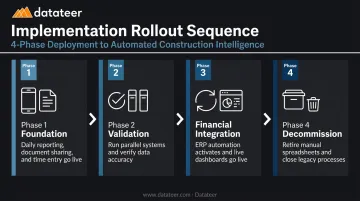
Running parallel systems adds short-term overhead, but it gives teams verified proof that the new data is accurate before they let go of familiar processes.
Define Success Metrics Before Go-Live
Set specific, measurable benchmarks before the system launches:
- Reduction in WIP report generation time (days → minutes)
- Elimination of duplicate data entry across systems
- Reduction in RFI response time
- Decrease in time spent on manual reconciliation per month-end close
Tracking these numbers from day one also gives you the data to make the case internally — and a clear signal when something in the integration needs adjustment.
Frequently Asked Questions
What is the biggest barrier to field-office integration in construction?
The most common barrier is disconnected systems — field tools that don't sync with office ERPs or financial platforms. This compounds with change resistance from teams accustomed to manual workflows and connectivity gaps on active job sites. Addressing these three factors — system connectivity, team adoption, and site infrastructure — in sequence is what separates successful rollouts from stalled ones.
How does construction management software improve financial visibility for CFMs?
When field cost data flows automatically into the ERP and into financial dashboards, CFMs gain real-time insight into WIP status, project-level margin, and cash flow. The manual reconciliation cycle that creates 10-20 days of reporting lag disappears, and finance teams can intervene on margin slippage before it becomes unrecoverable — not just document it after close.
What is the difference between field management software and construction ERP software?
Field management software handles operational workflows: tasks, schedules, documents, and crew coordination. Construction ERP software manages financial and accounting data. The strongest integrations connect both layers so operational activity feeds financial reporting automatically, without manual re-entry or reconciliation.
How long does it take to implement field-office integration software?
Phased rollouts focused on core operational workflows typically deliver initial value within 2-4 weeks. Full financial integration with ERP sync can run 4-8 weeks in complex environments with significant data migration or many active projects. Datateer's implementation runs 2-4 weeks from contract to live dashboards for ERP-connected financial reporting.
How does real-time field data help prevent budget overruns?
When labor hours and cost data flow from the field to financial dashboards in near real-time, project managers and CFMs can spot margin slippage as it develops, not after month-end close surfaces it. A recoverable 2% labor overrun in week three looks very different from the same overrun discovered at project closeout.