Research from Teletrac Navman found that construction equipment sits idle up to 50% of the time, and 27% of companies regularly rent or purchase redundant equipment simply because they don't know what they already have available. That's not a small inefficiency — it's a direct hit to project margins on every job.
The multi-site dimension makes this harder than single-site tracking. Informal equipment transfers, site managers running different processes, mixed fleets from multiple manufacturers, and spotty connectivity at remote locations all create data gaps that grow wider as your project count increases.
This article walks through exactly how to build a working multi-site equipment tracking system — the steps, the technologies, the parameters that determine whether the data is trustworthy, and how to connect that data to financial reporting where it actually drives decisions.
Key Takeaways
- Build a complete asset registry with standardized cost codes before deploying any hardware
- GPS and telematics must feed a single unified platform — multiple dashboards recreate the visibility problem
- Equipment utilization and idle time data generates ROI only when connected to job-level cost reports
- Most tracking programs fail due to inconsistent tagging, siloed data, and no defined ownership once the system goes live
Why Tracking Construction Equipment Across Multiple Sites Is Harder Than It Looks
The core problem is invisible movement. Equipment transfers between sites informally — a site super calls in a favor, a machine gets loaded on a trailer at end of shift, and no one updates the system. Within weeks, asset location records are stale, and project managers are making decisions based on information that no longer reflects reality.
The financial consequences compound quickly:
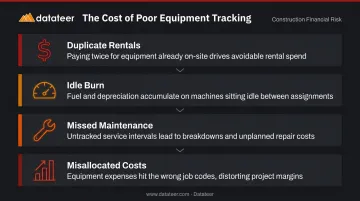
- Duplicate rentals — a site rents equipment that exists at another site two miles away, simply untracked
- Idle burn — machines sitting powered-on consume fuel and accumulate depreciation hours without producing output
- Missed maintenance — service intervals triggered by engine hours get skipped when no one can read those hours accurately
- Misallocated costs — equipment hours never get assigned to the right job code until the monthly close, making real-time cost visibility impossible
Multi-site operations add a second layer of complications that single-site fleets never encounter:
- Incompatible telematics — mixed fleets from Caterpillar, Komatsu, Volvo, and others use formats that don't communicate natively
- Coverage gaps — remote sites with no cellular signal break real-time tracking entirely
- Inconsistent check-in processes — different site managers logging data differently means the information you do collect isn't comparable across jobs
These aren't edge cases. 75% of construction fleets still rely on manual logs, and 74% cite data accessibility as their primary barrier to improving utilization — including firms that have already invested in tracking tools.
How to Track Construction Equipment Across Multiple Sites
Step 1: Build a Complete Asset Registry
Before a single tracker gets installed, compile a master list of every piece of equipment across all locations — owned assets, long-term rentals, and leased machinery together. Each entry needs:
- Asset ID (unique, standardized across all sites)
- Equipment type and manufacturer
- Current site assignment
- Operator assignment (where applicable)
- Service interval — hours-based or calendar-based
- ERP cost code the asset maps to
That last field is the one most firms skip. Without standardized cost codes baked into the registry from day one, equipment hours and costs flowing in from tracking hardware have nowhere clean to land in financial reporting. You end up with utilization data in one system and job costs in another, connected by someone's manual entry at month-end.
Skipping the asset registry is the single most common reason tracking programs fail to scale. The hardware works. The platform works. But without structure, the data can't do anything useful.
Step 2: Select and Deploy the Right Tracking Technology
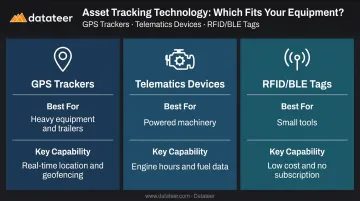
Three primary technologies apply to construction fleets, and the right choice depends on asset value and mobility:
| Technology | Best For | Key Capability |
|---|---|---|
| GPS Trackers | Heavy equipment, trailers, generators | Real-time location, geofencing, movement alerts |
| Telematics Devices | Powered machinery | Engine hours, fuel consumption, fault codes, diagnostics |
| RFID / BLE Tags | Small tools, attachments | Inventory-level tracking without GPS subscription costs |
For smaller tools, BLE tags like Milwaukee's ONE-KEY offer no subscription fee and built-in battery life up to three years — a practical option for assets that don't justify a full GPS unit.
Multi-site hardware deployment requires a few extra considerations beyond single-site installs:
- Ruggedization — devices need IP68 ratings or equivalent for outdoor construction conditions
- Connectivity planning — confirm cellular coverage at each site, or specify satellite-backup units for remote locations where LTE doesn't reach
- Transfer protocols — establish a documented process for re-tagging and updating site assignment when equipment moves between locations
Step 3: Configure a Unified Tracking Platform
The most common configuration mistake is letting each site choose its own tracking app. Site A uses the Caterpillar portal. Site B uses a generic GPS dashboard. Site C uses a spreadsheet. The result is exactly the same visibility problem you started with — just replicated in software.
Every site needs to run through a single platform with a single login. That's the non-negotiable.
The platform configuration should include:
- Geofence boundaries drawn around each job site, so the system automatically logs arrivals and departures without manual check-ins
- After-hours movement alerts that notify the equipment coordinator when a machine leaves a site boundary outside active hours
- Idle time thresholds that flag machines sitting unused beyond a set window (commonly 4–8 hours)
- Maintenance triggers based on engine hours rather than calendar dates — a machine running 16-hour days reaches its service interval far faster than a calendar would predict
Step 4: Integrate Tracking Data with Your Construction ERP
This step is where tracking stops being operational overhead and starts generating financial intelligence. Equipment location and usage data sitting in a standalone tracking platform doesn't improve job cost reports. For that, it needs to flow into your ERP.
The integration handles:
- Cost code mapping — equipment hours post to the correct job automatically based on site assignment
- Budget vs. actual comparisons — utilization data appears against estimated equipment hours in project cost reports
- Threshold alerts — notifications when accumulated equipment hours on a job approach the budgeted allowance
Datateer connects directly with major construction ERPs — including Procore, Sage, Viewpoint Vista, Acumatica, and others — and includes automated cost code standardization that normalizes inconsistent coding across sites. Equipment cost data flows into real-time job cost dashboards without manual entry, tracked as a discrete cost category separate from labor, materials, and subcontractors. Data refreshes overnight as standard, with more frequent options available for firms that need it.
For firms without a direct telematics integration yet, equipment hour data from tracking platforms can be incorporated via CSV upload and merged with the automated ERP feed.
Step 5: Establish Ownership and Ongoing Maintenance
Getting the ERP integration right is only half the equation. A well-configured system degrades fast if no one owns it — and that ownership needs to be assigned before launch, not after. Within a few months of go-live, site teams start bypassing the transfer protocol, the asset registry falls out of sync, and utilization alerts go unreviewed in someone's inbox.
Assign explicit ownership before the system launches:
- Asset location updates — one person responsible for re-tagging and logging site assignments when equipment moves
- Utilization alert review — designated owner who acts on idle machine flags, not just receives them
- Registry audits on a set schedule — monthly for active fleets, quarterly at minimum
Beyond individual ownership, establish a regular cross-site equipment review — a standing meeting where project managers and the equipment coordinator compare utilization data across all sites, identify underused machines, and make redeployment decisions before someone orders a rental.
Key Parameters That Affect Multi-Site Tracking Performance
Even a well-deployed system can produce unreliable data if these variables aren't managed deliberately.
GPS Update Frequency
How often a tracker reports location directly affects the quality of utilization analysis. Update frequency options typically break into tiers:
- Hourly or less — adequate for theft recovery, insufficient for measuring idle time or daily utilization
- Every 10–15 minutes — suitable for utilization analysis on most heavy equipment
- Every 1–5 minutes — useful for high-value assets or theft-risk environments, but draws more from battery
The tradeoff is battery life. More frequent updates drain battery faster on non-powered assets. A device reporting every 10 seconds may need recharging every 8–40 days; the same device at a 5-minute interval can last 21–140 days.
For assets connected to a power source, this is less of a concern. But for trailers and attachments running on battery-backed units, update frequency needs to match the actual maintenance cadence for the device.
Asset Tagging Consistency
If heavy equipment carries GPS trackers, mid-size equipment uses manual check-ins, and small tools go untagged entirely, the resulting data isn't comparable across sites and can't support portfolio-level decisions. The downstream effects compound quickly:
- Equipment appears "missing" when it's simply untagged
- Idle cost calculations are skewed by gaps in the asset record
- The business case for the entire program erodes
Set a minimum tagging standard for every asset category before deployment begins, and enforce it across all sites, not just the flagship location.
Cost Code Standardization
Equipment tracking data only becomes financially useful when usage hours map to the right job and cost center. If Site A uses a different cost code structure than Site B, or if the ERP cost codes were never reconciled against what the tracking platform logs, aggregating equipment costs across the portfolio requires manual cleanup every reporting cycle.
Datateer's automated standardization layer addresses this by reconciling cost codes across systems and mapping inconsistent entries into a unified structure. Without that normalization step, mismatched codes push equipment costs into the wrong job cost buckets — and cost overruns at the equipment level often go undetected until they've already damaged the project margin.
Field Adoption
Tracking systems depend on field teams following protocols. If operators don't log equipment transfers, ignore geofence rules informally, or work around the check-in process, the data layer degrades within weeks, regardless of hardware quality.
Two practices that improve adoption:
- Frame tracking as a worker protection tool — faster maintenance response means fewer breakdowns that strand crews mid-job
- Train on direct operator benefits first — when operators see that tracked service intervals mean fewer surprise failures on their shift, compliance follows
Common Mistakes When Tracking Construction Equipment Across Multiple Sites
Most tracking programs fail for predictable reasons. All of them are avoidable with upfront planning:
- Deploying hardware before completing the asset registry — data flows immediately but has no cost code structure to land in, making it useless for financial reporting from the start
- Choosing point solutions per site — different GPS apps per location recreate the visibility problem in software, with multiple logins and no cross-site aggregation
- Treating tracking as theft prevention only — theft is a real cost ($300M to $1B annually, with only a 21–23% recovery rate without GPS), but idle time is a larger and more consistent drain for most firms
- No assigned data ownership after deployment — alerts go unreviewed, the asset registry goes stale, and teams effectively abandon the program within six months while the subscription keeps billing
Turning Equipment Tracking Data Into Financial Intelligence
Most equipment tracking programs stop at the operations layer. They produce location data, utilization percentages, and idle alerts — but that information lives in the tracking platform and never makes it into the financial reports that drive decisions about job profitability, WIP accuracy, and equipment ROI. For construction CFOs and finance teams, operational data without a financial connection is just overhead.
Financial intelligence built on tracking data looks like this:
- Equipment utilization rates tied to project cost reports — actual equipment spend compared to budget, visible in real time rather than at monthly close
- Equipment cost broken out by resource type — separate from labor, materials, subcontractors, and overhead in job costing and cost variance reports
- Cross-site utilization visibility — identifying machines that can be redeployed before someone on another site requests a rental
- Maintenance cost history mapped to asset depreciation — supporting capital planning with actual usage data rather than age-based assumptions
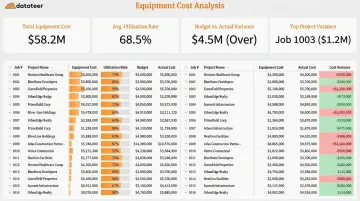
Closing that gap requires connecting tracking data to the financial system. Datateer pulls ERP data, including equipment cost data flowing from tracking integrations, directly into real-time financial dashboards. The Job Costing & Cost-to-Complete and Cost Variance modules track equipment as a discrete cost category, giving project teams and finance managers visibility into equipment cost performance by job, site, and across the portfolio.
At three active projects, spreadsheets can hold. At 15, they break — producing errors, delays, and decisions based on last month's numbers. Firms that scale past that threshold without automating the data flow from field to dashboard consistently find equipment costs drifting out of control before the monthly close catches up.
Frequently Asked Questions
What is construction analytics?
Construction analytics collects and analyzes data from construction operations — project financials, equipment usage, labor, and scheduling — to support faster decisions. Modern platforms connect field data directly to financial reports, replacing manual spreadsheet processes with automated, real-time visibility.
What types of technology are used to track construction equipment?
The three main categories are GPS trackers for real-time location and geofencing, telematics devices for engine hours, fuel consumption, and diagnostics, and RFID or BLE tags for smaller tools. The right choice depends on asset value, mobility, and whether the site has reliable cellular coverage.
How do you prevent equipment theft across multiple job sites?
GPS trackers with geofencing notify managers immediately when equipment leaves a designated site boundary outside of authorized hours. Combining geofence alerts with visible tracking hardware reduces theft risk — without GPS, NER/NICB data shows only 21% of stolen construction equipment is recovered.
What is equipment utilization rate and how is it calculated?
Utilization rate measures how much of an asset's available time it is actively working: (Run Hours ÷ Available Hours) × 100. A machine with a low utilization rate is generating cost — depreciation, fuel, financing — without generating output, which directly compresses project margins.
How much does a construction equipment tracking system cost?
Basic GPS-only trackers start around $7–$15/month per unit on annual plans, with hardware costs in the range of $15–$40 per device. Full telematics systems with engine-hour monitoring, diagnostics, and maintenance integration are typically quote-based depending on fleet size and feature depth.
How does equipment tracking data connect to job costing and financial reporting?
Tracking platforms log equipment hours by site and asset. When integrated with a construction ERP, those hours post automatically to the corresponding job code — eliminating manual entry for equipment time. Datateer, for example, pulls that equipment cost data into project cost reports as a discrete cost category, updated overnight rather than waiting for monthly close.