Construction ERP integration is the fix — but only when it's done correctly. The wrong method, skipped steps, or poor data mapping produces technically functional integrations that are operationally useless.
This guide covers what construction ERP integration actually is, the four primary methods, a six-step execution process, and the factors that separate integrations that transform financial reporting from ones that just move stale data between systems.
Key Takeaways
- ERP integration connects your construction software so data moves automatically — no manual exports, no duplicate entry.
- Four main methods: native connectors, REST API, middleware/iPaaS, and flat file/CSV.
- Execution follows six phases: audit, define requirements, select method, map data, test, and go live.
- Data mapping and cost code standardization are the most skipped — and most critical — steps.
- Done right, integration eliminates multi-week reporting lags and delivers real-time visibility into job costs, WIP, and margins.
What Is Construction ERP Integration and Why It Matters
Construction ERP integration is the process of establishing a continuous, automated data connection between a construction ERP — Sage, Vista, Procore, Acumatica, CMiC — and one or more downstream systems, so that transactions entered in one system are reflected across all connected systems without manual re-entry.
The goal is a Single Source of Truth: job cost actuals, committed costs, labor hours, and WIP schedules that are always current, letting finance and operations teams act on the same version of the data. Contrast that with the current reality at most construction firms, where cost reports are weeks old by the time they reach a CFO's desk — and margin problems surface only after they've already compounded.
Integration vs. Implementation
These two terms get confused often, but they're distinct:
- ERP implementation = setting up and configuring the ERP itself
- ERP integration = connecting that ERP to the broader technology ecosystem
Many firms have a fully deployed ERP with zero integration. Data still exports manually. Reports still live in Excel. And a marketplace listing (the kind that shows up in Procore's app directory) doesn't guarantee a working, maintained, bi-directional data connection.
A 2023 Dodge Construction Network study found 76% of general contractors reported data integration challenges, and 77% said consolidating their technology platforms would improve the value of their tech investments. That gap between having an ERP and having a connected ERP is exactly what the integration methods below are designed to close.
The 4 Main Construction ERP Integration Methods
The method you choose determines everything downstream: data freshness, error rate, maintenance burden, and cost. Here's how each one works — and where each one fits.
Native Pre-Built Connectors
Native connectors are pre-configured integrations built and maintained by the ERP vendor or destination platform. Procore, for example, publishes a certified Sage 300 CRE connector and a Viewpoint Vista connector that sync commitments, actual costs, and estimates.
Ideal when: Firms where both systems are on the supported list and standard field mapping covers their data needs.
The tradeoff: Native connectors are rigid. They map standard fields well, but if your firm uses custom cost code structures or a chart of accounts that diverges from the connector's defaults, you'll hit configuration limits quickly.
Setup typically takes days to a few weeks — faster than building a custom API integration.
REST API Integration
A REST API integration calls a construction ERP's published API endpoints to pull or push data programmatically. Trimble Vista, Acumatica, CMiC, and Procore all publish REST APIs with endpoints covering job cost, AP/AR, payroll, and project management data.
Best for: Firms that need real-time job cost updates, custom field mapping, or bi-directional sync — for example, pushing field time entries from a project management tool directly into ERP job cost codes within minutes of approval.
Where it breaks down: Developer resources are required. Authentication, rate limits, schema changes (when the API's data structure updates), and API versioning all need ongoing attention. One caveat worth noting: Vista's API, for instance, limits some GET endpoints (AP/Invoices, GL/Transactions) to 12 months of historical data — constraints that matter when you're pulling multi-year job histories.
Middleware and iPaaS Platforms
iPaaS platforms — Workato, MuleSoft, Boomi, or construction-specific tools like Agave — act as a translation layer between systems. They offer pre-built connectors to dozens of construction ERPs and project management platforms, assembled into automated workflows through visual builders rather than custom code.
Best for: Mid-size firms connecting three or more systems without a dedicated development team.
The catch: Monthly licensing fees add up, and while setup is faster than custom API work, complex construction data transformations (like cost code normalization across multiple ERPs) may still require specialist configuration.
Flat File and Scheduled Export (CSV/SFTP)
The flat file method exports data from the ERP on a schedule — daily or weekly — transfers it via SFTP or email, and imports it into the destination system. No API access required, no middleware license needed.
This remains the most common legacy method in construction, which is exactly why WIP reports are often weeks behind when they hit a CFO's desk.
Best for: Situations where the destination system has no API and some data lag is acceptable.
The limitations: This method introduces unavoidable lag (typically 24+ hours minimum), is vulnerable to formatting errors when the export schema changes, and creates a manual quality control burden. It's not a viable method when same-day financial visibility is the goal.
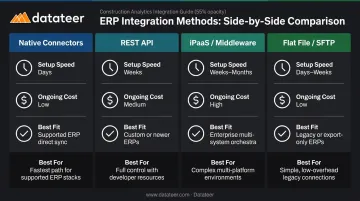
Quick Comparison: Which Method Fits Which Firm?
| Method | Setup Speed | Ongoing Cost | Best Fit |
|---|---|---|---|
| Native Connectors | Days–weeks | Low | Standard ERP pairs, minimal customization |
| REST API | Weeks–months | Medium–high (dev resources) | Real-time sync, custom field mapping |
| iPaaS / Middleware | Days–weeks | Medium (licensing) | Multi-system firms, no dev team |
| Flat File / SFTP | Hours–days | Low | No-API systems, lag acceptable |
The ETL/Data Pipeline Layer
Beyond the four methods sits a distinct approach: extract ERP data, clean and normalize it — standardizing cost codes, reconciling data logic across projects — then load it into an analytics or reporting layer.
This is the right model when the output is executive dashboards and real-time WIP reporting, not just operational data sync between two platforms. Raw ERP data needs transformation before it's useful for financial intelligence.
Datateer's direct ERP sync is built on this model. The platform automatically extracts and cleans data from 20+ construction ERPs, including:
- Procore, Sage 100/300/Intacct, and Foundation Software
- Trimble Vista, Viewpoint Spectrum, and CMiC
- Acumatica Construction, Jonas Construction, and NetSuite
Cost codes are standardized and data logic mapped automatically — so financial data flows from ERP to executive dashboards without manual formatting or VLOOKUP reconciliation.
Step-by-Step: How to Execute a Construction ERP Integration
Regardless of the method chosen, successful integration follows six phases. Skipping or compressing any phase is the most common reason integrations deliver incomplete or unreliable data after go-live.
Step 1: Audit Your ERP Data and Integration Endpoints
Map which ERP modules produce data that needs to flow downstream: job cost, committed costs, AP/AR, payroll, equipment usage. Document what's currently exported manually, how often, and by whom.
Most firms discover during this step that their ERP data has inconsistencies — duplicate cost codes, incomplete project records, inconsistent vendor naming — that must be resolved before integration begins. Research from Autodesk/FMI found that more than 80% of respondents described at least 25% of their project data as unusable. Only 36% had implemented any formal process for identifying and repairing bad data. Integration surfaces these problems. It doesn't hide them.
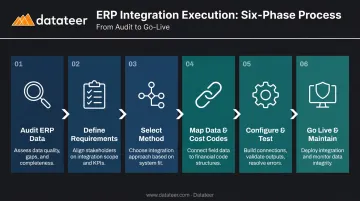
Step 2: Define Integration Requirements
Integration requirements cover four dimensions:
- Data direction — one-way push from ERP to reporting, or bi-directional sync?
- Data frequency — real-time, near-real-time, or scheduled batch?
- Data scope — which modules, which fields, which projects or time periods?
- Data ownership — who resolves conflicts when the same field is updated in two systems simultaneously?
Under-specifying requirements at this stage is the single largest driver of scope creep and rework during configuration. Get these decisions in writing before any technical work begins.
Step 3: Select the Integration Method
Match the method to your firm's context:
| Scenario | Method |
|---|---|
| Both systems on supported list; standard fields sufficient | Native connector |
| Real-time sync needed; developer available | REST API |
| Connecting 3+ systems; no dev team | Middleware/iPaaS |
| Destination has no API; lag is acceptable | Flat file/CSV |
| Output is dashboards; data needs transformation | ETL/data pipeline |
One important factor: cloud-hosted ERPs typically expose robust REST APIs, while legacy on-premise systems (still common in construction) may only support flat file exports. Identify your deployment model before selecting a method.
Step 4: Map Data Fields and Standardize Cost Codes
Data mapping aligns field names, data types, and values between the source ERP and destination system — confirming that a "Phase Code" in Sage maps correctly to a "Cost Code" in the reporting dashboard. This is the most time-consuming step, and the one most often rushed.
Construction firms typically have cost code structures that evolved over years and dozens of projects. The same cost category may be named differently across jobs, and the same code may serve different purposes on different projects.
These inconsistencies must be resolved before the integration is built, not after. Resolving them post-launch means reprocessing historical data and re-validating every report.
Platforms with automated data cleaning handle this by standardizing cost codes across systems, catching malformed entries, and mapping each firm's data logic into a unified structure. Datateer's cleaning engine, for example, reconciles Procore commits to Sage invoices automatically — no manual VLOOKUP work required.
Step 5: Configure, Test, and Validate
Testing follows a specific sequence:
- Unit testing — validate individual field mappings
- Integration testing — end-to-end data flow using real project data
- User acceptance testing — finance team validates that job cost actuals, WIP schedules, and committed cost reports match what's in the ERP
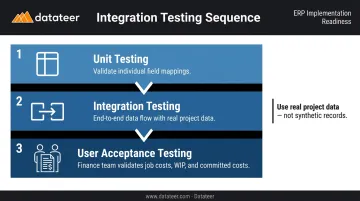
Use real project data, not synthetic records. Construction data has edge cases — change orders mid-project, retainage adjustments, multi-entity transactions — that synthetic data won't expose. A common mistake: validating only with a clean current project and skipping the irregular historical jobs that are most likely to break the integration.
Step 6: Go Live and Establish Ongoing Maintenance
Go-live is not the finish line. Both connected systems will update their schemas, authentication methods, and API versions over time. An integration that works perfectly in month one can silently stop flowing data in month six if no one is watching.
A maintenance protocol should include:
- Monitoring for failed sync events
- Alerts when data hasn't refreshed within the expected window
- A re-validation process after any ERP system update
- A designated owner responsible for integration health
Firms using managed platforms or vendor-maintained connectors reduce this burden significantly. Datateer covers schema changes, data extraction updates, and platform maintenance as part of its flat annual subscription. Clients don't rely on internal IT to keep data flowing.
Key Factors That Determine Integration Success
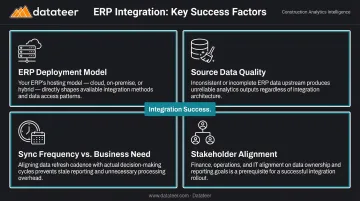
Technical execution matters, but these factors determine whether an integration actually delivers financial intelligence:
- ERP deployment model — cloud-hosted ERPs typically support REST APIs natively; on-premise systems may only support flat file or middleware approaches. Identify this before selecting a method.
- Source data quality — integration amplifies data quality problems rather than hiding them. Firms with inconsistent cost coding, duplicate vendor records, or incomplete project setups will see those errors in every downstream report. Cleaning source data is a prerequisite.
- Sync frequency vs. business need — a WIP report used in a Monday morning executive meeting needs data refreshed by Sunday night. A job cost dashboard used by PMs during active projects needs near-real-time updates. Match the sync frequency to the actual decision-making cadence.
- Stakeholder alignment — integrations built by IT without finance team input frequently map the wrong fields or exclude critical data like retainage and committed costs. Both groups must validate requirements before configuration begins.
The data quality gap is real. Autodesk/FMI research found that only 12% of construction firms always incorporate project data into decision-making. Integration alone doesn't fix that — the data flowing through it has to be clean and complete first.
Common Pitfalls and When a Method Isn't the Right Fit
Choosing the right integration method is only half the equation — execution and ongoing fit matter just as much.
The most common failure modes:
- Treating integration as an IT project rather than a financial operations project, which produces technically functional but practically useless data flows
- Selecting a method based on cost alone (choosing flat file to avoid licensing fees while accepting lag that makes financial reporting operationally irrelevant)
- Over-engineering a custom API integration when a maintained native connector delivers equivalent results faster and at lower long-term cost
When a method is the wrong fit:
- Flat file/CSV is wrong when the finance team needs same-day job cost visibility
- REST API is wrong when there's no developer on staff and no budget for ongoing maintenance
- Native connectors are wrong when the ERP isn't on the supported list — or when the firm's data structure has diverged enough from the connector's default mapping that customization outweighs the convenience
The maintenance misconception: Many construction firms treat integration go-live as the finish line. Six months later, data has stopped flowing: a credential expired, an ERP update changed a field name, or a new project structure fell outside the integration's original scope.
A successful integration requires a designated owner and a regular health-check cadence — the same as any other critical financial process.
Conclusion
Construction ERP integration isn't a single solution — it's a choice between four distinct methods, each with specific technical requirements, maintenance demands, and fit for different ERP environments. Choosing the right method and executing the six-step process correctly is what separates integrations that transform financial reporting from ones that just move stale data between systems.
For construction finance teams, the real goal is visibility: seeing job costs, WIP, and margin performance while there's still time to act on them. Firms that match their integration method to their reporting cadence and clean source data before connecting systems get there faster. Treating the integration as living infrastructure — not a one-time project — is what keeps that visibility intact as the business grows and reporting demands evolve.
Frequently Asked Questions
What is the difference between a native ERP connector and an API integration in construction?
A native connector is a pre-built, vendor-maintained link between two specific systems with predetermined field mappings — setup is fast but flexibility is limited. An API integration is a custom-built connection using the ERP's published endpoints, offering more flexibility and real-time sync but requiring developer resources to build and maintain over time.
How long does a construction ERP integration typically take to set up?
Timeline varies by method: native connectors go live in days to a few weeks, middleware takes 2–6 weeks, and custom API builds run 1–3 months or longer. Managed platforms like Datateer typically complete implementation in 2–4 weeks.
What data is typically mapped during a construction ERP integration?
Core data objects include job and project records, cost codes, committed costs (subcontracts and POs), AP transactions, payroll, change orders, and contract billings. WIP schedules also require over/under-billing data (costs incurred, billings to date, contract value, estimated cost at completion), which not all integrations map by default.
Can a construction firm integrate multiple ERPs into one reporting system?
Yes. Firms managing multiple divisions or acquisitions often run more than one ERP. Consolidating them into a single reporting layer requires a data normalization step to reconcile different cost code structures and chart-of-accounts schemas before data can be compared meaningfully across entities.
What are the most common reasons construction ERP integrations fail?
The three most common failure points are poor source data quality that corrupts downstream reports, inadequate field mapping that omits committed costs or retainage, and treating integration as a one-time project rather than ongoing infrastructure that needs monitoring and maintenance.
Do I need dedicated IT staff to maintain a construction ERP integration after go-live?
It depends on the method. Custom API integrations require ongoing developer attention, especially after ERP updates. Native connectors and managed platforms like Datateer reduce this burden significantly, with the vendor handling schema changes, authentication updates, and version management, making them viable for firms without a dedicated IT team.