Introduction
Most integration failures don't happen during setup — they happen the moment dashboards go live and distorted numbers surface. You're connecting multiple data sources: ERP, job costing, subcontract tracking, procurement. Any inconsistency in cost codes or incomplete ERP records flows directly into every report.
According to a 2021 study by Autodesk and FMI, poor data strategies cost the global construction industry an estimated $1.85 trillion — a figure that reflects exactly the kind of reporting errors that bad integrations produce at scale.
Who leads this successfully? Typically a finance manager, controller, or CFO with working knowledge of the firm's ERP, supported by IT or a specialist for the technical connection. Generic project managers rarely have the data mapping expertise required. This guide covers the complete integration process — from pre-integration readiness through live validation — so your team reaches accurate, trusted reporting without the false starts.
Key Takeaways
- ERP readiness, consistent cost codes, and defined user permissions must be in place before any technical connection begins
- Integration follows a fixed sequence: audit systems, map data sources, configure ERP connection, standardize fields, then validate with live project data
- Top failure points: mismatched cost codes, incomplete ERP records, skipping post-integration testing
- A complete integration eliminates manual WIP report cycles and delivers real-time financial visibility; anything less means the setup isn't finished
- Firms with 3+ active data sources or non-standard ERP configurations should choose a purpose-built construction analytics platform over a custom build
Prerequisites and Compatibility Checks Before You Begin
Most integration failures trace back to preparation gaps, not technical faults. The firms that move fastest through setup are the ones that resolve these three areas before a single API credential is entered.
System Compatibility and ERP Readiness
Start by confirming your landscape construction ERP or project management platform is on a supported version with API access enabled. Common platforms in this space include Procore, Sage 300 CRE, Sage 100 Contractor, Viewpoint Vista, Acumatica, Foundation, CMiC, and Jonas Construction.
On-premise vs. cloud matters here. Cloud-hosted systems typically connect via REST APIs and OAuth 2.0. On-premise deployments often require a desktop sync client or a different connection method: Procore's Sage 300 CRE connector, for example, uses an hh2 synchronization client rather than a direct API call. That distinction affects timeline and IT involvement.
Beyond version compatibility, confirm that job costing, purchase orders, subcontract tracking, and payroll data are actively maintained within the ERP, not duplicated across spreadsheets. An integration pulls what's in the system. If the source data is fragmented, the dashboard will be too.
Data Quality and Cost Code Standardization
Cost code consistency is where most integrations break before they even start. Procore's cost code guidance describes cost codes as the bridge between project and financial management — and that's precisely why inconsistent codes across divisions or project types create reconciliation failures downstream.
Before connecting any system:
- Audit cost code structures across all active projects and divisions
- Identify any projects using ad hoc or non-standard codes
- Flag historical data gaps — incomplete actuals, missing subcontractor invoices, unbilled change orders — that will distort baseline reports if they flow in uncleaned
What you find in that audit determines how much pre-work lands on your team versus the integration layer. Platforms like Datateer automate cost code normalization during setup, standardizing codes across systems and catching broken entries as part of data extraction. Even so, knowing your data quality upfront shortens the setup window and prevents surprises at go-live.
Team Roles and Access Permissions
Define ownership before the technical work begins:
- CFO or controller validates outputs and holds go-live authority
- IT or ERP administrator manages API credentials and service account configuration
- A named backup for each role — integrations stall when the primary contact goes on leave mid-setup
Establish user permission tiers before go-live. Field supervisors, project managers, and executives should each see only the data relevant to their role. Configuring this after the fact creates rework and security exposure.
How to Integrate Landscape Construction Management Software Step by Step
Integration follows a defined sequence. Skipping steps — particularly data mapping — creates reporting errors that are difficult to trace once dashboards are live.
Step 1: Audit and Document Existing Systems
List every system currently holding financial or operational project data:
- ERP and accounting software
- Payroll platform
- Procurement and subcontract management tools
- Any spreadsheets used for WIP or job cost tracking
This inventory becomes the source-of-truth map for the integration. It determines which systems need API connections versus manual data imports, and it surfaces redundant or conflicting data sources before they cause problems mid-integration.
Step 2: Map Data Sources and Define Reporting Requirements
Before making any technical connections, document what the integration must produce. Common outputs for landscape construction finance include:
- WIP schedules and over/under-billings
- Job cost reports and budget-vs-actual summaries
- Cash flow forecasts
- Labor productivity tracking
- Subcontract commitment tracking
Defining outputs first prevents two common mistakes: over-connecting systems that don't contribute meaningful data, and under-connecting ones that do. If a system doesn't feed a required report, it doesn't need to be in scope.
Step 3: Configure ERP Connection and Authentication
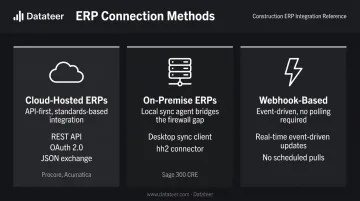
This step establishes the live data connection between your ERP and the reporting platform. The method depends on the ERP:
- Cloud-hosted ERPs (Procore, Acumatica): typically use REST APIs with OAuth 2.0 authentication and JSON data exchange
- On-premise ERPs (Sage 300 CRE): may require a desktop sync client, such as the hh2 client used in Procore's Sage connector
- Webhook-based connections: provide real-time event-driven updates rather than scheduled pulls
Authentication credentials must be tied to a dedicated service account, not an individual employee's login. When that employee leaves or their credentials change, the integration breaks. Create a service account with minimum required permissions, and store the credentials securely with both the finance lead and IT owner having access.
Platforms with pre-built native connectors — such as Datateer, which integrates directly with Procore, Sage, Vista, Acumatica, Foundation, CMiC, Jonas, and others — significantly reduce complexity here. Pre-built connectors eliminate manual configuration, handle the authentication handshake, and typically get data flowing within 2–4 weeks versus the months a custom API build can require.
Step 4: Standardize and Map Data Fields
Once the connection is established, map ERP fields to the reporting platform's data model. This is typically the most time-intensive step, particularly for firms with:
- Customized ERP configurations
- Multiple divisions using different cost structures
- Legacy projects using non-standard codes
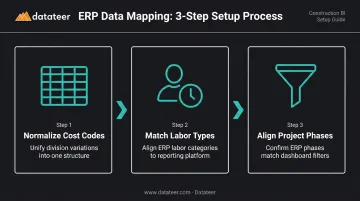
Three mapping tasks drive most of the work:
- Normalize cost code variations across divisions into a unified structure
- Match ERP labor types to the reporting platform's labor categories
- Confirm that project phases in the ERP correspond correctly to dashboard filters
Automated platforms like Datateer handle this mapping during implementation. Custom builds require a resource who understands both the ERP data model and the reporting platform's schema — if your team doesn't have that combination, budget for a specialist or choose a pre-built connector.
Step 5: Run Initial Sync and Verify Data Integrity
Trigger the first full data pull, but don't validate against the entire portfolio immediately. Select 2–3 active projects with clean, complete ERP records and compare dashboard figures to ERP source data line by line. Document every discrepancy before expanding the sync.
This pilot approach surfaces mapping gaps, permission issues, and data quality problems at a scale you can actually fix. Once those are resolved, expand to the full portfolio.
Post-Integration Validation and Testing
A successful technical connection is not the same as a validated integration. CFMA's WIP reporting framework requires internal controls over WIP schedules to ensure accurate reporting: the same discipline applies to integration outputs.
Key Validation Checkpoints
Run these checks before declaring the integration live:
- Compare dashboard WIP figures against ERP actuals for 3–5 active projects — numbers should match without manual adjustment
- Confirm data refreshes on schedule without manual exports. Overnight sync is the standard; more frequent updates are possible depending on platform configuration
- Log in as each user type — field supervisor, project manager, executive — and confirm each sees only the data they should
- If the firm operates multiple divisions, verify cost codes and project data appear consistently across all of them
Indicators of an Incomplete Integration
Catch these during validation — not after monthly close:
- Dashboard figures don't match ERP actuals
- Reports only update after a manual data export
- Cost codes appearing as "unknown" or "unmapped"
- Discrepancies between divisions or project types
- Missing projects or cost categories with no explanation
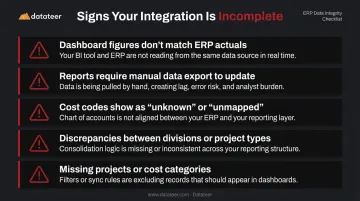
Any of these signals means the integration needs remediation before it touches a real reporting cycle. Addressing them now prevents compounding errors across monthly closes and WIP schedules.
Common Integration Problems and How to Fix Them
Most integration problems fall into a small number of recurring categories.
Mismatched or Unmapped Cost Codes
Problem: Dashboard reports show "unknown" line items or cost totals that don't reconcile with ERP actuals.
Why it happens: Cost codes weren't standardized before integration, or different divisions use different structures that weren't mapped during the data field configuration step.
Fix: Return to the data mapping layer and build a cost code translation table that normalizes variations across divisions. This is a one-time fix, but it requires someone with both ERP knowledge and access to the reporting platform's mapping configuration.
On automated platforms like Datateer, this normalization happens during the initial data extraction process. That said, the underlying ERP data still needs to be consistent enough for the engine to work from — so the fix starts in the ERP, not the dashboard.
Sync Gaps from Incomplete ERP Records
Problem: Some projects appear with missing cost data, incomplete actuals, or outdated budget figures.
Likely cause: The ERP contains projects with partially entered data — open purchase orders, unapproved subcontractor invoices, or timesheets not yet processed. The integration pulls a snapshot of whatever exists at sync time.
Fix: Establish an ERP data entry discipline before each reporting cycle:
- Close and approve all cost entries prior to the sync window
- Confirm subcontractor invoices are processed, not pending approval
- Verify timesheets are submitted and posted
This is a process problem, not a technical one. The fastest path to cleaner reports is a documented close checklist your team runs before each sync — not a platform setting.
Authentication Breaks After Staff Changes
Problem: The data connection drops or stops refreshing after an employee departure or credential change.
What's causing it: The ERP API connection was authenticated using an individual employee's login. When that user's credentials are deactivated, the integration loses access. Procore's developer documentation recommends using a Developer Managed Service Account with a client_credentials grant type to avoid exactly this scenario.
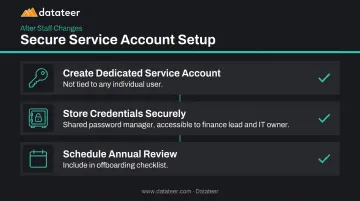
Fix: Set up a dedicated service account for the integration connection — not tied to any individual employee. Then:
- Store credentials in a shared password manager or secure vault
- Ensure both the finance lead and IT owner have access
- Review the service account annually alongside your offboarding checklist
Pro Tips for a Smoother Integration
Run a pilot before connecting everything. One well-chosen project with complete, clean cost data will expose mapping gaps and permission issues at a scale you can manage — before they affect every report in the system.
Document everything as you go. Record every connection point, field mapping decision, and data transformation rule in a configuration log. When something breaks six months later, this document is what allows someone to diagnose the issue without rebuilding from scratch.
Know when to bring in a specialist. Firms running multiple ERPs, managing more than one legal entity, or operating with heavily customized ERP configurations should consider a platform that handles automated data extraction and cleaning by design. The ongoing maintenance cost of a manual integration — plus the risk of inaccurate financial reports — typically exceeds the cost of a purpose-built tool.
Datateer connects to 12+ construction ERPs with automated data extraction, cost code normalization, and a 2–4 week setup timeline. For complex multi-source environments, that's a more defensible path than a custom build maintained by whoever happens to hold the API credentials.
Frequently Asked Questions
How long does it take to integrate landscape construction management software with financial reporting tools?
With pre-built ERP connectors, data can start flowing in as little as 2–4 weeks. Custom API builds typically run 8–16 weeks. Full ERP implementations are a separate scope entirely, often running 6–12 months. Data quality and cost code readiness are the main factors that extend the timeline in either direction.
What ERP systems do landscape construction companies commonly use?
Common platforms include Procore, Sage 300 CRE, Sage 100 Contractor, Viewpoint Vista, Foundation Software, Acumatica, CMiC, and Jonas Construction. ERP choice directly affects which integration methods and pre-built connectors are available.
Can financial dashboard software integrate with multiple landscape management platforms at once?
Yes, but each additional data source adds mapping complexity. Prioritize the systems holding the most financially critical data first — typically your primary ERP and project management platform — before expanding to secondary sources.
What data should landscape construction firms prioritize when setting up software integrations?
Job cost actuals, WIP schedules, subcontract commitments, and labor tracking are the highest-priority data sets. These feed the financial reports most critical to margin protection and cash flow visibility, and they're the outputs that break first when an integration is incomplete.
How do I know if my landscape construction software integration is working correctly?
Dashboard figures should match ERP actuals without manual adjustment, data should refresh on a scheduled basis without manual exports, and all cost codes should appear correctly mapped with no "unknown" categories.
What are the most common reasons landscape construction software integrations fail?
Three causes account for most failures: inconsistent cost codes in the source ERP, authentication credentials tied to individual users rather than dedicated service accounts, and skipping post-integration validation before going live.