The tension most construction finance teams face is real: manual reconciliation is deeply embedded in how the industry works, but the results vary wildly depending on how data is structured and how systems connect. Most firms are still running this process on spreadsheets with a 10-to-20-day lag before the job's true position is visible.
This article walks through exactly how construction companies are automating job-level reconciliation — what's required before you start, the step-by-step process, the variables that determine whether it actually works, and the mistakes that cause most automation projects to stall in the first six months.
Key Takeaways
- Manual WIP reporting creates a 10-to-20-day lag; automation delivers real-time or daily visibility instead
- Clean, consistent cost codes must come before system integration — bad data scaled is still bad data
- Live ERP integration (not file exports) is the technical foundation that makes continuous job visibility possible
- Exception workflow design, not just match rate, determines whether your team trusts and uses the system
- Shift from monthly forensic review to catching margin fade while there's still time to act
What Makes Job-Level Reconciliation in Construction Uniquely Complex
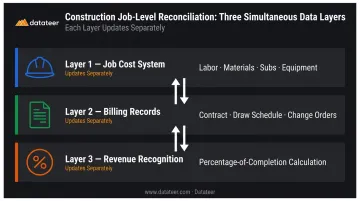
Standard account reconciliation matches debits and credits. Job-level reconciliation in construction requires matching data across at least three layers simultaneously:
- Job cost system — costs accumulated by job and cost code (labor, materials, subs, equipment)
- Billing records — amounts invoiced per contract, draw schedule, and change order
- Revenue recognition — earned revenue calculated via percentage-of-completion, which updates separately from both costs and billings
These three layers update at different times, from different source systems, and carry different levels of latency.
The Data Fragmentation Problem
Field costs flow from timesheets and subcontractor invoices into the job cost system. Change orders get approved and added to the contract. Billings follow a draw schedule tied to the owner's pay application cycle. Without an integrated system, reconciling these layers means manually pulling reports from multiple sources and cross-referencing them — a process that compounds errors at every handoff.
According to a Deltek guide on WIP reporting, decisions made from WIP reports that use prior-week or prior-month data are already behind actual job costs from the moment they're reviewed. A CFMA analysis of job costing in construction notes that compiling job cost information can take weeks — and by the time a job's position becomes visible at month-end, the window to correct a billing gap or catch cost overruns has typically already closed. That lag isn't just an administrative frustration — it carries real financial risk.
Why the Lag Matters
The real cost of a 10-to-20-day lag isn't just administrative inconvenience. According to EisnerAmper's analysis of WIP reports and bonding, substantial underbillings are a red flag for overstated profits — and bonding companies rely heavily on WIP accuracy when evaluating contractor capacity. A delayed WIP view doesn't just slow down the close process; it distorts the financial signals for surety relationships and executive decision-making.
How to Automate Job-Level Reconciliation: A Step-by-Step Process
Step 1: Standardize Source Data Before Connecting Any Systems
This is the step most firms skip — which is why most construction automation projects underperform.
Cost code alignment is non-negotiable. When subcontractors, field staff, and the office use different codes for the same cost type, matching logic has no reliable basis for reconciliation. The result is an exception queue full of items that aren't actually exceptions — they're data quality problems disguised as variances.
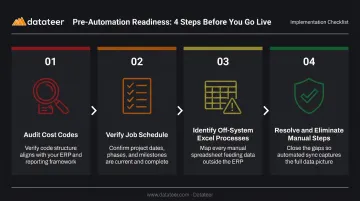
Before connecting any systems, complete these steps:
- Audit cost codes across all jobs, divisions, and subcontractors — identify every instance where the same cost type appears under multiple codes
- Verify the job schedule — confirm every job (including recently completed contracts) is present with contract amount, costs to date, billings to date, and estimated cost to complete
- Identify off-system Excel processes — document every manual transformation (pivot tables, VLOOKUPs, copy-paste workflows) that currently sits between raw job cost data and the reconciliation view
- Resolve or eliminate those Excel steps before automation begins
Baker Tilly's review of common construction job schedule errors identifies omitted completed contracts as a recurring cause of revenue reconciliation problems — jobs that closed but were removed from the schedule, creating a gap in the historical record that auditors, bonding companies, and leadership can't reconcile.
Step 2: Establish Direct ERP Integration
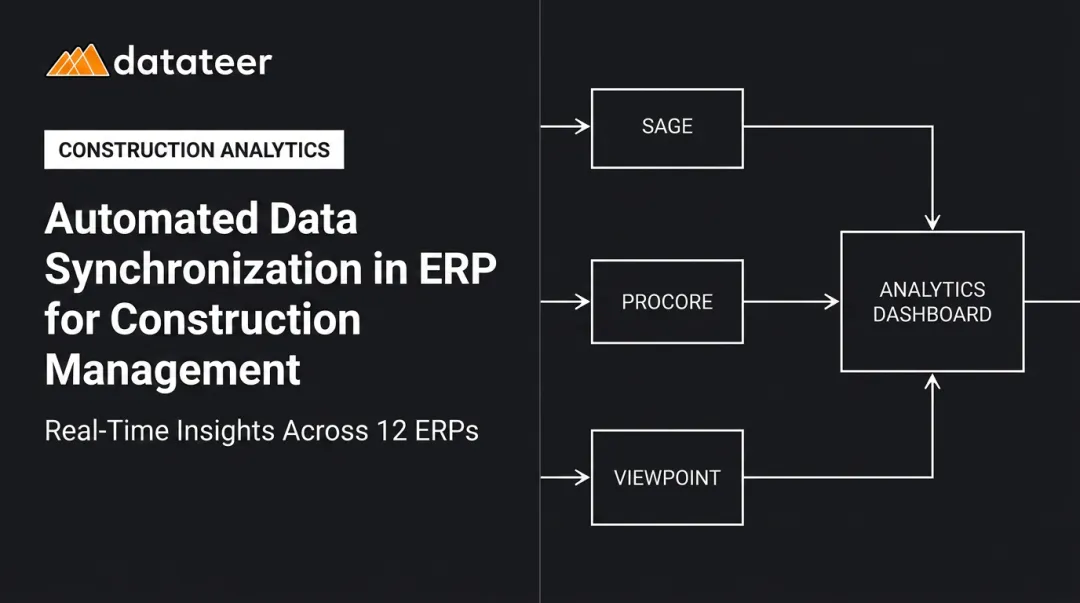
Connect your construction ERP — Sage, Vista, Procore, Acumatica, Foundation, CMiC, or similar — to your reconciliation and reporting layer through direct integration rather than periodic CSV or file exports.
File-based imports create data timing gaps that generate false exceptions. A stale import from three days ago looks like a real variance when the cost actually posted yesterday. Teams relying on file exports haven't automated reconciliation — they've automated a slightly faster version of the manual process.
What the integration must pull:
- Transaction-level cost postings (not just trial balance summaries)
- Individual billing records by job and draw period
- Change order approvals with associated cost and contract impact
- Committed costs — POs and subcontracts — not just actuals
Datateer integrates with 12+ major construction ERPs — including Procore, Sage 100/300/Intacct, Viewpoint Vista and Spectrum, Acumatica Construction, Foundation Software, CMiC, Jonas, QuickBooks, and NetSuite — with automated overnight data sync as the standard cadence.
The platform's data cleaning engine handles cost code standardization automatically during setup, reducing what would otherwise be a multi-month IT cleanup effort to a 2-4 week implementation.
Step 3: Configure Job-Level Matching Logic and Exception Rules
Define the matching conditions specific to construction accounting:
- Job number
- Cost category / cost code
- Billing period
- Change order reference
- Subcontract line item
These fields determine whether a cost entry and a billing item belong to the same job position. Without explicit matching rules on these dimensions, the system can't distinguish between a legitimate variance and a timing difference.
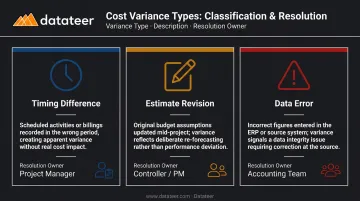
Three categories of variances will emerge — each requires a different resolution path:
| Variance Type | Description | Resolution Owner |
|---|---|---|
| Timing difference | Cost incurred but not yet billed | Project Manager |
| Estimate revision | Original budget changed mid-job | Controller / PM |
| Data error | Cost coded to wrong job or category | Accounting Team |
Set underbilling and overbilling alert thresholds so that jobs falling outside defined parameters surface automatically. This moves the team from line-by-line schedule review to exception-based oversight — and fundamentally changes how much time reconciliation requires.
Step 4: Build the Review and Reporting Layer
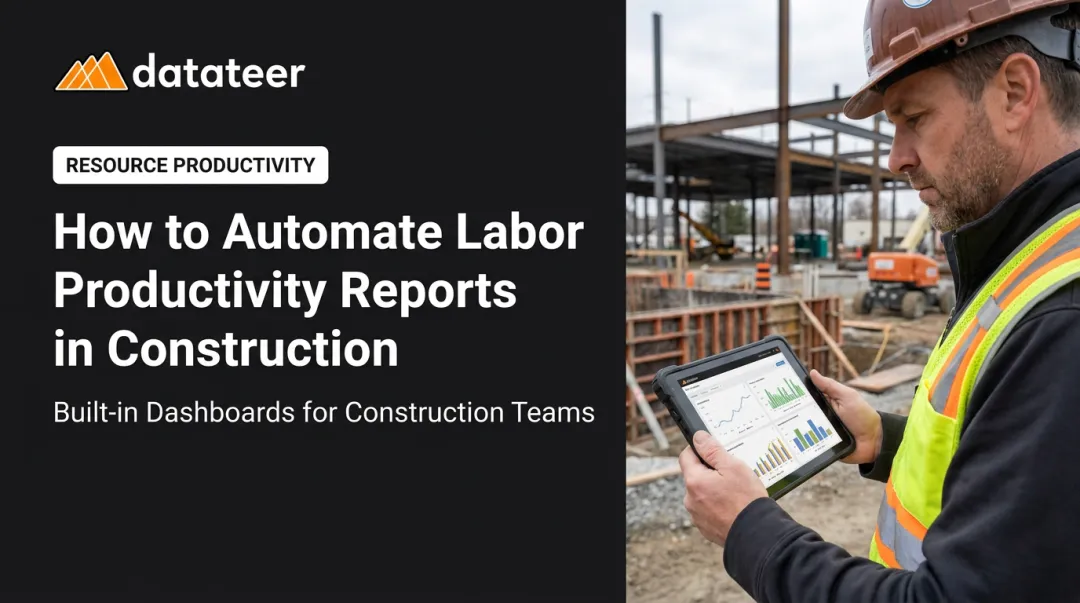
The reconciliation process is only as useful as the view it produces. A dashboard that surfaces job-level WIP position, underbilling/overbilling exposure, and cost-to-complete variance as a continuously refreshed view (not a month-end report) changes what finance teams can actually do with the information.
Define the review workflow explicitly:
- Which exceptions go to the project manager vs. the controller
- What the escalation path is when an item ages past a defined threshold
- What "reconciled" means for each job type
Datateer's WIP Reporting, Job Costing & Cost-to-Complete, and Margin Protection dashboards work as an integrated set — pulling automated daily updates from the ERP, surfacing over/under-billings by job, and flagging margin fade before it locks in. The Double L Management team put it directly: "That one click replaced two weeks worth of prior work."
What You Need Before You Start
ERP and System Requirements
Confirm your construction ERP supports direct integration and exports transaction-level cost and billing data. Systems that only allow manual exports or period-end batch files will create data gaps that undermine daily reconciliation. Verify that the integration can pull:
- Individual cost postings at the cost code level
- Billing records linked to specific contract line items
- Change order approvals and their cost impacts
Data Readiness Checklist
Before connecting any automation platform, work through this list:
- Cost codes are consistent across all jobs, divisions, and subcontractors
- All jobs — open and closed — are present in the job schedule
- Billing records align with contract documents and draw schedules
- Completed contracts are included (not removed after closeout)
- No job schedule data lives only in spreadsheets outside the ERP
Team and Process Readiness
Automation scales an existing process. It can't build one from scratch. Before go-live, define:
- Ownership: who is responsible for each job's reconciliation
- Materiality threshold: what dollar or percentage variance triggers a manual review
- Definition of "reconciled": what conditions must be true for a job to be marked complete
If the process is undefined before automation begins, the same confusion will carry forward at greater speed and scale.
Key Variables That Determine Automation Outcomes
The quality of automated job-level reconciliation depends less on which software is chosen and more on how four variables are managed.
Cost Code Consistency
Matching logic relies on cost codes to identify whether a cost entry and a billing item belong together. If different codes are used for the same cost type across projects or subcontractors, the system generates exceptions that are actually data quality problems — inflating the exception queue and eroding team trust in the results.
ERP Integration Depth
Automated daily integration means costs and billings appear in the reconciliation view within one business day of posting. File-import-based integration means the view is always one export cycle behind — which in active construction means it's always partially wrong.
A one-week data lag means a billing shortfall or cost overrun on a high-margin job can go undetected for a full billing cycle — long enough to miss the window for corrective action.
Exception Workflow Design
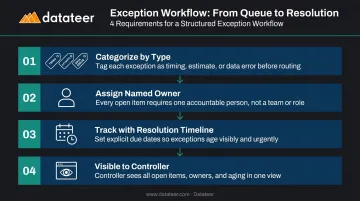
A high auto-match rate sounds like success. But if the remaining unmatched items sit in an unstructured queue with no assigned owner and no resolution timeline, the team's experience feels no different from spreadsheets.
Exceptions must be:
- Categorized by type (timing, estimate revision, data error)
- Assigned to a named owner
- Tracked with resolution expectations
- Visible to the controller without requiring a status meeting
Reconciliation Frequency
Running job-level reconciliation on a monthly close cycle mirrors the old manual cadence and preserves the same blind spots. Margin fade on labor-intensive jobs, growing underbilling exposure, and cost coding errors accumulate for weeks before anyone sees them.
Daily or weekly reconciliation keeps the job in view while there's still time to act. Monthly reconciliation tells you what went wrong — usually after the margin is already gone.
Common Mistakes When Automating Job-Level Reconciliation
Most reconciliation automation failures aren't technology problems — they're process problems that go live before anyone fixes the underlying data. These four mistakes account for the majority of projects that stall or backslide within the first year.
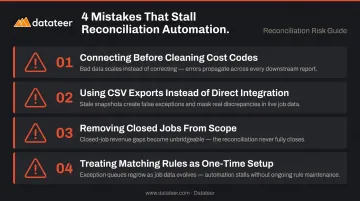
- Connecting the ERP to a reconciliation platform before cleaning cost codes and resolving off-system Excel schedules scales the inconsistency instead of eliminating it. This is the most common reason automation projects underperform in the first six months.
- Using periodic CSV exports instead of direct integration gives teams a slightly faster version of the manual process — not a real alternative. Stale data, false exceptions, and eroding team confidence in the output follow quickly.
- Removing closed jobs from the reconciliation scope after contract closeout creates an unbridgeable revenue gap and eliminates the historical record that bonding companies, auditors, and leadership need to evaluate estimating accuracy over time.
- Treating the matching rule set as a one-time setup allows it to degrade silently as job types, subcontractor naming conventions, and team practices evolve. The exception queue grows back toward pre-automation levels before anyone notices.
Frequently Asked Questions
How do construction companies perform job-level reconciliation?
The core process matches costs by job and cost code against billings issued and revenue recognized via percentage-of-completion, then reconciles that result to the WIP schedule and general ledger to confirm underbilling and overbilling positions. Most firms run this monthly using exported ERP data and Excel-based WIP schedules.
What is automatic reconciliation?
Automatic reconciliation uses software to match financial transactions across systems without manual intervention , routing only the items that don't meet predefined matching rules to human reviewers. The goal is replacing line-by-line review with exception-based oversight, where the team only touches items that genuinely require judgment.
Can construction companies use AI to automate job-level reconciliation?
Yes — AI can assist with pattern-based cost code matching, budget anomaly detection, and exception routing, but only when built on clean, integrated ERP data. Construction-specific platforms built around the industry's data model (cost codes, WIP, change orders, percentage-of-completion) consistently outperform generic accounting automation tools for construction reconciliation.
What are the most common errors in construction job-level reconciliation?
The three most frequent problems: omitting completed contracts from the job schedule, confusing billings with recognized revenue when reconciling year-to-date figures, and relying on non-integrated spreadsheets where formula errors distort the percentage-of-completion calculation.
How long does it take to set up automated job-level reconciliation?
Timeline depends on data readiness. Firms with consistent cost codes and clean ERP data can go live in 2-4 weeks; firms with fragmented data or Excel-based job schedules typically spend additional time on data cleanup before the platform runs reliably.