Introduction
Construction finance teams spend an uncomfortable amount of time doing work that shouldn't exist. A CFO needs current WIP numbers. A finance manager pulls a CSV from Sage, pastes it into Excel, runs a VLOOKUP against Procore data, rebuilds the format, and emails a report — only to have a project manager question whether the numbers are current. They aren't. By the time the report reaches anyone who can act on it, the data is days or weeks old.
This is the operational reality that automated ERP data synchronization is designed to fix. It's the continuous or scheduled process by which construction financial data — cost codes, job budgets, subcontractor commitments, payroll actuals, change orders — flows automatically from the ERP into dashboards and reporting tools, with no manual export or re-entry required.
Research from Autodesk and FMI estimated that bad data cost the global construction industry $1.85 trillion in 2020, including $88.69B in rework driven by poor decisions. Much of that traces back to data that is stale, inconsistent, or manually compiled — exactly the problem automated sync addresses.
What follows breaks down how automated ERP sync works, where it fits into construction workflows, and the factors that determine whether it actually holds up under real operational pressure.
Key Takeaways
- Automated ERP sync replaces manual CSV export cycles that introduce days-long reporting lags in construction finance
- Data flows end-to-end: ERP extraction, cost code transformation, loading into a reporting layer, and dashboard delivery
- Cost code mapping is the most critical — and most frequently botched — step in the entire process
- How well automation performs depends on sync frequency, ERP API quality, and the state of your data governance
- Automated sync amplifies existing data problems rather than correcting them; clean ERP data is a prerequisite, not an afterthought
What Is Automated Data Synchronization in Construction ERP?
Automated data synchronization is the process by which a construction ERP system continuously — or on a scheduled basis — pushes structured financial and project data into downstream systems without human intervention. Every connected platform reflects the same current state: project costs, committed subcontractor spend, payroll actuals, and billing events — without anyone exporting a file or running a manual refresh.
The intended result is a single version of truth. A project manager reviewing field performance and a CFO reviewing portfolio margin should be looking at the same underlying numbers, not two different snapshots compiled at different times from different sources.
What It Is Not
Several adjacent terms get conflated with automated sync, and the distinctions matter operationally:
- ERP integration describes connectivity between systems — but connectivity alone doesn't guarantee automatic data flow. Many integrations still require a manual trigger or a user-initiated export to move anything
- Real-time data is not synonymous with automated sync. Sync may run on hourly, nightly, or on-demand schedules; the right cadence depends on the operational need, not on a marketing claim
- Data migration is a one-time move of historical records — sync is a recurring, ongoing process active throughout the life of every project
The gap between "connected" and "automated" is where reporting breaks down in practice. A system that requires someone to hit export — or reconcile two exports afterward — isn't synchronized. It's manual work wearing an integration label.
Why Construction Management Depends on Automated ERP Data Sync
Construction generates transactional data at high volume and high velocity. A single active project may involve dozens of cost codes, multiple subcontractor billing events, weekly payroll submissions, and change orders that alter budget baselines mid-cycle. Each transaction has a short shelf life for decision-making purposes.
The WIP Problem
WIP reporting is the clearest example of where stale data causes direct financial harm. A WIP schedule requires current committed cost, earned revenue, billed-to-date, and projected final cost — all accurate simultaneously.
Without automated sync, finance teams manually compile these figures from AP, payroll, and subcontractor billing sources — introducing lag and arithmetic error at every step.
According to the Construction Progress Coalition, WIP reports are still primarily prepared in PDF or Excel, requiring recipients to manually rekey that data into their own financial systems. That's a data handoff problem compounding the original compilation problem.
What goes wrong when sync fails:
- WIP schedules reflect cost data from days or weeks prior, masking margin fade that is already in progress
- Project managers make field decisions against budget snapshots that no longer match the ERP ledger
- Finance and operations teams work from different versions of project reality, creating the finger-pointing dynamic that consumes hours per reporting cycle
- Bonding and lender submissions reflect positions that have already moved
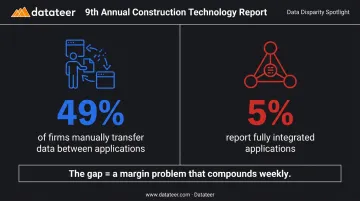
The 9th Annual Construction Technology Report found that 49% of construction firms manually transfer data between applications, and only 5% report having fully integrated applications. For most firms, that gap isn't an IT problem — it's a margin problem that compounds every week the data stays out of sync.
How Automated ERP Data Sync Works
The process follows a defined sequence. Understanding each step helps identify where implementations succeed — and where they fail without warning.
Step 1: Data Extraction from the ERP
Extraction pulls structured data from the ERP using a native API, a direct database connector, or a middleware layer. The source data includes AP entries, subcontractor invoices, labor timecards, change orders, and budget records.
The quality of this step depends heavily on the ERP. Sage Intacct, Acumatica, and CMiC each publish REST API documentation with varying levels of completeness. Trimble Vista offers a bidirectional cloud API. Foundation Software supports secure third-party API connections. The depth of what each platform exposes through its API determines what can be synced automatically — and what requires workarounds.
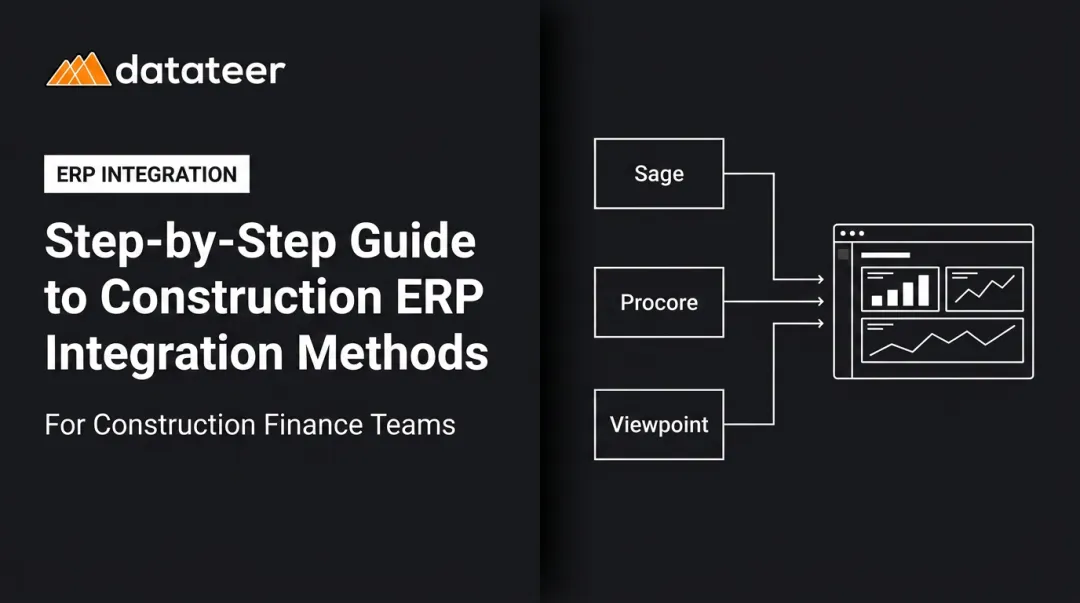
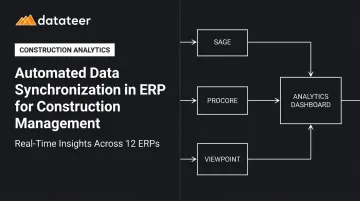
Direct connectors purpose-built for a specific ERP generally produce more reliable extractions than generic middleware solutions. Platforms like Datateer connect directly to 12+ named construction ERPs — Procore, Sage, Vista, Acumatica, Foundation, CMiC, and more. They eliminate the manual CSV export cycle entirely and handle extraction without requiring IT involvement from the client.
Step 2: Data Transformation and Cost Code Mapping
Raw ERP data cannot be used directly for reporting. Cost codes differ by project. Subcontractor data uses inconsistent naming. WIP calculations require mapped relationships between budget lines, committed costs, and actuals before any meaningful number can be produced.
Transformation normalizes the data, standardizes cost code structures, and applies business logic to produce outputs that construction finance teams can act on:
- Percent-complete calculations
- Over/under-billing derivations
- Projected final cost by job
This is where most automated sync implementations fail. Poorly mapped cost codes don't cause visible errors; they silently corrupt downstream reports. A cost code labeled differently across two projects produces misallocated actuals in job cost reports. An unmapped subcontractor line becomes a hole in the WIP schedule. The errors stay invisible until someone cross-references the ERP ledger manually, which defeats the purpose of automation entirely.
Datateer addresses this through an automated data cleaning engine that normalizes cost codes across systems, catches broken or malformed entries, and reconciles Procore project commits to Sage invoices. The reconciliation work that typically precedes every reporting cycle is handled before the data ever reaches a dashboard.
Step 3: Loading and Refresh Scheduling
Transformed data loads into a data warehouse or reporting layer, where dashboards and finance reports draw from it on a configured refresh schedule.
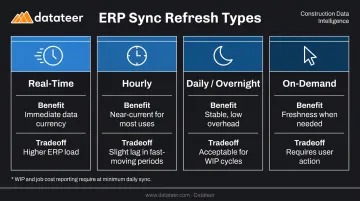
The practical tradeoff in scheduling:
| Refresh Type | Benefit | Tradeoff |
|---|---|---|
| Real-time (continuous API polling) | Immediate data currency | Higher ERP load, persistent connection required |
| Hourly scheduled | Near-current for most uses | Slight lag in fast-moving periods |
| Daily/overnight | Stable, low overhead | Acceptable for most month-end and WIP cycles |
| On-demand (user-triggered) | Freshness when needed | Requires user action |
Datateer's standard configuration is overnight data updates, with more frequent refreshes available when operational needs require it. The right cadence depends on how quickly decision-makers need to act — WIP and job cost reporting typically warrant at minimum a daily sync.
Where Automated Data Sync Is Applied in Construction Workflows
Automated sync delivers the most value in data domains where decisions are time-sensitive and errors compound quickly:
- WIP schedules: simultaneous accuracy of budget, committed cost, earned revenue, and projected final cost
- Job cost reports: actuals pulled from AP, payroll, and subcontractor billing across every active cost code
- Change order tracking: approved vs. pending changes reflected in budget forecasts before field teams spend against unapproved work
- Cash flow reporting: billing events combined with committed cost pipelines to project 13-week liquidity positions
Each of these domains becomes a liability when data lags. The moments in the project lifecycle where that lag does the most damage:
- Mid-project financial reviews, where margin trends are still correctable
- Monthly close cycles, where data accuracy determines whether the close takes hours or days
- Bonding and lender reporting, where sureties evaluate WIP schedules for underbillings, overbillings, and profit fade
- Executive portfolio dashboards, where leadership needs a cross-project view that reflects current ERP state
Sync must stay active for the full project lifecycle, not just at go-live. ERP updates, new project additions, and cost code structure changes are all common failure points — any of which can silently break data flows if the sync layer isn't monitored.
Key Factors That Affect Automated ERP Data Sync in Construction
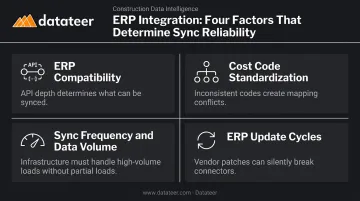
Four factors determine whether automated ERP sync delivers reliable results in construction:
ERP Compatibility and API Quality
The depth of data available through a given ERP's API determines what can be synced automatically. ERPs with limited or poorly documented APIs require workarounds that increase fragility.
When a vendor releases updates — CMiC's shift from Basic Auth to OAuth 2.0 and Patch 22's 1,000-record API request limit are real examples — existing connectors can break without warning. Direct-integration tools that maintain managed, per-ERP connectors are less exposed to this risk than generic middleware layers.
Cost Code Standardization and Data Governance
Firms with inconsistent cost code usage across projects create mapping conflicts that automated sync cannot resolve without human intervention. Establishing cost code governance before implementing sync reduces downstream failures.
Datateer's free Construction Data Maturity Audit helps firms assess whether their ERP data is clean enough to automate — or whether they'd be automating a mess.
Sync Frequency and Data Volume
Large firms running hundreds of cost codes across simultaneous projects generate high data volumes. Sync infrastructure must handle this without partial loads that leave reports in an inconsistent state.
The right cadence is operational: how quickly do decision-makers need to act, and how frequently does source data change?
ERP Update Cycles
Firms relying on generic iPaaS middleware (MuleSoft, Zapier, and similar tools) absorb full responsibility for detecting and remediating connector breaks when ERP vendors push schema or endpoint changes. Platforms with managed, construction-specific connectors — updated in response to vendor patches — shift that maintenance burden away from the customer.
Common Issues and Misconceptions About ERP Data Synchronization
Myth: "If our ERP is connected to another platform, data is syncing automatically."
Not necessarily. Many integrations still require a manual trigger, an overnight batch job, or a user-initiated export. True automation means the sync runs without human initiation on a persistent, maintained connection — not a one-time setup left unmonitored.
The survey data supports this: only 5% of construction firms report fully integrated applications, despite most having some form of ERP connectivity.
Myth: "Automated sync will clean up our messy ERP data."
It won't. Sync is a data delivery mechanism: it moves data from one place to another. Duplicate vendors, inconsistent cost codes, and unreconciled historical entries get delivered faster, not fixed.
Firms that implement sync without first addressing data quality discover the problem at higher speed and wider distribution. Fix the source data first, then automate its movement.
Myth: "Automated sync is the right fit for every construction firm."
Not quite. For firms with one or two active projects and straightforward cost structures, the overhead of maintaining sync infrastructure may outweigh the operational benefit. The value scales with project count, cost code complexity, and reporting frequency.
Firms that haven't standardized their ERP workflows need to address internal data discipline first — because automated sync amplifies whatever structure (or lack of it) already exists in the source system.
Frequently Asked Questions
What is an ERP in construction management?
A construction ERP is an integrated software platform that centralizes financial management, job costing, project controls, payroll, procurement, and reporting for construction firms. It serves as the authoritative system of record for all project and company financial data — the source that all downstream reporting should draw from.
What are the 7 stages of implementation of ERP?
The seven stages are: planning and scoping, requirements gathering, system configuration, data migration, integration and sync setup, user training, and go-live with ongoing support. Acumatica notes most implementations complete within six months to one year. Construction firms consistently underestimate the data sync and integration stage.
What are the five ERP modules?
Core modules in a construction ERP include:
- Financial management and accounting
- Project management and job costing
- Procurement and supply chain
- Human resources and payroll
- Reporting and analytics
Automated data sync connects these modules to external dashboards so data doesn't stay locked inside the ERP.
How often does data sync in a construction ERP system?
Sync frequency ranges from continuous API polling (near real-time) to scheduled intervals — hourly, daily, or on-demand. WIP and job cost reporting require at minimum daily sync; faster refresh is warranted when margin trends or cash positions need to be visible within hours, not days. The right cadence depends on operational need, not just what's technically possible.
What is the difference between automated ERP data sync and manual data exports?
Manual exports require extracting data from the ERP, reformatting it in Excel, and uploading it into a reporting tool — each step introducing lag, human error, and version-control risk. Automated sync replaces this entirely: data flows from ERP to reporting systems without human initiation, on a defined schedule or on-demand.
What are common signs that ERP data sync is failing in a construction firm?
Watch for dashboard figures that don't match ERP ledger balances, cost codes appearing as unmapped in reports, and data that hasn't refreshed despite automation being active. The most telling sign: finance teams quietly reverting to manual spreadsheets — when the automation loses trust, people stop using it.