Introduction
Construction finance teams have a problem that more software hasn't solved. They've invested in ERPs, accounting platforms, and project management tools — yet CFMs and finance managers still spend days each month manually assembling WIP reports in spreadsheets. By the time those reports reach leadership, the job data is already stale.
This isn't a niche frustration. Research from Autodesk and FMI found that 75% of construction professionals say rapid, real-time decision-making is increasingly important — but only 12% always incorporate project data into their decisions. The gap between data capture and financial intelligence is costing the industry real money.
This guide covers what construction financial management software actually is, which features matter — from WIP reporting and job costing to cash flow forecasting — and how to identify where your current stack is failing you. Most firms already have the right accounting platform. What they're missing is the layer that moves financial data from the field to executive dashboards automatically — without a week of manual cleanup in between.
Key Takeaways
- Construction financial management software handles job costing, WIP reporting, progress billing, retainage, and change order tracking — capabilities generic accounting tools lack
- Most ERPs capture transactions accurately but weren't built to produce the dashboards CFOs and lenders need
- The gap between raw ERP data and executive-ready intelligence is where finance teams lose days every month
- Closing that gap means adding an analytics layer on top of your existing ERP, not replacing it
- Implementation timelines for analytics layers run 2-4 weeks vs. 6-18 months for full ERP replacements
What Is Construction Financial Management Software?
Construction financial management software handles the financial complexity specific to project-based businesses. Generic accounting tools weren't built for it — they don't natively handle job costing, WIP schedules, AIA draw packages, retainage calculations, or change order budget impacts.
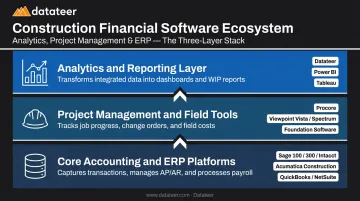
The category spans three distinct tiers:
- Core accounting and ERP platforms (Sage 300, Viewpoint Vista, Acumatica, Foundation): capture financial transactions, manage AP/AR, process payroll, and maintain the general ledger
- Project management and field tools (Procore, CMiC): track job progress, change orders, subcontractor workflows, and field costs that feed back into the financial system
- Analytics and reporting layers: transform raw ERP data into executive dashboards, WIP summaries, margin trend analysis, and bonding-ready financial reports
Construction CFOs and finance managers at firms ranging from $10M to over $1B in revenue use this software to close books faster, protect job margins, satisfy bonding requirements, and allocate capital with current data rather than month-old spreadsheet exports.
Core Features Every Construction Financial Management System Must Include
Job Costing and Cost Code Management
Job costing is the financial foundation of construction. Every labor hour, material purchase, subcontractor invoice, and equipment charge must trace back to a specific job and cost code. Without it, firms can't identify which projects make money or price future work accurately.
Effective job costing requires automatic allocation from payroll, AP, and field data into job records. Manual journal entries introduce lag and human error. Cost code standardization across projects is equally critical — without it, cross-project comparison becomes meaningless.
The practical challenge: cost codes are often entered inconsistently across projects or between systems. When Procore and Sage are both in play, the same cost category can be coded differently in each platform. Datateer addresses this by standardizing cost codes across systems and mapping a firm's unique data logic into a unified structure — eliminating the VLOOKUP reconciliation that burns hours before every month-end close.
Work-in-Progress (WIP) Reporting
WIP reporting is the financial heartbeat of a construction firm. It compares costs incurred against revenue earned (using percentage-of-completion) to reveal over-billing, under-billing, or margin fade on every active project.
According to AICPA-CIMA, WIP schedules help owners and project managers oversee budgets, understand completed work, and recognize what remains. Sureties and lenders rely on them to assess financial health — NASBP notes that sureties may request interim financial statements every three to six months.
The industry-wide pain: WIP schedules require monthly updates incorporating:
- New contracts and executed change orders
- Current-period costs and billings
- Overhead allocations
- Balance-sheet reconciliation of over/underbillings
For most firms running this manually, it's a multi-day process that produces a report stale before it's distributed.
A customer testimonial from Double L Management captures the transformation Datateer delivers: "The very first time we accessed our data through a Datateer analytics dashboard, that one click replaced two weeks worth of prior work."
Progress Billing, Retainage, and AIA Draw Management
Construction billing isn't a single invoice. It involves:
- AIA G702/G703 draw packages tied to schedule of values
- Retainage held back from owner payments (A/R retainage)
- Retainage your firm holds on subcontractors (A/P retainage)
- Billing aligned to percentage of completion, not calendar date
Systems that automate draw creation from live budget data compress billing cycles measurably. Retainage deserves particular attention — it ties up working capital on both sides of the balance sheet without triggering any obvious alarm. Datateer's retainage tracking covers both A/R and A/P retainage, monitors release schedules, and feeds directly into 13-week cash flow forecasting without manual input.
Change Order and Commitment Tracking
Untracked change orders are among the most common drivers of margin erosion. Approved scope changes that never make it into the budget create phantom overruns — work performed against cost without the corresponding revenue adjustment.
A proper system connects approved change orders directly to job budgets in real time. Datateer's Change Order Impact & Aging module pulls data directly from Procore, Sage, Vista, Spectrum, and Acumatica. It tracks pending, approved, denied, and executed statuses — with aging measured by days since submission — surfacing stalled approvals that erode margin before they show up at month-end.
Multi-Entity Financial Management and Consolidation
The same complexity that strains job costing and WIP reporting compounds when multiple entities are involved. Construction firms with subsidiaries, JV structures, or affiliated entities need software that produces consolidated financial statements while keeping entity-level reporting clean and separate.
For firms above $50M in revenue managing multiple operating entities, this is typically a non-negotiable requirement — and often the trigger for evaluating whether a current ERP can support the organization's actual structure.
The Reporting Gap: Why Your ERP Alone Isn't Enough
Most ERPs are transactional systems. They capture data accurately — costs, billings, change orders, retainage, payroll liabilities. But they weren't designed to transform that data into the executive dashboards, WIP summaries, cash flow forecasts, and bonding reports that construction leadership needs to run the business.
The result: finance teams export raw ERP data into Excel, build pivot tables, manually format reports, and re-run everything each time a job updates. That process takes days, introduces formula errors, and creates version control chaos — a perpetual lag between reality and the reports sitting in front of leadership.
Autodesk and FMI research puts a dollar figure on bad and untimely data: it may have cost global construction $1.84 trillion in 2020, with one in three poor decisions attributed to bad data. For a $1B general contractor, that translates to an estimated $165M in revenue impact and $7.1M in avoidable rework. The reporting lag, in other words, is a direct line to lost margin.
The Architectural Fix
The solution isn't replacing your ERP. It's adding an analytics layer that:
- Integrates directly with your ERP via automated data extraction
- Standardizes cost codes and data logic across systems
- Delivers pre-built construction-specific dashboards that refresh automatically
Datateer is built for exactly this use case. It integrates with 12+ major construction ERPs — including Procore, Sage 100/300/Intacct, Viewpoint Vista, Viewpoint Spectrum, Acumatica Construction, Foundation Software, CMiC, and Jonas Construction. QuickBooks and NetSuite are supported as well. Data syncs overnight as standard. No CSV exports, no manual reconciliation, no IT tickets.
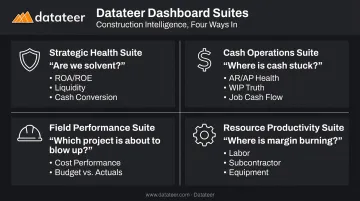
The platform delivers 12 pre-built dashboards across four strategic suites from day one, each targeting a different layer of construction decision-making:
- Are we solvent? Strategic Health Suite covers ROA/ROE, liquidity forecasting, and cash conversion.
- Where is our cash stuck? Cash Operations Suite tracks AR/AP health, WIP & Financial Truth, and job-level cash flow.
- Field Performance Suite — Which project is about to blow up? (project cost performance, budget vs. actuals, PM scorecard)
- Where is the field burning margin? Resource Productivity Suite surfaces labor productivity, subcontractor performance, and equipment utilization.
Why Not Just Buy a Better ERP?
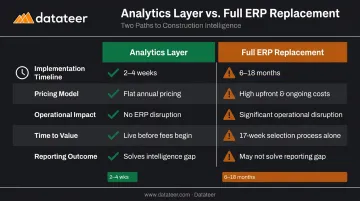
Switching ERPs is expensive, disruptive, and takes time — CMiC research indicates ERP selection alone takes 17 weeks, with 85% of leaders requesting an implementation timeline of roughly one year. And a new ERP still doesn't solve the reporting problem. Even the best platforms require significant custom reporting work to produce the dashboards construction leadership actually needs. You'd solve a transaction-capture problem while the intelligence gap remains.
Key Benefits of Purpose-Built Construction Financial Software
Margin Protection While There's Still Time
CFMA's 2025 Financial Benchmarker reports construction firms averaged 6.7% net income before tax in fiscal 2024. Best-in-class firms reached 12.0%. Those margins are narrow — a few points of cost slippage on active projects is the difference between a profitable year and a painful one.
When actual costs flow into dashboards daily rather than arriving in a report two weeks after month-end, project managers and CFOs can catch labor overruns and budget variance while there's still time to act.
Datateer's margin protection module monitors original estimated margin versus current projected margin per job, flags the specific drivers — labor overrun, material price escalation, subcontractor cost increases, change order denial — and identifies the exact cost codes causing the deterioration. That's early warning, not post-mortem.
Operational Efficiency: From Data Gatherer to Strategic Advisor
Manual WIP report assembly — CSV exports, VLOOKUP matching between Procore and Sage, formatting, reconciliation, version control — consumes significant finance staff capacity every month. Datateer's Excel Tax Calculator quantifies this directly: 40 hours per month across two staff members at $46/hour costs $43,846 annually in labor alone, before factoring in decision latency.
When the data pipeline is automated, that capacity shifts:
- Controllers move from "I'll have that report Thursday" to flagging which jobs need intervention this week
- Finance teams spend time on analysis instead of assembly
- CFOs get answers in minutes, not after the next close cycle
Bonding and Lending Credibility
Lenders and surety providers require timely, accurate WIP schedules and financial statements. Sureties may request interim statements every three to six months — and the quality and timeliness of those submissions directly affects bonding capacity and credit terms.
Datateer's WIP output is auditable back to ERP source transactions. Every figure in the dashboard can be drilled down to the underlying transaction in the source system — giving sureties and auditors a clear, verifiable chain from dashboard to general ledger.
That drill-through capability means surety reviews move faster, exceptions get resolved on the first request, and bonding capacity isn't left on the table because of documentation gaps.
How to Evaluate and Choose the Right Construction Financial Software
Match Complexity to Company Size
| Firm Size | Typical Needs |
|---|---|
| Under $15M | Disciplined job costing, billing, retainage, monthly WIP |
| $15M–$200M | Multi-entity reporting, role-based dashboards, cash flow forecasting |
| $200M+ | Division-level governance, auditability, cross-system integration, consolidated reporting |
The ROI on purpose-built analytics is typically strongest for firms in the $25M–$500M range — where financial complexity has outgrown spreadsheets but full ERP customization is difficult to justify on cost and timeline.
Verify Integration Compatibility
Map your existing tech stack before evaluating any tool. For each platform you're considering, ask vendors specifically:
- How does data flow from my ERP — API, database extraction, or manual export?
- How often does data refresh?
- What happens when cost codes don't match between systems?
- Can you show me a live demo with data from my ERP?
Flat-file or CSV-based integrations shift manual work onto your team; they don't eliminate it.
Calculate Three-Year Total Cost of Ownership
Integration complexity directly affects implementation cost — and that's before ongoing maintenance. Headline pricing is rarely the full story. Factor in:
- Implementation and configuration fees
- Training and change management costs
- Ongoing support and customization fees
- Internal staff time during setup and ongoing maintenance
Compare the 3-year TCO of an analytics layer — typically weeks to implement at flat annual pricing — against a full ERP replacement. Full replacements run 6-18 months, carry significant implementation costs, and disrupt ongoing operations throughout.
Diagnose the Actual Problem First
Before evaluating software, identify your primary bottleneck:
- Problem: transactions aren't being captured accurately → You need a better ERP
- Problem: ERP data exists but isn't turning into actionable intelligence → You need an analytics and reporting layer
Datateer's 15-Minute Workflow Audit is built for exactly this diagnostic: a direct review of your current workflow to pinpoint whether the pain lives in data capture or data intelligence. No slides, no pitch.
Vendor Evaluation Criteria
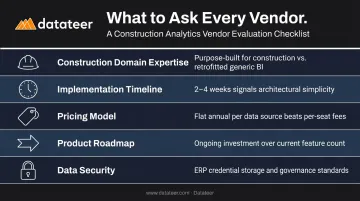
When comparing vendors, weight these factors:
- Construction domain expertise: generic BI tools retrofitted to construction rarely match purpose-built platforms
- Implementation timeline: 2-4 weeks vs. months signals architectural simplicity
- Pricing model: per-seat or per-dashboard fees add up fast at scale; flat annual pricing per data source with unlimited users is easier to budget
- Product roadmap: continuous investment matters more than current feature count
- Data security: verify how ERP credentials are stored and what data governance standards apply
Common Pitfalls to Avoid When Implementing Construction Financial Software
The Rip-and-Replace Trap
Firms that migrate to a new ERP hoping to solve their reporting problems often discover the new system has the same output limitations as the old one. That's because they solved a data entry problem when the actual pain was a data intelligence problem.
Before committing to an ERP migration, honestly assess whether your existing ERP captures transactions correctly. If it does, the problem is downstream — and the fix is faster and cheaper than a full platform replacement.
Data Quality and Cost Code Hygiene
The most common implementation failure is going live with messy data. The usual culprits:
- Inconsistent cost codes across projects
- Duplicate or stale job records
- Unmapped cost categories that break reporting logic
Any analytics layer is only as good as what flows into it.
Datateer's automated data cleaning engine handles much of this on ingestion — standardizing cost codes, catching malformed entries, and resolving mapping conflicts across systems. Even so, firms should audit job records, cost code structures, and open project data before or during implementation to ensure the analytics layer starts from a clean foundation.
Underestimating Adoption Risk
Clean data and a well-integrated system still fail if the tool never gets used. Construction financial software that requires heavy manual input or complex workflows from project managers rarely gets used consistently.
Prioritize systems where data flows automatically from existing tools rather than depending on behavior change from the field. When ERP data flows directly to dashboards without anyone touching it, adoption stops being a change management problem — it becomes a non-issue.
Frequently Asked Questions
What is the difference between construction accounting software and construction financial management software?
Construction accounting software handles transaction capture — AP, AR, payroll, and the general ledger. Construction financial management software is a broader category that includes analytics, WIP reporting, forecasting, and strategic financial intelligence. Accounting software records what happened. Financial management software helps leadership understand what it means — and what to do about it.
What is WIP reporting and why do construction companies need it?
WIP (Work in Progress) reporting compares costs incurred to revenue earned on active projects, identifying over-billing, under-billing, and margin fade. Lenders and bonding agents require it to assess a contractor's financial health — it's a compliance requirement, not an optional report.
How does construction financial management software integrate with existing ERPs?
Modern solutions connect via direct API or automated data extraction, pulling job cost data, transactions, and project records from systems like Procore, Sage, and Viewpoint Vista — no manual exports required. Data refreshes on a scheduled cadence (typically overnight), so dashboards stay current automatically.
How long does it typically take to implement construction financial management software?
It depends on what you're implementing. Full ERP replacements typically take 6-18 months. Analytics and reporting layers that sit on top of existing ERPs can be live in 2-4 weeks, with data flowing before annual fees begin.
What size construction company benefits most from this type of software?
Firms from $10M to over $1B benefit, but ROI is typically strongest in the $25M–$500M range — where financial complexity has outpaced what spreadsheets can handle but full ERP customization is hard to justify given the cost and disruption.
Can construction financial management software replace Excel entirely?
The goal isn't to eliminate Excel — it's to eliminate the manual labor of building reports in it. Purpose-built dashboards and automated data pipelines replace the spreadsheet grind while preserving the ability to drill into raw data when needed.