Introduction
Construction projects generate an enormous volume of data — job costs, labor hours, change orders, WIP schedules, subcontractor invoices, and cash flow figures across every active job. According to Autodesk and FMI research, available construction project data doubled over just three years. The problem isn't volume. It's that most firms still collect, move, and report this data manually.
A PlanGrid and FMI study found construction professionals spend 35% of their working time — roughly 14.1 hours per week — on non-optimal activities like searching for data, resolving conflicts, and rework. That's not a field productivity problem. It's a data infrastructure problem.
Fixing that infrastructure is straightforward in theory — and surprisingly uneven in practice. The right integrations, clean data structures, and proper setup matter far more than which software you pick. What follows is a practical guide to getting automation right the first time.
Key Takeaways
- Connect your ERP, field tools, and financial systems into a live pipeline — stop exporting to spreadsheets manually
- Configuration quality matters more than tool selection — data standardization is the make-or-break step
- The biggest ROI comes from automating WIP, job costing, labor productivity, and cash flow — not just field documentation
- Neglecting cost code mapping and chart of accounts alignment is the #1 cause of dashboard failures
- Firms from $10M to $1B+ in revenue can benefit, but approach must match ERP environment and reporting maturity
How to Automate Data Collection in Construction
Step 1: Audit Your Existing Data Sources and Collection Methods
Start by mapping every active data source across the business:
- ERP systems — job costing, payroll, AP/AR (Sage, Vista, Acumatica, Foundation, Jonas, CMiC, QuickBooks)
- Project management tools — Procore, field apps, daily logs
- Timesheets — whether mobile, paper-based, or ERP-native
- Spreadsheets — manual WIP schedules, cost-to-complete trackers, cash flow models
Document how data currently moves between each system. Then ask: how many hours per week does your finance or project team spend manually compiling, exporting, or reformatting data?
The reports that consistently take the longest to produce are worth targeting first:
- WIP schedules
- Cost-to-complete reports
- Labor variance analysis
Trace where each data point originates. That map shows exactly where automation returns the most time — and where errors are most likely entering your numbers. Use that map as your automation priority list going into Step 2.
Step 2: Standardize Your Data Structure Before Connecting Any Tools
This is the step most firms skip — and the most common reason implementations fail.
Connecting systems before standardizing data replicates errors at higher speed, not corrects them. If your cost codes are inconsistent across jobs, or your chart of accounts uses different naming conventions by division, automated reports will surface misleading comparisons every time.
Minimum standardization requirements before connecting any tool:
- Unified cost code structure across all active jobs
- Consistent job numbering format
- Aligned chart of accounts with clear definitions for budget, committed, and actual costs
- Agreed definitions for percentage complete, earned value, and over/under billing
CSI's MasterFormat and UniFormat frameworks provide a useful foundation for cost code standardization — they exist precisely to keep meaning consistent from estimate through closeout.
Platforms like Datateer handle much of this automatically. Their data extraction layer includes an automated engine that standardizes cost codes across systems, catches malformed entries, and maps each firm's unique data logic into a unified structure — including reconciling Procore commits to Sage invoices without manual VLOOKUP work. Cleaner source data accelerates that process, but the engine is designed to work with the messy reality most firms actually have.
Step 3: Integrate Your ERP and Field Tools Into a Unified Data Pipeline
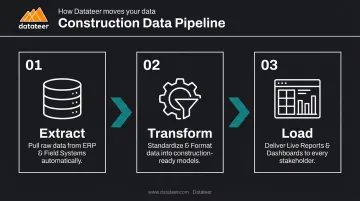
A data pipeline replaces the manual "export to Excel, reformat, paste into template" cycle. In practice, it means:
- Extract — data is pulled from your ERP on a set schedule or live trigger
- Transform — raw data is converted into consistent, report-ready formats
- Load — cleaned data flows into your reporting layer or dashboard automatically
The key distinction is integration depth. Flat-file imports (scheduled CSV exports) introduce lag and create maintenance burden — Procore's own documentation notes that files with errors must be corrected and resubmitted manually. Direct ERP connectors eliminate that cycle entirely.
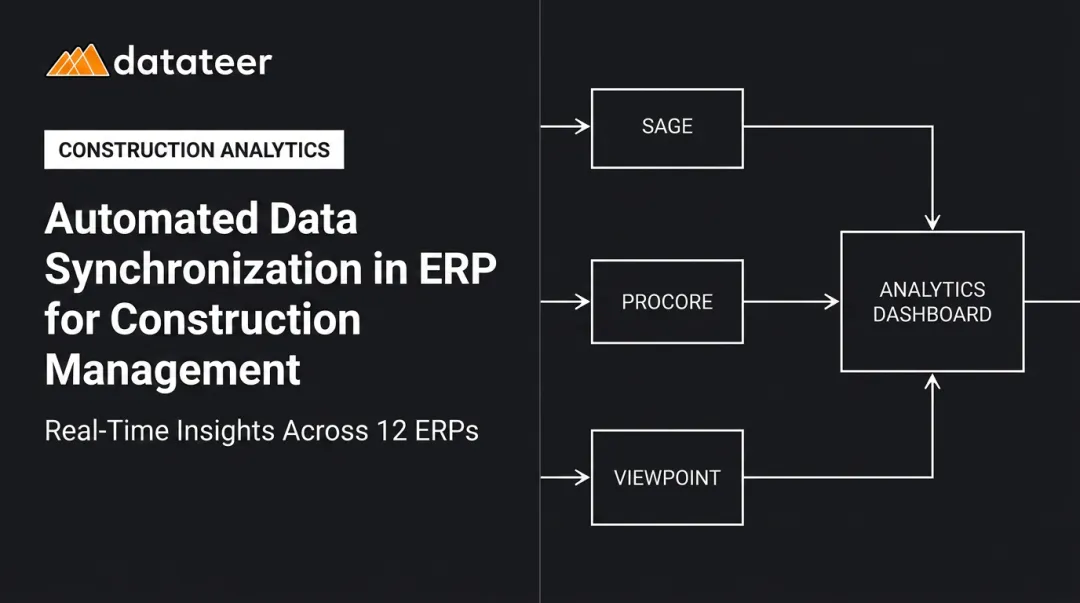
Datateer connects directly to 12+ construction ERPs including Procore, Sage 100/300/Intacct, Viewpoint Vista, Viewpoint Spectrum, Acumatica Construction, Foundation Software, CMiC, Jonas Construction, QuickBooks, and NetSuite. That direct sync removes the need for custom API development and gets data flowing in 2–4 weeks. CSV uploads are also supported for supplemental data sources not covered by a standard connector.
Step 4: Deploy Automated Dashboards and Configure Reporting Alerts
The gap between a static report and an automated dashboard is the gap between knowing what happened last week and knowing what's happening right now.
The practical difference: a WIP report compiled manually can take anywhere from 20 minutes to several hours per job, according to XBRL US research. Automated mapping can produce the same output in approximately five minutes — and with live ERP sync, that data reflects current actuals rather than last week's export.
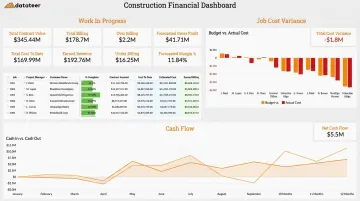
What automated dashboards deliver that static reports cannot:
- Live WIP calculations with margin fade flagged as it develops
- Job cost variance at the cost code level — not just the job summary
- Labor productivity trends updated without manual re-entry
- Cash flow positions that reflect current billing and collection status
CFMA recommends construction firms monitor KPIs like margin fade, job borrow, and days cash on hand daily or weekly. That monitoring frequency is only practical when dashboards refresh automatically.
Datateer's 12 pre-built dashboards — covering Executive Strategy, Financial Operations, Project Excellence, and Resource Productivity — are available on day one. The Double L Management team noted that "the very first time we accessed our data through a Datateer analytics dashboard, that one click replaced two weeks worth of prior work."
When Should You Automate Construction Data Collection?
Automation isn't the right investment for every situation. The business case depends on volume, reporting frequency, and how much time is currently lost to manual processes.
Automation delivers clear ROI when:
- Your firm manages multiple concurrent jobs with separate cost structures
- WIP reports are produced more than once per quarter
- Finance managers spend 8+ hours per week on spreadsheet formatting and data assembly
- Budget overruns go undetected until month-end close
- Multiple people maintain separate versions of the same report
Automation adds friction without clear benefit when:
- Only one active project is running at a time
- Cost structures are highly irregular and don't map cleanly to standard reporting
- ERP data itself is incomplete or unreliable, meaning data cleanup must come first
If the criteria above point toward automation but you still need a number to justify the investment, Datateer's Excel Tax Calculator quantifies your annual manual reporting cost based on hours per month, staff involved, and average salary.
Most firms spending 40 hours per month across two staff members typically reach $43,000 per year in manual reporting costs — well above the $10,000/year starting price for a direct-ERP platform. When your Excel Tax exceeds the platform cost, the math makes the case for you.
Key Variables That Affect Construction Data Automation Results
Two firms using the same tools can get dramatically different outcomes. What determines success is not the software — it's how well these variables are controlled.
ERP Integration Depth
A shallow integration (manual CSV export on a schedule) introduces lag and human error every cycle. A direct live sync eliminates both.
According to Deltek, when WIP reports aren't automated, decisions are often based on data that's a week or month behind actual costs. By the time stale data surfaces a problem, the project has already moved on — and the margin hit is already locked in.
JBKnowledge's Construction Technology Report found that 49% of firms resort to manual data transfer when applications don't integrate. That manual handoff is where errors enter, lag accumulates, and trust in the data erodes.
Data Standardization Quality
Automation amplifies whatever is already in the data. Inconsistent cost codes don't disappear when you automate — they show up as misleading cost comparisons across jobs and divisions.
The "garbage in, garbage out" problem is most visible in WIP and job costing dashboards, where cost code-level accuracy determines whether the margin analysis is actionable. A cost code mapping exercise typically covers three steps before the first data pull:
- Audit all active jobs for inconsistent code usage
- Identify discrepancies across divisions or project types
- Establish a master cost code structure as the single reference
Reporting Refresh Rate
Frequency matters for a specific reason: real-time data lets teams steer while there's still room to maneuver. Delayed data only supports post-mortem analysis.
CFMA's guidance on cash management KPIs explicitly calls for daily or weekly monitoring of margin fade and days cash on hand. That cadence only works if dashboards refresh automatically. Datateer's platform syncs data overnight by default, with more frequent updates configurable based on need — replacing what was previously a multi-week manual WIP cycle with current-state visibility.
User Access and Stakeholder Alignment
Consider who actually needs to act on the data. A dashboard only the CFO sees won't change field behavior or catch project-level problems early — access design is as important as the data itself.
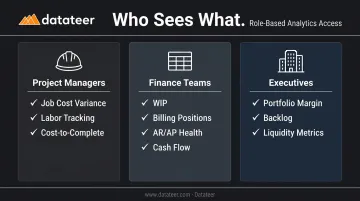
Effective access design means:
- Project managers see job cost variance, labor tracking, and cost-to-complete
- Finance teams see WIP, billing positions, AR/AP health, and cash flow
- Executives see portfolio-level margin, backlog, and liquidity metrics
The shared single source of truth also eliminates the "whose numbers are right?" argument that slows down weekly project reviews. When everyone works from the same data, conversations shift from debating figures to fixing problems.
Common Mistakes When Automating Construction Data Collection
Connecting systems before cleaning data. The most common mistake. Rushing to automate before standardizing cost codes, job numbers, and account structures produces a live dashboard of inaccurate data that erodes trust faster than a slow spreadsheet. Teams revert to Excel, and the automation investment sits unused.
Choosing tools based on field functionality rather than financial integration depth. Many construction platforms are optimized for daily logs, RFIs, and punch lists. That's legitimate functionality, but it's not the same as deep ERP integration for WIP accuracy and margin tracking. For firms whose priority is financial reporting, integration depth matters more than field feature count. Platforms like Datateer are built specifically for financial operations — WIP, job costing, ASC 606, retainage, and 13-week cash flow — rather than field documentation tools with a reporting module added on.
Underestimating change management. Automated data systems require buy-in across finance, project management, and field teams. PlanGrid and FMI found that among construction technology deployments that missed expectations, 36% cited poor fit with existing work processes and 22% cited lack of integration with other software as primary causes. Skipping training and rollout planning leads to parallel spreadsheet use that splits the data and defeats the single source of truth the system was built to create.
Most automation failures trace back to three root causes:
- Skipping data standardization before connecting systems
- Misaligned tool selection — choosing field tools when financial integration is the priority
- Poor adoption planning that leaves teams running parallel spreadsheets alongside the new system
Firms that resolve all three before go-live give their automation the best chance of sticking.
Frequently Asked Questions
How do you automate data collection in construction projects?
Automation connects your ERP, field apps, and financial systems through direct integrations or data pipelines that extract, standardize, and load data into dashboards automatically. This replaces manual exports, spreadsheet reformatting, and version conflicts with a single live data flow from source system to report.
What are the methods of data collection used in construction projects?
The main methods are direct ERP extraction (job costing, payroll, AP/AR), mobile field apps (daily logs, timesheets, inspection forms), IoT sensors and equipment telematics, and manual digital entry. The highest financial impact typically comes from automating ERP-sourced data: that's where WIP, margin, and cash flow reporting live.
What are the stages of automation for data collection in construction?
The four stages are: data source audit, standardization of cost structures, integration and pipeline setup, and live dashboard deployment with automated refresh. Skipping the standardization stage (rushing from audit directly to integration) is the most common reason implementations fail and dashboards lose credibility.
What are the best tools for automating financial data collection in construction?
The right tool depends on your ERP environment. Prioritize platforms with direct ERP connectors (not CSV imports), pre-built construction-specific dashboards, and real-time refresh, rather than generic BI tools that require heavy custom configuration. Datateer supports direct sync with 12+ construction ERPs and delivers 12 pre-built financial dashboards on day one.
How does automated data collection reduce errors in construction reporting?
Automation eliminates manual re-entry, broken Excel formulas, and version conflicts by pulling data directly from the source system. Every stakeholder works from the same verified number set, with no reformatting step where errors can enter.
What is the ROI of automating data collection in construction?
XBRL US found that manual WIP entry takes 20 minutes to several hours; automated mapping produces the same output in roughly five minutes. Beyond time savings, the real ROI is earlier detection: catching margin fade while there's still time to adjust a project, rather than discovering losses at year-end close.
Ready to see where your firm sits on the path from manual spreadsheets to live financial intelligence? Datateer's free 60-second Construction Data Maturity Audit gives you a personalized readiness report in five questions.