
Introduction
Retainage is straightforward in concept: withhold a percentage of each progress payment as a performance guarantee, release it when the work is done. In practice, it's one of the most operationally demanding aspects of construction finance.
For contractors, GCs, subcontractors, and construction finance managers, retainage represents real working capital sitting in someone else's account. According to Levelset's National Construction Payments Report, 57% of construction businesses say retainage is a challenge, and 66% wait more than 30 days to collect it after release conditions are met.
The AIA G702/G703 pay application process gives that withheld amount a formal, auditable structure. But the mechanics — how retainage is calculated line by line, entered correctly, and tracked across billing cycles — are commonly misapplied.
Those errors reset payment clocks, trigger full application rejections, and compound into cash flow gaps that stretch across multiple billing periods.
This guide walks through exactly how AIA retainage billing works, where the common errors occur, and what it takes to manage retainage accurately at scale.
Key Takeaways
- Retainage (typically 5%–10%) is withheld from each progress payment as a financial performance guarantee to the project owner.
- On AIA forms, retainage is calculated line by line in Column I of the G703 Continuation Sheet, then summarized on the G702 cover page.
- The contract — not industry convention — dictates the rate, applicable milestones, and release conditions.
- Common errors (wrong percentages, unapproved change orders, G702/G703 mismatches) cause full application rejections, not partial corrections.
- Tracking retainage across a project portfolio requires real-time visibility into what's held, what's collectible, and what's overdue — not just manual spreadsheet entries.
What Is AIA Retainage Billing?
AIA retainage billing is the contract-governed practice of withholding a set percentage of each certified progress payment on projects that use AIA G702/G703 standard forms, with the withheld amount tracked as a receivable until contractual release conditions are met.
The process serves two parties simultaneously. The project owner gets a financial lever to ensure complete, specification-compliant work. The contractor gets a standardized, documented record of amounts owed and outstanding at every billing period: amounts that are defensible during disputes and required by lenders on financed projects.
How It Differs from a Simple Payment Hold
Retainage on AIA forms isn't a vague payment delay. It's itemized at the line-item level on the G703 Continuation Sheet, making the withheld amount, the work it relates to, and its release conditions fully transparent and auditable. That granularity is a requirement on commercial, lender-financed, and public projects — not optional documentation.
Regulatory Context
That auditability matters because retainage rules vary significantly depending on who's funding the project. On private projects, retainage is governed entirely by contract terms. On federal construction contracts, FAR 52.232-5 permits the contracting officer to withhold up to 10% of a progress payment only when satisfactory progress has not been made — if progress is satisfactory, payment is made in full. It's a conditional cap, not a blanket withholding requirement.
State public works laws impose their own caps, and they vary considerably:
| State | Public Works Retainage Cap |
|---|---|
| California | Generally 5% of contract price |
| Texas | 10% (contracts under $5M); 5% (contracts $5M+) |
| New York | Generally 5%; up to 10% without performance bond |
| Florida | Not to exceed 5% of progress payments |
| Washington | Not to exceed 5% of moneys earned |
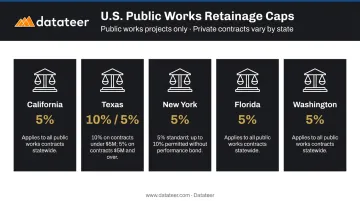
Confirm the applicable cap for your state and contract type before billing — applying the wrong rate creates reconciliation problems that compound across every subsequent pay application.
How AIA Retainage Billing Works on the G702 and G703
The G702 and G703 are two distinct but inseparable documents. The G703 is the working document where retainage is calculated per cost category. The G702 is the summary cover page that formalizes those totals into the payment request. Errors on the G703 will always surface as discrepancies on the G702, and any discrepancy sends the entire application back.
Before billing begins, you need a Schedule of Values (SOV) broken into defensible line items (foundation, framing, mechanical, electrical, etc.) that represents the full contract value. That SOV is the reference point for every retainage calculation across the project's life.
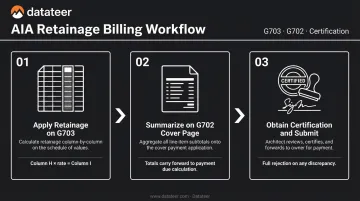
Step 1: Apply Retainage on the G703 Continuation Sheet
For each active SOV line item, update:
- Column E — Work completed this period
- Column F — Materials presently stored (as materials are incorporated, their value moves from Column F to Column E)
- Column H — Total completed and stored to date
Then apply the contract retainage percentage to the Column H total to arrive at the retainage figure for that line item (Column I).
Worked example: $20,000 of cumulative completed work at 10% retainage = $2,000 in Column I for that line.
A few contract-specific nuances to check before each billing cycle:
- Stored materials are typically subject to the same retainage rate as completed work unless the contract says otherwise
- Some contracts apply tiered retainage, where the rate drops once the project hits a defined completion threshold (for example, from 10% to 5% at 50% completion)
- Column I is specifically used where variable retainage applies at the line-item level; where a single constant rate applies to the whole contract, some applications handle this differently — verify the treatment in your contract language
Step 2: Summarize Retainage on the G702 Cover Page
The G702 cover page consolidates the G703 totals into the formal payment request. Retainage is carried from the G703 to the G702 and reflected in the calculation of the current payment due:
- Total completed and stored to date
- Minus retainage withheld
- Minus previous certificates for payment
Any mismatch between G703 line-item totals and the G702 summary triggers a full rejection. There is no partial correction — the entire application comes back.
Step 3: Obtain Certification and Submit
The completed G702/G703 package goes to the architect (or owner's representative) for review and signature. The architect certifies that the work claimed matches observed field progress before the owner releases payment.
A disputed line item or math discrepancy doesn't result in a partial payment on the undisputed lines. It resets the payment clock on the entire application, often by 30 days or more — which is why clean, verified G703 data matters before submission, not after.
When Retainage Is Applied and How It Gets Released
Retainage applies from the first pay application and accumulates through every subsequent billing cycle at the contract rate. It appears on every G702 submission until the contract terms trigger a release — not just on the final application.
The Two Standard Release Milestones
Two contractual milestones govern when retainage gets released. Each triggers a different release event, and confusing them is a common source of billing disputes.
Substantial completion, as defined in AIA A201-2017, is reached when the work is sufficiently complete for the owner to occupy or use it for its intended purpose. This milestone typically triggers a partial retainage release, and it's also when warranty periods and certain risk transfers take effect.
Final completion — when all punch list items are closed and required documentation is submitted — triggers full release of any remaining retainage balance. Required documentation typically includes:
- Lien waivers (conditional and unconditional, as specified)
- Affidavits of payment
- Consent of surety (if bonded)
- Any project-specific closeout deliverables
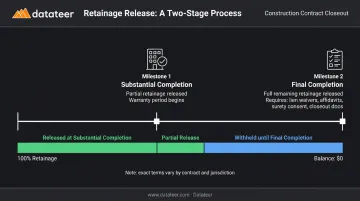
Exact terms vary by contract and jurisdiction. Read yours before assuming.
Change Orders and Retainage
Every approved change order adds a line to the SOV, and retainage applies to that line at the contract rate unless the change order terms specify otherwise. Updating the G703 with approved change orders before billing is one of the most commonly skipped steps — and one of the most common causes of application rejection.
Common AIA Retainage Billing Mistakes That Delay Payment
Slow payments already plague the industry — Rabbet's 2025 Construction Payments Report estimates that slow, inconsistent payments cost U.S. construction $299 billion annually. Billing errors accelerate that problem. Here are the specific mistakes that trigger rejection:
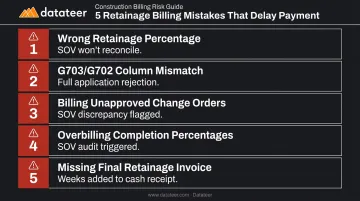
1. Applying the wrong retainage percentage Tiered retainage contracts change the rate at defined milestones. Once a threshold is crossed, continuing to apply the original rate means you're undercharging — and your SOV won't reconcile. Check the contract before every billing cycle.
2. G703 Column I totals that don't match the G702 summary This happens when line items are updated manually without recalculating the cover page summary. Architects catch it immediately, and the result is full rejection — not a line-by-line correction.
3. Billing for unapproved change order work Entering change order amounts on the G703 before the order is formally signed creates a SOV discrepancy. The approved change order must be added as a separate line item in the SOV before that scope is billed.
4. Overbilling work completion percentages Listing work as more complete than it is may survive internal review, but it often gets caught during architect certification or site inspection. Beyond the rejected application, it damages credibility with the certifying architect and can trigger a full SOV audit — stalling multiple subsequent billing cycles.
5. Failing to invoice retainage separately at project close When the project reaches final completion, the accumulated retainage balance must be billed as a distinct line item or application. Many contractors delay this step or bundle it incorrectly, adding weeks or months to the time between project close and final cash receipt.
Managing Retainage Visibility Across Multiple Projects
On a single project with a clean SOV, retainage can be tracked manually. Across a portfolio of five, ten, or more active projects at different completion stages, manual tracking breaks down. The accumulated withheld amounts, their release milestones, and their aging across projects become practically impossible to monitor without dedicated tracking infrastructure.
What Finance Teams Actually Need to See
Effective retainage management at the portfolio level requires more than a billing function. Finance teams need:
- Total A/R retainage held by owners, broken down by project and aging
- Total A/P retainage held on subcontractors — and when those obligations come due
- Which projects have reached substantial completion and whose retainage is now collectible
- How retainage release schedules affect 13-week cash flow projections
- Which retainage balances are overdue and silently constraining working capital
That's a different data problem than filling out the G703 correctly. It requires connecting billing data to financial reporting across the full project portfolio — updated frequently enough to catch release milestones before they're missed.
The Spreadsheet Problem
Most construction finance teams track retainage in Excel. The lag that creates — typically 10–20 days between when data changes in the ERP and when it shows up in a spreadsheet report — means retainage release decisions are being made on outdated information. A project that reached substantial completion three weeks ago may have collectible retainage that nobody has flagged yet.
How Datateer Approaches This
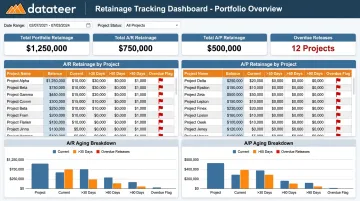
Datateer's Retainage Tracking syncs data overnight from 12+ construction ERPs — including Procore, Sage 100/300/Intacct, Viewpoint Vista, Acumatica Construction, Foundation Software, CMiC, and others — and surfaces both sides of the retainage ledger:
- A/R retainage (owner-held amounts your firm is owed)
- A/P retainage (amounts your firm holds on subcontractors)
Retainage aging, overdue release flags, and benchmarked retainage percentages per project, per owner, and per subcontractor are available across the full portfolio in a single view. Those release schedules feed directly into Datateer's 13-week cash flow forecasting, so anticipated collections show up in forward-looking liquidity projections rather than getting flagged after the fact.
For firms managing projects across multiple ERPs, Datateer aggregates data from each connected system into a unified portfolio view, including CSV uploads for data outside integrated ERPs.
Retainage analytics are bundled into the base Datateer subscription: flat annual pricing starting at $10,000/year per data source, unlimited users, no separate module fees.
Frequently Asked Questions
How do you bill for retainage on an AIA form?
Apply the contract retainage percentage to the total completed and stored amount in Column H for each SOV line item on the G703, and enter the result in Column I. The sum of all Column I values is then carried to the G702 cover page, where it reduces the total earned to arrive at the current payment due.
When should retainage be billed?
Retainage isn't billed as a separate invoice during the project; it accumulates as a withheld amount on each pay application. It becomes a collectible billing item only when the contract's release conditions are triggered, typically at substantial or final completion.
What does retainage mean on an AIA contract?
Retainage is the percentage of each certified progress payment (typically 5%–10%) that the owner withholds as a financial guarantee until the contractor completes the work to contract standards. The specific rate, applicable milestones, and release conditions are all defined in the contract, not the AIA forms themselves.
What is the difference between the G702 and G703 in retainage billing?
The G703 is the continuation sheet where retainage is calculated line by line for each SOV item (Column I). The G702 is the summary cover page that formalizes those totals into the certified payment request — the G703 provides the detail; the G702 is what the architect certifies and the owner pays against.
How is retainage released at the end of a construction project?
Retainage is typically released in two stages: a partial release at substantial completion and the remainder at final completion. Before the owner is obligated to release funds, the contractor must generally submit lien waivers, close out punch list items, and provide any contract-required closeout documentation.
Can retainage rates change during a construction project?
Yes. Some contracts include tiered retainage provisions where the withholding rate drops once the project crosses a defined completion threshold, commonly 50%. When that threshold is reached, contractors must update their G703 calculations to reflect the reduced rate. Read the contract before each billing cycle, not just at project start.