Key Takeaways
- Cost codes are alphanumeric identifiers that map every project expense to a specific scope item, trade, and cost type
- CSI MasterFormat is the dominant commercial standard; UniFormat fits early budgeting; phase-based codes suit residential work
- Every code structure should capture four cost types: Labor, Materials, Equipment, and Subcontractors
- Consistent code structures across projects are what make historical data useful for future estimates
- Procore, Sage, and Acumatica accept cost code imports; Datateer can standardize codes automatically across all connected systems
What Are Construction Cost Codes?
Construction cost codes are numerical or alphanumeric identifiers assigned to every project expense. Each code ties a dollar amount to a specific type of work, material, or activity — functioning as a financial filing system where every transaction is traceable to a defined scope item.
Without them, job cost reports are little more than lump-sum totals. With them, a project manager can see exactly which phase, trade, and cost type is burning through budget.
How a Single Code Contains Multiple Answers
A well-structured cost code answers three questions at once: what type of work, what cost category, and which project. Consider this example:
03 – 210 – LAB – P023
| Segment | Value | Meaning |
|---|---|---|
| Division | 03 | Concrete |
| Section | 210 | Cast-in-Place Concrete |
| Cost Type | LAB | Labor |
| Project ID | P023 | Project 23 |
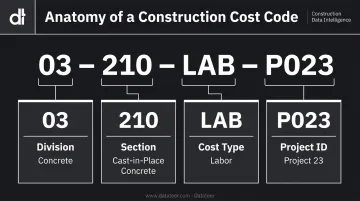
This four-segment structure is one common implementation pattern. Simpler firms may use two segments; larger commercial contractors may add a fifth for phase or region. Consistency matters more than structure.
Cost Codes and the Work Breakdown Structure
Cost codes are the building blocks of a Work Breakdown Structure (WBS). They map each expenditure to a specific project deliverable and enable hierarchical reporting — from high-level budget summaries all the way down to individual line items. A finance team can roll up by division to see total concrete costs. From there, they can drill into labor, materials, or subcontractors within that same division.
Why Cost Codes Matter for Contractors
That hierarchical visibility is exactly what prevents budget disasters. McKinsey's analysis of 532 global projects valued at $100M+ found that cost overruns averaged at least 79% versus initial budget estimates. That level of slippage rarely happens overnight — it compounds in small increments that go undetected when tracking is too coarse.
Granular cost codes change that dynamic. They provide:
- Real-time budget vs. actual — broken down by division, phase, and cost type so nothing hides in a lump sum
- Early warning on overruns — flags a phase trending over budget while there's still time to course-correct
- Sharper future bids — historical actuals by code give estimators a real baseline instead of gut instinct
- Margin protection — traces cost slippage to its source trade or phase, not discovered at closeout when it's too late
Standard Construction Cost Code Systems
Several standardized frameworks exist. The right choice depends on project type, contract requirements, and how much administrative overhead the field team can handle. Consistency across projects matters more than which specific system you select.
CSI MasterFormat
CSI MasterFormat is the most widely used standard in commercial construction. Developed by the Construction Specifications Institute, MasterFormat 2026 is the current edition, introducing 2,185 new and 617 reorganized listings. According to RSMeans, the system is organized into 50 divisions using a six-digit hierarchy — the first two digits identify the Division, the next two the Subdivision, and the final two the specific activity.
GSA P100 and the 2025 PBS Core Building Standards memorandum require project specifications to follow CSI MasterFormat Division/Section/Page format, making it mandatory for government and public work.
Major divisions relevant to most contractors:
| Division | Title |
|---|---|
| 00 | Procurement and Contracting Requirements |
| 01 | General Requirements |
| 02 | Existing Conditions |
| 03 | Concrete |
| 04 | Masonry |
| 05 | Metals |
| 06 | Wood, Plastics, and Composites |
| 07 | Thermal and Moisture Protection |
| 08 | Openings |
| 09 | Finishes |
| 22 | Plumbing |
| 23 | Heating, Ventilating, and Air Conditioning |
| 26 | Electrical |
| 31 | Earthwork |
| 32 | Exterior Improvements |
| 33 | Utilities |
UniFormat
UniFormat (standardized as ASTM E1557-09(2024)) organizes costs by building element or functional system rather than by trade or material specification. NIST recommends it for early project planning and economic evaluation, when elemental cost plans precede detailed design. It's the right framework for conceptual estimates and early-phase budgeting, before trade scopes are defined.
Its primary categories:
- A – Substructure
- B – Shell
- C – Interiors
- D – Services
- E – Equipment and Furnishings
- F – Special Construction and Demolition
- G – Building Sitework
AIA Schedule of Values
AIA contract documents — specifically A201, G702, and G703 — govern Schedule of Values (SOV) submissions and progress billing on stipulated sum and GMP contracts. The G703 Continuation Sheet breaks work into line items with scheduled values, tracking completed work and stored materials through each payment application.
The legacy "16 divisions" sometimes described as AIA cost codes belong to older MasterFormat structures, not a distinct AIA taxonomy. For current projects, AIA billing formats are best understood as an SOV and progress-payment workflow, not a standalone cost-coding framework.
Standard Construction Cost Code List (Free Download)
📥 Download the Free Construction Cost Code List Access the complete CSI MasterFormat-based cost code reference in PDF and Excel/Google Sheets format — ready to adapt for your ERP or project management platform.
Full MasterFormat Division Reference
| Division | Title |
|---|---|
| 00 | Procurement and Contracting Requirements |
| 01 | General Requirements |
| 02 | Existing Conditions |
| 03 | Concrete |
| 04 | Masonry |
| 05 | Metals |
| 06 | Wood, Plastics, and Composites |
| 07 | Thermal and Moisture Protection |
| 08 | Openings |
| 09 | Finishes |
| 10 | Specialties |
| 11 | Equipment |
| 12 | Furnishings |
| 13 | Special Construction |
| 14 | Conveying Equipment |
| 21 | Fire Suppression |
| 22 | Plumbing |
| 23 | Heating, Ventilating, and Air Conditioning |
| 25 | Integrated Automation |
| 26 | Electrical |
| 27 | Communications |
| 28 | Electronic Safety and Security |
| 31 | Earthwork |
| 32 | Exterior Improvements |
| 33 | Utilities |
The full downloadable list includes sub-sections and granular line items within each division.
Sample Residential Phase-Based Code List
Contractors using simplified systems aligned with draw schedules often prefer phase-based codes:
| Code | Phase Description |
|---|---|
| 1000 | General Requirements / Permits |
| 2000 | Site Work & Excavation |
| 3000 | Foundation & Concrete |
| 4000 | Framing |
| 5000 | Roofing & Exterior Envelope |
| 6000 | MEP Rough-In (Mechanical, Electrical, Plumbing) |
| 7000 | Insulation & Drywall |
| 8000 | Finishes & Fixtures |
| 9000 | Site Cleanup & Project Completion |
Importing Into Your ERP
The downloadable list can be imported into most construction platforms:
- Procore: bulk import via cost code templates, cost types, and custom segments
- Sage 100 Contractor: import via comma-delimited files
- Sage 300 CRE: master cost codes imported via AccountingLink
- Viewpoint Vista: estimate-data import with phase, cost type, and unit-of-measure mapping
- Acumatica Construction: cost code import via scenario workflows
Datateer accepts CSV uploads directly, so you can bring in custom cost code lists alongside automated ERP feeds. This is particularly useful when supplementing data from systems not yet integrated or incorporating manual adjustments.
Cost Code Categories by Cost Type
Regardless of division system, every cost code structure should also capture cost type — the dimension that explains how money was spent, not just where.
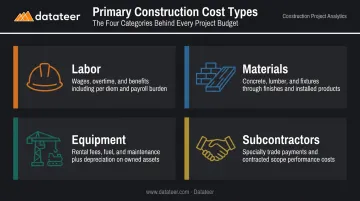
The four primary cost types are:
| Cost Type | What It Covers |
|---|---|
| Labor | Wages, overtime, benefits, per diem |
| Materials | Concrete, lumber, fixtures, finishes |
| Equipment | Rental fees, fuel, maintenance, depreciation |
| Subcontractors | Specialty trade payments tracked by scope |
Why Labor Deserves Its Own Sub-Structure
Labor is typically the largest single cost driver on a construction project. The Bureau of Labor Statistics reported construction average hourly earnings of $41.20 in early 2025, up from $39.47 a year prior — and ENR reported average first-year union-trade wage settlements of 4.6% in 2024. On labor-intensive projects, even modest annual increases erode margins fast if you can't pinpoint where hours are bleeding.
Breaking labor codes down by role and activity — not just by trade — is what enables identification of specific productivity issues. "Concrete labor is over budget" tells you there's a problem. "Concrete formwork labor on Level 3 is running 23% over" tells you where to act.
Multi-Dimensional Reporting
Maintaining separate cost type dimensions within each division code enables multi-dimensional reporting. A firm can see not just that "concrete" is over budget, but whether the overrun is in labor, materials, or subcontractor spend.
That distinction determines the corrective action:
- Labor overrun → investigate crew productivity, overtime patterns, or crew mix
- Materials overrun → review unit pricing, waste factors, or procurement timing
- Subcontractor overrun → audit scope creep, change order exposure, or contract terms
Without cost type separation, all three look identical in a rolled-up budget report — and the wrong fix gets applied.
This is why cost variance reporting works best when it surfaces actual costs at the job, phase, cost code, and resource type level simultaneously — not as separate reports that someone must manually reconcile after the fact.
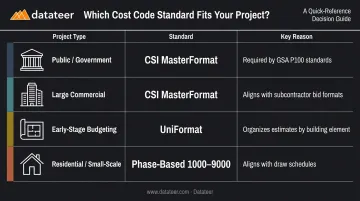
Choosing the Right Cost Code Standard
| Project Type | Recommended Standard | Why |
|---|---|---|
| Public / Government | CSI MasterFormat | Required by GSA P100 and PBS standards for specification format |
| Large Commercial | CSI MasterFormat | Aligns with subcontractor bids, compliance documentation, formal spec packages |
| Early-Stage Budgeting | UniFormat | Organizes by building element before trades are defined |
| Residential / Small-Scale | Phase-Based (1000–9000) | Aligns with draw schedules; simpler for field teams using QuickBooks |
How to Structure a Hybrid Cost Code System
Many mid-size commercial contractors use MasterFormat as the foundation but layer in company-specific sub-codes for owned equipment, specialty trades, or project-phase tracking. A hybrid structure uses standard two-digit MasterFormat division codes at the top level, then breaks into firm-specific sub-sections below.
A practical approach to building your code list:
- Start with 25–40 core codes covering your most common work types
- Expand only after the team applies existing codes consistently
- Too many codes drive miscoding in the field; too few leave data too aggregated to act on
Best Practices and Software Integration
Three Non-Negotiable Rules
Maintain identical code structures across all projects. Historical data is only useful for future estimating if the same work is coded the same way across jobs. One project using "03-100" for concrete formwork and another using "03-210" produces two datasets that can't be compared.
Keep cost codes separate from the chart of accounts. Cost codes serve job-level analysis. GL accounts serve financial statement reporting. Conflating them creates reporting confusion and makes both systems harder to maintain.
Audit for miscoding patterns regularly. The most common pattern: overuse of "miscellaneous" or catch-all codes that obscure where costs actually land. A quarterly review of code distribution by dollar volume reveals these problems before they corrupt historical data.
How ERPs Use Cost Codes
Construction ERPs use cost codes to automate the data flow from field time entry and purchase orders through to job cost reports. When a field supervisor logs hours against a cost code in Procore, or a purchase order is coded in Sage, that data flows automatically into budget-vs-actual tracking without manual re-entry. Consistent code application is what makes that automation reliable.
FMI research found that poor data management and misuse of critical information cost global construction approximately $1.84 trillion in 2020 — much of that traceable to inconsistent data practices at the field level, including miscoded transactions.
Where Datateer Fits
Datateer connects directly to 12+ construction ERPs — including Procore, Sage 100/300/Intacct, Viewpoint Vista, Acumatica Construction, Foundation Software, CMiC, and Jonas Construction — and handles cost code standardization as part of its automated data cleaning engine. Firms don't need perfect code consistency before analysis begins.
Specifically, Datateer's standardization layer:
- Remaps and normalizes cost codes across different ERP schemas
- Catches malformed entries before they reach reporting
- Reconciles cross-system data (for example, matching Procore project commits to Sage invoices) without manual VLOOKUP work
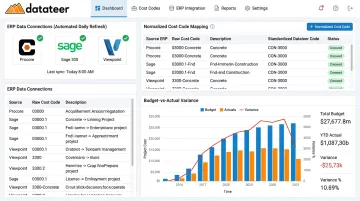
The output is automatically updated daily dashboards that replace what previously took finance teams two weeks to assemble manually. Datateer's Job Costing & Cost-to-Complete and Cost Variance modules break down budget-vs-actual by division, phase, and cost type — giving finance teams the visibility to catch margin fade before it's too late to course-correct.
Frequently Asked Questions
What are cost codes for construction?
Construction cost codes are numerical or alphanumeric identifiers that categorize project expenses by work type, material, or activity — ensuring every dollar is traceable to a specific scope item, trade, and cost type for job cost reporting and budget-vs-actual analysis.
What are the categories of construction costs?
The four primary cost categories are Labor (wages, overtime, benefits, and per diem), Materials (physical construction inputs), Equipment (owned and rented, including fuel and maintenance), and Subcontractors (specialty trade payments).
What is the difference between CSI MasterFormat and UniFormat?
MasterFormat organizes costs by trade or material specification — Division 03 is Concrete, Division 26 is Electrical — and is used during detailed design and construction phases. UniFormat organizes by building element or functional system (B: Shell, D: Services) and is used for early conceptual estimates before individual trades and specifications are defined.
What are the 5 levels of cost estimation?
AACE RP 18R-97 defines five estimate classes: Class 5 (Order of Magnitude, 0–2% project definition), Class 4 (Feasibility Study), Class 3 (Budget Authorization), Class 2 (Control/Bid Estimate), and Class 1 (Definitive Estimate, 65–100% project definition).
How many cost codes should a construction company use?
Most contractors start with 25–40 core codes covering their most common work types. Too many codes create field-level miscoding; too few produce data that's too aggregated for meaningful analysis. Expand the code structure only after the team demonstrates consistent application of the core set.