This scenario is familiar to construction finance managers across the industry — and the root cause is almost never the software itself. It's the selection process that preceded it.
According to a 2018 PlanGrid/FMI survey, 36% of construction firms cited poor fit with current processes as the primary reason technology investments missed expectations, followed by low adoption (25%) and integration issues (22%). These aren't software failures — they're evaluation failures.
What follows are the six most costly pitfalls construction firms make when choosing finance software, and the concrete steps to avoid each one before signing anything.
Key Takeaways
- Skipping a documented requirements baseline creates selection bias toward impressive demo features, not practical fit
- Reporting architecture is a core platform design decision — define it before demos begin, not after
- ERP integration quality varies enormously — surface-level API connections are not the same as true direct sync
- Total cost of ownership extends well beyond license fees — modules, per-user pricing, and implementation timelines can double the real cost
- Implementation for an analytics layer can be live in 2-4 weeks; full ERP replacements typically take 3-12 months
Pitfall 1: Skipping a Structured Financial Workflow Needs Assessment
The most common entry point into a bad software decision is scheduling vendor demos before documenting what the firm actually needs. Without a written requirements baseline, demos feel impressive for the wrong reasons: sales teams showcase their strongest features, not the ones your finance team will use every day.
The Workflows That Must Be Mapped First
Before evaluating any platform, construction finance managers need to document five specific workflow categories, because each creates distinct software requirements that generic accounting tools regularly miss:
- WIP schedule preparation — requires automated percent-complete calculations, over/under-billings tracking, and direct ERP sync
- Job cost tracking by cost code — needs drill-down capability to source transactions at phase and cost-code level
- Progress billing cycles — depends on earned-versus-billed reconciliation that must update without manual intervention
- Subcontractor compliance — requires change order lifecycle tracking and vendor performance data
- Month-end close steps — the sequence of reconciliations, approvals, and report generation that defines how long close actually takes
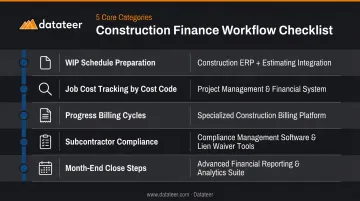
Each of these has different data model requirements. A platform that handles AP beautifully may produce WIP schedules that still require two days of Excel work. That gap surfaces after go-live — if requirements weren't documented first, there's no basis to challenge the vendor on it.
The "Future State" Gap
Firms typically document what software they have today, not what financial visibility they'll need 18-24 months from now as revenue scales. That forward-looking gap is just as dangerous as missing a current workflow. Only 28% of contractors collected feedback from field users before purchase, according to FMI's 2019 technology report — yet 36% of failed implementations are attributed directly to poor fit with existing processes.
How to Avoid This Pitfall
Build a pre-demo checklist before a single vendor call:
- Document pain points by function: identify reporting lag, manual re-entry, cost code inconsistencies, and close cycle length before touching a demo
- Classify features as must-have vs. nice-to-have: WIP automation is must-have; CRM integration is probably not
- Require written vendor responses to how their platform handles each workflow you've identified
- Include project managers and field operations in the requirements process: field costs that don't reach the office until week-end create data flow problems that office-only assessments miss
Datateer's free 15-Minute Workflow Audit is one example of a structured pre-evaluation tool: no slides, no pitch — just a review of current workflow against what the platform actually delivers with the firm's own data.
Pitfall 2: Treating Reporting and Dashboards as an Afterthought
Firms focus on data entry workflows during software selection — AP processing, payroll, job costing inputs — and assume reports will come along for free. They don't. Reporting architecture is a separate design decision: what data is captured, how it's structured, how quickly it refreshes, and whether a finance manager can generate it without IT support.
The Reports That Actually Matter
Construction CFOs and finance managers depend on a specific set of reports that reveal job health in near real time:
- Real-time WIP schedules with percent complete, earned revenue, and over/under-billings
- Job-level profitability by cost code with drill-down to source transactions
- Cash flow projections based on actual project burn rates and retainage schedules
- Overbilling and underbilling tracking that flags margin fade before it's locked in
- Labor productivity by project, measured in hours per unit against budget
If any of these require a manual export to Excel, or take more than a few days to compile after month-end, the platform's core promise is broken — regardless of how well it handles payroll or procurement.
Why Finance Teams Get This Wrong
The demo effect is real. Vendors show polished dashboards built from clean, pre-structured data — not the messy, multi-source data construction firms actually have. A dashboard that looks perfect in a demo environment may require a week of manual data preparation in production.
Ask vendors to demonstrate reports using a live client dataset — or your own data — not a curated demo environment. Push on these questions specifically:
- How fast does data refresh after an ERP sync?
- Can a finance manager generate the report without IT involvement?
- Does the WIP schedule drill down to individual cost codes and source transactions?
How to Avoid This Pitfall
Define your 10 most critical financial reports before any demo, then require vendors to produce each one live during the evaluation.
Datateer's WIP & Financial Truth dashboard is worth using as a benchmark: it automates percent-complete calculations, earned revenue, billed revenue, and over/under-billings directly from ERP data, with overnight refresh replacing what previously required weeks of spreadsheet work.
As one client put it, "that one click replaced two weeks' worth of prior work." That's the standard reporting performance should meet — not a nice-to-have outcome.
Pitfall 3: Misjudging ERP Integration Quality
Nearly every construction finance software vendor claims seamless integration with major ERPs — Procore, Sage, Vista, Acumatica. The quality of that integration varies enormously. Surface-level API connections may sync once a day, require manual triggers, or fail to map cost codes accurately when project structures change.
The 2025 AGC/Sage Construction Hiring and Business Outlook survey found 28% of construction firms cited integration between internal software as a top IT hurdle — and that number has remained consistent across multiple annual surveys.
Surface Integration vs. True Direct Sync
Understanding the difference matters operationally:
| Surface-Level Integration | True Direct Sync |
|---|---|
| Scheduled overnight exports | Automated, continuous data extraction |
| Manual field mapping required | Auto-maps cost code logic across systems |
| Breaks when cost codes change | Standardizes and reconciles mid-project changes |
| Reconciliation discrepancies require staff hours | Single source of truth across the finance stack |
| IT-dependent to troubleshoot | Finance team self-sufficient |
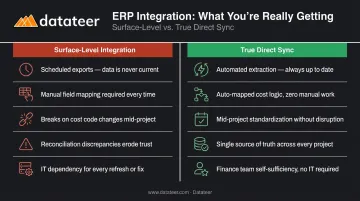
A misallocated cost code on a WIP schedule doesn't stay contained. It affects bonding capacity, job cost reporting, and percent-complete calculations at once. Errors propagate across every report that draws from that data.
What to Test Before Signing
Push every vendor on these questions before signing:
- How often does data sync, and who initiates it?
- Who manages the field-to-office mapping logic?
- What happens when a cost code is changed mid-project?
- Has the integration been tested against the firm's specific ERP version?
- Can the vendor provide references using the same ERP configuration?
Datateer integrates directly with 20+ construction ERPs — Procore, Sage 100/300/Intacct, Viewpoint Vista, Viewpoint Spectrum, Acumatica, Foundation Software, CMiC, Jonas, and others — using automated data extraction and cleaning that standardizes cost codes and maps data logic across systems.
For firms evaluating any vendor's integration claims, the free Integration Blueprint / ERP Compatibility Check delivers a personalized readiness report against your specific tech stack in 60 seconds.
Pitfall 4: Getting Dazzled by Demo Features That Don't Fit Real Workflows
Enterprise construction finance platforms are marketed on breadth — payroll, procurement, CRM, scheduling, compliance, and project management all bundled together. For mid-market firms in the $10M–$300M revenue range, buying a platform for features they'll use at 20% capacity means paying for complexity that slows adoption without delivering proportional value.
The Feature Creep Failure Pattern
When software is too broad, finance teams revert to Excel for the workflows they know best. The platform becomes an expensive data repository instead of an operational system. FMI's data puts this in concrete terms: approximately 96% of data captured in engineering and construction goes unused, and 25% of construction technology investments fail primarily due to low adoption rates.
Evaluate software against a "day-one usage" standard:
- Which features will the finance team actively use in the first 90 days?
- How many modules require significant process redesign before they're functional?
- Does the vendor's implementation plan assume the firm changes its workflows to fit the software, or the reverse?
Weight day-one features heavily. Deprioritize modules that require operational transformation alongside software selection — unless the firm is explicitly undertaking both at the same time.
Why Purpose-Built Beats Broad
That evaluation framework points toward a different kind of platform entirely. Datateer takes the opposite approach to module sprawl: all 12 dashboards across four suites (Executive Strategy, Cash Operations, Field Performance, Resource Productivity) are live from day one with no module selection required. "We don't sell modules. Construction finance doesn't work in silos, so our software doesn't either." At $10,000/year per data source with unlimited users, there's no feature gate that unlocks at a premium tier.
For mid-market firms, that distinction is practical, not just philosophical. A $50M contractor with a two-person finance team can't afford 18 months of configuration before the system earns its keep — so the right question to ask any vendor isn't "what can this platform do?" but "what will my team actually use on day 31?"
Pitfall 5: Overlooking Total Cost of Ownership, Scalability, and Vendor Support
The line-item license fee is rarely where construction firms get surprised. The surprises come from what's not in that line item.
Hidden Cost Layers to Evaluate
Common TCO components that don't appear in initial pricing proposals:
- Module-based pricing — critical features (WIP, multi-entity consolidation, advanced reporting) unlocked only at premium tiers
- Per-user licensing — costs that compound as the firm scales headcount or brings project managers onto the platform
- Implementation fees — often quoted separately, sometimes not quoted at all until the contract is in review
- Data migration costs — moving historical job cost data from a legacy system to a new platform is rarely free or fast
- Post-go-live support tiers — whether standard support covers construction-specific questions or routes to generalist help desk staff
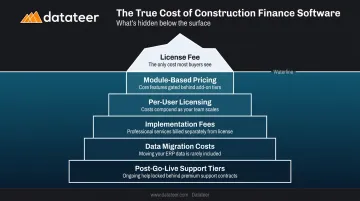
Platforms structured around flat annual pricing with all modules included eliminate several of these exposure points before they reach the contract stage.
The 2025 AGC/Sage survey found 15% of construction firms planned to change accounting software in 2025 — a data point that reflects not just product dissatisfaction, but underestimated total cost driving firms to restart the selection process.
The Scalability Question Firms Forget to Ask
Most firms ask "can this software handle more users?" The better question is whether it can handle more complex financial structures. Before committing, stress-test these capabilities with your vendor:
- Multi-entity consolidation across subsidiaries or acquired firms
- Multiple ERPs operating under one parent post-acquisition
- Intercompany transaction management
- Multi-currency billing for geographic expansion
Firms expecting M&A activity or rapid growth should surface these gaps during evaluation — not six months into a new organizational structure.
Vendor Support as a Long-Term Criterion
Discovering scalability limits after signing leads directly to the next question: what does the vendor do about it? Post-go-live responsiveness, product roadmap transparency, and whether the support team has construction-specific expertise — not just generalist help desk staff — all determine whether the platform keeps pace with your firm's growth and complexity.
Before signing, ask vendors for references from clients who went through a major ERP upgrade or data migration after implementation. That experience reveals more about vendor support quality than any SLA document.
Frequently Asked Questions
What is the biggest mistake construction firms make when choosing finance software?
Starting with vendor demos before documenting internal workflow requirements. This creates selection bias toward impressive features rather than practical fit. A written needs assessment — covering WIP preparation, job costing, billing cycles, and close steps — corrects this before the first demo is scheduled.
How do I properly evaluate ERP integration quality during software selection?
Ask vendors to demonstrate live data mapping using your specific ERP version and cost code structure, not a generic demo environment. A scheduled overnight export and a true direct sync are not the same thing. One maintains data integrity automatically; the other breaks when cost codes change or ERP versions update.
Should reporting capabilities be evaluated before or after shortlisting construction finance software?
Before. Reporting architecture — what data is captured, how it's structured, and how quickly it refreshes — is a core platform design decision. Defining your 10 most critical reports before any demos ensures you're evaluating the platform's actual reporting capability, not its sales team's presentation skills.
What is the difference between a hosted solution and a true cloud construction finance platform?
Hosted solutions run legacy software on remote servers with limited real-time access and manual update cycles. True cloud platforms offer automated data refresh, multi-user access with no per-seat limits, and continuous updates. Those differences determine how quickly WIP schedules and cash flow reports are available after data changes.
How long should construction finance software implementation realistically take?
Analytics and reporting layers with pre-built ERP integrations can be live in 2-4 weeks. Full ERP replacements typically require 3-12 months depending on data migration scope. Ask vendors for implementation timelines from comparable clients — firms of similar size, using the same ERP — before accepting any estimate.
What questions should I ask vendors before purchasing construction finance software?
Ask these five before signing anything:
- How often does data sync, and who manages the mapping logic?
- How long does WIP schedule generation take after month-end?
- What is the pricing structure for additional users and modules?
- Can you provide references from firms using our specific ERP?
- What are your post-go-live support SLAs, and how is construction expertise represented on your support team?