Introduction
Construction finance teams live in two worlds simultaneously. Procore manages the project — budgets, commitments, timelines. A separate procurement platform manages purchasing — POs, vendor negotiations, materials ordering. Those two worlds rarely communicate automatically. Someone is manually reconciling committed costs, chasing PO data, and working from financial snapshots that are days — sometimes weeks — out of date.
Procore is a powerful project management hub, but its financial value depends entirely on the quality and timeliness of the data feeding it. When procurement data arrives late or incorrectly, the cost picture in Procore is incomplete. Every budget decision, subcontractor conversation, or owner update made from that incomplete picture carries risk that doesn't show up until it's expensive to fix.
This article covers the operational benefits of integrating Procore with procurement platforms: what the integration actually does, how it changes day-to-day financial management, and what it costs firms that choose to leave the gap open.
Key Takeaways
- Procore-procurement integration creates an automated data flow from purchase order to project budget — no manual re-entry.
- Committed costs appear in Procore in real time, replacing delayed, manually assembled budget snapshots.
- Errors from duplicate data entry, mismatched cost codes, and stale PO data drop significantly.
- Finance and project teams work from the same numbers, closing the gap between field decisions and office reporting.
- Disconnected Procore and procurement systems lead to late-discovered overruns and unreliable financial reporting.
What Is Procore-Procurement Integration?
Procore-procurement integration is the automated sync between Procore — which manages project budgets, commitments, and workflows — and a dedicated procurement platform that handles purchase orders, vendor management, RFx, materials sourcing, and subcontract tendering. When configured correctly, data created in procurement automatically populates the corresponding fields in Procore without manual intervention.
Where the Integration Typically Applies
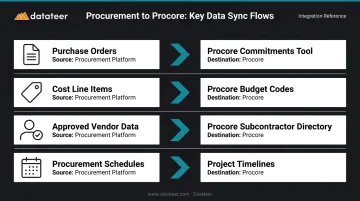
The sync most commonly operates across these data flows:
- Purchase orders syncing into Procore's Commitments tool as committed costs
- Cost line items mapping to Procore budget codes at the line-item level
- Approved vendor data flowing into the Procore subcontractor directory
- Procurement schedules connecting to project timelines
The practical goal is financial accuracy: Procore's committed spend figures should reflect what was actually approved in the field, not what someone managed to re-enter two days later.
Procore's App Marketplace includes a dedicated Procurement & Materials Management category with tools built specifically for this purpose. Platforms like Kojo, ProcurePro, StructShare, Requis, Remarcable, and LeadTime each offer varying degrees of PO sync, invoice reconciliation, and budget integration — the right fit depends on whether the primary need is materials purchasing, subcontract management, or supply chain visibility.
Key Benefits of Integrating Procore With Procurement Platforms
The advantages below aren't theoretical. They map directly to metrics construction finance managers and CFOs track: budget accuracy, error rates, time spent on manual tasks, and the speed of financial decisions.
Real-Time Committed Cost Visibility
When a procurement platform syncs approved POs directly into Procore's Commitments tool, finance teams see the true financial position of a project — including spend that hasn't yet been invoiced — without waiting for manual uploads or data entry runs.
In practice, this means a PO approved in the procurement platform is automatically recreated in Procore at the line-item level, showing up as a committed cost against the correct budget line. The project manager in the field and the CFO reviewing the dashboard are looking at the same number, updated automatically.
Why does timing matter so much? Budget overruns in construction typically surface late because committed costs aren't visible until invoices arrive — by then, corrective action is expensive or impossible. According to a Procore/IDC survey of 505 construction owners and developers, 75% of owners exceeded planned budgets, with an average total cost increase of 15% per project. Late visibility into committed costs is a structural contributor to this pattern.
KPIs this affects:
- Budget variance rate
- Committed cost accuracy
- Forecast reliability
- Days to close monthly financials
This advantage is most pronounced for firms running multiple simultaneous projects, where manual cost tracking creates compounding lag — and for projects where subcontract and materials spend represents the majority of project cost.
Elimination of Duplicate Data Entry and Costly Manual Errors
Without integration, someone has to manually transfer PO numbers, vendor names, cost codes, quantities, and pricing from the procurement system into Procore. Every transfer is an opportunity for error: transposed figures, wrong cost codes, version conflicts, and duplicate entries that take hours to trace.
Integration removes this entirely. Once a PO is finalized in the procurement platform, it flows into Procore with line-item detail intact and cost codes mapped correctly. The data is entered once at source and trusted downstream.
KPMG's 2016 Global Construction Survey found that 41% of respondents used multiple software platforms requiring manual monitoring, which KPMG directly linked to data errors and lack of transparency. Manual re-entry doesn't just waste time — it creates financial data integrity problems that undermine WIP reports, budget-to-actual comparisons, and audit trails.
A single miskeyed cost code causes a line item to appear over-budget in one area and under-budget in another, masking real risk. When cost code mapping is automated and consistent, financial reports from Procore are reliable enough to act on — not just another data set requiring a manual audit before the executive review.
KPIs this affects:
- Data entry hours per week
- Error rate in cost coding
- Time spent on financial reconciliation
- WIP report preparation time
Highest impact for firms managing high PO volumes across multiple projects, and for finance teams currently spending significant weekly hours reconciling procurement records against Procore budget data.
Faster, More Reliable Financial Decision-Making
When procurement data flows automatically into Procore and the broader financial stack, finance teams stop gathering data and start analyzing it. Instead of assembling a budget-to-actual report by pulling exports from the procurement system, Procore, and the ERP — then manually reconciling them — teams work from a single connected data flow where committed costs, actual costs, and forecasts are always current.
CFMA notes that contractors need to monitor KPIs such as margin fade and underbillings daily or weekly — and that underbillings tend to turn into margin fade and potential job losses. That monitoring cadence is only achievable when the underlying data is current.
Construction firms that can see their true cost position while a project is still in progress — uncommitted budget, pending POs, variance by cost code — have real opportunities to protect margins. Firms relying on end-of-month reconciliations often discover problems too late to act.
Datateer extends this advantage by connecting Procore's synced procurement and committed cost data directly into automated financial dashboards — giving construction CFOs and finance managers real-time WIP reporting, budget variance, job costing, and margin protection visibility without waiting for a manual report cycle or a two-week close.
Datateer's platform reconciles Procore project commits to Sage invoices automatically, eliminating the VLOOKUP work and reconciliation marathons that currently define too many month-end processes.
KPIs this affects:
- Time to produce WIP reports
- Days to close
- Margin variance identified early vs. late
- Finance team hours on data gathering vs. analysis
Most valuable for CFOs at firms where the monthly close requires significant manual data assembly, and where margin fade on projects is typically discovered too late to correct.
What Happens When Procore and Procurement Stay Disconnected
The status quo for most construction firms looks like this: finance manually exports PO data from the procurement system and re-enters or uploads it into Procore. Budget numbers are always a few days behind, cost codes are inconsistent, and committed costs stay invisible until invoices arrive.
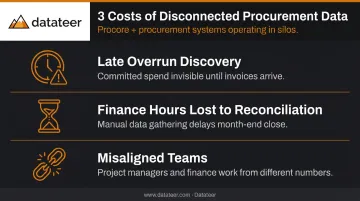
That disconnection creates downstream problems across every project:
- Overruns surface late. Committed spend isn't visible in real time, leaving little runway for corrective action before the damage is locked in.
- Finance teams spend hours on reconciliation. Time that should go to financial analysis goes to data gathering, contributing to slow month-end closes and persistent human error risk.
- Project managers and finance teams work from different numbers. This creates friction, erodes trust in financial reports, and slows approvals and decisions across the organization.
These issues are manageable when project volume is low. As a firm grows — more projects, more POs, more vendors — the disconnected data compounds into material financial risk. What was an inconvenience at five projects becomes structurally damaging at twenty.
KPMG's 2021 Global Construction Survey found that only 16% of executives said their organizations had fully integrated systems and tools, while 60% said they needed increased integration and visibility between enterprise, portfolio, and project functions. Most firms are still operating with the manual workarounds that integration is designed to eliminate.
How to Get the Most Value from the Integration
The integration delivers maximum value when configured correctly from the start. Four principles determine whether you get clean, actionable data — or a well-structured mess.
Map cost codes before go-live. Cost codes in the procurement platform must align accurately to Procore budget codes. This unglamorous step determines whether data flowing into Procore is trustworthy or unreliable numbers. Datateer's data cleaning engine reconciles Procore commits to ERP invoice data automatically, cutting ongoing maintenance significantly.
Only push finalized, approved POs. Configure sync rules so draft or unapproved orders never populate Procore's commitments view. Budget numbers cluttered with pending POs are just as misleading as missing data.
Treat it as a live system, not a periodic transfer. Review committed costs in Procore regularly — not just at month-end. Structure procurement approvals so POs are finalized promptly, keeping the budget current at all times.
Connect the data to a reporting layer. The integration's value compounds when clean, timely Procore data feeds financial dashboards, WIP reporting, and executive visibility. That's where Datateer comes in: pre-built dashboards for job costing, cost variance, margin protection, and WIP turn reconciled data into decisions — not just records.
Conclusion
Integrating Procore with procurement platforms is about one thing: data integrity and timing: getting accurate committed cost data into Procore automatically, so finance teams and project teams work from the same reliable numbers without manual effort.
The three core advantages — real-time cost visibility, elimination of manual errors, and faster financial decision-making — don't operate in isolation. Accurate committed costs produce better forecasts, which surface overruns while there's still time to act. Meanwhile, less time spent on reconciliation means finance teams can actually interpret the numbers rather than chase them. The compounding effect is real and measurable.
Firms that treat connected procurement and project management as standard operating practice — not a future initiative — consistently outperform those still reconciling costs manually at month-end. For construction finance teams already using Procore, platforms like Datateer can take that connected data further, automatically surfacing committed cost visibility, budget variance, and cash flow exposure across every active job. The integration infrastructure is already in place. The question is what you're doing with it.
Frequently Asked Questions
Does Procore support integration with procurement platforms?
Yes. Procore's App Marketplace includes a dedicated Procurement & Materials Management category with tools that sync PO data, committed costs, and vendor information directly into Procore's budget and commitments modules. Kojo, ProcurePro, StructShare, Requis, and Remarcable are among the listed options.
What are the main benefits of integrating Procore with a procurement platform?
The core benefits are real-time committed cost visibility, elimination of duplicate data entry and manual errors, and faster financial decision-making. Together, these improve budget accuracy and give construction finance teams reliable data for managing project profitability.
What procurement platforms integrate with Procore?
The main options are Kojo, ProcurePro, StructShare, Requis, Remarcable, and LeadTime. Choosing between them comes down to your primary need: materials purchasing, subcontract management, or broader supply chain visibility.
How does the integration improve budget accuracy in Procore?
By automatically syncing approved POs from the procurement platform to Procore's commitments tool, the integration ensures committed costs appear in real time — so the budget reflects true financial exposure rather than only invoiced costs, which typically arrive weeks later.
What data syncs between Procore and procurement platforms?
Most integrations sync purchase order details, cost code mapping to Procore budget lines, and committed cost figures. Some also sync subcontract commitments, reconciled invoices, and vendor directory data — exact scope varies by platform.
How long does it take to set up a Procore procurement integration?
Setup time varies by platform and cost code complexity. The more important investment is mapping cost codes correctly before go-live — that configuration step determines the accuracy of every data point that flows downstream.