Introduction
By the time a cost overrun surfaces in a monthly report, the project has already moved on. The window for course correction has closed — and the damage is done. Most construction failures trace back not to bad execution, but to problems that stayed hidden too long.
A construction progress report is a structured, recurring document that tracks work completed, schedule status, budget performance, and open risks against an approved baseline. Built on accurate, timely data, it's one of the most reliable tools a project team has. Built on stale data, it creates a false sense of control that's often worse than no report at all.
This guide is written for construction project managers, finance managers, and CFOs who either produce progress reports or rely on them to make decisions. We'll cover what a well-structured report actually contains, how to build one step by step, and the mistakes that make reports unreliable when it matters most.
Key Takeaways
- Progress reports should cover scope, schedule, cost, and risk — not just task completion percentages
- Tailor the format to the audience: field teams need task-level detail; owners and lenders need cost performance and WIP status
- Match reporting frequency to project phase: daily for site ops, weekly for coordination, monthly for financial review
- The #1 reporting failure is data lag: reports built on stale ERP exports show where the project was, not where it stands today
- Direct ERP sync can collapse a 10–20 day reporting cycle into live project data — without manual exports or spreadsheet cleanup
What Is a Construction Progress Report?
A construction progress report is a formal, recurring document that communicates the current state of a project against its approved baseline — covering scope, schedule, cost, and risk. It gives decision-makers a time-stamped record of where a project stands and what actions are needed.
How It Differs From a Status Report
These terms get used interchangeably, but they're not the same thing:
| Status Report | Progress Report | |
|---|---|---|
| Format | Informal snapshot | Structured, documented |
| Tied to reporting period | No | Yes |
| Used for contract compliance | Rarely | Often required |
| Supports draw requests | No | Yes |
| Audience | Internal team | Owners, lenders, executives |
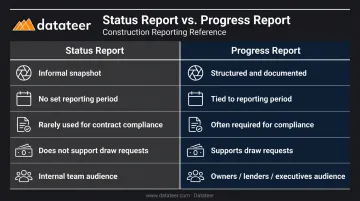
The core difference: a status report is a point-in-time snapshot. A progress report measures performance against a baseline — and answers what the gap means for the budget, schedule, and contract obligations.
That distinction matters most when reports are tied to draw request approvals, lender reporting requirements, or end-of-project dispute resolution — all situations where an informal snapshot won't hold up.
Why Construction Progress Reports Matter in Construction Finance
The financial stakes are clear. According to KPMG's 2023 Global Construction Survey, only 50% of project owners report their projects completing on time. KPMG's 2021 survey found that 37% of respondents missed budget or schedule targets by 20% or more.
Those gaps don't appear overnight — they accumulate in the absence of structured documentation. Finance teams need more than task completion percentages to catch them early.
What Finance Teams Actually Need
Financial stakeholders need data that reveals the health of the job, not just its status. That means:
- Earned value against spend — is budget being consumed at the right rate for work completed?
- WIP billing position — where does each job stand on over- or under-billing?
- Cash impact of billing gaps — overbilling improves short-term cash flow but creates a future liability; underbilling means the job is burning cash
- Cost-to-complete vs. original forecast — does the remaining budget actually cover the remaining work?
The Accountability Function
Progress reports also create a documented record that supports:
- Draw request approvals and lender disbursements
- Change order justification
- Federal contract compliance — FAR 52.232-5 requires monthly progress payment requests backed by itemized work documentation
- End-of-project dispute resolution
When a disputed change order reaches arbitration, the side with documented progress history wins. The side without it improvises.
What Every Construction Progress Report Should Include
The right structure depends on the audience, but every formal progress report should contain these core sections:
- Project overview: name, location, contract value, and current phase
- Work completed in the period, tied to the schedule of values
- Work in progress and upcoming tasks for the next period
- Schedule variance summary comparing actual vs. planned milestones
Core Financial Components
Finance-focused sections are the most frequently underdeveloped. A complete financial section covers:
- Budget vs. actual cost by cost code — not just at the project level
- Committed costs — executed subcontracts and purchase orders that haven't been invoiced yet
- Projected cost at completion vs. original contract value
- Current billing position — are invoices ahead of or behind actual work completed?
- Change orders — pending, approved, and denied
Platforms like Datateer pull all five elements directly from construction ERPs — Procore, Sage, Viewpoint Vista, Acumatica, and others — into a single data source, eliminating manual reconciliation.
Core Operational Components
Financial data tells part of the story. These operational sections round it out:
- Risk register updates — new risks identified, status of open risks, mitigation actions taken
- Safety and compliance — incidents, near-misses, OSHA observations
- Resource utilization — labor hours, crew productivity, subcontractor performance
- Site conditions — weather delays, access issues, material delivery impacts
- Photo documentation — date-stamped visuals mapped to specific scope items
The AIA G711 Architect's Field Report standardizes many of these operational fields, making it a useful reference for teams building their own report templates.
How to Create a Construction Progress Report: Step by Step
A reliable progress report is a repeatable process. The quality of the output depends on the quality of the inputs, the clarity of the format, and the discipline of the review cycle.
Step 1: Define the Audience and Purpose
Before writing anything, identify who receives the report and what decisions they need to make from it. A weekly field report for subcontractors looks nothing like a monthly financial progress report for a lender.
Ask:
- Who reads this report?
- What decisions do they make from it?
- What level of detail do they actually need?
A bank doesn't need daily crew counts. A site supervisor doesn't need ASC 606 revenue recognition schedules. Tailor the metrics, format, and depth accordingly.
Step 2: Collect Data From Reliable Sources
The key data sources for a complete progress report:
- Daily site logs: labor hours, equipment, weather, visitors
- Approved project schedule: Gantt or CPM with current baseline and actual dates
- Job cost reports from the ERP: actual costs by cost code, committed costs, variances
- Subcontractor pay applications: percent complete and billing position per trade
- Risk register: current status of open risks, new risks identified
The critical warning: outdated data from stale spreadsheets is the single biggest source of reporting errors. Per KPMG's 2017 Global Construction Survey, only 8% of construction organizations had push-button real-time PMIS dashboard reporting — the rest relied on manual reconciliation or spreadsheets.
Step 3: Organize the Report Using a Consistent Structure
Lay out the report in the same sequence every period:
- Project overview (name, contract value, phase, reporting period)
- Work completed this period
- Financial performance (budget vs. actual, committed costs, billing position)
- Schedule status (milestones, variances, critical path items)
- Risks and issues (open items, escalations, mitigations)
- Next period outlook
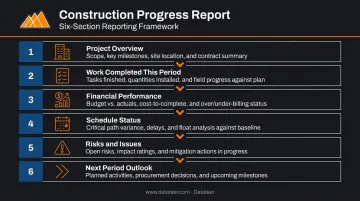
Stakeholders who review reports regularly should find the same data in the same place every time — and catch changes at a glance.
Step 4: Use Visuals to Make Data Actionable
Charts and photos communicate status faster than paragraphs. Include:
- Budget vs. actual bar charts by cost code
- Schedule burn-down curves showing planned vs. actual progress
- Percent complete by cost code — tied to earned value, not just physical observation
- Date-stamped site photos mapped to specific scope items
A photo showing "foundation pour complete — 14 March" is more credible than a line that says "foundation is 80% done."
Step 5: Review, Then Distribute to the Right Stakeholders
Before the report goes external:
- A second reviewer catches data errors and flags inconsistencies
- Distribution should be role-based: owners get the executive summary, PMs get the full detail, finance teams get the cost section with supporting backup
Large projects need layered reporting. Sending a 15-page report to everyone creates confusion, not alignment.
Common Mistakes That Weaken Construction Progress Reports
Data Lag and the Stale Spreadsheet Problem
The most damaging reporting mistake is presenting data that's days or weeks old as if it reflects current reality. When job cost data lives in an ERP that only gets exported at month-end, the report shows where the project was — not where it is.
For finance managers, this lag is particularly costly. Margin fade that started three weeks ago shows up in the report after the billing period has closed and corrective action is much harder.
Teams still using manual processes typically experience a 10–20 day reporting lag for WIP data. By the time the report is published, the underlying reality has already shifted. Double L Management, a Datateer customer, replaced "two weeks' worth of prior work" with a single dashboard click after implementing automated ERP-connected reporting.
Datateer's platform syncs directly with construction ERPs overnight and refreshes WIP dashboards in minutes, collapsing that 10–20 day cycle into near-real-time visibility.
Reporting Percent Complete Without Financial Backing
Physical progress and cost performance are not the same thing. A job that's 80% complete but has consumed 95% of its budget is in serious trouble — a report that only shows the 80% number is misleading.
Tie physical progress to earned value metrics:
- Cost Performance Index (CPI) = Earned Value / Actual Cost
- Schedule Performance Index (SPI) = Earned Value / Planned Value
A CPI below 1.0 means you're spending more than planned for the work completed. That's the number that matters.
Burying Issues or Omitting Risks
Progress reports are often written to look good rather than be useful. Teams downplay delays, omit emerging risks, or present optimistic forecasts that aren't grounded in data.
Stakeholders surprised by problems they weren't warned about lose trust far more severely than those who received early, honest notifications. Transparent reporting of variances and risks is a professional standard, not a liability.
One-Size-Fits-All Formatting
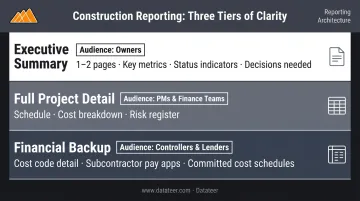
A 15-page report works for a PM who needs granular detail. It creates confusion for an owner who wants a two-paragraph summary and a cash flow forecast. Structure reporting in layers:
- Executive summary (1–2 pages): key metrics, status indicators, and decisions needed
- Full project detail: complete schedule, cost breakdown, and risk register for PMs and finance teams
- Financial backup: cost code detail, subcontractor pay apps, and committed cost schedules for controllers and lenders
Frequently Asked Questions
What are the basic types of construction progress reports?
The main types are daily reports (site activity, labor, weather conditions), weekly reports (task completion, coordination issues), monthly reports (financial overview, milestone status, risks), and WIP/draw reports used to support payment applications and lender disbursements. Each serves a different audience and decision-making purpose.
Is a construction progress reporting survey mandatory?
It depends on the contract type and funding source. Federally funded projects and construction loans typically require reporting under FAR 52.236-15 and 2 CFR 200.329. The U.S. Census Bureau's Construction Progress Reporting Survey (CPRS) is a separate government data-collection program — mandatory only for selected businesses under Title 13, not a standard contractor obligation.
How often should construction progress reports be submitted?
Daily during active construction for site operations, weekly for coordination among PMs and subcontractors, and monthly for financial and executive reporting. Additional reports are typically triggered by major milestones, approved change orders, or newly identified risks that require immediate stakeholder notification.
What financial data should be included in a construction progress report?
Include budget vs. actual cost by cost code, committed costs (executed subcontracts and POs), projected cost at completion, current billing position (overbilled or underbilled), and change order status (pending, approved, denied). Together, these give finance teams and lenders a clear view of where the project stands financially.
What is the difference between a construction progress report and a status report?
A status report is a brief, informal snapshot of where a project stands at a given moment. A progress report is a formal document tied to a specific reporting period — covering completed work, financial performance, schedule variance, and risks. Progress reports are often required for contract compliance or draw request approval.
What is a PMC (Project Management Consultant) in construction?
A PMC is a third-party firm or individual hired by a project owner to oversee planning, coordination, and delivery of a construction project. As defined by CMAA, a construction manager in an agency role serves as the owner's representative, with responsibilities that include monitoring contractor progress and establishing reporting and control systems on the owner's behalf.