That two-week lag isn't just an inconvenience. According to UFG Surety, a well-prepared WIP schedule is indispensable for a construction company's financial health — affecting bonding capacity, cash flow management, and margin protection. When your WIP is built from month-old data, those functions break down quietly.
In 2026, construction finance teams are replacing the manual process with ERP-connected platforms that surface real-time overbilling, underbilling, margin fade, and cash flow risk. Choosing the right vendor is now a strategic call — not just a software upgrade.
Key Takeaways
- WIP automation syncs directly to your construction ERP and replaces manual spreadsheet builds with continuously refreshed financial data
- The best tools cut the 10–20 day reporting lag, eliminate human error, and let finance teams catch margin fade before a project closes
- Evaluate tools on: ERP integration depth, reporting granularity, setup speed, pricing model, and construction specificity
- Top WIP automation companies for 2026: Datateer, Briq, Deltek ComputerEase, Foundation Software, and Procore
What Is WIP Automation in Construction?
WIP Reporting Defined
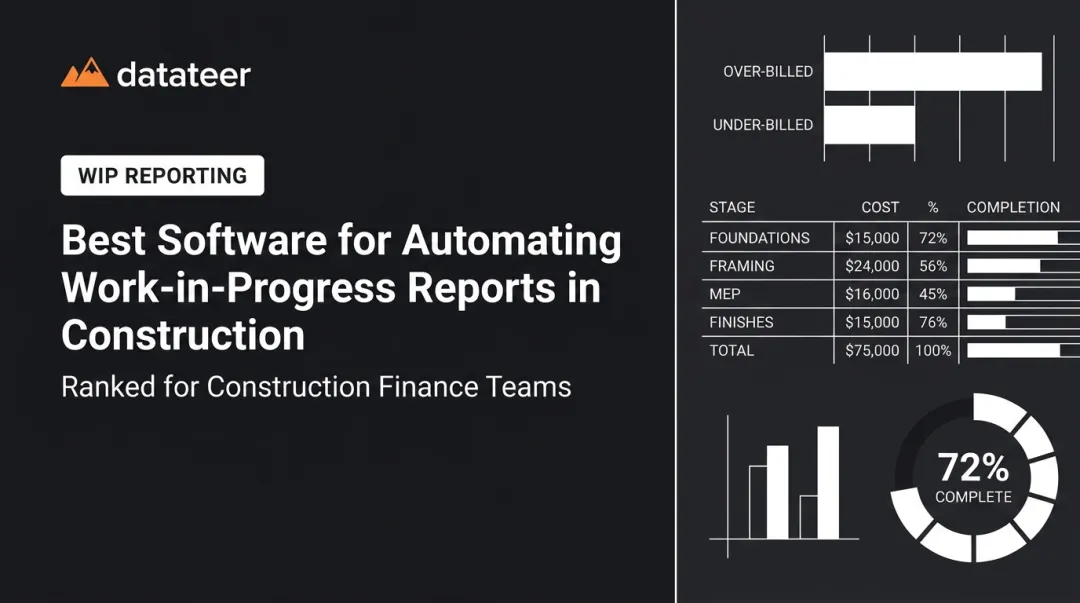
A Work in Progress (WIP) report is the financial backbone of any active construction firm. It tracks contract amounts, costs incurred to date, earned revenue, percent complete, and over/underbilling status across every active job. Per AICPA-CIMA, WIP schedules enable proper revenue recognition and give CPAs the data needed to calculate how much revenue was legitimately earned through any given date.
The stakes are real:
- Large underbillings signal a contractor isn't getting paid for work already completed
- Overbillings create future liability that will compress future-period revenue
- Both conditions affect bonding capacity — which directly limits how much work you can take on
What "WIP Automation" Actually Means
Manual WIP involves exporting cost data from your ERP, pulling billing figures from another system, dropping everything into a spreadsheet, reconciling mismatches, and formatting the final report — a process that routinely consumes two to three days per reporting cycle.
WIP automation replaces that entire cycle with software that:
- Connects directly to your construction ERP via native integration
- Pulls costs, billings, change orders, and percent-complete data automatically
- Normalizes cost codes across jobs so every report speaks the same language
- Generates live WIP dashboards without requiring anyone to touch the data manually
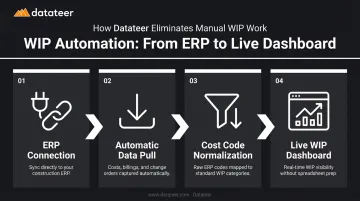
The providers below differ significantly in how they deliver this capability — in integration depth, pricing model, implementation time, and construction specificity. Those differences matter when you're choosing a long-term reporting infrastructure.
Best WIP Automation Companies for Construction in 2026
These platforms were evaluated on ERP integration breadth, reporting depth, setup speed, pricing transparency, and demonstrated value for construction finance teams managing multiple active jobs simultaneously.
Datateer
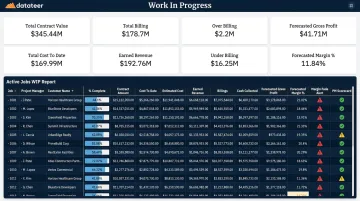
Datateer is a construction financial analytics platform built specifically for firms ranging from $10M to over $1B in annual revenue. It functions as a Financial Operating System — connecting directly to 20+ major construction ERPs and delivering 12 pre-built dashboards on day one, with no manual setup required.
Why it stands out: Datateer replaces the 10–20 day manual WIP lag with automated overnight data sync (configurable to run more frequently), eliminating the CSV export and VLOOKUP marathon that finance teams typically endure at month-end.
The platform calculates percent complete, earned revenue, over/underbillings, cost-to-complete, and margin fade alerts at the job, phase, and cost-code level. Individual Project Manager Scorecards give CFOs the data to have direct, evidence-based conversations instead of gut-feel ones.
Clients include Morris-Shea Bridge Company, Acme Constructors, Double L Management, and The State Group.
Pricing starts at $10,000/year per data source — flat annual fee, unlimited users, no per-seat games, no per-dashboard fees. Setup takes 2–4 weeks, and the annual fee begins only when data is flowing.
| Feature | Details |
|---|---|
| Key WIP Features | Real-time WIP dashboards, over/underbilling tracking, margin fade alerts, cost-to-complete by cost code, PM scorecards, 12 pre-built construction reports |
| ERP Compatibility | Procore, Sage 100/300/Intacct, Viewpoint Vista, Viewpoint Spectrum, Acumatica Construction, Foundation Software, CMiC, Jonas Construction, QuickBooks, NetSuite, and custom integrations |
| Pricing Model | Flat annual fee starting at $10,000/year per data source; unlimited users; setup fee paid upfront; annual fee starts when data flows |
Briq
Briq is a construction financial automation platform that uses AI-powered digital workers to automate core accounting functions — including WIP reporting, data entry, and financial forecasting. It targets mid-size to large GCs and specialty contractors looking to reduce manual finance workflows across the project lifecycle.
Where it wins: Briq's strength is AI-driven workflow automation that connects project management and accounting data. As costs are posted and change orders are approved, Briq automatically populates WIP fields — cutting manual entry time substantially. The platform's WIP Forecasting module improves project visibility through forward-looking projections rather than just trailing data.
Briq is SOC 2 Type II certified (also SOC 1 Type 2 and SOC 3). Case study clients include Metro Walls, where Briq reportedly saved the CFO one week every month, and Bayley Construction, which previously relied on a complex Excel workbook prone to manual errors.
| Feature | Details |
|---|---|
| Key WIP Features | Automated WIP population, change order sync, WIP forecasting, AI-assisted financial analysis, Finance/Risk/Operations AI modules |
| ERP Compatibility | Sage 300 CRE, Viewpoint Vista, Procore, Deltek ComputerEase, Acumatica (confirm current full list with vendor before purchase) |
| Pricing Model | Token-based consumption model; pricing not publicly disclosed — contact Briq directly for current rates |
Deltek ComputerEase
Deltek ComputerEase is a purpose-built construction accounting ERP with decades of industry history. It provides integrated WIP reporting alongside job costing, payroll, accounts payable/receivable, and project management — positioned as an all-in-one back-office solution for contractors consolidating their financial operations.
The core differentiator: ComputerEase's WIP module lives inside the same system as the general ledger and job costing tools. That means WIP data reflects committed costs, billed amounts, and percent-complete figures without a separate export step.
For firms that want a single-platform approach rather than an analytics overlay, that eliminates the integration gap entirely.
It holds a 4.2/5 rating on G2 based on 241 reviews and a matching 4.2 on Capterra from 133 reviews.
| Feature | Details |
|---|---|
| Key WIP Features | Integrated WIP scheduling, job costing, over/underbilling calculations, customizable WIP reports, committed cost tracking |
| ERP Compatibility | Native platform; integrates with Procore (synchronized fields include Jobs, Phases/Categories, Cost Type, and Budgets), Kojo, and via API Import Services |
| Pricing Model | Not publicly disclosed — contact Deltek directly for current pricing tiers |
Foundation Software (FOUNDATION®)
Foundation Software's FOUNDATION® platform is a construction-specific accounting and project management system with a dedicated WIP automation module. It serves general contractors, subcontractors, and specialty trades that want automated WIP generation without building custom reports from scratch.
What sets it apart: FOUNDATION® offers drill-path analytics that let finance teams trace profit fade down to the cost-code level. The platform's DataGenie report designer supports custom WIP configurations, filtering, and real-time drill-down — giving firms flexibility without requiring a developer.
Cloud-based deployment means project stakeholders can access WIP data on mobile without waiting for accounting to distribute a spreadsheet.

Foundation's pricing is fully modular — you pay for the components you need. No standard public pricing tiers exist; contact the vendor for a custom quote.
| Feature | Details |
|---|---|
| Key WIP Features | Automated WIP report generation, visual overbilling/underbilling flags, drill-path analytics, customizable KPI layouts, mobile access, DataGenie custom reporting |
| ERP Compatibility | Native platform; integrates with Procore, WorkMax time tracking, and other construction tools |
| Pricing Model | Module-based custom pricing — no standard public tiers; contact Foundation Software directly |
Procore
Procore is the dominant cloud-based construction project management platform, and its financial management module connects field activity directly to financial reporting. With 17,850 customers as of December 2025 and over $1 trillion in annual construction volume flowing through the platform, Procore's scale gives it a data model that few competitors can match.
The key tradeoff: Because field teams, subcontractors, and finance all operate inside the same system, committed costs, change orders, and progress updates flow into financial views automatically. There's no sync step because there's no gap to bridge.
That said, Procore is best suited for firms that want project management and finance under one roof — not for teams looking for a standalone WIP analytics layer on top of an existing ERP.
Pricing is annual contract with unlimited users; specific dollar tiers require a quote from Procore's sales team.
| Feature | Details |
|---|---|
| Key WIP Features | Real-time job cost tracking, change order integration, budget forecasting, over/underbilling visibility, customizable financial dashboards |
| ERP Compatibility | Integrates with Sage, QuickBooks, Viewpoint, Acumatica, and others; also functions as a standalone ERP for some firms |
| Pricing Model | Annual contract, unlimited users; pricing not publicly disclosed — request an estimate at procore.com/pricing |
How We Chose the Best WIP Automation Companies
The Evaluation Framework
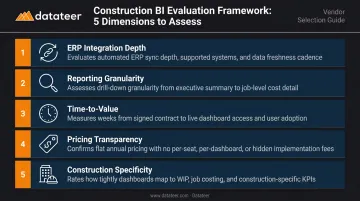
Each company on this list was assessed across five dimensions:
- ERP integration depth — does the tool sync natively, or does it require manual CSV exports?
- Reporting granularity — can users drill to cost codes, jobs, and individual project manager performance?
- Time-to-value — how quickly can a firm go from sign-up to live WIP dashboards?
- Pricing transparency — flat fee vs. per-user vs. module-based vs. consumption-based pricing
- Construction specificity — is the platform built for construction, or adapted from a generic tool?
The Most Common Buying Mistake
Construction firms frequently choose WIP tools based on brand recognition or the cheapest Excel replacement rather than asking one critical question: does this tool connect directly to our existing ERP?
A WIP platform that requires manual data exports still leaves a lag in reporting and a human error risk at every export. Per CFMA's research on field tracking and accounting integration, ERP integration reduces time and error from manual data entry across multiple systems. A polished interface means nothing if the data behind it is a day old and manually assembled.
What the Best Platforms Do Differently
The best WIP automation companies eliminate the need for finance teams to touch the data at all between the ERP and the dashboard. Look for:
- Automated cost code mapping that eliminates manual reconciliation after every import
- Pre-built construction reports, not generic templates you configure from scratch
- Real-time or near-real-time sync — not a nightly file drop requiring manual triggers
- Consolidated multi-job views across all active jobs, not just individual project reports
Conclusion
WIP automation is no longer optional for construction firms managing margins under cost pressure. The CFMA's 2025 Financial Benchmarker shows Best-in-Class firms achieving 12% net income before taxes vs. 6.7% for the industry average — a gap that's difficult to close when your financial data is two weeks old.
The companies on this list take different approaches. Procore and Deltek ComputerEase are full-platform ERPs where WIP is one module among many. Foundation Software and Briq are construction-specific platforms that automate WIP within a broader accounting system. Datateer operates as a dedicated analytics layer: it connects to your existing ERP and delivers WIP dashboards without requiring you to replace anything.
Which approach fits your firm comes down to two questions:
- Whether you want to replace your back-office system or build on top of it
- Whether you need WIP analytics today or can absorb a 6–18 month ERP implementation first
For construction finance teams that need real-time WIP dashboards now, without replacing their current system or adding headcount, Datateer connects directly to your existing ERP and delivers the full 12-report suite from day one. Reach out at hello@datateer.com to see how it fits your stack.
Frequently Asked Questions
What is WIP in construction management?
WIP (Work in Progress) is a financial report tracking costs incurred, revenue earned, billing status, and percent complete across all active construction jobs. It's the primary tool for identifying overbilling, underbilling, and potential margin fade on a per-project basis — and it's required for bonding and accurate financial statements.
What is the best ERP for construction?
The best ERP depends on firm size, trade type, and reporting needs. Foundation Software, Sage 300 CRE, Viewpoint Vista, Acumatica, and Deltek ComputerEase are the most widely used in the US. Many firms add a dedicated analytics layer like Datateer on top of their existing ERP for real-time WIP reporting without a full system replacement.
How does WIP automation reduce errors in construction finance?
Direct ERP sync pushes cost postings, change orders, and billing updates into WIP dashboards automatically. This removes the formula errors, missed cost codes, and stale data that make spreadsheet-based WIP builds unreliable.
What should I look for when choosing a WIP automation tool?
Prioritize native ERP integration, construction-specific reporting templates, fast setup time, a clear pricing model (flat vs. per-user), and support for multi-job consolidated views.
How often should construction companies run WIP reports?
Best practice is monthly at minimum, with many firms moving toward weekly or continuous reporting through automation. The more frequently WIP is updated, the sooner finance teams can identify cost overruns, billing discrepancies, or margin erosion — while there's still time to act.
Can WIP automation software integrate with my existing construction ERP?
Most modern platforms integrate with major construction ERPs including Sage, Viewpoint Vista/Spectrum, Procore, and Acumatica, but integration depth varies (native sync vs. file import). Confirm your specific ERP version is supported before committing — Datateer, for instance, treats Viewpoint Vista and Viewpoint Spectrum as separate, distinct integrations.