Introduction
Construction finance teams juggle data across ERPs, project management platforms, field apps, payroll systems, and spreadsheets — and almost none of these systems talk to each other by default. The result is a daily grind of manual re-entry: the same job codes, labor hours, and invoice details typed into two, three, or four separate systems.
The cost goes well beyond lost hours. Duplicate entry fragments job cost data, introduces coding errors, delays WIP reporting, and obscures margin visibility until it's too late to act. According to a 2021 study by Autodesk and FMI, bad data cost the global construction industry $1.85 trillion in 2020, with $88.69 billion of that traced directly to rework driven by bad data decisions.
This guide breaks down how software integrations actually eliminate duplicate entry: where data breaks down across construction systems, how well-designed integrations fix it, and what that means for finance teams trying to close faster and report with confidence.
Key Takeaways
- Duplicate entry persists when software tools are added over time without connecting data pathways between them
- The five highest-impact areas: project setup, procurement, field operations, change order management, and accounts payable
- Real integrations validate and map data automatically, not just shuttle raw records between systems
- Properly integrated data produces real-time job cost, accurate WIP, and reliable committed cost figures
- Finance teams shift from correcting stale numbers to acting on current data
What Duplicate Data Entry in Construction Actually Is
Duplicate data entry in construction means manually re-entering the same information — job codes, labor hours, subcontractor costs, change orders, invoice details — into two or more systems that don't exchange data with each other.
It persists for a clear reason: most construction firms built their software stack incrementally. They added an estimating tool, then a project management platform, then a field app, each solving a specific problem without a plan for how those systems would share data. According to JBKnowledge's 2020 ConTech Report, 49% of construction companies manually transferred data when applications didn't integrate, and only 5% said all their applications integrated.
Those gaps between systems get filled with spreadsheets and manual re-entry. It holds together until a missed entry, a stale figure, or a reconciliation error makes the cost visible.
The problem isn't running multiple software tools. A firm can operate five platforms without duplicate entry if integrations are properly designed. The issue is the absence of a governed data pathway between systems, not the number of systems itself.
How Software Integrations Work to Eliminate Duplicate Entry
A software integration is a configured data pathway between two or more systems. Information entered or approved in one platform automatically appears — validated and correctly mapped — in another, without anyone retyping it.
Initiation: What Triggers the Integration
Integrations fire on defined events, not human action. In construction, typical triggers include:
- A new job set up in the ERP
- A timesheet approved in a field app
- A purchase order committed in a procurement tool
- A change order reaching final approval in a project management platform
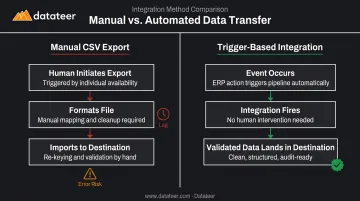
This is what separates a true integration from a CSV export. An export still requires a human to initiate, format, and import the file — introducing lag and the risk of skipped or misformatted transfers. A trigger-based integration fires the moment the event occurs, with no manual step required.
Core Operation: How Data Moves
When a trigger fires, the integration layer reads data from the source system, applies transformation logic, and writes validated data to the destination. That transformation step is where most of the real work happens:
- Field labor codes get mapped to ERP cost codes
- Vendor IDs get standardized across platforms
- Project phases get assigned correctly
- Formatting inconsistencies get resolved before data lands anywhere
How well this mapping logic is built determines whether an integration actually works. Many tools claim to "integrate" but push raw data that still requires human review before it's usable. Datateer's direct ERP sync — covering platforms including Procore, Sage, Viewpoint Vista, and Acumatica — includes automated data extraction, cost code standardization, and mapping logic that eliminates the manual formatting step entirely.
Data Integrity: The Validation Layer
Before data is written to the destination, integrations should check it against master data: active cost codes, valid project IDs, approved vendor records. When validation fails, a well-designed integration creates an exception task for the responsible party — it doesn't silently post bad data or abandon the record.
This matters in construction specifically because cost codes drift when data is entered manually across platforms. An integration with proper validation logic stops that drift from compounding across every project, every month.
Output: What the Finance Team Gets
The end result is concrete:
- Approved field records post directly to the ERP
- Committed costs from procurement appear in job cost without re-entry
- Change orders update both project controls and financial records simultaneously
Finance teams get accurate job cost, real-time WIP status, and reliable committed cost figures — without waiting for someone to update a spreadsheet.
Where Duplicate Entry Hits Hardest in Construction
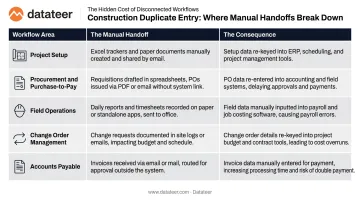
Duplicate entry isn't evenly distributed. Five workflow areas create the most operational damage:
| Workflow Area | The Manual Handoff | The Consequence |
|---|---|---|
| Project Setup | Job codes, budgets, and vendor records entered separately in ERP and PM tools | Mobilization delays; budget baseline errors |
| Procurement & Purchase-to-Pay | Requisitions, POs, receipts, and invoices moved by hand | Commitment errors; approval backlogs |
| Field Operations | Labor hours and quantities captured on-site, re-entered at the office | Inaccurate job cost; delayed labor reporting |
| Change Order Management | Approved scope changes tracked in PM software but not synced to ERP | Distorted earned revenue; WIP schedule errors |
| Accounts Payable | Invoice details re-keyed for matching, coding, and approval routing | Duplicate payments; slow close cycles |
The cost difference is measurable. Ardent Partners' 2024 AP data shows the average organization spends $9.87 per invoice and 10.1 days to process it, with a 20.7% exception rate. Best-in-class performers hit $2.81, 3.4 days, and 11.1% — a gap that maps to how much manual handling is involved.
Each error compounds across systems. A change order not recorded in the ERP skews the WIP report. A misallocated invoice distorts job cost. A missing timesheet creates a payroll correction that reopens a closed period. CFMA notes that unapproved change orders are scrutinized by banks and sureties: if removed from contract price, working capital drops and surety capacity shrinks. Integrations at these key handoff points break the cascade before it starts.
What Changes When Integrations Are in Place
The Finance Team's Daily Reality
When integrations work correctly, finance teams stop spending their days pulling data from multiple systems, reconciling differences, and correcting coding errors. They work from a live, accurate data set instead.
This is the practical meaning of a "single source of truth" — not a marketing phrase, but a specific operational state where every team sees the same job cost, committed cost, and WIP figures because those numbers flow from one governed data pathway.
Double L Management described it directly after implementing Datateer: "The very first time we accessed our data through a Datateer analytics dashboard, that one click replaced two weeks worth of prior work." That shift from a two-week manual close cycle to a live WIP refresh is what integration-sourced reporting actually delivers in practice.
Reporting That Reflects Reality
Live data changes what finance teams can actually do with it. Instead of explaining what went wrong last month, construction CFOs can catch margin fade while there's still time to act — adjusting crew deployment, flagging subcontractor overruns, or accelerating billing before a project closes in the red.
Datateer's automated overnight ERP sync delivers this visibility consistently, without manual compilation steps standing between the data and the decision.
Compliance and Audit Benefits
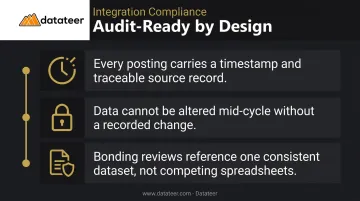
The same governed data pathways that speed up reporting also simplify compliance. Integrations create an inherent audit trail with practical advantages:
- Every posting carries a timestamp and a traceable source record
- Data cannot be quietly altered mid-cycle without a record of the change
- Bonding reviews and audits reference a single, consistent dataset rather than reconciling competing spreadsheet versions
Organizational Resilience
Manual workarounds concentrate risk in individuals. When the person who knows how to run the Procore-to-Sage reconciliation leaves, the process breaks with them.
Automated integration architecture removes that dependency. New staff access the same governed dashboards from day one, and the data pathway keeps functioning regardless of who's in the seat.
Conclusion
Duplicate data entry in construction isn't an unavoidable feature of running multiple systems. It's a symptom of missing or poorly designed data pathways between those systems. Integrations built with proper trigger logic, validation, and mapping eliminate the manual translation layer that causes cost code drift, reporting lag, and margin distortion.
When that translation layer is gone, financial decision quality rises directly with data quality. A finance team working from real-time, integration-sourced data can protect margins, catch overruns early, and advise leadership with confidence. That's only possible with integrations built specifically for construction's data model — where job cost structure, cost codes, and WIP accounting create requirements that generic connectors routinely fail to meet. Platforms like Datateer address this by connecting directly to construction ERPs, standardizing cost codes automatically, and delivering pre-built financial dashboards that reflect how construction firms actually account for work in progress.
Frequently Asked Questions
What causes duplicate data entry in construction companies?
Duplicate entry arises when firms add software tools over time — ERP, project management, field apps, payroll — without building automated data pathways between them. Staff fill the gaps manually, re-entering the same information in each system. The JBKnowledge/CFMA 2020 report found 49% of construction firms handled this through manual transfer.
What is the difference between a software integration and a manual data export?
A manual export still requires a human to initiate, format, and import a file — introducing lag and error risk at every step. A true integration fires automatically when a defined event occurs and moves validated, correctly mapped data to the destination system without any human action required.
How do software integrations improve financial reporting accuracy in construction?
Integrations eliminate the reconciliation step between systems. When data flows directly from the ERP to reporting tools via a direct ERP sync, job cost figures, WIP balances, and committed costs stay consistent and current. The figures reflect actual system data, not whoever last updated a spreadsheet.
Can software integrations work across different construction ERP platforms?
Yes. Integration platforms built for construction connect with multiple ERPs — Sage, Viewpoint Vista, Procore, Acumatica, and others. The quality depends on whether the connector includes cost code mapping and validation logic specific to each ERP's data structure, not just raw data transfer.
How long does it take to set up software integrations for a construction firm?
Timelines vary, but platforms with pre-built construction ERP connectors can have data flowing in 2–4 weeks. Datateer follows this timeline, and annual fees begin only after data is confirmed flowing — so there's no billing lag before the platform delivers value.
Do software integrations require IT staff to manage ongoing data flows?
Mature integration platforms handle ongoing sync, validation, and error flagging automatically. Data extraction and cleaning run without IT involvement, and staff access centralized dashboards directly — without manual exports, spreadsheet maintenance, or anyone acting as a data courier.