According to Intuit's 2025 construction technology report, 75% of construction decision-makers spend excessive time managing data from disconnected technology stacks, and the average firm runs 10 separate applications. The reporting burden is real, and it compounds with every active job.
Before diving in: consolidating QuickBooks reports in construction means two different things. The first is rolling up job-level data within a single QB file into executive-ready reports. The second is combining data across multiple QB company files for multi-entity firms. The right approach depends entirely on which problem you're solving—and this article covers both.
Key Takeaways
- Standardized cost codes and a consistent chart of accounts are prerequisites you can't skip—no consolidation method works without them
- QuickBooks offers two native paths: job rollup within one file, or combined reports via Desktop Enterprise—both have hard limits for firms with more than a handful of active jobs
- Pulling data before account mapping is complete is the most common failure mode—reports look right but the numbers are wrong
- WIP schedules, over/under billing, and job profitability summaries need data QB holds but won't format for exec use
- At scale, automated analytics platforms replace weeks of manual consolidation with daily-refresh dashboards
How to Consolidate QuickBooks Reports: A Step-by-Step Process
Step 1: Standardize Your Chart of Accounts and Cost Codes
Every consolidation attempt succeeds or fails based on whether the underlying data is consistent. If "labor" is coded three different ways across jobs—"01-Labor" on one project, "Labor-Field" on another—QuickBooks cannot aggregate it. The rollup produces accurate totals per code but no meaningful cross-job view.
Minimum chart of accounts structure for construction consolidation:
- Separate income accounts for contract revenue vs. change order revenue
- Expense sub-accounts for at least five direct cost categories: materials, labor, equipment, subcontractors, and other direct costs
- Indirect cost accounts separated from direct job costs
- Retainage receivable tracked as its own asset account
Cost codes are the bridge between field-level job data and company-wide financial reports. Standardized cost codes let you compare labor efficiency, material spend, or subcontractor costs across every active job simultaneously. The CSI MasterFormat provides a widely adopted framework that construction firms can use as a starting point.
That consistency requirement becomes even more critical across multiple QB company files. For firms with separate entities for different divisions or subsidiaries, cost code and account naming conventions must be identical across all files before any cross-entity consolidation is attempted. Even a single naming variation ("Sub" vs. "Subcontractors") breaks the rollup.
Step 2: Choose the Right Consolidation Method
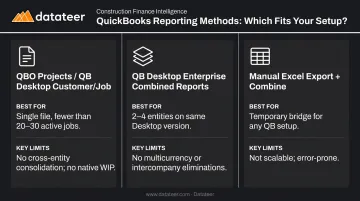
Three options exist, and the right one depends on your firm's structure:
| Method | Best For | Key Limits |
|---|---|---|
| QBO Projects / QB Desktop Customer/Job | Single file, fewer than 20–30 active jobs | No cross-entity consolidation; no native WIP schedule |
| QB Desktop Enterprise Combined Reports | 2–4 entities on the same Desktop Enterprise version | No multicurrency; no intercompany eliminations; basic reports only |
| Manual Excel export + combine | Temporary bridge for any QB setup | Doesn't scale; always historical; error-prone |
If your firm operates multiple QuickBooks Online company files—common in construction holding companies and multi-entity GCs—there is no native QBO feature for cross-entity consolidation. QBO Advanced users can use Spreadsheet Sync to combine reports from multiple Advanced companies, but the chart of accounts must match exactly in name, type, hierarchy, and account numbers.
Any deviation means manual intervention before the consolidation can proceed.
For QuickBooks Online, job costing through the Projects feature is available in Plus, Advanced, and Intuit Enterprise Suite tiers only. Simple Start and Essentials don't support it.
Step 3: Pull and Map Job-Level Data
For each active job, you need to extract:
- Estimated vs. actual costs by cost code
- Contract value (including approved change orders)
- Billed-to-date and retainage held
- Costs-to-complete (estimated remaining costs)
- Unbilled charges
Four QuickBooks source reports feed this data:
- Profit & Loss by Job — revenue and cost by job
- Job Estimates vs. Actuals — variance between budget and current spend (Desktop)
- Unbilled Costs by Job — costs incurred but not yet invoiced
- Customer Balance Detail — outstanding balances per job/customer
In QBO, the Projects reporting suite includes Profit and Loss by Project, Work in Progress (showing percentage spent vs. estimate), and Unbilled Time and Expenses by Project. These are the closest native equivalents. From here, map the extracted data to three consolidated report templates: job profitability (revenue minus direct costs per job), WIP schedule, and company-wide P&L with job-level drill-down.
Step 4: Build the Consolidated Reports
Assembling the WIP schedule manually requires three calculations:
- Percent complete = Costs incurred ÷ Estimated total cost
- Earned revenue = Percent complete × Contract value
- Over/under billing = Billed-to-date − Earned revenue
This is where most Excel-based consolidations introduce errors—particularly in the percent complete estimate, which depends on field data that may not yet be in QuickBooks.
The AICPA's guidance on WIP schedules identifies contract price, estimated total project cost, and costs and requisitions to date as the required inputs—all of which QB holds, but none of which QB automatically assembles into a schedule.
Structure the consolidated job profitability report as:
- Rows = individual jobs
- Columns = contract value, costs incurred, gross profit, gross margin %, billing status, and job status
This single report gives leadership a cross-portfolio financial snapshot without requiring a drill-down into individual job files.
Firms that move beyond manual assembly to a purpose-built construction analytics platform like Datateer eliminate both the formula error risk and the 10–20 day lag that makes manual WIP schedules stale before they reach leadership.
Step 5: Establish a Reconciliation and Refresh Cadence
Consolidated reports are only as reliable as the underlying QB data. If field teams are delayed entering costs, or change orders haven't been recorded yet, the consolidation looks clean but is materially wrong.
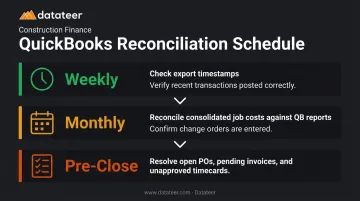
Minimum reconciliation routine:
- Weekly: Check export timestamps or sync logs; verify recent transactions posted correctly
- Monthly: Reconcile consolidated job costs against QB's job cost reports; confirm change orders are entered
- Pre-close: Resolve all open POs, pending invoices, and unapproved timecards before reports go to leadership
For firms refreshing manually, the consolidated report is typically 10–20 days stale by the time it reaches decision-makers. On fast-moving jobs with rapid billing cycles, a two-week-old WIP schedule can misstate over/under billing by significant amounts—and by then, the project has moved on.
What You Need Before You Start
The consolidation process itself is straightforward. What makes it fail is starting before two foundational elements are in place:
QuickBooks Version & Access Requirements
- QuickBooks Online Plus or Advanced for the Projects feature (job costing)
- QuickBooks Desktop Enterprise for combined reporting across company files
- Simple Start and Essentials are not supported for job costing or project tracking
- For multi-entity QBO consolidation, each company file needs an active subscription with admin access for whoever is running the process
Template & Hierarchy Requirements
- The person running consolidation must understand QB's Customer/Job/Project hierarchy—misassigning transactions to the wrong level is one of the most common causes of consolidated reports that don't match actual job performance
- A defined consolidation template must exist before you begin: which reports are needed, in what format, for which audience
Without that template in place first, the process produces output that's technically complete but practically useless.
Key Variables That Break Construction Report Consolidation
Even with the right setup and steps, four variables determine whether consolidated reports are trustworthy or just approximate.
Cost Code Consistency
When the same cost type is coded differently across jobs, QuickBooks aggregates them as separate line items rather than rolling them up. The result: accurate totals per code, but no meaningful cross-job comparison. Fixing this retroactively means reclassifying potentially hundreds of transactions.
WIP Calculation Accuracy
WIP depends on percent-complete estimates that come from field data, not QuickBooks. If field reporting lags, the consolidated WIP schedule will overstate or understate earned revenue. UFG Surety notes that a well-prepared WIP schedule can significantly enhance bonding capacity, while a poorly documented or unreliable one can limit it. Over/under billing errors directly affect bonding capacity, banking covenants, and line availability.
Intercompany Transaction Handling
When one entity in a construction group bills another (an equipment company renting to the GC, for example), that intercompany revenue and expense must be eliminated in the consolidated report. Failure to eliminate inflates both revenue and costs without affecting net profit, distorting every margin metric.
QuickBooks Desktop Enterprise's combined reports include no automatic elimination entries. Multi-entity firms consolidating in Excel must manually identify and remove these transactions each period — a step that's easy to miss under deadline pressure.
Data Freshness and Reporting Lag
Manual consolidation creates structural lag. By the time data is exported, mapped, calculated, and formatted, the reports reflect a point in time that may be two to three weeks in the past. For short-duration commercial projects or GC work with rapid billing cycles, a two-week-old cost report means labor slippage and budget overruns are discovered too late to course-correct.
None of these variables operates in isolation. Stale data compounds a mismatched cost code structure, which compounds an unreliable WIP estimate — and the consolidated report that results reflects all four failure points at once. Understanding where the breakdowns occur is the first step toward fixing them.
Common Mistakes When Consolidating QuickBooks Reports
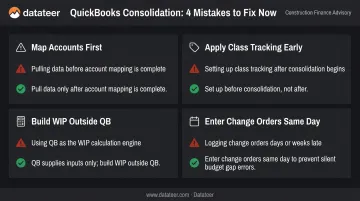
Most consolidation problems aren't data problems — they're process problems that surface once the data is already in the wrong place. These four mistakes account for the majority of bad outputs.
Map accounts before pulling any data. Pulling QB data into Excel before every account and cost code is mapped produces output that looks complete but contains miscategorized costs and inflated or understated margins.
Apply Class tracking before consolidation, not after. QB's Class feature separates residential, commercial, and service revenue within one file. Firms that skip it lose the ability to segment by division — retrofitting classes later means re-categorizing hundreds of historical transactions.
Build the WIP schedule outside of QB. QB cannot produce a WIP schedule natively; it supplies the inputs. Expecting QB to handle this automatically is why consolidated numbers rarely match what the accountant's WIP shows.
Enter change orders in QB the same day they're approved. Change orders approved in the field but not yet entered create a silent gap — job cost reports show costs against the original budget, making every active change order job appear over-budget until the entry catches up.
Alternatives When QuickBooks Alone Isn't Enough
QuickBooks is a capable accounting engine. It was not designed to produce the consolidated, multi-job, executive-level financial views that construction leadership needs.
Manual Excel Consolidation
Works well for firms with fewer than 10 active jobs, one QB file, and a finance team willing to own a monthly process. The cost is staff time, not software.
The tradeoffs are real, though:
- Every manual step is an error opportunity — academic research on spreadsheet error rates puts cell-level error rates at 1–2% in a typical workbook
- The process cannot scale past a handful of jobs without significant staff time investment
- Reports are always historical by the time they're assembled
- A single staff change can break the entire model if it isn't documented
QuickBooks Desktop Enterprise Combined Reporting
Appropriate for firms already on Desktop Enterprise with two to four entities that share a common currency and don't need intercompany elimination. The feature is native, costs nothing additional, and produces a combined balance sheet and P&L without third-party software.
Worth knowing before committing to this path:
- Limited to Desktop Enterprise — not available in QuickBooks Online
- No intercompany eliminations
- Cannot produce WIP schedules or job profitability summaries
- Intuit stopped selling new U.S. Desktop subscriptions after September 30, 2024, making long-term reliance on the platform a planning consideration
Automated Construction Analytics Platforms
The right fit for firms managing more than 15–20 active jobs, operating multiple entities, or whose finance team spends more than a few hours per week assembling consolidated reports.
Datateer, for example, connects directly to QuickBooks and 20+ other construction ERPs, replacing the manual consolidation cycle with automated overnight data refreshes. Pre-built dashboards — WIP reports, over/under billing summaries, job profitability views, and cost-to-complete analytics — are available on day one. A Double L Management team member described the first time they accessed their data through Datateer's dashboard: "That one click replaced two weeks worth of prior work."
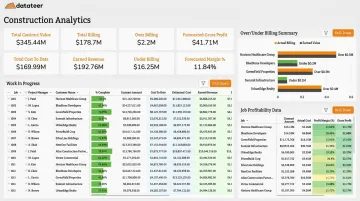
The platform handles automated data cleaning and cost code standardization during a 2–4 week implementation, with flat annual pricing starting at $10,000/year per data source and unlimited users. The math is simple: compare the platform cost against the fully loaded cost of current staff hours spent on manual consolidation, plus the value of decisions made faster on accurate data.
Datateer offers a free 15-Minute Workflow Audit and a 60-second Construction Data Maturity Audit for firms that want to assess fit before committing.
Frequently Asked Questions
Can QuickBooks do consolidation?
QuickBooks supports basic consolidation within a single file using the Customer/Job or Projects feature, and Desktop Enterprise can combine reports across multiple company files. Neither produces construction-specific outputs like WIP schedules, and QBO has no native cross-entity consolidation for firms with multiple company files.
How do I use QuickBooks for a construction company?
Three essential setup steps: configure a construction-specific chart of accounts, enable Projects (QBO Plus/Advanced) or job costing (Desktop), and establish standardized cost codes that mirror your estimating process. The setup foundation determines whether QB data can be consolidated later.
What reports should construction companies consolidate in QuickBooks?
The five most important: consolidated job profitability summary, WIP schedule, over/under billing report, company-wide P&L with job-level drill-down, and cash flow by project. Only the P&L is available as a native QB output—the others require calculation from QB source data.
What is the best way to consolidate QuickBooks reports across multiple construction entities?
Firms with multiple QB company files must use Desktop Enterprise's combined reporting, manually export and combine in Excel with intercompany eliminations, or use a third-party consolidation platform. The best method depends on entity count, currency complexity, and how frequently consolidated reports are needed.
How do cost codes affect QuickBooks report consolidation for contractors?
Inconsistent cost codes are the single most common reason consolidated reports produce misleading totals. When the same cost type is coded differently across jobs, QB aggregates them as separate line items instead of rolling them up. Cross-job comparisons become impossible without manual reclassification.
When should a construction company use third-party software instead of QuickBooks for consolidation?
Consider third-party software when you hit any of these thresholds: 15–20+ active jobs, multiple QB entities needing intercompany elimination, or a finance team spending several hours per week on manual consolidation. At that point, the labor cost and decision risk outweigh sticking with a manual QB approach.