Introduction
Construction finance managers know the drill: month-end closes, and the next two weeks disappear into spreadsheet reconciliation. By the time the WIP report lands in front of the CFO, the data is already stale — and any margin fade that happened three weeks ago is now a forensic exercise rather than a fixable problem.
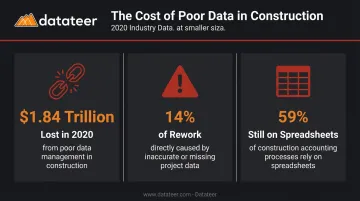
The problem is structural, not effort-related. According to Trimble's construction technology research, construction accounting departments use spreadsheets for 59% of their processes — and the Construction Progress Coalition confirms that WIP reports are primarily prepared in PDF or Excel and manually rekeyed into recipient systems.
Modern WIP automation software changes this by syncing directly with construction ERPs, eliminating manual data gathering, and delivering real-time financial dashboards. This article breaks down the five best tools available today, what each one does well, and how to choose the right fit for your firm — so you can stop chasing data and start acting on it.
Key Takeaways
- Manual WIP compilation creates a 10–20 day lag that leaves finance teams reacting to margin problems instead of preventing them.
- The best tools connect directly to your ERP, standardize cost code logic, and refresh data automatically.
- Accounting-native WIP engines (Sage Intacct, Vista, Foundation) enforce financial controls at the ledger level; analytics layers like Datateer pull from any ERP to surface trends and forecasts across the portfolio.
- Pricing across all five tools is quote-based or contact-required; no tool publishes a public rate card.
- The biggest buyer mistake: choosing project management software when the real need is financial WIP reporting.
What Is a Construction WIP Report — and Why Does Automation Matter?
A WIP report is a financial document that reconciles contract value, costs incurred, billings to date, and estimated costs to complete across every active job. The result tells you whether each project is over-billed, under-billed, profitable, or quietly losing margin — and it's central to percentage-of-completion accounting, as AICPA & CIMA frames it.
The Problem With Manual WIP Processes
When WIP lives in spreadsheets, several things go wrong simultaneously:
- Data integrity breaks down — manual rekeying between systems introduces errors that compound across jobs
- Cost codes aren't standardized — different team members categorize the same costs differently, making cross-project comparisons meaningless
- Reporting lags behind reality — by the time the WIP report is compiled and reviewed, the underlying project data has moved on
- Finance teams become data gatherers — instead of analyzing what the numbers mean, they're assembling them
The financial consequences of poor data management across construction are substantial. FMI's research on data analytics in construction found that the industry lost $1.84 trillion in 2020 from poor data management, with 14% of rework directly caused by bad data.
What Automated WIP Software Actually Does
Purpose-built WIP automation tools connect directly to construction ERPs via API or scheduled data sync. From there, they handle the work that typically consumes a finance team's first two weeks of every month:
Purpose-built WIP automation tools connect directly to construction ERPs via API or scheduled data sync. From there, they handle the work that typically consumes a finance team's first two weeks of every month:
- Pull job cost and billing data on a scheduled or real-time basis
- Apply standardized logic across all active jobs without manual mapping
- Surface results in pre-built dashboards with no CSV exports or VLOOKUP chains required
- Flag over-billed and under-billed positions automatically for review
The result: finance teams stop spending 10-20 days assembling a report and start spending that time acting on what it says.
Best Software for Automating WIP Reports in Construction
Each tool below serves a different position in the market — from dedicated analytics layers to full ERP systems with native WIP accounting. The right fit depends on where your data lives, how much configuration you can absorb, and whether you need WIP as a reporting layer or as part of your core accounting workflow.
Datateer
Datateer is a construction financial intelligence platform that automates the entire data flow from ERP to executive dashboards. It serves firms from $10M to over $1B in annual revenue and functions as a dedicated analytics layer on top of a firm's existing ERP — not a replacement for it.
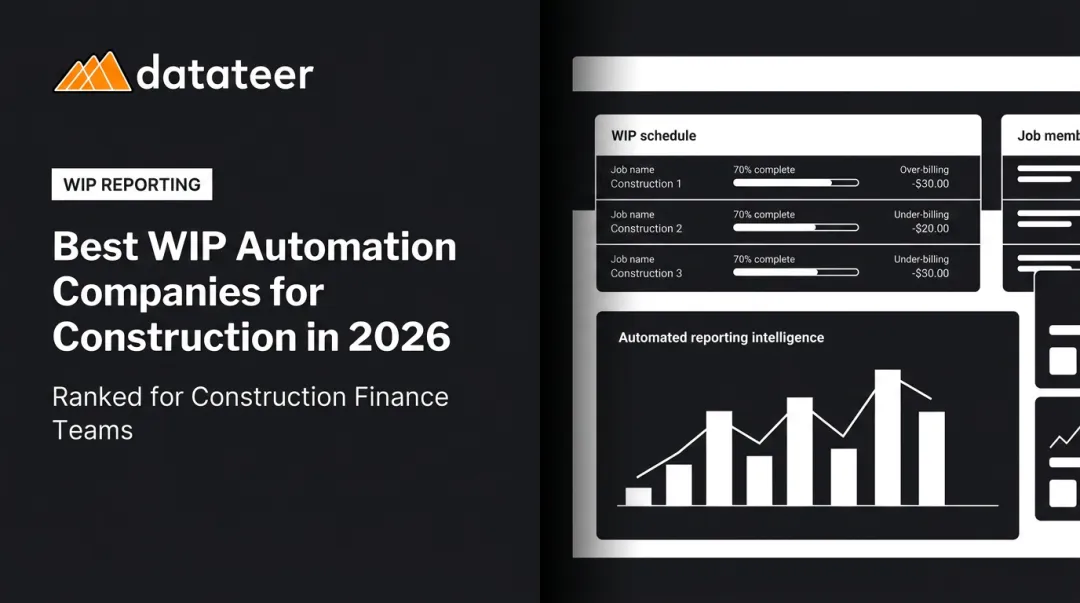
The platform's WIP & Financial Truth dashboard provides visibility into earned revenue, margin fade, budget slippage, pending change orders, under-billings, and over-billings — all pulled directly from the source ERP. Rather than requiring finance teams to export and reformat data, Datateer's automated extraction and cleaning engine standardizes cost codes, maps data logic, and delivers a refreshed WIP picture without manual intervention.
What makes Datateer stand out for WIP automation:
- WIP reports refresh in approximately 2 minutes (vs. weeks of manual compilation)
- All 12 pre-built dashboards — including WIP, job costing, cash flow, and margin protection — are available on day one across four strategic suites
- Flat annual pricing starting at $10,000/year per data source with unlimited users and no module-based upsells
- Setup completes in 2–4 weeks, and annual fees don't start until data is flowing
- CSV upload support lets firms incorporate manual data alongside automated ERP feeds — useful for partial ERP coverage scenarios
| Category | Details |
|---|---|
| Key WIP Features | Real-time WIP dashboard, over/under-billing tracking, margin fade alerts, earned revenue calculations, percent-complete per job — all pre-built |
| ERP Integrations | Direct sync with 12+ named construction ERPs including Procore, Sage 100/300/Intacct, Viewpoint Vista, Viewpoint Spectrum, Acumatica, Foundation Software, CMiC, Jonas Construction, QuickBooks, and NetSuite; custom integrations available |
| Pricing & Setup | Flat annual fee starting at $10,000/year per data source; unlimited users; 2–4 week implementation; fees begin only when data is flowing |

Procore Analytics
Procore is one of the most widely adopted construction management platforms in the industry, and its Analytics module extends the platform's project data into configurable financial dashboards for mid-to-large general contractors already operating within the Procore ecosystem.
Procore Analytics draws on live financial data already housed in Procore — contracts, commitments, budget changes, pay applications — making it a natural fit for firms whose entire workflow lives there. The Financials Report surfaces budget vs. actual variances, commitment status, and pay application data consolidated from across the platform.
One important distinction: Procore Analytics is a configurable reporting layer, not a native WIP accounting engine. Generating WIP-specific outputs requires setup within the Analytics module, and firms needing deep accounting-layer WIP schedules may find it requires more configuration than dedicated WIP accounting tools.
| Category | Details |
|---|---|
| Key WIP Features | Budget vs. actual tracking, commitment summaries, pay application status, configurable financial dashboards; WIP-specific reporting requires configuration |
| ERP Integrations | Native within Procore; third-party ERP connections (including a Procore-built Sage Intacct connector) available through the Procore marketplace |
| Pricing & Setup | Annual, fixed, predictable pricing based on Annual Construction Volume (ACV); Analytics-specific pricing is not published — contact Procore for a quote |
Sage Intacct Construction
Sage Intacct Construction is a cloud-based ERP built for construction and real estate firms that combines project accounting, job costing, and financial reporting in one platform. For firms seeking WIP reporting as part of a broader accounting system rather than a standalone analytics layer, it's a well-suited choice — particularly for its accounting-native WIP generation and multi-entity capabilities.
Sage's August 2024 announcement confirmed that the platform's WIP feature automates the monthly WIP statement and eliminates the need to comb through separate spreadsheets. The tool automatically creates GL transactions for over- and under-billing — one of the clearest examples of accounting-native WIP generation among the tools reviewed here.
Its multi-entity and multi-currency capabilities make it well-suited for complex firms managing multiple legal entities. Firms wanting executive-level visual dashboarding beyond standard report outputs may benefit from a supplemental BI layer, but the accounting WIP foundation is robust.
| Category | Details |
|---|---|
| Key WIP Features | Native WIP schedule generation, automated over/under-billing GL entries, percent-complete tracking, project profitability reporting — built into the accounting workflow |
| ERP Integrations | Sage Intacct is the ERP; connects with Procore (via Procore-built connector) and Salesforce through its marketplace |
| Pricing & Setup | Subscription-based; pricing not published — contact Sage or a VAR partner for a quote; implementation typically involves a Sage partner |
Vista by Viewpoint (Trimble)
Vista by Viewpoint, now part of the Trimble Construction One suite, is a long-established construction ERP used by mid-to-large contractors. Its job cost accounting module includes native WIP reporting — Trimble's help documentation confirms the JC Work in Progress Report calculates earned revenue and over/under-billings by contract using percentage of completion.
Vista's strength is depth of job cost detail and its integration with field data through the broader Trimble Construction One suite, which connects Spectrum, ProjectSight, and Viewpoint for Projects under one vendor contract. Firms already standardized on Viewpoint get continuous field-to-finance data continuity across the full Trimble suite without managing separate vendor relationships.
For executive-level cross-project analytics or real-time visual dashboards, firms often add a dedicated reporting layer on top of Vista — tools like Datateer connect directly to Vista's data to extend its native WIP outputs into live financial dashboards.
| Category | Details |
|---|---|
| Key WIP Features | Native WIP schedule, job cost accounting, earned revenue calculation, over/under-billing tracking by contract |
| ERP Integrations | Native across Trimble Construction One (Spectrum, ProjectSight, Viewpoint for Projects); third-party connections via Viewpoint Partner Directory |
| Pricing & Setup | Pricing not published — contact Trimble for licensing details; implementation typically involves a certified partner; timeline varies by firm complexity |
Foundation Software
Foundation Software is a construction-specific accounting platform built exclusively for contractors. It covers job costing, payroll, and WIP reporting in a purpose-built environment designed for construction accountants — making it a focused fit for small-to-mid-market contractors who need job costing, payroll, and WIP in one system without the overhead of a full enterprise ERP.
Foundation generates detailed WIP reports and identifies over/under-billing through automated reports. Its Executive Dashboard provides real-time project insights into cost, labor, and resource metrics. The platform also integrates with Procore — Foundation's partner page confirms that clients can share budgets, change orders, direct costs, and vendor data between the two systems.
What Foundation covers for WIP and project accounting:
- Built-in WIP reporting with automated over/under-billing identification
- Percent-complete calculations tied directly to job cost data
- Executive Dashboard with real-time cost, labor, and resource metrics
- Verified Procore integration for budget, change order, and vendor data sharing
Firms with multi-system ERP requirements or those seeking sophisticated cross-portfolio analytics may find Foundation's scope more limited than enterprise alternatives, but for focused contractor accounting it's well-regarded.
| Category | Details |
|---|---|
| Key WIP Features | Built-in WIP reporting, automated over/under-billing identification, job costing, percent-complete calculations, Executive Dashboard with real-time project insights |
| ERP Integrations | Verified Procore integration; additional integrations listed on the Foundation partners page |
| Pricing & Setup | Pricing not published — contact Foundation for a quote; implementation is structured around the contractor's team and timeline (an older official checklist cited 2–3 months) |
How We Chose the Best WIP Report Automation Software
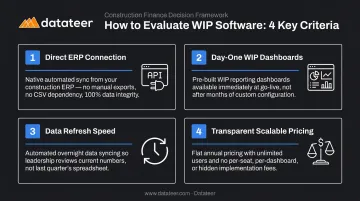
Four criteria drove the evaluation:
- Does the tool connect directly to construction accounting data, or does it require manual exports?
- Are WIP-specific dashboards ready on day one, or do they need significant configuration first?
- How fast does data refresh — real-time, near-real-time, nightly batch, or manual?
- Is pricing transparent, and does it scale for firms from $10M to $1B+ in revenue?
The Most Common Buyer Mistake
Construction firms frequently evaluate general project management software when what they actually need is financial WIP reporting. Project management tools — including Procore's core PM modules — track schedule, tasks, and field activity.
WIP reporting requires job cost accounting integration: costs vs. budget by cost code, percent complete by cost incurred, over/under-billings, and projected margin per job. These are accounting-layer problems, not field-data problems.
Choosing a PM tool to solve a finance problem means you'll either configure it heavily to approximate WIP outputs or continue exporting to Excel anyway.
Additional Factors Considered
- Implementation timelines and whether specialized partners are required to get started
- Responsiveness of support and access to construction-specific expertise
- Whether outputs are clean and reconciled enough for both internal finance teams and external CPA or advisory partners
Conclusion
The gap between a stale monthly WIP spreadsheet and a live financial dashboard is, practically speaking, the gap between catching margin fade and discovering it too late. For any firm managing multiple active jobs, that gap has a direct cost — in rework exposure, cash flow surprises, and finance team hours that could be spent on analysis instead of assembly.
The right tool depends on your starting point. If you need a full accounting platform with native WIP generation, Sage Intacct Construction, Vista, or Foundation are strong options worth a close look. If you already have an ERP and need real-time financial intelligence on top of it — including WIP, margin protection, cash flow, and job costing — a dedicated analytics layer like Datateer delivers that without replacing your existing system.
Datateer's pre-built WIP dashboard suite connects directly to your existing ERP and delivers live financial intelligence from day one — giving your finance team a real-time single source of truth across every active job, with no spreadsheet assembly required. Reach out at hello@datateer.com or book a 15-minute workflow audit. No slides, no pitch.
Frequently Asked Questions
What is the most popular software tool for tracking progress status of projects?
It depends on what "progress" means to your team. Field progress tracking (schedule, tasks, punch lists) is dominated by tools like Procore and Buildertrend. Financial WIP reporting — tracking percent complete by cost, over/under-billings, and projected margin — requires accounting-integrated tools like Datateer, Sage Intacct Construction, or Foundation Software.
What is the best AI tool for construction project management?
Platforms like Procore, Autodesk Construction Cloud, and Trimble Construction One are incorporating AI-assisted features for field management and scheduling. For financial WIP reporting specifically, the highest-impact application is automated data extraction and real-time ERP sync. That combination removes the manual steps that delay financial visibility and introduce reporting errors.
What is a WIP report in construction accounting?
A WIP report reconciles contract value, costs incurred to date, billings, and estimated costs to complete for each active job. The output shows whether each project is over-billed, under-billed, or trending toward margin fade — and it's the foundation of percentage-of-completion revenue recognition.
How does WIP report automation software integrate with construction ERPs?
Purpose-built tools connect to construction ERPs via API or direct data sync, pulling job cost and billing data on a scheduled or near-real-time basis. Standardized logic then generates dashboards automatically, with no manual exports or Excel intermediaries involved.
How often should construction WIP reports be updated?
Traditionally, WIP is compiled at month-end close. Automated tools can refresh data daily or continuously, letting finance teams catch over/under-billing issues and margin slippage during the project — before problems become unrecoverable.
What is the difference between WIP reporting software and general project management software?
Project management software tracks schedule, tasks, and field activity. WIP reporting software focuses on the accounting layer — job cost vs. budget, percent complete by cost incurred, over/under-billings, and cash flow projections. The two systems solve different problems and require different data sources.