Introduction
Construction finance teams are operating under conditions that punish slow information. Margins are thin — CFMA's 2024 benchmark of 1,290 firms found net income before tax averaging just 6.3% across all respondents. Material costs keep climbing, and labor costs rose 4.4% in the 12 months ending March 2026.
Executive teams now expect CFOs and finance managers to provide forward-looking guidance — not just month-end summaries.
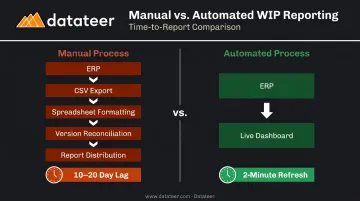
The problem? Most construction firms are still running project controls on spreadsheets. That means a 10–20 day lag between what's happening on a job site and what leadership actually sees. By the time a WIP report reaches the CFO's desk, the financial reality it describes may already be materially different.
This article breaks down the concrete advantages automation delivers to construction project controls: what changes operationally, why the timing gap matters financially, and how firms that close it are protecting margins while others react too late.
Key Takeaways
- Automated project controls eliminate the WIP reporting lag — live data replaces weeks of spreadsheet work.
- Real-time visibility lets finance teams catch cost variances, overbilling gaps, and cash shortfalls before they compound.
- Continuous budget-vs-actual comparisons surface margin fade and labor slippage while corrective action is still possible.
- Automating the reporting pipeline reclaims meaningful hours each month — time that shifts from data assembly to strategic analysis.
- Automated controls scale with your firm — manual workflows break under growth, these get sharper.
What Is Automating Project Controls in Construction?
Project controls are the processes used to monitor cost, schedule, scope, and risk across active jobs. The goal is straightforward: keep projects on time, on budget, and aligned with contract commitments. In practice, that means tracking job cost entries, WIP positions, committed costs, over/under-billings, and forecast-to-complete — across every active project simultaneously.
The challenge is execution. Manual project controls rely on finance teams pulling data from ERPs, reformatting it in spreadsheets, reconciling versions, and distributing reports — a process that routinely takes one to three weeks. By the time numbers reach decision-makers, a project may have already moved past the window where intervention was cost-effective.
Automation replaces that pipeline entirely. Instead of CSV exports and manual formula work, a direct integration connects the ERP to a live reporting layer that refreshes automatically. Platforms like Datateer, for example, sync directly with construction ERPs — Procore, Sage, Viewpoint Vista, Acumatica, Foundation Software, CMiC, and others — and deliver updated dashboards without manual extraction or formatting.
The practical result: a CFM who previously spent evenings copy-pasting data into Excel now opens a dashboard that's already current. That shift — from two-week-old numbers to live project data — is what makes automation a controls problem, not just a workflow convenience.
Key Advantages of Automating Project Controls in Construction
The advantages below aren't theoretical. They're operational outcomes — cost accuracy, earlier risk detection, reporting speed, margin protection, and the capacity for finance teams to act as strategic partners rather than data processors.
Advantage 1: Real-Time Financial Visibility Across All Projects
Manual WIP reporting creates a structural blind spot. When job cost data takes two weeks to reach a dashboard, every decision made during that gap is based on stale numbers. Automated project controls close that gap entirely.
With a direct ERP-to-dashboard sync, construction finance teams get a live view of:
- Job costs — actuals vs. budget at job, phase, and cost-code level
- WIP position — percentage complete, earned revenue, and projected margin per job
- Committed costs — purchase orders, subcontracts, and pending change orders
- Over/under billings — costs in excess of billings and billings in excess of costs
- Cash flow — which projects are generating liquidity and which are consuming it
Datateer's platform, for instance, delivers a 2-minute refresh from ERP data across all these dimensions, replacing what previously required two weeks of manual spreadsheet work. As one Double L Management team member put it: "That one click replaced two weeks worth of prior work."
Why the timing matters: KPMG's 2023 Global Construction Survey found that 37% of respondents missed budget and/or schedule targets by 20% or more in the prior year due to ineffective risk management. When a superintendent overspends a labor cost code this week, the finance team needs to know this week, not at next month's close meeting when the overrun has already compounded.
KPIs most directly impacted:
- WIP accuracy and over/under billing balance
- Job cost variance at cost-code level
- Cash flow forecast accuracy
- Days to close monthly reports
This advantage matters most for firms managing multiple simultaneous projects, firms with high subcontractor spend, and firms where billing cycle delays create real liquidity exposure.
Advantage 2: Proactive Risk Detection and Margin Protection
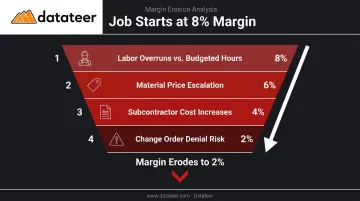
A job that starts at an 8% margin can quietly erode to 2% before anyone notices. Labor runs a few percent over budget. A change order sits unprocessed. Subcontractor costs creep up. None of these individually triggers an alarm.
Together, though, they produce what the industry calls margin fade: a gradual, invisible erosion of job profitability that only becomes visible at month-end, when recovery options are limited.
Automated project controls interrupt this pattern by continuously comparing actuals against budgets and forecasts. Rather than reviewing hundreds of line items manually, finance teams see exceptions surfaced automatically — the jobs or cost codes trending off-plan.
Datateer's margin protection module tracks original estimated margin versus current projected margin per job in real time, flagging variance drivers including:
- Labor overruns against budgeted hours
- Material price escalation vs. original estimates
- Subcontractor cost increases beyond committed amounts
- Change order impact and denial risk
This shifts the finance team's operating mode. Instead of forensic accounting — explaining what went wrong after the fact — they become a proactive safeguard to project profitability. The difference is significant: on a fixed-price or GMP contract, margin erosion can't be recovered through change orders. The window to act is while the project is still in flight.
KPIs most directly impacted:
- Gross margin by job
- Cost-to-complete accuracy
- Earned value (CPI and SPI where applicable)
- Labor efficiency ratio
- Subcontractor cost variance
This advantage is most critical on fixed-price contracts and projects with significant labor components, where hours-to-budget variance accumulates quickly and quietly.
Advantage 3: Eliminating Manual Reporting to Unlock Strategic Capacity
Spreadsheet-based reporting carries a hidden cost: the analysis that never gets done because the team is too busy moving data.
JBKnowledge's construction technology research found that 49% of firms manually transfer data when applications don't communicate, and only 5% have fully integrated construction applications. That means most construction finance teams are spending significant hours every month on work that produces no analysis — just data movement.
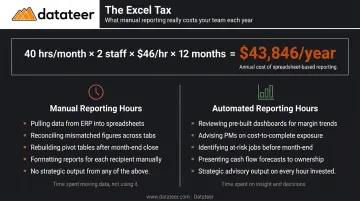
Datateer's Excel Tax Calculator puts a dollar figure on this. Using inputs of hours per month, number of staff, and average salary, the tool calculates what firms are paying for manual reporting. A realistic example: 40 hours per month × 2 staff × $46/hour × 12 months = $43,846 in annual Excel Tax.
That figure has nothing to do with software costs. It's what firms are already paying to maintain a process that produces no strategic output.
What automation changes: When the ERP-to-dashboard pipeline runs automatically and data is standardized at the source — cost codes mapped, logic validated, reconciliation handled — the entire reporting function shifts from production work to analysis work.
Finance managers stop building reports and start interpreting them. They spend Wednesday morning meetings advising on project health rather than apologizing for data they haven't finished reconciling. They become the strategic partner that project managers and owners actually need.
Key metrics this affects:
- Reporting cycle time
- Hours spent on manual data preparation
- Error rate from manual entry
- Number of actionable insights produced per close cycle
This advantage compounds as firm size grows. A firm managing 5 projects has a manageable manual reporting burden. A firm managing 20 does not. Manual reporting can't keep pace as project count grows.
What Happens When Project Controls Are Not Automated
The consequences of manual project controls aren't hypothetical. They show up in predictable, recurring patterns:
Reporting lags create blind spots. Monthly WIP reports produced 10–20 days after month-end describe a financial reality that may already be materially different. Decisions made on that data are made on a delayed picture.
Manual data handling propagates errors. Broken formulas, incorrect cost code mapping, and copy-paste mistakes introduce inaccuracies that distort job profitability, over/under billing positions, and forecasted margins. These errors often go undetected until a project closes, sometimes surfacing only when an audit forces a closer look.
Finance teams operate in reactive mode. Without automated alerts and live dashboards, the finance function spends its time answering "what happened?" questions after the fact. The SEC's 2022 enforcement action against Granite Construction — involving construction project financial reporting and forecasting issues — shows where inadequate financial controls can lead.
Scaling becomes impossible. Manual reporting workflows that strain a 5-project firm collapse under the weight of 20. The result: bottlenecked capacity, slower decisions, and growing exposure to financial misstatements.
How to Get the Most Value from Automating Project Controls
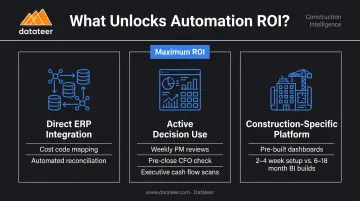
Automation delivers its highest return when three conditions are met.
1. The ERP is the system of record — and the integration is direct. The automated layer should pull clean, standardized data without manual intervention. That means proper cost code mapping, validated data logic, and automated reconciliation between systems (Procore commits matched to Sage invoices, for example). Datateer handles this during the 2–4 week setup process, with data cleaning and standardization automated at the source before dashboards go live.
2. Outputs are actively used for decision-making. Dashboards that sit unreviewed don't protect margins. Build review into your standard cadence:
- Project managers checking job cost variance weekly
- CFOs reviewing WIP position before monthly close
- Executives scanning cash flow projections before committing to new work
3. The platform is purpose-built for construction, not retrofitted from a generic BI tool. Generic BI tools require months of custom configuration to handle construction-specific data structures — cost codes, WIP schedules, over/under billings, retainage. Platforms built specifically for construction, like Datateer, arrive with pre-built dashboards, pre-mapped KPIs, and direct integrations with the ERPs firms already use. Data flows within 2–4 weeks, and the annual subscription only begins once it does — cutting the 6–18 month timelines typical of BI implementations down to weeks.
Conclusion
The value of automating project controls in construction comes down to compounding outcomes that build on each other: knowing your real financial position at any given moment, catching which jobs need attention before they become problems, and freeing finance teams to operate as strategic advisors rather than spreadsheet operators.
These advantages grow more valuable as the firm scales. The manual workflows that barely work at $50M in revenue are unsustainable at $200M. Automation doesn't just solve today's reporting problem. It builds the financial foundation that makes growth manageable.
The firms that consistently protect margins and grow profitably have one thing in common: real-time financial visibility is a standard operating practice, not something pieced together once a month after a week of manual work, when the window for corrective action has already closed.
Frequently Asked Questions
What are the advantages of automation in construction?
Automation removes manual data handling, eliminates reporting delays, and improves accuracy by taking human error out of the pipeline. Construction teams gain real-time visibility into job costs, cash flow, and risk — catching problems while corrective action is still possible, not weeks after the fact.
What are the benefits of project controls?
Project controls give construction firms a structured, data-driven way to monitor cost, schedule, scope, and risk across active jobs. When functioning properly, they let finance teams make proactive decisions that protect margins, prevent overruns, and keep projects aligned with contract commitments throughout their lifecycle.
What is automated project controls in construction?
Automated project controls replace manual spreadsheet reporting with a system that pulls financial and operational data directly from construction ERPs into live dashboards. The result: real-time visibility into WIP position, cost variances, committed costs, and cash flow — without the multi-week lag of traditional close cycles.
How does automating project controls reduce costs?
Real-time visibility lets finance teams catch cost overruns, labor inefficiencies, and billing errors while still correctable. Catching a labor overrun in week three is a scheduling conversation. Discovering it at month-end close, after three more weeks of the same pattern, is an expensive problem with far fewer solutions.
What data sources need to be connected for automated project controls to work?
Direct integration with the construction ERP is the core requirement — it's the system of record for job costs, committed costs, and billing, and the only way to ensure data accuracy without manual exports. Payroll and subcontractor data can supplement the ERP feed once that foundation is in place.
How long does it take to implement automated project controls?
Purpose-built platforms with pre-built ERP integrations typically have data flowing within 2–4 weeks, compared to 6–18 months for custom BI builds. Datateer completes data connection, cost code mapping, and dashboard configuration within that window, with the annual subscription starting only once data is live.