Introduction
Construction teams don't work from desks. Project managers are on-site reviewing drawings, estimators are in trucks calculating scope changes, and field crews are moving between locations all day. A CRM that only works from the office creates a real problem — and in 2026, firms still relying on office-bound tools are paying for it through missed follow-ups, stale pipeline data, and client communication gaps that cost bids.
Grand View Research values the global construction and design software market at $10.96 billion in 2024, projected to reach $19.12 billion by 2030 at a 10.4% CAGR. Investment is accelerating — but adoption isn't keeping pace.
Dodge Construction Network found that 53% of general contractors still don't use technology for most core processes. Mobile-first CRM adoption is one of the clearest areas where that gap is starting to close.
This article evaluates the five best mobile-first CRMs for construction companies in 2026: ServiceTitan, Procore, Buildertrend, monday CRM, and JobNimbus — evaluated on offline access, field usability, sync reliability, and workflow depth across real construction scenarios.
Key Takeaways
- A mobile-first construction CRM lets field teams capture leads, update job status, and communicate with clients from any jobsite — no office trip required
- Best options for 2026: ServiceTitan (commercial specialty trades), Procore (general contractors), Buildertrend (residential), monday CRM (flexible/any size), JobNimbus (roofing and specialty contractors)
- Purpose-built construction CRMs outperform adapted general tools like Salesforce or HubSpot for field-to-office connectivity
- The right platform depends on firm size, project type, and whether you need field service management alongside CRM
What Is a Mobile-First Construction CRM — and Why Does It Matter in 2026?
A mobile-first CRM isn't just a desktop platform with an app added as an afterthought. In construction, it means the mobile experience is a core channel — where field teams log leads, update job status, communicate with clients, and access pipeline data from a phone or tablet without needing to return to the office.
Construction is more dependent on mobile access than most industries. Unlike a sales team operating from a central office, construction teams are distributed across multiple active job sites. Decisions get made in the field.
When the CRM requires a desktop to update, those decisions don't get recorded — and the office won't know until it's too late to act.
The consequences are practical:
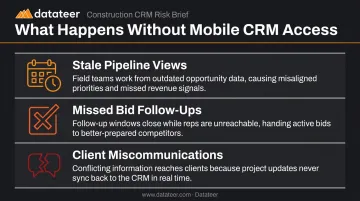
- Stale pipeline views that don't reflect current site conditions
- Missed bid follow-ups when field activity never makes it into the system
- Client miscommunications caused by the gap between what happened on-site and what got logged
The platforms below were evaluated on how well their mobile apps support real construction workflows — not just whether a mobile app exists. A breakdown of the specific features worth prioritizing follows the list.
Best Mobile-First CRMs for Construction Companies in 2026
These five platforms were selected based on construction relevance, mobile app depth, field-office sync capability, integration options, and verified app store ratings — not just general software popularity.
For construction teams, mobile depth isn't a bonus feature. It's the difference between field data that's current and data that's a day old when someone finally gets back to the office.
ServiceTitan
ServiceTitan targets commercial specialty contractors — mechanical, electrical, plumbing, HVAC, roofing, and fire and life safety. It unifies CRM, project management, and field service in one cloud-based system, making it particularly strong for firms that handle both new construction work and recurring service contracts.
Its Field Mobile App (iOS and Android) lets technicians and project teams complete daily logs, create and update estimates, manage work orders, and capture job photos directly on-site. Won opportunities in the CRM automatically create projects — eliminating re-entry when transitioning from sales to operations.
| Details | |
|---|---|
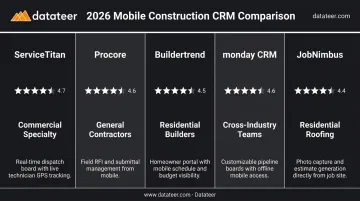
| Mobile App Highlights | Native iOS and Android; custom forms, daily logs, timesheets, work orders, job photos, customer signatures, and payments — real-time sync to office |
| Key CRM Features | Project-based opportunity management, line-item estimating, pipeline reporting, bid loss tracking, sales dashboards |
| Best For | Commercial specialty contractors and multi-trade firms |
| Pricing | Custom pricing — contact for a demo |
| App Store Rating | 3.3 stars (App Store, ~3.5K ratings) |
Procore
Procore is one of the most widely adopted platforms in construction, serving general contractors, specialty contractors, owners, and public agencies. Its CRM-adjacent tools cover contact management, preconstruction, and bid pipeline tracking — all connected to a broader project management ecosystem.
Procore's mobile app is among the most field-tested in the industry, with a 4.6 stars from 44K App Store reviews. Field teams can submit RFIs, mark up drawings, log daily reports, manage contacts, and access documents from any device. Its strength is connecting preconstruction and client management workflows directly to active project execution.
| Details | |
|---|---|
| Mobile App Highlights | RFIs, submittals, daily logs, drawing markups, document access, and contact management — offline capable |
| Key CRM Features | Contact management, bid management, sales pipeline tracking, integration with project and cost management modules |
| Best For | Large to mid-sized general contractors and commercial firms |
| Pricing | Custom pricing — unlimited users and data included |
| App Store Rating | 4.6 stars (App Store, 44K ratings) |
Buildertrend
Buildertrend is designed for residential builders, remodelers, and contractors. It combines CRM, scheduling, financial management, and client communication in a single platform built around the home construction workflow.
What sets it apart on mobile is the client-facing experience. Builders and clients both access a shared mobile portal for scheduling, change order approvals, daily log updates, photo sharing, and messaging — reducing the back-and-forth that typically slows residential projects. Its 4.5 stars from nearly 5K App Store reviews reflects strong real-world adoption.
| Details | |
|---|---|
| Mobile App Highlights | Builder and client mobile access; scheduling, daily logs, messaging, photo uploads, and change order management on the go |
| Key CRM Features | Lead and sales pipeline management, customer portal, proposal generation, financial tracking, QuickBooks and Xero integration |
| Best For | Small to mid-sized residential builders and remodelers |
| Pricing | Custom pricing — contact Buildertrend for a tailored quote |
| App Store Rating | 4.5 stars (App Store, 4.9K ratings) |
monday CRM
monday CRM is built on the monday.com Work OS — a highly customizable, no-code platform that construction firms use to manage leads, client communications, and project pipelines without IT-heavy configuration. It's well-suited to construction sales teams and PMs who need flexibility over rigid, pre-built workflows.
The mobile app earns 4.8 stars from 47K App Store reviews — the highest rating on this list. Users can check deal status, update pipeline boards, log client interactions, and receive real-time notifications from anywhere. The drag-and-drop visual interface translates well to mobile screens.
| Details | |
|---|---|
| Mobile App Highlights | Board updates, client interaction logging, email access, activity management, AI call summaries, and push notifications |
| Key CRM Features | Customizable pipelines, automation for lead assignment and follow-ups, dashboards, integration with Slack, Google Calendar, Zoom, QuickBooks, and more |
| Best For | Construction businesses of any size needing a flexible, general-purpose CRM |
| Pricing | From $12/user/month (Basic, billed annually; 3-seat minimum) |
| App Store Rating | 4.8 stars (App Store, 47K ratings); 4.7 stars (Google Play, 44.7K reviews) |
JobNimbus
JobNimbus is designed specifically for construction and roofing contractors, combining lead tracking, workflow customization, scheduling, and invoicing in one mobile-accessible platform. It's built for smaller and mid-sized contractor operations, particularly roofing firms and specialty contractors without dedicated office staff.
Field usability is where JobNimbus earns its 4.8 stars from 12K App Store reviews. Crews log real-time job updates, capture annotated before/after photos, send digital proposals, and collect signatures on-site — all through workflow boards built to navigate on a smartphone.
| Details | |
|---|---|
| Mobile App Highlights | Real-time job updates, annotated photo capture, digital proposals, pipeline management, and integrated texting — designed for contractor field workflows |
| Key CRM Features | Customizable sales pipelines, lead and project tracking, estimating, scheduling, document management, and mobile-first client communication |
| Best For | Small to mid-sized contractors and roofing firms |
| Pricing | Custom pricing by tier (Essentials, Pro, Premium, Enterprise) |
| App Store Rating | 4.8 stars (App Store, 12K ratings) |
Key Features to Look For in a Mobile-First Construction CRM
Offline Access and Real-Time Sync
A CRM that requires a live connection isn't truly mobile-first — it's just mobile-capable. Job sites frequently have poor connectivity, and teams need to log updates, capture photos, and fill out forms regardless of signal. The CRM should queue that data and sync automatically when connectivity returns. Procore explicitly supports this; not every platform on the market does. Confirm offline functionality before committing.
Field-to-Office Data Continuity
The purpose of a mobile CRM is to eliminate manual handoffs. When a lead is captured on-site or a job status is updated in the field, that change should be immediately visible to the office without anyone re-entering data. Deloitte found that construction businesses using multiple fragmented data environments spent significantly more on training and operating costs, with respondents estimating a more unified data environment could save 10.5 hours per week. A weak mobile CRM recreates the same fragmentation it was meant to solve.
Bid and Estimate Management on Mobile
Scope changes and RFI requests happen in the field — and waiting until you're back at a desktop to respond costs time and costs bids. A CRM with mobile estimating capability (or at least mobile estimate review) is critical for fast-moving project environments. ServiceTitan and JobNimbus both support mobile estimate creation; others offer review and approval without full creation capability.
Client Communication and Approval Tracking
A strong mobile CRM functions as a portable client portal. Contractors should be able to send updates, share documents, and capture digital approvals directly from a phone — creating an audit trail for decisions made off-site. This reduces disputes and keeps clients informed without requiring anyone to be in the same location. Buildertrend's shared client portal is one of the strongest examples of this done well.
Integration with Financial Reporting Tools
CRM data captures the relationship and pipeline side of construction, but that information needs to flow into financial reporting to be fully useful. WIP schedules, job cost tracking, and budget vs. actual dashboards require project data from ERPs — not just CRM notes.
That gap is where Datateer operates. The platform connects directly to 12+ construction ERPs — including Procore, Sage, Viewpoint Vista/Spectrum, Acumatica, Foundation, CMiC, Jonas, and QuickBooks — and automates reconciliation between project management data and financial reporting.
For construction finance leaders, that means real-time WIP, margin performance, and budget vs. actuals without the manual spreadsheet grind. What the field records becomes what the CFO can act on.
How We Selected These Mobile-First CRMs
This list was built around a mobile-first lens. Each platform was assessed not just on overall features but specifically on how well its mobile app supports construction workflows in the field — including App Store ratings, offline capability, field-specific features, and field-to-office data sync quality.
Selection criteria applied:
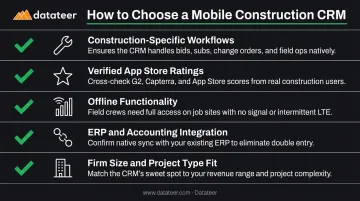
- Supports project-based sales, bid management, and contractor communication — not a generic CRM with "construction" added as a use case
- App Store and Google Play ratings verified independently, not taken from vendor marketing materials
- Functions offline without a live connection for field crews in low-signal environments
- Data flows into the ERPs and accounting systems construction firms actually run (Sage, Procore, Viewpoint, Acumatica, and similar)
- Appropriate for the firm size and project type claimed — residential, commercial, and specialty contractors have different workflow needs
These criteria exist because the most common selection mistake is picking based on brand recognition. A CRM that looks sharp in a demo but freezes on a 4G connection at a job site isn't a field tool — it's a liability. Test the mobile app in actual field conditions before committing.
Conclusion
For construction companies in 2026, mobile access is baseline — not a premium feature. The firms winning more work are the ones where every team member, from the estimator in the truck to the PM on-site, can update the CRM, respond to clients, and track pipeline stages without needing to be at a desk.
When shortlisting tools, prioritize your team's daily reality: where decisions get made, how data moves from job site to office, and whether the CRM connects to the financial systems that drive project profitability.
Choosing the right CRM closes the sales and relationship loop. For construction finance leaders who also need real-time visibility into WIP, margin performance, and budget vs. actuals, Datateer's automated financial dashboards connect directly to 12+ construction ERPs and eliminate manual reporting — so your team spends less time pulling numbers and more time acting on them.
Learn more at datateer.com or reach out at hello@datateer.com.
Frequently Asked Questions
What is the best construction CRM with mobile integration?
The best option depends on firm size and project type. ServiceTitan and Procore lead for commercial and enterprise use; Buildertrend and JobNimbus are stronger fits for residential builders and specialty contractors. The key differentiator is how well the mobile app supports construction-specific workflows — not just general CRM tasks.
What is a mobile CRM?
A mobile CRM is a customer relationship management platform with a native app that lets users manage leads, client interactions, pipeline stages, and job updates from a smartphone or tablet. In construction, where teams operate from job sites rather than fixed offices, a capable mobile app is a baseline requirement — not a nice-to-have.
What features should a mobile construction CRM have?
The most critical mobile-specific features include:
- Offline access with automatic sync when connectivity returns
- Real-time field-to-office data updates
- Mobile estimating or estimate review
- Client communication and digital approval capture
- Integration with project management and ERP tools
Can construction CRMs work offline?
Not all of them. Most require an internet connection to function, with limited or no offline capability. Procore explicitly supports offline access for daily logs, photos, and drawings. Buyers should test or confirm offline functionality before committing — especially for teams that work in areas with poor connectivity.
How is a construction CRM different from general project management software?
A CRM focuses on managing client relationships, leads, bids, and the sales pipeline from initial contact through won opportunities. Project management software handles task scheduling, resource allocation, and execution. The best construction platforms integrate both so won opportunities automatically transition into active projects without manual re-entry.
How much does a construction CRM cost?
Pricing varies widely. monday CRM starts at $12/user/month (billed annually). Buildertrend uses customized pricing based on firm needs. ServiceTitan, Procore, and JobNimbus all use custom pricing — contact each vendor for a quote. Total cost should account for user count, required integrations, and onboarding complexity alongside the base subscription rate.