
Introduction
Most construction projects don't fail at kickoff — they erode quietly through unmanaged change orders. A construction change order is a formal written amendment to the original contract that modifies scope, cost, or schedule during project execution. For project managers, financial controllers, and CFOs, the process matters: unmanaged change orders are one of the most reliable ways to turn a profitable project into a margin problem.
The numbers back this up. Research from Dodge Construction Network and Clearstory found that 98% of general contractors experienced fee erosion from change orders, 83% of specialty trade contractors say the process negatively affects cash flow, and the average change order cycle runs nearly seven weeks.
This guide walks through what triggers change orders, how the formal process works, what every valid change order must contain, and how finance teams can stay ahead of the cumulative cost.
Key Takeaways
- A change order is a legally binding contract modification — it requires signed approval from all relevant parties before work begins
- Most change orders stem from owner decisions, unforeseen site conditions, or design gaps — not contractor mistakes
- The process follows a predictable lifecycle: identify, estimate, submit, approve, execute, document
- Valid change orders require a scope description, cost breakdown, schedule impact, and authorized signatures
- Untracked or pending change orders drive margin fade — damage that rarely surfaces until month-end reports are already too late
What Is a Construction Change Order?
Under AIA A201-2017, a change order is a written instrument prepared by the architect and signed by the owner, contractor, and architect that documents agreement on three things: the change in the work, the adjustment to the contract sum, and the adjustment to the contract time.
A change order isn't simply an internal memo or a verbal directive — it's a formal contract modification that gives all parties legal and financial protection.
How Change Orders Differ from Related Documents
Three other documents are closely related but serve distinct functions:
| Document | Purpose | Modifies Contract? |
|---|---|---|
| Change Order (CO) | Agreed modification to scope, cost, or time | Yes — requires all signatures |
| Construction Change Directive (CCD) | Owner's unilateral instruction to proceed before cost/time is agreed | Temporarily — later formalized into a CO |
| Architect's Supplemental Instruction (ASI) | Minor clarifications or interpretations | No — cannot affect cost or schedule |
| Request for Information (RFI) | Question to resolve ambiguity in contract documents | No — but may trigger a CO |
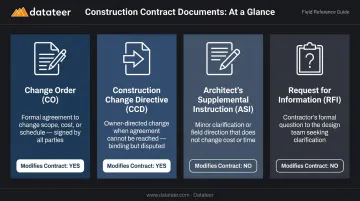
The most important distinction for contractors: an RFI is a question, not an authorization. If an RFI response reveals a scope gap requiring additional work, a separate change order must formalize it — or you're proceeding without payment protection.
Why Change Orders Happen: Common Triggers
Change orders are a structural feature of construction, not a symptom of poor planning. Projects are contracted on incomplete information — design drawings evolve, site conditions diverge from surveys, and owner requirements shift between contract signing and project completion.
The most frequent triggers include:
- Owner-requested scope changes: added features, layout revisions, tenant fit-outs, upgraded finishes
- Unforeseen site conditions: subsurface obstructions, contaminated soil, undocumented utilities, hidden structural defects
- Design errors or omissions that only surface once construction is underway
- Post-contract regulatory updates — building codes, fire suppression requirements, accessibility standards
- Material substitutions driven by supply chain disruptions requiring approved alternatives
The data backs this up. HKA's 2025 CRUX report, which analyzed over 2,200 projects valued at $2.43 trillion, found that change in scope remained the most common cause of construction conflict, affecting just over 28% of post-2020 projects. Incorrect design affected more than 15% of projects analyzed.
The downstream effects of poorly managed changes compound quickly. Subcontractor coordination breaks down, schedule integrity erodes, and project profitability declines — not because a single change order caused the damage, but because no one was tracking their cumulative weight.
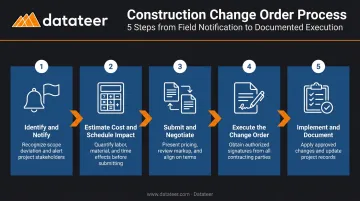
The Construction Change Order Process: Step by Step
The formal process can be initiated by several documents, depending on who identifies the change and how urgently work must proceed:
- Proposal Request (PR) — owner or architect requests pricing before authorizing scope
- RFI Response — field question reveals a design gap requiring contract adjustment
- Construction Change Directive (CCD) — owner directs work to proceed before price is agreed
- Change Order Request (COR) — contractor-initiated notice of changed conditions or scope
One rule applies regardless of how the process starts: work should never begin on changed scope without written approval. Proceeding under a verbal agreement or on good faith exposes contractors to non-payment risk and gives owners no mechanism to control cost escalation.
Step 1: Identify and Notify
When any party identifies a condition requiring a contract modification, the contractor must formally notify the owner and architect within the contract's specified notification window.
Notice requirements vary by contract form. Under AIA A201-2017, claims for concealed or unknown conditions require notice within 14 days of recognition. ConsensusDocs 200 requires written notice within 14 days of the event giving rise to the claim. Missing the notice window can void entitlement to additional compensation entirely — which makes prompt notification one of the most consequential steps in the process.
Step 2: Estimate Cost and Schedule Impact
The contractor prepares a detailed cost breakdown covering:
- Direct costs — labor, materials, equipment
- Indirect costs — overhead and profit markup (the specific markup percentage should be defined in the original contract)
- Impact costs — disruption, remobilization, productivity loss
- Schedule analysis — whether the change affects the project's critical path and, if so, by how many calendar or working days
The schedule analysis matters because changes not on the critical path generally do not entitle the contractor to a time extension, even if they require additional labor.
Step 3: Submit and Negotiate
The contractor submits the formal Change Order Request to the architect and owner. The architect reviews for reasonableness — verifying quantities, assessing whether the proposed cost is fair, and evaluating critical path impact — before presenting to the owner for approval.
If parties disagree on scope, cost, or time, the architect mediates between parties to reach mutually agreeable terms.
Step 4: Execute the Formal Change Order Document
Once all parties reach agreement, the architect prepares the official change order document referencing the original contract, detailing the scope change, cost adjustment, and time extension. Signatures are obtained in sequence — typically architect first, then contractor, then owner — which makes the document legally binding.
Step 5: Implement and Document
After signing, the contractor executes the changed work. Meticulous records are essential throughout: daily logs, photos, labor timesheets, material receipts, and all correspondence. This documentation supports payment applications and protects all parties if disputes arise.
What Must Be Included in a Construction Change Order
The AIA G701-2017 form is the construction industry's standard change order document, and its required elements apply regardless of whether you use AIA, ConsensusDocs 202, EJCDC C-941, or a custom form.
Project and contract identification:
- Project name and address
- Original contract number and date
- Change order number (sequential)
- Names and contact information for the owner, contractor, and architect
Description of the change: A clear, detailed explanation of work being added, removed, or modified — specific enough that someone unfamiliar with the project can understand the scope. References to updated drawings, specifications, or supporting photos should be attached.
Cost impact section:
- Line-item breakdown: direct labor, materials, equipment, overhead and profit, taxes, insurance adjustments, and impact costs
- Original contract sum
- Net change from all previously authorized change orders
- This change order's value (increase, decrease, or no change)
- New total contract sum
Schedule impact section:
- Number of additional calendar or working days required
- Whether the change affects the critical path
- Revised substantial completion date
Signatures and authorization: Dated signatures from authorized representatives of all relevant parties. Without them, the change order provides no contractual protection — and a verbal agreement is equally unenforceable if a dispute reaches litigation.
Managing Change Orders: Controlling Cost and Schedule Impact
Individually, each approved change order may appear manageable. Cumulatively, they can inflate contract values significantly, create cash flow strain when approvals lag, and mask margin fade if finance teams lack visibility into approved versus pending versus disputed changes across active projects.
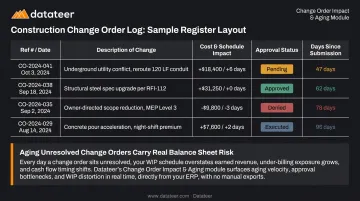
The Change Order Log
Every project needs a maintained change order log — a centralized register tracking:
- Reference number and date
- Description of change
- Cost impact and schedule impact
- Approval status (pending, approved, denied, executed)
- Days since submission (aging)
This log functions simultaneously as a project management tool and a financial audit trail. The CFMA notes that unapproved change orders often create underbillings on the WIP schedule, and that lenders may remove unapproved change orders from contract price and working-capital calculations entirely. An aging, unresolved change order isn't just a paperwork problem — it's a balance sheet problem.
Subcontractor Flow-Down
Prime contractors must pass approved change order terms to affected subcontractors promptly. Delays create subcontract disputes, payment misalignment between contract tiers, and compounding liability if the prime has accepted changed scope from the owner but hasn't formally authorized the corresponding subcontractor work.
Contract Clause Preparation
Proactive management starts in the original contract. Before any project begins, review and clarify:
- Notification requirements and deadlines
- Approval timelines for owner review
- Markup percentages for overhead and profit
- Dispute resolution procedures
Vague contract language creates friction precisely when urgency is highest : when a change event occurs mid-project and parties disagree on what was agreed to at signing.
Real-Time Financial Visibility
Getting the contract language right solves the process problem. The financial problem is different: the lag between when a change order occurs in the field and when its impact surfaces in reporting.
Research shows that only 1 in 3 contractors say their change order process works well, and the average change order cycle runs nearly seven weeks. Traditional ERP reporting presents change order data in a project-by-project, transactional format. A CFO managing a portfolio of 20 active jobs would need to run separate reports for each project, manually consolidate them in Excel, and recalculate margin impact by hand. By the time that picture is assembled, the data is already weeks old.
Datateer's Change Order Impact & Aging Analytics module addresses this directly. It pulls change order data from Procore, Sage, Vista, Spectrum, and Acumatica automatically, tracking:
- Lifecycle status for each change order (pending, approved, denied, executed)
- Aging by days since submission
- Margin impact tied to specific cost codes
It also flags situations where work has been performed in the field but the change order hasn't yet been approved — creating a real-time view of margin exposure before it becomes a month-end discovery.
That aging and status data flows into the Job Costing & Cost-to-Complete dashboards (where pending change orders appear as a distinct line item in projected final cost) and the Margin Protection dashboards (where change order denial is flagged as a named margin fade driver).
A Double L Management business analyst described the shift: "The very first time we accessed our data through a Datateer analytics dashboard, that one click replaced two weeks worth of prior work."
The platform runs on a flat annual subscription starting at $10,000/year per data source, with unlimited users. PMs, project executives, controllers, and claims teams all work from the same real-time data without seat fees or module upgrades.
Common Change Order Mistakes and How to Avoid Them
Treating Change Orders as Exceptional Events
The most damaging misconception is that change orders signal something went wrong. Most are routine modifications driven by owner decisions, incomplete design information, or site realities. Teams that treat change orders as exceptions rather than expected process steps develop poor documentation habits and miss notification deadlines.
Proceeding Without Written Approval
Many contractors begin changed work under a verbal agreement, trusting that the owner will sign later. As construction law firm Taft notes, proceeding without a signed change order can waive rights to payment for that additional work entirely. Waiting for written authorization costs a brief delay. Skipping it can cost the entire change order value — and there's rarely a legal remedy once the work is done.
The Scope Creep Trap
Small informal changes often fall below the threshold where teams bother with formal documentation. Each one seems minor. Collectively, they accumulate into significant uncompensated work.
Finance managers reviewing WIP reports without complete change order data will consistently understate actual project costs and overstate projected margins. The data isn't wrong — it's just incomplete because the change order data was never captured. Watch for these early warning signs:
- Verbal approvals substituting for written sign-offs on small scope additions
- Field crews starting work before the change order reaches the office
- Informal "while you're at it" requests logged only in emails or texts
- End-of-project surprises where accumulated informal changes exceed documented ones
Frequently Asked Questions
Who pays for construction change orders?
Payment responsibility depends on the cause. Owner-requested changes are paid by the owner. Contractor errors are typically absorbed by the responsible party. Unforeseen site conditions are generally the owner's financial responsibility under standard contract forms. The signed change order establishes who pays — which is why getting it signed before work begins matters.
What should be included in construction change orders?
Every change order needs six core elements:
- Project and contract identification
- Detailed description of the scope change
- Line-item cost breakdown
- Schedule impact and revised completion date
- Updated total contract value
- Dated signatures from authorized representatives of all relevant parties
What is the reason for construction change orders?
Change orders formalize any modification to the original contract's scope, cost, or schedule. Common triggers include owner-requested scope additions, unforeseen site conditions, design errors or omissions, material substitutions, and post-contract regulatory changes discovered during construction.
What is the difference between an RFI and a construction change order?
An RFI (Request for Information) is a question submitted to resolve ambiguity or fill gaps in the contract documents — it does not modify the contract. A change order is the formal agreement that actually alters contract terms. An RFI may identify the need for a change order, but the RFI itself carries no contractual authority.
What is the difference between a change order and a Construction Change Directive (CCD)?
A change order requires mutual agreement from all parties before work proceeds. When urgency outpaces negotiation, a CCD is a unilateral owner or architect directive instructing the contractor to begin work immediately. It is typically formalized into an agreed change order once cost and time terms are settled.
How do change orders affect the project budget and schedule?
Each change order can increase or decrease the contract sum and extend or compress the schedule. Their cumulative effect can significantly inflate total costs, delay cash flow, and push the completion date — making real-time tracking of open, approved, and disputed changes critical to staying ahead of project financials.