Those gaps aren't bugs in the platform. They're deliberate. Sage Intacct's best-in-class design philosophy means it focuses on doing a few things exceptionally well and relies on a marketplace of 350+ integration partners to fill the rest. For finance teams, that means the right integration stack matters as much as the ERP itself.
This guide covers the best Sage Intacct integrations across five workflow categories — AP automation, expense management, close management, FP&A, and analytics — with a consistent evaluation framework so you can compare options against your actual gaps, not just feature lists.
Key Takeaways
- Sage Intacct intentionally leaves gaps in AP automation, expense management, close orchestration, FP&A, and analytics — purpose-built integrations outperform any single platform in each of those areas.
- The best integrations connect via bidirectional API, map to all Sage dimensions, and keep Sage as the system of record — not a secondary ledger.
- Ramp closes books up to 8x faster for finance teams using it with Sage Intacct; Stampli implements within weeks.
- For construction teams, Datateer replaces manual WIP builds with real-time dashboards — 12 pre-built reports live within 2–4 weeks of connecting to Sage Intacct.
- The right integration passes four tests: deep API connectivity, fast time-to-value, room to scale, and workflows specific to your finance function.
Why Finance Teams Need Sage Intacct Integrations
Sage Intacct is trusted by 30,000+ finance teams globally — and the platform earns that trust on GL strength, multi-entity management, and financial controls. Its Financial Assurance agent flags unusual journal entries against materiality thresholds. It can consolidate hundreds of entities across currencies in minutes. What it doesn't cover is the workflow layer above and around the GL — the processes that generate the transactions in the first place.
The Five Consistent Workflow Gaps
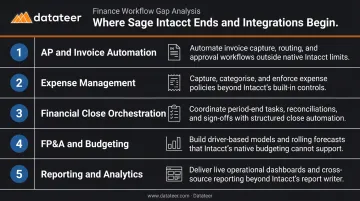
Finance teams running Sage Intacct encounter the same five friction points:
- AP and invoice automation — manual invoice entry, fragmented approval chains, no visibility into where invoices are stuck
- Employee expense management — policy enforcement after the fact, receipt capture that relies on employees remembering to submit
- Financial close orchestration — reconciliation tracking lives in spreadsheets, sign-off status tracked through email threads
- FP&A and budgeting — collaborative forecasting happens outside the ERP in spreadsheets that go stale immediately
- Reporting and analytics — multi-source dashboards, construction-specific KPIs like WIP and job cost margins require manual assembly every period
G2's aggregate reviews of Sage Intacct include 376 mentions of missing features, with advanced reporting among the most cited pain points. That tracks with how the platform is actually positioned.
Solving these gaps requires adding the right tools around Sage — but before selecting any tool, the integration architecture matters as much as the feature set. Integrations that sync via file export reintroduce the manual work you're trying to eliminate.
What Good Integration Architecture Looks Like
The right approach:
- API-level, bidirectional sync — data syncs automatically without manual exports or rekeying
- Full dimension mapping — class, department, location, project, and custom fields all carry through
- Sage as system of record — the integration reads from and writes to Sage; it doesn't create a parallel ledger
Integrations that meet all three criteria keep Sage as the authoritative source of truth while eliminating the manual handoffs that slow finance teams down.
Best Sage Intacct Integrations for Finance Teams in 2026
These six integrations were selected across five workflow categories based on depth of Sage Intacct connectivity, documented ROI, and fit for finance teams at different complexity levels. The first five cover general finance workflows — AP automation, expense management, close management, and FP&A. The sixth is construction-specific: purpose-built analytics for construction CFOs and finance managers running Sage Intacct.
Ramp — AP Automation + Expense Management
Ramp is a US-based spend management platform combining corporate cards, bill pay, invoice automation, and expense management in one interface, with a direct API integration to Sage Intacct. Over 70,000 businesses use Ramp overall, and its Sage Intacct integration is used by thousands of those customers.
The key differentiator: Ramp consolidates AP automation and expense management under one vendor. Card transactions, reimbursements, vendor bills, and payments all sync directly into Sage with GL codes, dimensions, and tracking categories already attached. Policy violations surface before close. According to Ramp's Sage Intacct Marketplace listing, finance teams close books up to 8x faster using the integration. One documented customer cut month-end close by 3 days; REVA Air Ambulance reduced AP processing time by over 80%, from 15–20 minutes per invoice to under 3 minutes.
| Category | Details |
|---|---|
| Key Features | Corporate cards with spend controls, AI-powered bill pay, real-time GL sync, multi-entity support, procurement workflows |
| Best For | US-based finance teams managing both card spend and vendor invoices who want a single consolidated spend platform |
| Integration Approach | API-level bidirectional sync; maps Sage tracking categories, custom fields, and UDDs; supports multi-entity splitting |
Stampli — Invoice-Centric AP Automation
Stampli is an AP automation platform built around invoice collaboration — approvals, comments, GL coding, and audit history all attach directly to the invoice record itself, eliminating the email chains that slow approval cycles.
Stampli is a Sage Recommended Solution for AP automation and the first AP fintech to achieve Plus Tier Marketplace Partner status for Sage Intacct Construction. Its AI assistant, Billy the Bot™, learns GL coding patterns and predicts account assignments, reducing manual coding effort. The two-way sync with Sage updates vendor lists and GL accounts every 5 minutes and runs full sync cycles every 2 hours. Stampli's documented customer outcomes include 63% faster invoice approvals at Purple, 93% faster invoice intake at Spanish Fork City, and 50% processing time reductions at Renova Energy. Implementation runs within weeks, not months.
| Category | Details |
|---|---|
| Key Features | AI-powered invoice coding, collaboration built into invoice record, configurable approval chains, vendor self-service portal, full audit trail |
| Best For | Teams with multi-department approvals or complex routing rules where invoice collaboration and audit readiness are priorities |
| Integration Approach | Pre-built API integration; invoices post to Sage upon approval; two-way sync maintains GL and vendor data alignment |
SAP Concur — Enterprise Expense and Travel Management
SAP Concur is the enterprise standard for expense and travel management. Its Sage Intacct connector pulls GL accounts, vendors, and dimension lists directly from Sage, then posts approved expense reports back as bills or credit card transactions — no manual re-keying.
Concur handles the full expense lifecycle at scale — receipt capture, per diem rules, mileage calculations, policy enforcement, approval routing, and reimbursement. The Sage connector ensures clean posting with full dimension support. That matters because roughly 19% of expense reports contain errors, and correcting each erroneous report costs $52 and takes 18 minutes on average, according to GBTA. Catching policy violations at submission rather than during close eliminates that rework.
| Category | Details |
|---|---|
| Key Features | Receipt capture, per diem and mileage rules, policy enforcement, travel integration, configurable approval workflows |
| Best For | Larger finance teams with significant T&E spend requiring enterprise policy enforcement and audit-ready documentation |
| Integration Approach | Connector maps expense data to Sage GL structure; approved reports post with full dimension support; near real-time data pull eliminates legacy import files |
FloQast — Financial Close Management
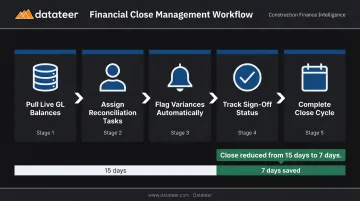
FloQast is a close management and reconciliation platform that pulls live account balances directly from Sage Intacct, assigns task owners, and tracks sign-off status in real time. It manages the people and process layer above the GL — not the GL itself.
FloQast solves the orchestration gap Sage deliberately leaves open. Reconciliation checklists have assigned owners and deadlines. Variance flags surface automatically when account balances shift. Sign-off tracking replaces the email back-and-forth that drags out close cycles. One documented Sage Intacct + FloQast customer reduced close time to 7 days, down from 10–15 days. No manual exports required — it reads live from Sage.
| Category | Details |
|---|---|
| Key Features | Live Sage account balance pulls, reconciliation checklists with owner assignment, automated variance flagging, sign-off tracking, flux analysis |
| Best For | Teams with multiple preparers and reviewers who need structured close workflows and want to reduce close cycle time |
| Integration Approach | Direct Sage Intacct connection; real-time GL data sync; no manual exports required |
Planful — FP&A and Collaborative Budgeting
Planful is a collaborative FP&A and workforce planning platform that syncs actuals from Sage Intacct automatically and layers budgeting, forecasting, and scenario modeling on top. It's built for budget cycles that involve department heads outside of finance.
Sage handles actuals well but has no collaborative environment for multi-contributor forecasts. Planful fills that gap. Multiple users work against the same model without version conflicts, actuals sync from Sage nightly, and variance analysis stays current automatically. CalCPA, a Planful + Sage Intacct customer, reduced monthly reporting time by 90% — from 8 hours to 30 minutes — and accelerated annual budgeting by two weeks.
| Category | Details |
|---|---|
| Key Features | Driver-based budgeting models, collaborative multi-contributor budgets, workforce planning, rolling forecasts, scenario analysis |
| Best For | Finance teams managing multi-department budget cycles where version control and contributor access are pain points |
| Integration Approach | Syncs actuals from Sage Intacct nightly for live budget-vs-actual variance analysis; no manual export required |
Datateer — Construction Financial Analytics
Datateer is a construction-focused financial analytics platform that integrates directly with Sage Intacct (and 20+ other construction ERPs) to automate the entire data flow from ERP to executive dashboards. Unlike generic BI tools that require teams to build construction logic from scratch, Datateer ships with the data models already done.
Generic BI implementations for construction can take 18 months and $500K+. Datateer delivers 12 pre-built construction dashboards — WIP reports, job cost tracking, margin fade alerts, labor slippage, AR/AP health, and more — on day one. The Sage Intacct integration syncs data automatically, replacing the manual WIP build cycle with real-time visibility.
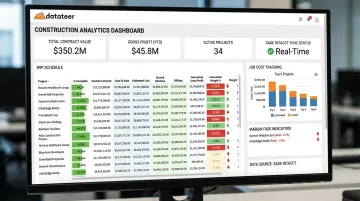
As one Datateer customer put it: "The very first time we accessed our data through a Datateer analytics dashboard, that one click replaced two weeks worth of prior work."
Flat annual pricing starts at $10,000/year per data source with unlimited users — no per-seat costs that penalize growing teams. Annual fees only begin once data is flowing.
| Category | Details |
|---|---|
| Key Features | Real-time WIP reports, job cost dashboards, margin fade alerts, labor slippage tracking, direct Sage Intacct sync, 12 construction dashboards on day one |
| Best For | Construction CFOs and finance managers who need real-time visibility into job performance, WIP, and liquidity — without rebuilding Excel models every period |
| Integration Approach | Direct ERP sync with Sage Intacct; automated data extraction and cleaning; 2–4 week setup with data flowing before annual fees begin |
How We Chose the Best Sage Intacct Integrations
The common mistake finance teams make is selecting integrations based on feature lists. The real question is whether the tool addresses a genuine Sage gap — or whether it duplicates something Sage already does reasonably well.
The Four Evaluation Criteria
Every integration above was assessed against these four factors:
- API connectivity depth: Bidirectional, real-time sync that respects all Sage dimensions, including custom fields and UDDs.
- Time-to-value: Measurable ROI within the first close cycle or billing period — not months down the road.
- Scalability: Multi-entity support that grows with the organization, without per-seat pricing cliffs.
- Workflow specificity: Does it solve a genuine Sage gap, or replicate functionality the ERP already handles?
Two Pitfalls to Avoid
Don't over-invest before you're ready. Enterprise tools like SAP Concur carry implementation complexity that mid-market teams don't always need. If your team has 20 employees submitting expenses, a simpler tool will deliver stronger ROI.
Don't underestimate integration depth. A tool that syncs via CSV uploads instead of a live API connection reintroduces the manual work you were trying to eliminate. The sync method matters as much as the feature set.
Conclusion
The right Sage Intacct integration stack starts with a clear map of where your team actually loses time or visibility — not a wishlist of tools that look useful on paper.
Before adding anything new, audit your current friction points: Is the gap costing more in manual labor, error risk, or delayed decisions than the integration would cost to implement? Prioritize integrations that connect via API, deliver value in the first close cycle, and preserve Sage as your authoritative financial system.
For construction finance teams still building WIP reports manually or waiting days for job cost visibility, that audit tends to surface the same bottleneck. Datateer connects directly to Sage Intacct and delivers 12 real-time construction dashboards within 2–4 weeks — with annual fees starting only once your data is flowing. If you're ready to stop chasing data and start driving decisions, reach out at hello@datateer.com.
Frequently Asked Questions
Can Sage Intacct automate tasks?
Sage Intacct automates core accounting workflows natively — journal entries, multi-entity consolidations, approval routing, and revenue recognition. For tasks like invoice capture, expense coding, close orchestration, and advanced analytics, it relies on third-party integrations from its 350+ partner marketplace.
What are the best Sage Intacct integrations for automated expense workflows?
Ramp and SAP Concur lead for most teams, with Expensify as a lighter-weight alternative. Look for real-time API sync that maps to Sage dimensions, policy enforcement at submission rather than after the fact, and automated posting of approved reports — not manual file imports.
Does Sage Intacct have expense management?
Yes — Sage Intacct includes a native expense module covering receipt capture through reconciliation. Teams add a dedicated tool when they need corporate card reconciliation, per diem automation, travel management, or stricter policy enforcement than the native module provides.
How do Sage Intacct integrations work technically?
Most integrations connect via Sage Intacct's open API, which supports 300+ API methods and bidirectional data sync in real time. The integration maps data fields, dimensions, and entities between systems so GL entries, vendor data, and financial records stay aligned automatically — no manual file exports required.
How long does it take to implement a Sage Intacct integration?
AP and expense tools typically deploy within days to two weeks. Close management platforms like FloQast may require one to two close cycles to fully configure. Analytics platforms like Datateer typically have data flowing within 2–4 weeks. The annual subscription starts only once the data pipeline is live — not at contract signing.
How many integrations do most Sage Intacct customers use?
Most Sage Intacct customers use two or more integrations — the platform is designed to work that way. With 350+ marketplace options, teams can build a stack tuned to their workflow gaps without replacing the core ERP.