Many firms have already adopted an ERP or accounting platform. The harder question is whether the platform they're running was actually designed for construction's financial demands: job costing by cost type, WIP schedules, multi-entity consolidations, AIA billing. Generic accounting software answers that question quickly.
This article covers what Sage Intacct for Construction delivers in practice — three specific advantages that translate into measurable operational outcomes for finance teams running real projects.
Key Takeaways
- Sage Intacct Construction is a cloud-native financial platform built for contractors managing job costing, WIP, and multi-entity reporting
- Real-time job costing eliminates the discovery lag that turns manageable overruns into margin disasters
- Automated WIP calculations replace manual spreadsheet processes that consume weeks of finance team time
- Multi-entity consolidation delivers enterprise-wide financial visibility without spreadsheet merging
- Pairing Sage Intacct with Datateer closes the gap between ERP data and executive-ready decisions
What Is Sage Intacct for Construction?
Sage Intacct Construction is a cloud-native financial management and project accounting platform built specifically for contractors, developers, and multi-entity construction firms. It carries the AICPA's endorsement as the only AICPA-preferred finance solution — which matters when lenders, sureties, and auditors are scrutinizing your financial reports.
The platform serves as the system of record for job costing, AP/AR, revenue recognition, WIP reporting, and multi-entity consolidations — from preconstruction through project close-out. Sage offers three contractor-specific packages, each built on a multi-tenant, true-cloud foundation with automatic updates:
- Sage for General Contractors — job costing, WIP, and multi-entity consolidations
- Sage for Specialty Contractors — AP/AR, revenue recognition, and project accounting
- Sage for Real Estate Developers — development accounting and investor reporting
For construction finance teams, that means a single source of truth across every job — with the reporting accuracy to close faster, spot margin fade earlier, and give lenders and sureties the data they need without a manual scramble.
Key Advantages of Sage Intacct for Construction
The three advantages below focus on operational outcomes — not theoretical capabilities. Each is tied to a financial or operational result that construction CFOs and finance managers are directly accountable for.
Real-Time Job Costing and WIP Visibility
Sage Intacct Construction tracks every cost — labor, materials, equipment, and subcontractors — at a granular level using a Work Breakdown Structure organized by project, task, and cost type. Finance teams get live budget-vs-actual data for every active job.
In practice, costs map in real time as transactions occur. Committed costs (POs, subcontracts) and actual costs update simultaneously. Customizable dashboards surface this data without requiring manual exports or spreadsheet assembly.
The biggest financial risk in construction is margin fade: costs creeping above budget undetected until corrective action is no longer possible. According to KPMG's 2023 Global Construction Survey, 37% of respondents missed budget or schedule targets by 20% or more in the prior year due to ineffective risk management. Only half of project owners reported projects completing on time.
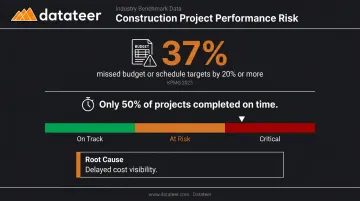
Real-time job costing eliminates that discovery lag. When finance has live job cost data, conversations with project managers shift from reporting what happened to directing what happens next.
KPIs impacted:
- Job cost variance
- Committed cost exposure
- Gross margin by project
- Earned value and Cost Performance Index (CPI)
When this matters most: This advantage is critical for general contractors managing five or more active projects, firms with high subcontractor spend, and organizations where a single project represents more than 15-20% of annual revenue. One blind spot at that scale has material impact on company financials.
Datateer's Job Costing & Cost-to-Complete and Margin Protection dashboards integrate directly with Sage Intacct, surfacing actual costs, committed costs, projected final cost, and margin variance at job, phase, and cost-code level — with automated daily data syncing that keeps executive dashboards current without manual extraction.
Automated WIP Reporting and Revenue Recognition
Sage Intacct Construction automates Work-in-Progress calculations — including earned revenue, over/under-billings, and forecasted margin — and automatically posts revenue recognition journal entries with a complete audit trail.
The system calculates WIP using project cost and billing data, generates WIP schedules by project or entity, and when change orders are approved, directly updates contract values, budgets, and WIP calculations. No manual monthly recalculation.
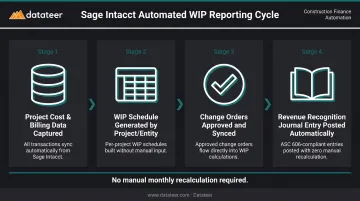
WIP reporting is one of the most time-consuming tasks in construction accounting. Many firms spend the better part of two weeks per month producing WIP reports manually in spreadsheets, creating a significant lag between project reality and what leadership sees. Double L Management, a Datateer client, described the before-and-after this way: "That one click replaced two weeks worth of prior work."
Automating this process eliminates both the lag and the risk of formula errors compounding over time. Inaccurate WIP isn't just an efficiency problem either: as NASBP notes, underbillings and WIP inaccuracies directly affect surety processing and can distort project profitability signals in ways that create bonding and banking risk.
KPIs impacted:
- WIP accuracy rate
- Over/under-billing balance
- Period-end close time
- Revenue recognition variance
- Audit finding rate
When this matters most: Firms closing on surety bonds, those undergoing lender reviews, firms with more than a dozen active projects producing monthly WIP schedules, and any team where finance spends more time assembling data than analyzing it.
Multi-Entity Consolidation and Cloud-Based Scalability
Sage Intacct Construction supports multiple legal entities, locations, and currencies within a single environment, automating intercompany eliminations, consolidation entries, and cross-entity reporting without separate instances or spreadsheet merging.
Entities share common data (vendors, customers, GL accounts) while maintaining separate books. Consolidations run automatically, with elimination entries handled by the system.
Sage's product pages cite the ability to consolidate hundreds of entities in minutes, compared to the days manual consolidation typically requires. The platform also reports that users can reduce average month-end close time by up to 50% and increase time spent on analysis by up to 75%.
The open API architecture integrates with Procore, payroll platforms, and field management systems, connecting financial and operational data in one place.
Construction firms managing multiple entities through separate QuickBooks instances or legacy platforms waste significant finance team hours on manual consolidation, introduce reconciliation errors, and lose visibility at the enterprise level. Sage Intacct eliminates that overhead and delivers a consolidated view on demand.
The cloud-native architecture means new entities, projects, or users can be added without IT infrastructure changes. New entities go live in hours, not weeks — no reimplementation required as the firm grows.
KPIs impacted:
- Consolidation cycle time
- Intercompany reconciliation errors
- System uptime and accessibility
- IT maintenance cost per user
- Time-to-onboard new entity
Who needs this most: Firms operating across multiple states or subsidiaries, companies that have grown through acquisition, and finance teams currently producing consolidated reports by manually combining entity-level spreadsheets at month-end.
What Happens When Construction Firms Rely on Outdated Financial Tools
The consequences of operating without construction-specific, cloud-based financial management aren't inconveniences — they're operational and strategic risks:
- Stale WIP data creates a 10-20 day blindspot between project reality and financial statements; leadership makes decisions based on what was true two weeks ago
- Manual job costing in spreadsheets introduces formula errors, version-control conflicts, and inconsistent cost code mapping — producing reports that can't be trusted for bonding, banking, or strategic planning
- FMI research found that the construction industry lost $1.84 trillion due to poor data management in 2020, with 14% of rework attributed to bad data
- Without automated consolidation, multi-entity firms burn finance team hours on reconciliation that adds no analytical value and delays the monthly close by days or weeks
- No bandwidth for risk flagging: finance teams buried in data assembly can't flag margin fade, cash flow stress, or cost overruns until it's too late to course-correct
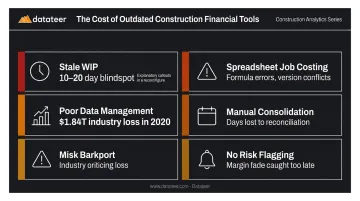
Data quality and reporting speed sit at the root of all five problems. That's where construction-specific financial platforms like Sage Intacct are designed to intervene.
How to Get the Most Value from Sage Intacct for Construction
Sage Intacct delivers its full value when it's configured correctly from the start and used consistently as a living system — not a transaction recorder.
Configure It for How You Actually Work
Set up a chart of accounts and Work Breakdown Structure that mirrors how the firm bids and tracks jobs. Cost code data is only meaningful when it's consistent and comparable across projects. This is the single most important configuration decision — everything downstream depends on it.
Drive Adoption Across the Workflow
The platform works best when all data entry happens in the system:
- Field teams logging time and expenses via mobile
- Subcontractor invoices flowing through AP automation
- Change orders approved inside the workflow, not via email
Data quality upstream directly determines the reliability of dashboards and WIP reports downstream. A well-configured Sage Intacct that only captures 60% of transactions will produce unreliable reports — and unreliable reports drive the wrong decisions.
Extend the Reporting Layer
Firms that see the greatest return from Sage Intacct are those that extend its reporting capability with construction-specific analytics tools. Datateer integrates directly with Sage Intacct to sync financial data and surface real-time construction dashboards, including WIP & Financial Truth, Job Costing & Cost-to-Complete, Margin Protection, Cost Variance, and 12+ additional dashboards available from day one.
The integration handles data cleaning and cost code standardization automatically, so inconsistencies in the ERP don't carry into reporting. Key details:
- Setup: 2–4 weeks, with data flowing before annual fees begin
- Pricing: Flat $10,000/year per data source, unlimited users
- No per-dashboard or per-seat fees
Conclusion
Sage Intacct for Construction changes how finance teams operate — moving from assembling data to acting on it. That shift protects margins by surfacing problems while there's still time to course-correct, not after the project closes.
Its advantages compound over time. Firms that configure it well and use it consistently develop stronger financial discipline, faster close cycles, and more credible reporting for lenders, sureties, and ownership — all of which support growth.
Getting the most from Sage Intacct requires ongoing attention to data quality and workflow adoption. It also means pairing it with a reporting layer that surfaces WIP trends, margin signals, and cash flow gaps in real time — turning ERP data into decisions leadership can act on. Datateer connects directly to Sage Intacct to deliver exactly that, with pre-built construction dashboards live in 2–4 weeks.
Frequently Asked Questions
What are the features of Sage Intacct?
Sage Intacct's core feature set includes job costing, WIP automation, AP/AR management, multi-entity consolidation, customizable dashboards, open API integrations, and cloud-based access. These capabilities are purpose-built for construction and financial services firms, with specific construction packages for general contractors, specialty contractors, and real estate developers.
Is Sage Intacct Construction good for small contractors?
Sage Intacct Construction is best suited for mid-sized to large firms, typically $10M+ in revenue, managing multiple projects or entities. Smaller single-entity contractors may find Sage 100 Contractor more cost-appropriate, while firms expecting to grow benefit from Sage Intacct's scalability and multi-entity architecture.
How does Sage Intacct handle WIP reporting for construction?
Sage Intacct automates WIP calculations using project cost and billing data, producing real-time schedules that show earned revenue, over/under-billings, and forecasted margin by project or entity. It posts revenue recognition journal entries automatically and updates WIP when change orders are approved, eliminating the manual spreadsheet work that typically consumes month-end close.
What is the difference between Sage Intacct Construction and Sage 100 Contractor?
Sage Intacct Construction is a cloud-native platform designed for mid-to-large firms needing multi-entity management, advanced reporting, and scalability. Sage 100 Contractor is an on-premise, all-in-one solution better suited to smaller contractors needing integrated job costing and payroll in a simpler, single-entity environment.
Does Sage Intacct integrate with Procore and other construction tools?
Yes. Sage Intacct connects via open API to leading platforms including Procore, payroll systems, and field management tools, syncing financial and operational data between systems and eliminating duplicate data entry throughout a project.
How long does Sage Intacct implementation take for a construction firm?
Implementation typically takes 3-6 months depending on scope and complexity, with some firms going live in as little as 2 months under ideal conditions. Firms working with experienced implementation partners who understand construction-specific chart of accounts and WBS configuration tend to see faster go-live timelines.