The challenge isn't just volume. It's that construction billing is fundamentally event-driven. Invoices go out when milestones are hit, not on fixed schedules. Retainage sits in limbo until project completion. Change orders get approved weeks or months after the work is done. Generic AR automation tools weren't built for any of this.
According to research from Autodesk and FMI, 30% of construction respondents said more than half of their project data is bad and causes poor decisions more than half the time. Automating on top of that data doesn't fix the problem — it just produces errors faster.
This article explains how construction companies automate AR reconciliation correctly: what to prepare, how the process works, and the mistakes that cause most automation projects to stall before they deliver value.
Key Takeaways
- Clean ERP data is the prerequisite — automation won't fix bad source data, it will amplify it
- Construction-specific billing types (AIA progress billing, retainage, change orders) require explicit configuration before any automation layer can handle them
- Direct ERP integration eliminates the manual export cycle where most data errors originate
- Retainage is often the largest single AR reconciliation gap — it must be tracked separately at the project level
- Successful firms redirect finance team time from reconciliation firefighting to forward-looking cash flow analysis
Why AR Reconciliation Is Uniquely Complex in Construction
Most industries send invoices on a schedule. Construction doesn't work that way.
Billing is project-based and milestone-driven. A general contractor submits a progress billing application — typically in AIA G702/G703 format — when a defined percentage of work is complete. That application then flows through a review and approval process before payment is issued.
Meanwhile, the GL has to reflect not just what was billed, but what was withheld, what was approved, and what's still pending.
The Documentation Layers That Must Reconcile
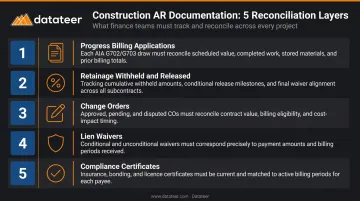
Each of the following creates a distinct reconciliation point that generic AR tools don't account for:
- Progress billing applications — AIA G702 (application and certificate for payment) and G703 (continuation sheet and schedule of values) are the core billing documents; matching them to GL entries requires understanding percent-complete logic
- Retainage withheld and released — typically 5–10% of total project cost per CFMA guidelines, tracked as a separate AR balance rather than embedded in the invoice total
- Change orders — once approved, these trigger revised contract values and new billable amounts; GAO research on 62,000+ USACE changes found nearly 4% took more than a year to finalize, leaving AR balances misaligned for months
- Lien waivers — conditional and unconditional waivers tied to payment status, which CFMA identifies as a critical gating document in the construction payment chain
- Compliance certificates — insurance, bonding, and other documentation requirements that can hold up payment even when billing is accurate
The Multi-Party Payment Chain
Construction doesn't have a single payer-payee relationship. Owners pay GCs, who pay subs, who pay suppliers — and a delay or dispute at any level cascades upward.
Under federal construction contracts, progress payments are due 14 days after receipt of a proper payment request, and prime contractors must pay subcontractors within 7 days of receiving payment from the government. Tracking AR reconciliation manually across this chain — on concurrent projects with different billing cycles — is where construction finance teams lose the most time each month.
How to Automate Accounts Receivable Reconciliation in Construction
Step 1: Clean and Standardize Your ERP Data
Automation cannot fix bad source data. This is the most important thing to understand before starting any integration project.
Before connecting any tool, audit your ERP for:
- Inconsistent or missing cost codes across projects
- Duplicate customer records tied to the same contract
- Unapplied cash sitting outside invoice records
- Retainage embedded in invoice totals rather than tracked as a separate balance
- Change orders rolled into base contracts instead of recorded as distinct line items
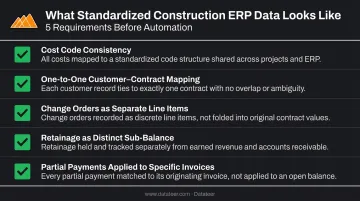
What "standardized" looks like in construction:
- Cost codes applied consistently across every project using the same naming structure
- Customer accounts mapped one-to-one with contracts (not split across multiple records)
- Change orders recorded as separate line items with their own approval status
- Retainage tracked as a distinct AR sub-balance per project, not folded into the billable total
- Partial payments applied against specific invoices, not left as unapplied cash
Datateer's automated data extraction and cleaning engine handles cost code standardization, broken entries, and cross-system mapping as part of the 2–4 week implementation process. But even that layer works better when the underlying ERP data reflects accurate, consistent input. Firms that invest a week in ERP cleanup before implementation typically cut exception rates in half during the first reconciliation run.
Step 2: Map Construction-Specific Billing Types to Automation Rules
The automation layer needs explicit rules for each billing type the firm uses. Progress billing based on percent-complete behaves differently from time-and-material billing, which behaves differently from unit-price billing. None of these are interchangeable in a reconciliation engine.
Four billing rules that need explicit mapping:
- A 10% retainage hold must reduce the collectible AR balance on each draw — not just appear as a note in the invoice record
- A change order approval triggers a revised contract value, which then creates a new billable amount that must reconcile against the original contract line
- Lien waiver status should gate whether an invoice can be marked as fully reconciled — an invoice paid but missing a conditional lien waiver isn't closed
- T&M billing requires labor and material line items to reconcile against cost codes, not just against a contract total
Two Datateer modules cover this directly:
- Retainage Tracking — tracks AR retainage (held by owners) and AP retainage (held on subcontractors) separately, by project and owner relationship
- Change Order Impact & Aging Analytics — tracks change orders across their full lifecycle (pending, approved, denied, executed) with aging by days since submission and revenue impact tied to specific cost codes
Step 3: Connect the ERP to an Automated Data Pipeline
The core of construction AR automation is a reliable, direct connection between your ERP and the analytics or reconciliation layer. This eliminates the manual export-import cycle that introduces most data errors.
Key integration requirements:
- Direct connection to your ERP's data (not reliance on CSV exports or manual syncs)
- Support for your ERP's specific data schema, including construction-specific fields
- Automatic cost code remapping when codes differ across projects or entities
- A refresh frequency that keeps AR balances current enough to act on
Datateer connects directly to 20+ construction ERPs and project management platforms — including Procore, Sage 100/300/Intacct, Viewpoint Vista, Viewpoint Spectrum, Acumatica Construction, Foundation Software, CMiC, and Jonas Construction — with automated overnight data sync as standard and more frequent updates available when needed.
The Procore-to-Sage reconciliation is a practical example: Datateer automatically matches Procore project commits to Sage invoices, eliminating the manual VLOOKUP work that typically consumes hours before board meetings or month-end close.
Step 4: Implement Automated Matching, Exception Flagging, and Reporting
Once clean data flows reliably from the ERP, the automation layer can do the actual reconciliation work.
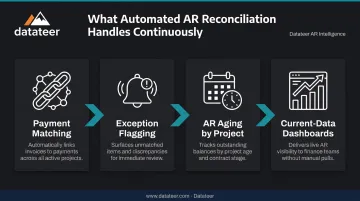
Four functions the automation layer handles continuously:
- Payment matching — incoming payments matched against open invoices by project, billing period, and contract line
- Exception flagging — short pays, unapplied cash, duplicate entries, and missing retainage releases are surfaced automatically rather than discovered during manual review
- AR aging by project — outstanding balances, retainage held, overdue amounts, and disputed items organized by project rather than by customer account
- Current-data dashboards — rather than waiting for month-end close, the AR dashboard reflects live ERP data, giving finance teams the ability to act on cash flow risks while there's still time
Datateer's AR & AP Health dashboard, part of the Cash Operations suite, provides this project-level view — replacing the estimated version of the AR ledger with figures drawn directly from ERP data, without manual spreadsheet work.
What You Need Before Automating Construction AR Reconciliation
The most common reason AR automation underdelivers is that firms begin integration before their underlying systems are ready. Preparation directly determines whether the output is reliable or just faster to produce incorrectly.
ERP and System Requirements
Minimum conditions before automation is viable:
- The ERP must have a functioning AR sub-ledger organized by project (not just by customer account)
- The system must support direct data connection — firms running older on-premise systems with no API access may need a middleware layer first
- Billing period tracking must be consistent — invoices assigned to the correct project and the correct period
Datateer's free ERP Compatibility Check maps your current systems and identifies what's needed to connect. Firms on legacy systems aren't excluded — custom integrations are available for on-premise and Excel-based workflows.
Billing Data and Documentation Standards
Every billing type the firm uses must be recorded consistently in the ERP with the same field structure. Inconsistent documentation breaks automation rules immediately. Common examples include:
- Retainage tracked in free-text notes on some projects, as a line item on others
- Change orders logged under different cost codes across projects
- Billing periods recorded inconsistently (month-end vs. invoice date)
Team and Process Readiness
Automation shifts human judgment — it doesn't remove it. Someone on the finance team needs to own the exception queue: reviewing what the system flags, understanding why, and resolving discrepancies within a defined timeframe. Without clear ownership, flagged exceptions pile up and the efficiency gain disappears.
Key Variables That Affect Automation Results in Construction AR
Even well-configured automation produces different results depending on four variables — all of them within the firm's control.
ERP Data Freshness
AICPA-CIMA guidance identifies monthly as the standard WIP update cadence — but monthly data means reconciled AR balances are already three to four weeks behind actual project activity. Automation tools fed stale data carry the same cash flow risk as manual spreadsheets, just faster.
Overnight sync closes most of this gap. Higher-frequency options close it entirely.
Retainage Tracking Accuracy
Retainage is often the single largest AR reconciliation discrepancy in construction. If the system doesn't track withheld amounts separately by project and milestone, it over-reports collectible AR.
Firms without project-level retainage tracking frequently surface six- or seven-figure reconciliation gaps when automation runs for the first time. Those amounts were there all along — manual aggregation just kept them hidden.
Change Order Volume and Recording Lag
Unrecorded or late-recorded change orders create phantom AR: invoices issued against contract values that haven't been updated in the system yet. The automation layer then flags those valid invoices as over-billings.
With high change order volume, the exception backlog can grow faster than the team can clear it. At that point, the efficiency gains from automation start eroding.
Multi-Entity or Multi-ERP Complexity
Firms managing multiple entities, JVs, or more than one ERP face a data consolidation problem before reconciliation can even begin. Cost codes need to align and data logic needs to map across entities — that groundwork has to exist before cross-entity AR reconciliation is possible.
Without it, consolidated AR balances will always need manual adjustment, regardless of what the automation layer does downstream.
Common Mistakes When Automating Construction AR Reconciliation
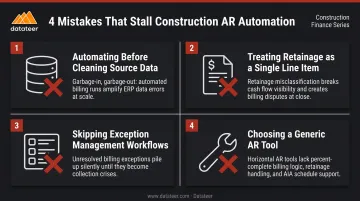
Most automation failures in construction AR aren't technology problems — they're implementation problems. These four mistakes account for the majority of stalled or abandoned projects.
Automating before cleaning source data. Firms that connect their ERP to an automation tool without first resolving duplicate records, unapplied cash, and inconsistent cost codes produce reports that are faster to generate but still wrong. Finance teams lose trust in the system and revert to spreadsheets within weeks.
Treating retainage as a single line item. Automation rules that don't distinguish retainage withheld from collectible AR will consistently misstate the firm's receivable position. Retainage must be tracked at the project and draw level for reconciliation to mean anything.
Skipping exception management workflows. Automation surfaces discrepancies — it doesn't resolve them. Firms that implement automated matching without defining who reviews exceptions, by when, and through what process end up with an exception queue that grows into its own reconciliation problem.
Choosing a generic AR tool instead of a construction-native integration. General-purpose AR platforms typically lack native support for AIA billing formats, retainage structures, or construction ERP schemas. Finance teams end up building custom workarounds that break with every system update. Construction-specific platforms come pre-built with the data models, cost code mappings, and ERP connections that construction billing actually requires — Datateer's integrations with Sage, Viewpoint, Acumatica, and Procore are built for this workflow out of the box.
Frequently Asked Questions
Can you automate accounts receivable?
Yes. AR automation handles invoice matching, payment application, discrepancy flagging, and reporting. In construction specifically, it requires clean ERP data and explicit configuration for construction billing types — retainage, progress billing, and change orders — before it works reliably.
What is AR reconciliation in construction?
It's the process of verifying that invoiced amounts, payments received, retainage balances, and GL entries all align across every active project. Unlike standard AR reconciliation, it must account for progress billing applications, change order approvals, and lien waiver status, not just invoice-to-payment matching.
How does ERP integration affect AR reconciliation automation in construction?
ERP integration quality is the single most important technical factor. A direct, automated sync eliminates the manual export step where most data errors originate. Shallow or delayed integrations produce reconciliations that are already outdated by the time anyone reviews them.
How often should construction companies reconcile accounts receivable?
With automation, firms can move from monthly reconciliation to continuous or weekly reconciliation by project. This surfaces cash flow risks while there's still time to act — not after month-end close when the billing cycle has already moved on.
What construction billing types are hardest to automate?
Retainage release billing and change-order-driven invoices. Both require event-triggered logic tied to project milestones, approvals, and documentation status rather than simple schedule-based rules. Most generic AR tools require custom workarounds to handle either.
What is the difference between AR automation and AR reconciliation automation?
AR automation covers invoicing and collections workflows. AR reconciliation automation verifies that what was billed, received, and recorded in the GL all agree — the back-end accuracy check that keeps financial reporting reliable. It's a distinct problem from sending invoices or chasing payments.