The gap between field procurement and the accounting ledger isn't a technology problem. It's a process and data structure problem. Field teams, procurement staff, and accounting departments operate in separate workflows with no consistent data handoff — and costs fall through the cracks between them.
This article covers the exact steps to build a working integration: what to set up, what variables affect accuracy, and the mistakes that keep the field-to-ledger gap open.
Key Takeaways
- Cost code alignment between field and accounting must happen before any system integration goes live
- Track material costs at three points: commitment (PO), receipt (delivery), and invoice
- Include committed costs alongside actuals — WIP reports are unreliable without them
- Automated ERP integration eliminates the reporting lag that manual processes consistently produce
- Most integration failures trace back to setup errors, not software limitations
How to Integrate Material Cost Tracking with Accounting in Construction
Step 1: Standardize Your Cost Code Structure Across Field and Accounting
Most integrations fail before they start: field teams and accounting are running on different cost code structures, and nobody catches the mismatch until after go-live.
Start by building a master cost code list that reflects how materials are physically organized and purchased on job sites, not just how accounting has historically categorized expenses. A code structure that makes sense to a controller but not to a field supervisor will be ignored in the field — and ignored codes mean untracked costs.
Your cost codes should capture:
- Material type (concrete, structural steel, lumber, MEP materials, etc.)
- Project phase or work scope
- A direct mapping to the corresponding job cost account in the general ledger
Once the list is finalized, every stakeholder — project managers, field supervisors, procurement staff, and accounting personnel — needs to be trained on it before any transactions are processed. One department using a legacy code set while another uses the new one creates reconciliation problems that compound over time.
Step 2: Set Up Purchase Orders and Record Material Commitments
Configure your ERP or construction accounting platform to require a purchase order for every material purchase. Each PO should link to a specific job, cost code, and budget line item.
Committed costs drive this requirement. As defined by AACE International, a committed cost is contractually obligated but not yet paid — meaning the moment a PO is issued, the project's available budget shrinks even if no cash has moved. Teams that skip commitment tracking consistently overestimate how much budget they have left.
Set up approval workflows for POs above defined thresholds. Without them, two gaps open quickly:
- Supervisors calling in orders verbally, which never enter the system
- Personal account purchases that bypass cost tracking entirely
Step 3: Record Material Receipts and Match Them to Job Cost Accounts
Tracking costs only when invoices arrive creates a timing gap between what the project has consumed and what appears in the job cost report. Receipt recording closes that gap.
Implement a three-way match process: when materials arrive on site, the delivery receipt is matched against the original PO and the eventual supplier invoice before payment is approved and costs are posted to the job cost ledger. Sage defines three-way matching as confirming the business pays only for goods actually received at the authorized price.
For this to work in practice:
- Field staff log receipt confirmations digitally — via mobile app or ERP field module — at the time of delivery
- Accounting receives real-time delivery data rather than waiting for paper packing slips to be batched and submitted
- Receipt date, not invoice date, is used to align costs with the period when materials were incorporated into the project
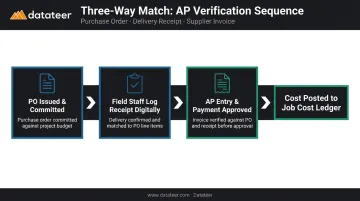
This timing distinction directly affects WIP calculations. If costs only appear when invoiced — which can happen well after delivery — the cost-to-complete estimate will be overstated and the WIP schedule will misrepresent project health during that gap.
Step 4: Reconcile Material Costs with WIP Reports and the General Ledger
At each reporting cycle, pull job cost ledger data for materials — committed, received, and invoiced — and compare it against the project budget. Calculate cost-to-complete and identify variances by cost code.
The job cost ledger, the accounts payable sub-ledger, and the general ledger must all reflect the same material cost figures. Any gap between them signals a posting error, a missing receipt entry, or an unmatched invoice. When those three ledgers don't agree, the WIP schedule becomes unreliable. The AICPA identifies WIP as incorporating contract price, estimated total costs, costs to date, and requisitions to date — every element depends on clean, reconciled cost data.
Manual spreadsheet exports to build WIP reports introduce significant reporting lag. Platforms like Datateer integrate directly with construction ERPs — Procore, Sage 100/300/Intacct, Viewpoint Vista, Viewpoint Spectrum, Acumatica Construction, Foundation Software, CMiC, Jonas Construction, and others — to sync job cost data automatically and refresh WIP dashboards overnight.
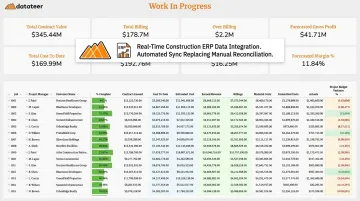
That replaces what would otherwise be days or weeks of manual reconciliation. Double L Management, a Datateer customer, described it plainly: "That one click replaced two weeks worth of prior work."
What You Need Before Integrating Material Cost Tracking with Accounting
Preparation determines whether the integration holds up under field conditions or breaks down within weeks. The most common setup failure is attempting to connect systems before internal data standards are agreed upon.
System Requirements
You need a construction ERP or accounting platform that supports:
- Job cost accounts with cost code mapping
- Purchase order management with commitment tracking
- Accounts payable sub-ledger linked to job cost accounts
Standard general accounting tools — basic QuickBooks configurations, for example — are insufficient for multi-project material tracking at scale. Construction-specific platforms or ERPs with construction modules are required.
Inputs and Conditions
- A complete, approved cost code library finalized before any project begins
- Historical data from past projects cleaned and re-mapped if those records will be used for benchmarking
- A designated owner for each data entry step — specifically, who logs receipt confirmations, when, and in which system
Team Readiness
Field and office teams must agree on data entry protocols before the integration goes live. Without clear ownership, the three-way match process breaks down fast. Define the following before you flip the switch:
- Who confirms material delivery in the field and which system they record it in
- Who matches purchase orders, receipts, and invoices on the office side
- What the escalation path is when a discrepancy holds up invoice approval
Key Variables That Affect Material Cost Integration Results
Even with the right systems and steps in place, a few variables determine whether the integration produces actionable data or just noise.
Cost Code Granularity
If cost codes are too broad — for example, "materials" as a single code across an entire project — the integration produces technically complete data that is operationally useless. There's no way to identify which material category is driving an overrun.
Too many sub-categories create a different problem. Hundreds of line items generate data entry burden that leads to misposting — field teams will skip or guess codes rather than look up the correct one. A practical middle ground: enough codes to distinguish labor, subcontractors, equipment, and material categories by trade, but not so many that compliance breaks down under field conditions.
Timing of Cost Recognition
Construction accounting can recognize material costs at three stages: commitment (PO issued), receipt (delivery confirmed), or invoice (AP entry). Relying solely on invoice — the most common default — creates a gap between what the project has actually consumed and what appears on the job cost report.
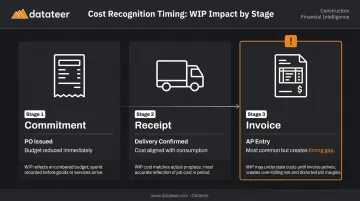
Under ASC 606, PwC notes that when using the cost-to-cost input method, costs that don't depict performance should be excluded from progress measurement. This means cost timing isn't just an operational concern — it has direct revenue recognition implications.
Data Source Integration Between Procurement and Accounting
When procurement runs in a separate platform from the accounting system and data is transferred manually or via periodic exports, any delay creates a discrepancy between what the project manager sees and what accounting reports show.
Research from Autodesk and FMI found that better data strategies could save the global construction industry $1.85 trillion in estimated losses from bad data. A separate Autodesk/Deloitte survey found 80% of construction companies are not data leaders — and the procurement-to-accounting disconnect is one of the clearest reasons why.
Closing that gap requires automated reconciliation between the two systems. Datateer's engine, for example, reconciles Procore project commits to Sage invoices without manual VLOOKUP work — eliminating the version mismatch that typically surfaces when procurement and accounting run on separate platforms.
Common Mistakes When Integrating Material Cost Tracking with Accounting
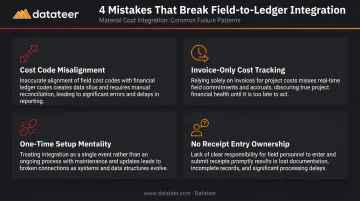
Most integration failures aren't technical — they're process failures that compound quietly until the data becomes unreliable. These four mistakes account for the majority of breakdowns:
Configure cost code alignment before go-live, not after. Teams that stand up the integration while still running inconsistent or legacy codes produce data that can't be compared across projects or periods — worthless for forecasting and benchmarking.
Track materials at receipt and commitment, not just at invoice. This is the most common timing error. Job cost reports lag reality by weeks, and any overrun identified at invoice stage is already locked in with no room to intervene.
Treat integration as an ongoing process, not a one-time IT setup. Cost codes evolve, vendors change, and change orders introduce new cost categories. Without a maintenance protocol, exceptions accumulate outside the system and the data degrades over time.
Assign explicit ownership for receipt data entry. When no one is responsible for logging delivery confirmations, three-way match breaks down — invoices get approved without verified receipt, creating direct exposure to billing errors and inflated costs.
Troubleshooting Material Cost Tracking Integration Issues
Variance Between the Job Cost Report and the General Ledger
Likely cause: Materials posted to the job cost ledger under one cost code were recorded in the GL under a different account — often due to manual override during AP entry or a mapping error in the ERP configuration.
What to check:
- Run a reconciliation report comparing job cost account balances to corresponding GL accounts by project
- Identify transactions where the cost code in the job ledger doesn't match the chart of accounts mapping
- Correct the posting rules in the ERP to prevent the mismatch from recurring
WIP Reports Showing Incorrect Cost-to-Complete Estimates
Root cause: Committed costs (open PO balances) aren't being pulled into the WIP calculation. The system treats unordered budget as available when materials are already contractually obligated.
What to check:
- Confirm the WIP reporting module includes committed cost columns alongside actual costs incurred
- Verify that closed or partially invoiced POs are updating the commitment balance correctly
Field-Entered Cost Codes Not Matching Accounting System Records
Root cause: The field team is working from a locally maintained cost code list — a paper form, spreadsheet, or outdated system configuration — that has drifted from the master list in the accounting system.
What to check:
- Export the active cost code list from the accounting system and compare it against what field staff are using
- Implement a single-source master list in the ERP that both field and accounting systems pull from
- Archive all local versions to prevent parallel lists from re-emerging
If your firm is doing this reconciliation across multiple ERPs or data sources, automated cost code standardization tools (like Datateer's data cleaning module) can compress what's otherwise a multi-day manual effort into an overnight sync.
Frequently Asked Questions
What are the steps involved in material control in cost accounting?
The core steps are: define cost codes, issue POs to create committed cost records, record receipts against job cost accounts, perform three-way matching on invoices, and reconcile material balances against the project budget at each reporting cycle.
What is a common method used for tracking and controlling costs during a construction project?
Job costing is the primary method — assigning every material, labor, and equipment cost to a specific job and cost code. The percentage-of-completion method then ties these costs to revenue recognition in WIP reporting.
What is the difference between CIP and WIP accounting?
CIP (Construction in Progress) is a balance sheet asset account used by owners or developers to accumulate costs on uncompleted projects. WIP reporting is a contractor-side tool that compares costs incurred, revenue earned, and billing to assess job profitability and identify over- or under-billings.
How do cost codes connect material tracking to construction accounting?
Cost codes are the shared language between field procurement and the accounting system. Each material purchase is tagged with a code that maps to a specific job cost account in the general ledger, enabling accurate budget tracking and variance reporting across projects.
What causes discrepancies between material costs in the field and the accounting system?
The most common causes: cost code mismatches between field entry and accounting, recording costs at invoice date rather than receipt, committed costs (open POs) being excluded from cost reports, and manual data transfers that introduce timing gaps or entry errors.
How does material cost integration affect WIP reporting in construction?
Accurate material cost integration ensures WIP reports reflect the true cost-to-complete. If material commitments or receipts are missing from the data, the WIP schedule understates costs incurred. Projects appear healthier than they are, and over-budget jobs don't get flagged until it's too late to course-correct.