The gap shows up fast. Project managers work in one system, AP teams in another, field crews on paper timesheets, and the finance team manually rebuilding WIP reports in spreadsheets every month. When those systems don't talk to Foundation, data lags, reconciliation errors pile up, and decision-making slows down.
The real value comes from building a connected tech stack. When the right tools sync directly with Foundation, teams eliminate duplicate data entry, reduce manual errors, and get a current view of project finances — without someone manually moving data between systems. According to Ardent Partners' 2024 AP benchmarks, best-in-class AP teams process invoices in 3.4 days at $2.81 each, compared to an industry average of 10.1 days at $9.87 — a gap that proper integration directly addresses.
This article covers the best construction software tools that integrate with Foundation, organized by the operational gap each one solves.
Key Takeaways
- Foundation Software handles job costing, payroll, and billing — but specialized integrations extend what it can do
- Procore bridges field and office — project management, document control, and Foundation sync in one
- hh2 automates AP and time tracking with native Foundation sync for invoices and payroll
- WorkMax — now part of Foundation — sends GPS-verified field time straight to payroll and job costing
- Stampli provides AI-powered AP automation with two-way Foundation sync for vendors, POs, and invoice data
- Datateer pulls Foundation data into real-time executive dashboards, replacing manual WIP reporting
What Is Foundation Software and Why Integration Matters
Foundation Software (by Foundation Software, LLC) is a purpose-built construction accounting platform with nearly 40 years in the industry and more than 43,000 construction professionals using it nationwide. Core modules built specifically for commercial and government contractors include:
- Job Costing and financial reporting
- Payroll, General Ledger, Accounts Payable, and Accounts Receivable
- Purchase Orders, Subcontracts, and WIP reporting
Foundation handles the financial core exceptionally well. What it doesn't cover is field operations, automated AP workflows, jobsite labor tracking, or executive-ready dashboards — and those gaps show up fast.
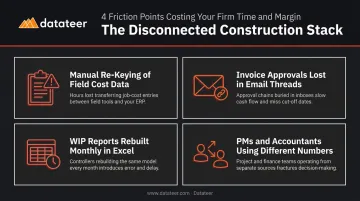
When those functions run in disconnected systems:
- Cost data entered in the field has to be manually re-keyed into Foundation
- Invoice approvals happen in email threads that never touch the accounting system
- Month-end WIP reports get rebuilt from scratch in Excel every time
- Project managers and accountants are working from different numbers
Each tool below solves a specific operational gap and connects directly to Foundation so data flows automatically.
Best Construction Software That Integrates with Foundation
These tools were selected based on verified Foundation integration documentation, construction-specific functionality, and the distinct problem each one solves.
Procore
Procore is the leading construction project management platform, used by general contractors to manage RFIs, submittals, drawings, change orders, daily field reports, and subcontractor workflows across complex multi-site projects.
The Foundation integration — listed in the Procore Marketplace and built by Foundation Software — connects field operations to the financial books without manual data transfer. Procore handles document control and field execution; Foundation handles accounting. Each system stays current because the sync runs automatically.
What syncs between Procore and Foundation:
- Procore Budgets → Foundation Job Costs
- Procore Commitments → Foundation PO/Subs
- Procore Change Orders → Foundation Job Cost Change Orders
- Procore Companies → Foundation Vendors
Note: The integration requires Procore's out-of-box Work Breakdown Structure (Subjob, Cost Code, Cost Type) to remain unchanged — a technical requirement to confirm before committing.
| Category | Details |
|---|---|
| Key Features | RFI and submittal tracking, drawing management, change order workflows, subcontractor portal, mobile field access |
| Best For | General contractors managing complex projects with large field teams and extensive document workflows |
| Integration Type | Bidirectional sync of committed costs, change orders, subcontract data, budgets, and vendor records |
hh2
hh2 is a cloud-based workforce and AP management platform built specifically for construction. It covers payroll, HRIS, time tracking, AP routing, and field expense capture — with a dedicated Foundation integration that syncs payroll and job cost data natively.
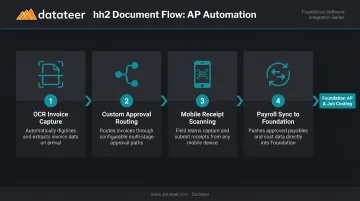
Document Flow is the key module: it uses OCR to capture invoices automatically, routes them through custom approval workflows, and syncs approved invoice data directly into Foundation's AP and job costing modules. hh2 also syncs job and phase codes from Foundation, so field employees assign time against the correct cost codes from day one.
hh2 Document Flow capabilities:
- OCR-based invoice data capture with upload path flexibility
- Custom approval routing across cost types and commitments
- Mobile receipt scanning for field expenses
- Payroll sync with Foundation job and phase codes
| Category | Details |
|---|---|
| Key Features | OCR invoice processing, custom AP approval routing, mobile receipt scanning, payroll sync, field reports |
| Best For | Contractors looking to automate the full AP lifecycle and connect field expense data to Foundation's job costing |
| Integration Type | Native two-way sync for AP, payroll, and job cost data |
WorkMax
WorkMax is a mobile-first field time tracking and project costing solution — and since Foundation Software acquired WorkMax's parent company (AboutTime Technologies) in May 2023, it's now a native companion product in the Foundation ecosystem.
That acquisition matters for integration depth. WorkMax captures GPS-verified labor hours from the field, assigns them to jobs and cost codes synced directly from Foundation, then pushes that data into Foundation's payroll and job costing modules. There's no re-entry step.
Foundation describes WorkMax as using a secure API to keep field data and Foundation budgets continuously aligned.
WorkMax field data capabilities:
- GPS-stamped clock-ins with patented facial recognition and real-time discrepancy alerts
- Cost code assignment from synced Foundation job and phase codes
- Crew management and equipment tracking
- Certified payroll data flow into Foundation's payroll module
| Category | Details |
|---|---|
| Key Features | GPS-verified time capture, cost code assignment, crew management, equipment tracking, project cost reporting |
| Best For | Contractors needing accurate field labor data tied directly to Foundation's job costing and certified payroll |
| Integration Type | Native integration (WorkMax is a Foundation product line tool) with direct payroll and cost code sync |
Stampli
Stampli is an AI-powered AP automation platform with a centralized hub for invoice capture, coding, approvals, and payments. It integrates with Foundation via a file-based sync and is known for fast deployment that doesn't require heavy IT involvement.
Stampli's AI — called Billy the Bot — learns an organization's invoice management processes and GL coding patterns to automate AP tasks including invoice capture, coding suggestions, and fraud detection. For Foundation users, Stampli syncs vendor lists, GL accounts, open purchase orders, invoice coding, and payment data in both directions.
What syncs with Foundation:
- Vendor lists and vendor management
- GL accounts and open purchase orders
- Invoice coding and cost allocation
- Payment data after approval
| Category | Details |
|---|---|
| Key Features | AI-driven invoice coding, vendor management, integrated payments, collaboration hub, audit trails |
| Best For | Construction finance teams that want fast AP automation with minimal training and strong audit compliance |
| Integration Type | Two-way sync for vendor lists, GL accounts, open POs, and invoice/payment data |
Datateer
Datateer is a construction financial analytics platform that connects directly to Foundation Software to automate the extraction, cleaning, and visualization of financial data into executive-ready dashboards. The platform replaces the manual cycle of exporting Foundation data into spreadsheets and rebuilding WIP reports at month-end.
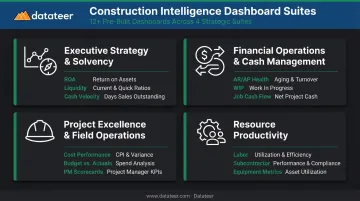
The platform delivers 12+ pre-built construction intelligence dashboards from day one, organized across four strategic suites:
- Executive Strategy & Solvency — return on assets, forecasted liquidity, cash conversion velocity
- Financial Operations & Cash Management — AR/AP health, WIP and over/under billing, job-level cash flow
- Project Excellence & Field Operations — project cost performance, budget vs. actuals, PM scorecards
- Resource Productivity — labor and materials productivity, subcontractor performance, equipment utilization
For Foundation users specifically, Datateer's data cleaning and standardization engine handles cost code normalization across systems, catches malformed entries, and maps each firm's unique data logic into a unified structure. One Datateer customer, Double L Management, noted that "the very first time we accessed our data through a Datateer analytics dashboard, that one click replaced two weeks worth of prior work."
Pricing is flat at $10,000/year per data source with unlimited users, a setup fee paid upfront, and implementation that typically runs 2–4 weeks before data starts flowing.
| Category | Details |
|---|---|
| Key Features | Real-time WIP reporting, job cost dashboards, over/under billing analysis, labor variance tracking, cash flow visibility |
| Best For | Construction CFOs and finance managers who want to stop building reports manually and start using Foundation data for strategic decisions |
| Integration Type | Direct ERP sync with automated data extraction, cleaning, and cost code standardization |
How to Evaluate Foundation Software Integrations
Not all integrations are equal. Here's what actually separates a useful connection from a checkbox claim.
Three Criteria That Matter
- Verified, documented integration
Each tool on this list has official Foundation integration documentation — Procore has a Foundation-built Marketplace listing, hh2 has a dedicated Foundation integration page, WorkMax is a Foundation product, and Stampli publishes a Foundation-specific AP automation page. That's meaningfully different from a tool that exports a CSV you manually import.
- Construction-specific functionality
Generic software adapted for construction rarely handles cost codes, certified payroll, AIA billing, or committed cost tracking correctly. Every tool above was built for construction workflows, not adapted from another industry.
- Data flow depth — bidirectional vs. one-way
This is where buyers most often get surprised. Ask specifically:
- Which direction does data flow — both ways, or only one?
- How frequently does the sync update?
- Are construction-specific fields like cost codes and certified payroll supported?
- Is setup self-service, or does it require IT involvement?
Dodge Construction Network's 2023 automation study found that 53% of general contractors still don't use a technology solution for the majority of their project-management processes. Integration depth — not feature count — is what closes that gap. Data captured in one system should appear in Foundation automatically, with no copy-paste step in between.
Conclusion
Foundation users who pair their ERP with the right complementary tools gain a connected stack where financial data flows automatically across every department. The operational gaps — field time tracking, AP routing, project management, and financial reporting — each have a purpose-built solution that connects directly to Foundation rather than creating a new silo.
When evaluating any integration, push past the compatibility claim. Ask vendors specifically how the sync works, how often it runs, and whether it handles construction-specific data structures like cost codes and certified payroll. If a vendor can't answer those questions clearly, the integration probably isn't as deep as the marketing suggests.
For construction firms that want to turn the data already sitting in Foundation into automated financial dashboards — WIP reports, cash flow forecasts, job costing, and more — without a manual reporting process, Datateer offers direct Foundation integration with a full suite of financial intelligence reports. Reach out at hello@datateer.com or visit Datateer to see how it works.
Frequently Asked Questions
Does Procore integrate with Foundation?
Yes. Procore integrates with Foundation Software through a Data Connector app built by Foundation Software and listed in the Procore Marketplace. The integration syncs committed costs, change orders, subcontract data, budgets, and vendor records between the two platforms so project managers and accountants are working from the same financial picture.
What is Foundation construction software?
Foundation Software is a purpose-built construction accounting ERP covering job costing, certified payroll, accounts payable and receivable, progress billing, and financial reporting. It's designed specifically for commercial and government contractors, with nearly 40 years in the industry and over 43,000 construction professionals using it across the US.
What types of software integrate with Foundation Software?
The main categories are project management (Procore), AP automation (hh2 and Stampli), mobile field time tracking (WorkMax), and financial analytics (Datateer). Each fills a distinct operational gap that Foundation's core accounting modules don't address natively.
How does AP automation integration with Foundation work?
Tools like hh2 and Stampli capture invoices via OCR, route them through approval workflows, then push approved invoice data (vendor, amount, GL codes, job cost allocation) directly into Foundation's AP module. The goal is zero manual re-entry between systems.
Can Foundation Software connect to reporting and analytics tools?
Yes. Platforms like Datateer connect directly to Foundation's data to automate financial reporting, pulling job cost, WIP, and billing data into real-time dashboards. This replaces the manual process of exporting Foundation data into spreadsheets and rebuilding reports at month-end.
What should I look for when evaluating a Foundation Software integration?
Verify whether the sync is bidirectional or one-way, how frequently data updates, and whether it handles construction-specific fields like cost codes and certified payroll. Also confirm that setup doesn't require ongoing IT involvement — the best integrations run automatically after initial configuration.