Key Takeaways
- Manual WIP reports are typically 10–20 days stale by the time finance teams act on them
- Margin fade compounds silently: labor slippage, expediting fees, and unlogged change orders pile up long before monthly reviews catch them
- Consistent cost codes across all projects are the prerequisite for reliable portfolio-level reporting
- A structured daily/weekly/monthly review cadence turns cost tracking from reactive cleanup into proactive management
- Breaking the export-format-reconcile cycle delivers the fastest, highest-impact win for most construction finance teams
Why Real-Time Budget Management Is Critical for Construction Projects
Construction runs on thin margins. CFMA's 2024 Construction Financial Benchmarker reports average net income before taxes of 6.3% of revenue across 1,290 construction companies — with industrial and nonresidential firms at just 4.1%. At those margins, cost variances that might seem small in isolation become serious firm-level exposure when they repeat across a dozen active jobs.
The stakes on individual projects are just as high. A 2023 McKinsey analysis of 532 global projects over $100M found cost overruns averaged at least 79% relative to initial budget estimates. While that data reflects large capital projects, the underlying drivers — scope drift, labor slippage, unmanaged change orders, and delayed detection — affect commercial and industrial contractors at every scale.
The Data Lag Problem
When WIP reports and job cost summaries are assembled manually, the numbers a CFO or financial controller acts on are already weeks old. Datateer's internal benchmarking puts the typical lag window for manually prepared WIP reports at 10–20 days — by the time variance surfaces, the labor hours, material orders, and subcontractor billings driving it have already been committed.
That gap turns financial management into reactive damage control. Firms working from stale data discover overruns after the fact and spend weeks reconstructing what went wrong. Firms with current data catch labor slippage and margin fade early enough to act on it.
Margin Fade and Compounding Cost Drift
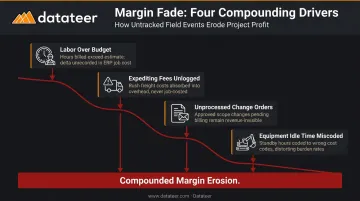
Margin fade rarely announces itself. It accumulates through smaller signals:
- Labor running a few percent over budget on one phase
- Materials delivered late, triggering expediting fees that aren't immediately logged
- Subcontractor change orders sitting unprocessed in an email thread
- Equipment idle time charged to the wrong cost code
None of these individually destroys a job. Combined across phases and multiplied across a portfolio of active projects, they compound into margin erosion that monthly spreadsheet reviews cannot catch in time.
The Bonding and Lender Connection
Real-time cost data also affects firm-level financial relationships. Surety underwriters rely on WIP schedules to evaluate bonding capacity, reviewing gross profit, underbillings, and overbillings as indicators of financial health. Clean, current WIP data signals the financial discipline sureties and lenders expect to see.
The benefits extend beyond financing. Accurate job cost history feeds directly into future estimates — firms that don't track costs precisely cannot price future work with confidence. Real-time tracking closes that loop by making every completed job a reliable data point for the next bid:
- Demonstrates financial discipline to surety underwriters and lenders
- Supports accurate bonding capacity assessments with current WIP schedules
- Converts completed job cost data into reliable benchmarks for future estimates
Types of Construction Cost Tracking Approaches
Cost tracking exists on a spectrum. The right position on that spectrum depends on project complexity, volume, and how quickly financial decisions need to be made.
Spreadsheet-Based Tracking
Most firms start here. Cost data from invoices, payroll summaries, and subcontractor billings gets manually entered into Excel workbooks — typically job by job, often by someone who has other work to do.
For a single-project operation or a very small firm, this can be sufficient. It breaks down quickly beyond that:
- Version control becomes a problem when multiple people edit the same file
- Broken formulas and entry errors go undetected until they cause a reporting discrepancy
- No automatic sync with ERP data means every report cycle involves manual re-entry
- Producing each report consumes hours of labor that finance teams cannot spend on analysis
According to JBKnowledge's 9th Annual Construction Technology Report, 51% of construction companies still used spreadsheets for accounting and ERP workflows, and 44% used them when apps didn't integrate. That's not a niche problem — it's an industry-wide drag on finance team capacity.
ERP and Accounting Software Job Costing
Construction ERPs — Sage, Procore, Viewpoint Vista, Acumatica, Foundation — include built-in job costing modules that categorize expenses against cost codes and compare actuals to budget. This is a meaningful step up from pure spreadsheet management.
The limitation is that storing data in an ERP and turning it into an actionable report are two different things. Most reporting still requires a manual export-and-format step before finance teams can interpret the results — and that last mile consumes hours a CFO or surety reviewer shouldn't be waiting on.
Automated Dashboard and Business Intelligence Layer
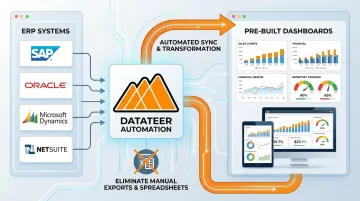
A BI or analytics layer connects directly to the ERP through automated data sync, extracts and standardizes cost code data, and delivers pre-built dashboards without the manual extraction step.
This is where Datateer operates. The platform integrates with 12+ major construction ERPs (Procore, Sage 100/300/Intacct, Viewpoint Vista and Spectrum, Acumatica, Foundation Software, CMiC, Jonas, QuickBooks, and NetSuite), with custom integrations available for systems beyond the standard list. Pre-built dashboards covering WIP reporting, job cost summaries, budget-vs-actual views, and margin protection update on an overnight automated sync — replacing what previously required days of manual assembly.
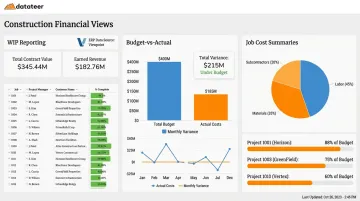
One customer from Double L Management described the shift directly: "The very first time we accessed our data through a Datateer analytics dashboard, that one click replaced two weeks' worth of prior work."
Warning Signs Your Cost Tracking System Is Failing You
These patterns signal financial risk regardless of which tools a firm nominally uses.
Budget Variances Are Discovered Too Late to Act On
Overruns surface at month-end review — after the labor hours, material orders, or subcontractor billings that caused them have already been committed. The problem isn't that variances exist; variances exist on nearly every job. The problem is the timing of detection.
Discovering a 12% labor overrun at month-end, three weeks after the crew finished that phase, leaves no room for correction. Discovering it mid-phase, while the crew is still on-site, creates options.
WIP Reports Take Days or Weeks to Prepare
If producing a WIP report requires pulling data from multiple sources, reformatting exports, and manual reconciliation, the process itself is the problem. Each day of preparation lag is a day where financial risk is invisible to the people responsible for managing it.
The preparation cycle also distorts priorities. Finance teams spend the first week after month-end assembling data rather than analyzing it — which means the insights that could prevent next month's overrun get pushed to the back of the queue.
Cost Code Data Is Inconsistent Across Projects
Different teams using different codes for the same cost category, or codes that don't map cleanly across jobs, breaks portfolio-level reporting entirely. Cross-project comparisons become unreliable. Aggregate margin analysis loses accuracy. Any automated reporting layer inherits the inconsistency from the source data.
Fixing this typically means standardizing cost codes across systems before any portfolio-level reporting becomes reliable. The good news: firms don't need perfectly clean data to start — automated data cleaning tools like Datateer's onboarding engine can map and standardize codes as part of implementation, catching malformed entries and aligning the firm's data logic into a unified structure.
Finance Team Spends More Time Building Reports Than Acting on Them
When a CFM's week is dominated by spreadsheet formatting, data validation, and report assembly, the firm is paying for strategic financial talent to do data entry. That's an opportunity cost problem. Strategic analysis, risk identification, and advisory conversations get deferred — or never happen.
The report-building grind doesn't just slow down the close cycle. It keeps finance teams from doing the work that actually protects margins.
Construction Budget Review Cadence: What to Check and When
Review frequency should match the risk profile and phase of the project. A project in active subcontractor billing with open change orders needs tighter monitoring than one in early permitting. A defined cadence prevents both over-review (wasted time) and dangerous gaps.
Recommended Review Framework
| Frequency | Focus Areas |
|---|---|
| Daily / Per-Shift | Labor hours logged vs. budget, active purchase orders, field-reported cost anomalies |
| Weekly | Budget-vs-actual by cost code, subcontractor billing progress, change order status |
| Monthly | Full WIP report, cash flow forecast, earned value analysis, job cost report by project |
| Quarterly / Milestone | Portfolio margin analysis, historical job cost benchmarking, forecast-to-complete updates |
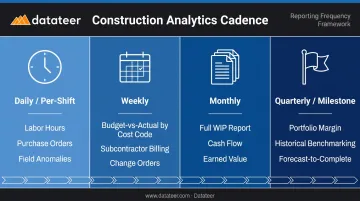
Construction Executive notes that Estimated Cost of Revenue Earned — a critical WIP component — requires regular review, typically monthly, to ensure contracts are progressing as projected. Most firms treat monthly as the floor, not the ceiling.
Adjusting Based on Project Risk
- Tighten to daily and weekly monitoring for projects with multiple active subcontractors, high change order volume, or tight margin profiles
- Shift toward weekly rhythms for projects in low-activity phases like permitting or punch list, where financial risk isn't actively accumulating
- Watch for early warning signals — labor trending over budget, material deliveries slipping, or unresolved change orders aging past 30 days each warrant an immediate step up in review frequency
The right cadence isn't uniform — it follows the money, tightening where exposure is growing and relaxing where risk has stabilized.
Best Practices for Building a Real-Time Cost Tracking System
Standardize Cost Codes First
Real-time tracking is only as reliable as the underlying data. Consistent cost code structures across all projects — with clear rules for how labor, materials, equipment, and subcontractor costs are categorized — are the prerequisite for meaningful automated reporting. Without them, cross-project comparisons produce noise, not insight.
Procore's cost-code guidance notes directly that incorrect cost-code application hinders stakeholders from accurately evaluating a project's financial health. The fix doesn't require a lengthy manual cleanup project. Datateer's implementation process standardizes cost codes automatically, mapping the firm's existing data logic into a unified structure during the 2–4 week setup.
Close the Field-to-Finance Gap
Cost data often exists in the field — timesheets, material receipts, daily logs — but reaches finance days later through manual handoffs. Costs should be recorded at the point of activity, not batched at week-end. That means field personnel and supervisors to log costs in the project management or ERP system as work occurs, rather than batching entries at week-end. When that data flows through a system like Procore that integrates directly with your financial layer, the field-to-office lag collapses from days to hours.
Eliminate the Manual Extraction Step
The highest-impact change most construction finance teams can make is removing the export-format-reconcile cycle from WIP and job cost report preparation entirely.
Datateer connects directly to ERPs like Sage, Procore, Vista, and Acumatica — no manual CSV exports, no spreadsheet reconciliation, no IT requests. The automated data cleaning engine handles standardization. From there, the data flows straight through to dashboards without any remaining manual steps.
What that looks like in practice:
- WIP reporting, budget-vs-actual, job cost summaries, and margin protection dashboards update on overnight sync
- Pricing starts at $10,000/year per data source with unlimited users and no per-seat fees
- Implementation runs 2–4 weeks, with data flowing before annual fees begin
Conclusion
Construction cost tracking is the mechanism by which firms protect margins, catch risk while there's still time to act, and position finance teams as strategic partners rather than report producers.
The path from monthly manual review to real-time visibility requires three things working together: consistent cost codes that produce reliable data, a review cadence matched to where financial risk is actively building, and an automated ERP-to-dashboard data flow that eliminates the preparation lag entirely. Firms that build this foundation gain something more valuable than faster reports: the ability to make decisions while outcomes can still be changed.
Datateer connects directly to your existing ERP — Sage, Procore, Viewpoint, Acumatica, and others — and delivers pre-built cost tracking and job costing dashboards in 2-4 weeks, without a multi-month BI implementation. If you're still closing the books manually each month, the free 15-Minute Workflow Audit is a practical starting point.
Frequently Asked Questions
What is the best software for construction accounting?
Widely used options include Sage 100/300/Intacct, Procore Project Financials, Viewpoint Vista, and Acumatica Construction — with the right choice depending on firm size and project complexity. Keep in mind that most ERPs require manual export steps before data can be used for financial decisions, so the reporting layer sitting above your ERP matters just as much as the ERP itself.
What is the best time tracking app for construction?
Look for tools with mobile entry, cost code tagging, and direct ERP sync — options like Procore Timecards, Rhumbix, and hh2 cover most of these requirements. Accurate time data feeds directly into job cost accuracy, so the quality of labor tracking has a direct impact on whether your budget-vs-actual reports reflect reality.
What is job costing in construction and why does it matter?
Job costing tracks all labor, material, equipment, and subcontractor costs against a specific project budget. Without it, firms have no reliable way to measure true project profitability, spot a job trending toward a loss while work is still in progress, or build the historical cost data that keeps future estimates accurate.
How often should construction companies review project budgets?
A tiered cadence works best: daily for active labor and cost inputs, weekly for budget-vs-actual by cost code and change order status, and monthly for full WIP and cash flow review. Increase that frequency during high-risk phases such as active subcontractor billing or open change orders.
What causes budget overruns in construction projects?
The most common drivers are inaccurate initial estimates, unmanaged change orders, labor productivity shortfalls, and material price escalation. Late detection is usually what turns a manageable variance into a margin-destroying overrun — catching a 5% labor overage mid-phase leaves time to act; finding it at month-end does not.
How does real-time cost tracking differ from monthly reporting?
Monthly reporting shows what already happened and cannot be changed. Real-time tracking surfaces variances while corrective action is still available. The difference isn't just speed — it's the distinction between documenting project history and actually managing project outcomes.