Most coverage of cloud integration focuses on field collaboration or project management — not on the financial back office, where the manual re-entry burden hits hardest. According to a JBKnowledge construction technology survey, 49% of construction firms manually transfer data between applications that don't integrate, and 45% still use spreadsheets for project management.
This article covers five specific ways cloud integration eliminates that manual work — and what each one means for financial accuracy, reporting speed, and margin protection.
Key Takeaways
- Cloud integration connects ERPs, project management tools, and financial dashboards so data entered once flows automatically everywhere it's needed.
- The five biggest data entry savings: ERP-to-dashboard sync, field-to-payroll integration, automated cost code mapping, change order sync, and consolidated job cost reporting.
- Manual re-entry introduces errors that distort WIP reports, cost-to-complete calculations, and billing accuracy — not just wasted hours.
- Integration shifts teams from moving data to acting on it.
What Is Cloud Integration for Construction?
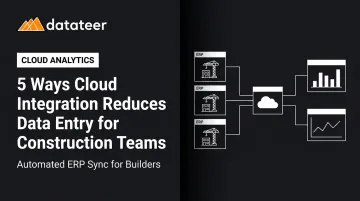
Cloud integration is the automated connection between two or more cloud-based systems — ERP, project management software, payroll, dashboards — so data entered in one platform becomes immediately available in others. No manual export. No copy-paste. No re-entry.
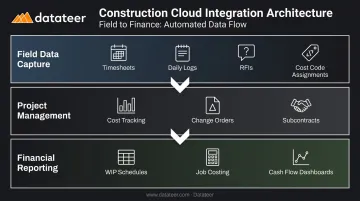
For construction, integration typically spans three layers:
- Field data capture — timesheets, daily logs, RFIs, cost code assignments
- Project management — cost tracking, change orders, subcontracts
- Financial reporting — WIP schedules, job costing, cash flow dashboards
What matters isn't software connectivity as a concept — it's the hours recovered when construction finance teams stop manually moving data between systems that don't talk to each other. The CSV exports, the VLOOKUP marathons, the reconciliation grind before every board meeting: integration eliminates all of it.
5 Ways Cloud Integration Reduces Data Entry for Construction Teams
Way 1: ERP-to-Dashboard Sync Eliminates Financial Report Re-Entry
The most time-consuming data entry in construction finance happens at the end of every reporting cycle. ERP data — job costs, committed costs, earned revenue — gets manually extracted, cleaned, and reformatted into WIP reports, cost-to-complete schedules, and executive dashboards. For many firms, that process takes 10–20 business days per cycle.
Direct ERP integration replaces that entire workflow. Cost data moves from the ERP to financial dashboards automatically, without manual exports or spreadsheet manipulation.
Double L Management, a Datateer client, described the impact directly: "The very first time we accessed our data through a Datateer analytics dashboard, that one click replaced two weeks worth of prior work."
The operational impact compounds quickly. When WIP reports take two weeks to build, project decisions get made on data that's already stale by the time it reaches the leadership team. Integration collapses that lag from weeks to hours.
This matters most for:
- Multi-project firms where monthly close requires consolidating data across dozens of jobs
- Teams using Sage 300, Vista, or Acumatica, where reporting pulls from multiple modules
- Controllers who currently maintain separate spreadsheet models for each job
Datateer's ERP sync pulls job costs, committed costs (POs and subcontracts), earned revenue, and WIP schedule data directly from 12+ connected ERPs — including Procore, Sage, Vista, Acumatica, CMiC, and others. Dashboards refresh overnight by default, with more frequent updates available. Twelve pre-built dashboards are live on day one, covering WIP reporting, job costing, cash flow, and executive KPIs.
Way 2: Field-to-Payroll Integration Removes Timesheet Double-Entry
The traditional field-to-payroll process creates work twice. Field crews record hours — on paper, in a mobile app, or on a timesheet form. A back-office employee then re-keys that same data into payroll and job costing. The hours get entered once in the field and again at the desk.
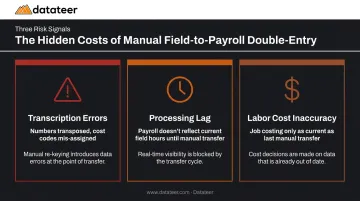
That duplication creates three separate problems:
- Transcription errors — numbers get transposed, cost codes get mis-assigned
- Processing lag — payroll doesn't reflect current field hours until someone manually transfers the data
- Labor cost inaccuracy — job costing entries are only as current as the last manual transfer
When time capture flows directly from field tools to payroll and job cost systems — with cost codes assigned at the point of entry — the back-office re-entry step disappears entirely.
Labor typically accounts for 30%–50% of total construction project cost, which means payroll data accuracy isn't a clerical issue — it's a project margin issue. When labor hours are posted to the wrong cost code or a day late, cost-to-complete calculations drift, and project managers don't see the slippage until it's too late to correct.
Way 3: Automated Cost Code Mapping Replaces Manual Data Translation
Cost code mismatches are among the most persistent sources of manual work in construction finance. Project managers enter data using field cost codes. Accounting needs that data mapped to accounting cost categories. Without integration, someone translates every line item by hand.
That translation work is error-prone by design. It requires knowing two code structures simultaneously and mapping them correctly at volume, for every job, every cycle.
Cloud integration with automated cost code standardization handles this mapping without human intervention. Datateer's data cleaning engine standardizes cost codes across systems, catches broken or malformed entries, and maps the firm's unique data logic into a unified structure automatically. Procore commits reconcile to Sage invoices without VLOOKUP formulas or manual matching.
Areas directly affected:
- Data entry errors in job costing
- Hours spent on end-of-period reconciliation
- Accuracy of cost-to-complete estimates
The Autodesk/FMI Data Advantage report estimated bad data cost the global construction industry $1.84 trillion in 2020, with $88.69 billion attributable to rework. Inconsistent cost code structures are a direct contributor to that category of bad data — they produce cost allocations that look accurate until someone reconciles them.
Datateer handles this normalization during setup, not as a prerequisite for it. Clients don't need to standardize their chart of accounts before going live — the automated cleaning layer manages that as part of the 2–4 week implementation.
Way 4: Change Order Sync Between PM and Accounting Ends Duplicate Record-Keeping
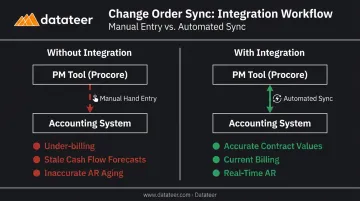
Change orders create a double-entry problem. An approved change order lives in the project management tool — Procore, for example — complete with the scope detail, cost, and approval date. To update contract values, billing schedules, and accounts receivable records, someone manually re-enters that same data into the accounting system.
When that second entry is delayed or missed, the consequences are concrete:
- Billing misses the revised contract value, creating under-billing
- Cash flow forecasts use stale contract totals, producing inaccurate projections
- AR aging reports don't reflect actual receivables, until someone reconciles the two systems
Integrated cloud systems push approved change order data directly to the accounting and billing layer, keeping contract values and committed costs in sync without a second round of data entry.
Payment timing in construction already creates cash flow pressure. The 2019 National Construction Payments Report found that 49% of construction payments were not made on time, and 66% of contractors affected by retainage waited more than 30 days to collect it. Delayed change order entry into accounting compounds that problem — it defers billing and extends the collection timeline unnecessarily.
Datateer's Change Order Impact & Aging module tracks change orders across pending, approved, denied, and executed statuses. It pulls directly from Procore, Sage, Vista, and other integrated systems, and surfaces aging by days since submission — identifying stalled approvals that are eroding margin in real time.
Way 5: Consolidated Job Cost Data Replaces Multi-Spreadsheet Reporting
For firms managing multiple simultaneous projects, portfolio-level reporting creates a compounding manual workload. Each job has its own spreadsheet model. At reporting time, someone consolidates them manually — copying data between files, resolving version conflicts, and hoping nothing changed in the source files between pull and publish.
Every new project adds proportional manual work. A firm running 15 jobs doesn't just have 15 reports to prepare — it has 15 models to maintain, 15 sets of data to transfer, and one consolidated view to rebuild from scratch each month.
Cloud integration creates a single data layer that aggregates job cost data across all projects automatically. New projects added to the ERP flow into the reporting layer without manual configuration.
Datateer's portfolio-level dashboards — including Job Costing & Cost-to-Complete, Cost Variance, and the Construction KPI Library — pull from the unified data layer and refresh overnight. Each new project added to a connected ERP appears in portfolio reporting automatically. No new spreadsheet. No new manual work.
In a spreadsheet-based environment, each additional project adds proportional reporting overhead. In an integrated environment, it adds none.
What Happens When Manual Data Entry Persists in Construction
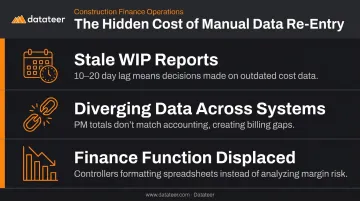
Finance teams operating on manual re-entry cycles face three compounding problems that don't resolve themselves:
WIP reports arrive too late to act on. When they take 10–20 days to build, the numbers are already two to three weeks old by the time they're distributed. Projects get managed on last month's cost data. Slippage that could be corrected goes undetected until it's already priced into the job.
Data entered in multiple systems always diverges. Job cost totals in the PM tool don't match accounting. Billing misses committed costs. Over- and under-billing go undetected until they become a cash flow problem.
The scale of the impact isn't trivial. Research from KPMG's 2023 Global Construction Survey found that only 50% of project owners reported projects completing on time — and manual data gaps create the decision lag that contributes directly to schedule and cost overruns.
Re-entry cycles displace the actual finance function. Controllers and CFOs stuck formatting spreadsheets aren't analyzing labor slippage, budget drift, or liquidity risk. The strategic work of construction finance — protecting margins and forecasting cash — gets crowded out by data logistics.
How to Get the Most from Cloud Integration
Integration delivers its full value only when it connects systems at the data level. Scheduled file exports and shared folders reintroduce the same lag that manual processes create. Real-time or overnight API sync is what makes the automation stick.
A few practical considerations:
Cost code standardization is handled for you. Platforms built for construction normalize cost codes as part of setup — not as a prerequisite. Datateer's automated cleaning engine catches broken entries and maps data logic across systems during a 2–4 week implementation. Clients don't pre-clean their data.
Start with the highest-friction points. ERP-to-dashboard sync and change order sync typically deliver the fastest visible time savings for finance teams. Field-to-payroll integration and cost code mapping reduce errors that often don't appear until month-end close or WIP review.
Measure time saved as a business metric. Datateer's Excel Tax Calculator quantifies what manual reporting actually costs: one example puts it at 40 hours per month × 2 staff × $46/hour × 12 months = $43,846 annually. Errors and delayed decisions add to that figure, but the labor cost alone makes a clear case for change.
Datateer connects to 12+ construction ERPs and delivers 12 pre-built dashboards on day one. Annual pricing starts at $10,000 per data source with unlimited users — and the yearly fee doesn't begin until data is flowing. Teams that want to review their current setup first can book the free 15-Minute Workflow Audit, which focuses on your workflow with no sales presentation attached.
Conclusion
Cloud integration delivers value not through connected software alone, but by cutting out the manual re-entry steps that drain finance team hours and make construction financial data unreliable.
The five areas covered here each address a distinct point where manual work currently creates friction:
- ERP-to-dashboard sync removes the report-building cycle
- Field-to-payroll integration eliminates timesheet double-entry
- Automated cost code mapping ends manual data translation
- Change order sync keeps contract values current in accounting
- Consolidated job cost reporting scales without adding manual overhead
The firms that get the most from integration treat it as an operating standard, not a one-time project. That means reviewing data flows as new tools are adopted, measuring time saved against the cost of staying manual, and directing recovered hours toward the analysis that actually protects margins. Platforms like Datateer — which connects directly to 12+ construction ERPs and typically has data flowing within two to four weeks — are built specifically to make that standard achievable without a months-long BI implementation.
Frequently Asked Questions
What types of data entry does cloud integration eliminate for construction finance teams?
Cloud integration eliminates the re-entry of financial and project data across systems: WIP report preparation, payroll transfers from field to back office, change order entry into accounting, and manual consolidation of job cost data. Any workflow requiring an export from one system and import into another is a candidate for automation.
How does cloud integration connect field data to the back office without manual re-entry?
Integrated systems use direct APIs or ERP sync to push field data — time entries, cost codes, daily progress — directly into accounting and payroll systems. Data entered once in the field bypasses the manual transfer step entirely and flows automatically to every downstream system.
How long does it take to set up cloud integration for a construction ERP?
Timelines vary by complexity, but platforms like Datateer implement in 2–4 week implementation, with data flowing before annual fees begin. That's faster than traditional BI or ERP customization projects, which typically run 6–18 months.
Can cloud integration help with WIP reporting in construction?
Yes — direct ERP integration is one of the highest-impact applications for WIP reporting. It replaces the manual extraction and spreadsheet formatting process with automated data pulls that refresh overnight (or more frequently), collapsing the typical 10–20 day reporting lag to near real-time.
What's the difference between cloud integration and just using cloud storage?
Cloud storage moves files online but still requires manual data transfer between systems. Cloud integration actively connects systems so data flows automatically between them, eliminating the human steps entirely. Shared drives don't solve the re-entry problem — they just change where the file lives.
How does reducing manual data entry improve financial accuracy in construction?
Every manual re-entry step introduces risk: transcription errors, version conflicts, missing records. When data flows directly from a single correct entry, those errors don't accumulate — the same number populates the WIP report, job cost dashboard, and billing schedule without anyone copying it between systems.