Cloud AI Construction ERP promises to break this cycle. By centralizing job costing, field data, procurement, and financial reporting on a single vendor-hosted platform, these systems aim to give construction finance teams the real-time visibility they've been chasing across spreadsheets for years.
But the promise comes with real tradeoffs. Implementation costs are significant. Data migration is messy. And even firms that successfully deploy a cloud ERP often find themselves back in spreadsheets to build the executive dashboards and WIP reports their leadership needs.
This article covers both sides honestly — the genuine advantages, the real-world limitations, and how to structure your investment to actually deliver on the platform's potential.
Key Takeaways
- Cloud AI Construction ERP centralizes job costing, WIP, procurement, and field operations on one internet-hosted platform with AI-driven analytics
- Advantages include real-time financial visibility, workflow automation, field-to-office data sync, and sharper cost forecasting
- Disadvantages to plan for: high upfront costs, complex data migration, heavy change management, and limited out-of-box customization
- AI features — predictive cost analytics, anomaly detection, automated WIP reporting — catch margin fade and cash risks before they compound
- ROI depends on construction-specific KPIs, structured change management, and an analytics layer that turns ERP data into executive-ready reporting
What Is Cloud AI Construction ERP?
Cloud AI Construction ERP is enterprise resource planning software hosted on vendor-managed servers, accessed through a browser or mobile app, and enhanced with artificial intelligence capabilities — built specifically for the financial and operational complexity of construction.
The "construction-specific" distinction matters. Generic cloud ERP handles accounting, procurement, and HR. Construction ERP adds the workflows that generic systems don't natively support:
- Job-level cost tracking across phases, cost codes, and resource types
- Progress billing and change order management
- WIP schedule generation and percentage-of-completion revenue recognition (ASC 606)
- Subcontractor management including compliance and lien waiver tracking
- Certified payroll processing for Davis-Bacon and prevailing wage projects
Those workflows run on different infrastructure depending on the platform — and the deployment model shapes what's actually possible with your data.
On-Premise vs. Cloud vs. AI-Enhanced
The distinction between deployment models matters for decision-making:
| Feature | On-Premise ERP | Cloud ERP | Cloud AI ERP |
|---|---|---|---|
| Hosting | Company servers | Vendor servers | Vendor servers |
| Access | Internal network | Any browser/device | Any browser/device |
| Updates | Manual, IT-managed | Automatic | Automatic |
| AI capabilities | Rare | Limited | Native |
| Upfront cost | High | Lower | Subscription-based |
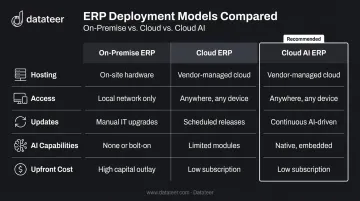
The gap between standard cloud ERP and AI-enhanced ERP comes down to what the platform does with your data. A standard cloud ERP stores and organizes it. An AI-enhanced one detects patterns, flags anomalies, and generates forecasts. That difference is consequential in construction: according to KPMG's 2023 Global Construction Survey, 37% of respondents missed budget and/or schedule targets by 20% or more in the prior year due to ineffective risk management.
Key Advantages of Cloud AI Construction ERP
Real-Time Financial Visibility Across All Projects
Traditional construction finance runs on end-of-period reporting. Project managers update spreadsheets, field staff submit paper timesheets, and accounting reconciles everything after the fact — often weeks after the costs were actually incurred.
Cloud AI ERP breaks this by maintaining a continuously updated dataset that reflects actual costs, billings, and WIP in near real time — meaning a CFO can see where a project stands today, not where it stood three weeks ago. The cost of not closing that gap is well documented: Autodesk and FMI reported that bad construction data caused $1.84 trillion in global losses in 2020, with data quality failures driving an estimated 14% of rework costs.
Automation of Manual Financial Workflows
Cloud AI ERP automates the repetitive, error-prone tasks that consume construction accounting teams:
- Subcontractor invoice matching against purchase orders and contract line items
- Change order tracking with budget sync and approval workflow
- Budget variance alerts triggered by actual-vs-budgeted divergence at the cost code level
- WIP schedule calculations — percentage complete, earned revenue, over/under-billings
- Certified payroll processing — the U.S. DOL estimates Form WH-347 takes an average of 55 minutes per response, submitted weekly on covered federal projects
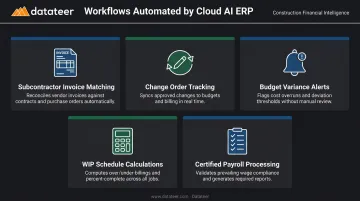
For firms running multiple prevailing wage projects at once, that payroll burden alone makes automation worth the investment.
Field-to-Office Data Integration
Cloud AI ERP links mobile field inputs — labor hours, material usage, equipment logs — directly to the job cost ledger. Everyone works from the same data. When the field records a cost, it flows to accounting immediately rather than arriving as a batch update at month-end close.
The practical result: the window to correct a labor overrun stays open. Instead of discovering the problem during reconciliation, supervisors and controllers can act while the work is still in progress.
Scalability Without Infrastructure Overhead
Cloud deployment means growth doesn't require hardware procurement. A firm scaling from $20M to $200M in annual revenue adds users and projects through subscription adjustments — not server upgrades, IT hiring, or infrastructure projects.
This matters particularly during periods of rapid project growth, when firms need to onboard new staff quickly and can't wait for IT to provision systems.
Improved Cost Forecasting and Budget Control
AI-enhanced ERP analyzes historical job cost data — labor productivity trends, material cost variances, subcontractor performance patterns — and generates forward-looking cost forecasts at the job, phase, and cost code level. Rather than discovering an overrun during monthly close, construction CFOs can see margin drift as it develops.
The KPMG survey found that 83% of construction survey participants identified improving estimating accuracy for materials and equipment as their biggest priority — a direct signal that current forecasting processes are falling short.
Enhanced Compliance and Audit Readiness
Cloud AI ERP maintains automated audit trails for job costing, certified payroll, lien waivers, and contract compliance. For construction firms managing bonding relationships and surety reviews, accurate WIP schedules directly affect financial credibility. Underbillings can signal financial distress to sureties — systems that automate WIP calculation reduce the risk of errors that create those signals inadvertently.
Leading platforms like Acumatica, CMiC, and Procore maintain SOC 2 compliance through annual audits, providing a security baseline that most individual construction firms would struggle to match with internal IT.
How AI Specifically Amplifies Cloud Construction ERP
The difference between a standard cloud ERP and an AI-enhanced one comes down to what happens after the data is stored.
Standard ERP: data goes in, reports come out on request. AI-enhanced ERP: the system continuously analyzes the data, detects patterns, and surfaces insights that a human reviewing a spreadsheet would miss — or catch only after the damage is done.
Predictive Cost Analytics
AI layers analyze cost codes, labor productivity trends, and historical project benchmarks to forecast where a project will land at completion. This gives construction finance teams the ability to identify margin fade while there's still time to intervene, rather than doing forensic accounting after project close.
A 2025 study published in Automation in Construction reported a hybrid deep-learning model achieving a 0.977 accuracy index for final construction cost prediction — though that's an academic dataset finding, not a production ERP benchmark. Real-world accuracy depends on data quality and implementation depth.
Anomaly Detection and Variance Flagging
AI-driven anomaly detection automatically flags:
- Labor slippage (actual vs. budgeted hours diverging beyond threshold)
- Unusual subcontractor billing patterns
- Procurement costs trending above estimate by cost code
These alerts surface without requiring someone to manually build and review exception reports. The broader adoption picture reinforces why this matters: KPMG's 2025/2026 survey found 43% of construction leaders viewed generative AI as a top transformative technology, yet only 24% had deployed it on more than 50% of projects — meaning most firms are still early in capturing these gains.
WIP and Revenue Recognition Automation
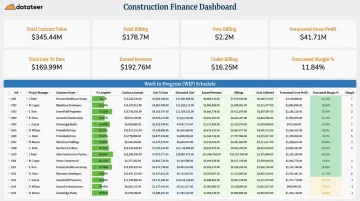
Month-end WIP reporting is where manual process debt hits hardest in construction finance. AI-enhanced ERP can automate percentage-of-completion calculations, update WIP schedules continuously, and reduce the manual effort that turns WIP reporting into a multi-week exercise.
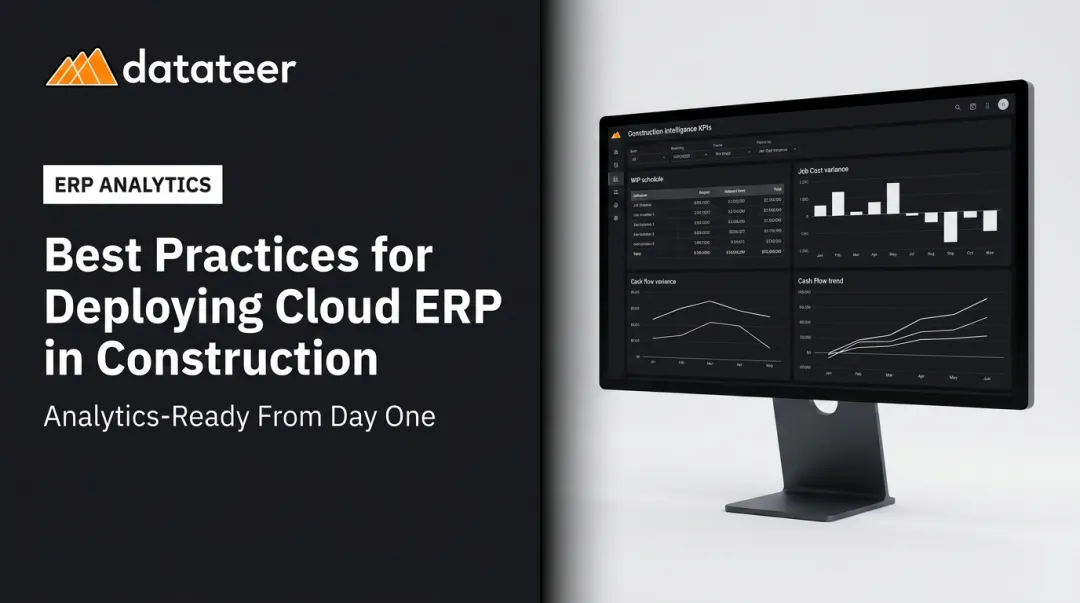
Even after deploying Procore, Sage, Vista, or Acumatica, many finance teams still export ERP data into spreadsheets to build WIP reports and executive dashboards. That last mile remains manual. Datateer closes it by integrating with 12+ construction ERPs — including Procore, Sage 100/300/Intacct, Viewpoint Vista, Acumatica Construction, Foundation Software, and CMiC — to automate the full reporting workflow. The result: what Double L Management described as replacing "two weeks worth of prior work" with a single click.
Key Disadvantages of Cloud AI Construction ERP
Disadvantage 1: High Implementation Costs and Timeline
Cloud AI ERP adoption is not a plug-and-play event. For mid-market firms, implementation involves:
- Licensing and subscription fees
- Data migration and cleaning costs
- Configuration for construction-specific workflows (cost codes, billing structures, union payroll rules)
- Professional services fees for implementation partners
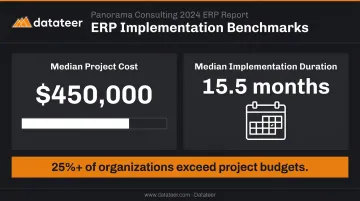
Panorama Consulting's 2024 ERP Report, based on 131 respondents with median revenue of $200.5M, found a median ERP project cost of $450,000 and median implementation duration of 15.5 months. These are cross-industry figures — construction implementations add complexity through cost code mapping, job data migration, and construction-specific configuration.
More than a quarter of organizations in Panorama's study exceeded their project budgets. The pattern is consistent: firms underestimate scope because they don't fully account for the data preparation work required before the system is usable.
Disadvantage 2: Data Migration and Cleaning Complexity
Construction companies typically have years of project data distributed across legacy ERPs, spreadsheets, and paper-based systems. Migrating this into a new cloud ERP requires:
- Cost code standardization across historical jobs
- Job data cleansing and validation
- Mapping historical project structures to the new system's data model
- Reconciliation between field systems (Procore) and accounting ERPs (Sage, Vista)
This process can take months and usually requires dedicated internal resources or external consultants. Firms that underinvest here often end up with a clean system running on dirty data.
Disadvantage 3: Training Requirements and Change Management
ERP value depends on consistent adoption across the entire organization, and construction organizations resist workflow changes, particularly in the field. Without structured training and genuine leadership buy-in:
- Field superintendents continue using paper timesheets
- Project managers maintain their own tracking spreadsheets
- Accounting runs parallel processes in both the ERP and Excel
The result is a firm paying for an ERP while still carrying the full cost of the manual processes the ERP was supposed to replace. Change management isn't a soft skill issue — it's the primary reason construction ERP implementations underdeliver.
Disadvantage 4: Customization Constraints
Cloud platforms are built for standardized workflows. That creates friction for firms with:
- Unique union payroll rules or multi-state prevailing wage requirements
- Specialized billing structures (T&M, GMP, hybrid contracts)
- Custom cost tracking requirements that don't map to standard cost code structures
Deep customization often requires paid development work and can complicate future platform upgrades. Firms need to weigh customization needs against the long-term maintenance cost of a heavily modified system.
Disadvantage 5: Internet Dependency and Data Security
Cloud ERP requires reliable internet connectivity, which is a genuine constraint for job sites in remote locations or areas with poor coverage. No authoritative benchmark exists for the frequency of rural jobsite connectivity failures, but any firm with remote operations should assess this risk before committing to a cloud-only platform.
Security is a separate consideration. Reputable construction ERP vendors invest substantially in compliance infrastructure:
- Acumatica: Maintains annual SOC 1 and SOC 2 audits
- CMiC: Publishes SOC 2 and SOC 3 compliance documentation
- Procore: Maintains published security and data governance standards
Compliance certifications are a starting point, not a complete answer. Firms with sensitive contract data or bonding requirements should evaluate vendor data residency policies and contractual data ownership terms carefully.
How to Maximize Your Cloud AI Construction ERP Investment
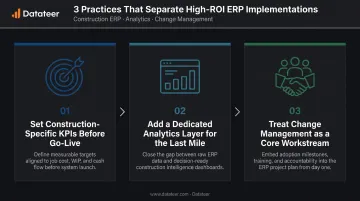
Getting ERP ROI in construction requires more than a successful technical implementation. Three practices consistently separate firms that extract value from those that don't.
1. Set construction-specific KPIs before go-live. Generic financial reports don't answer construction questions. Before launch, define the specific outputs the organization needs — WIP schedule accuracy, cost-to-complete forecasting, labor productivity ratios, 13-week cash flow projections — and configure the ERP to deliver these from day one. Otherwise, the system defaults to generic reports that nobody actually uses for decision-making.
2. Add a dedicated analytics layer for the last mile. ERPs are optimized for transaction processing and data storage. Many construction finance teams still pull ERP data manually into spreadsheets to build executive dashboards, WIP schedules, and CFO presentations.
Datateer is built specifically to close this gap, connecting directly to Procore, Sage, Vista, Acumatica, and 12+ other construction ERPs to automate data extraction, cleaning, and reporting. The platform delivers 12 pre-built construction finance dashboards on day one, covering:
- WIP and over/under-billings
- Job costing and cost-to-complete
- Margin fade detection
- Cash flow forecasting
- Change order tracking and retainage analytics
- PM scorecards
Flat annual pricing starts at $10,000/year per data source with unlimited users, no per-seat fees, no hidden implementation costs, and a 2–4 week setup timeline.
3. Treat change management as a core workstream, not an afterthought. Technology alone doesn't drive adoption — people do. Build this into your implementation plan from the start:
- Assign internal champions in both the field and the office
- Build a phased training plan tied to each user group's actual workflows, not a single all-hands session
- Set realistic adoption milestones by department and track them alongside technical KPIs
Firms that skip this step often end up with a fully configured ERP that only the finance team uses — leaving the field-to-office data loop broken.
Frequently Asked Questions
What are the advantages of cloud ERP?
Cloud ERP provides real-time data visibility, lower IT infrastructure costs, automatic vendor-managed updates, and remote accessibility for both field and office teams. For construction firms specifically, the ability to access project financials from any device (including job sites) eliminates the information lag common with office-bound on-premise systems.
What are the benefits of embedded AI in cloud ERP?
Embedded AI moves ERP from a record-keeping system to a predictive intelligence layer. This means cost forecasting that identifies margin drift before month-end, anomaly detection for labor slippage and budget overruns, and automated reporting that surfaces exceptions without requiring someone to build manual exception reports.
What is the difference between on-premise and cloud construction ERP?
On-premise ERP runs on a company's own servers, with higher upfront costs, greater data control, and dependence on internal IT for maintenance. Cloud ERP is vendor-hosted and browser-accessed, with lower upfront costs, automatic updates, and anywhere access, including job sites, provided internet connectivity is reliable.
How long does it take to implement a cloud AI construction ERP?
Timelines vary significantly by firm size and data complexity. Cross-industry mid-market benchmarks from Panorama Consulting show a median of 15.5 months. For construction firms, data migration, cost code mapping, and user training are the most time-intensive phases — and firms that underestimate these consistently blow past their original timelines.
What construction-specific features should I look for in a cloud AI ERP?
Non-negotiable capabilities include job costing at the cost code level, WIP schedule automation, ASC 606 revenue recognition, subcontractor management, certified payroll, change order tracking, and real-time cost-to-complete reporting. Any platform missing these natively is a generic ERP dressed up for construction, not a purpose-built system.
Can cloud AI ERP replace spreadsheets entirely for construction financial reporting?
It reduces spreadsheet dependency significantly for transaction processing and basic reporting. Many construction finance teams still rely on supplementary analytics tools for executive dashboards, WIP reports, and board presentations, because ERP reporting layers rarely support the custom views construction CFOs require.