The irony is that most discussions about integrated construction software focus on scheduling tools and project management platforms. The harder problem — the one that actually costs firms money — is the financial layer: ERP data, WIP reporting, job costing, and budget visibility that lives in silos no one fully controls.
This article covers what financial and operational integration in construction software actually delivers in practice, why it directly affects margins, and what it takes to move from reactive reporting to proactive decision-making.
Key Takeaways
- Integrated construction software connects ERPs, field tools, and dashboards into a single automated data flow — no more manual re-entry or reconciliation.
- Real-time financial visibility lets firms catch margin problems as they emerge, not three weeks after close when it's too late to act.
- Disconnected systems surface issues after close, when course-correction is no longer possible.
- The financial layer is where integration delivers the most measurable ROI: WIP accuracy, margin protection, and faster close cycles.
- Firms reach full dashboard visibility within 2–4 weeks by adding a financial intelligence layer on top of their existing ERP.
What Is Integrated Construction Software?
In practical terms, integrated construction software is a connected technology ecosystem where tools share data automatically — no manual exports, no spreadsheet reconciliation, no version conflicts between what the field recorded and what finance is working with.
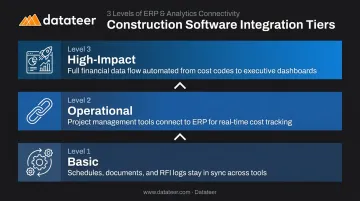
That integration operates on a spectrum:
- Basic level: Syncs project schedules, documents, and RFI logs across platforms
- Operational level: Connects project management tools to the ERP for cost tracking
- High-impact level: Automates the entire financial data flow — from cost codes and subcontract commitments in the ERP through to executive-ready dashboards and WIP schedules
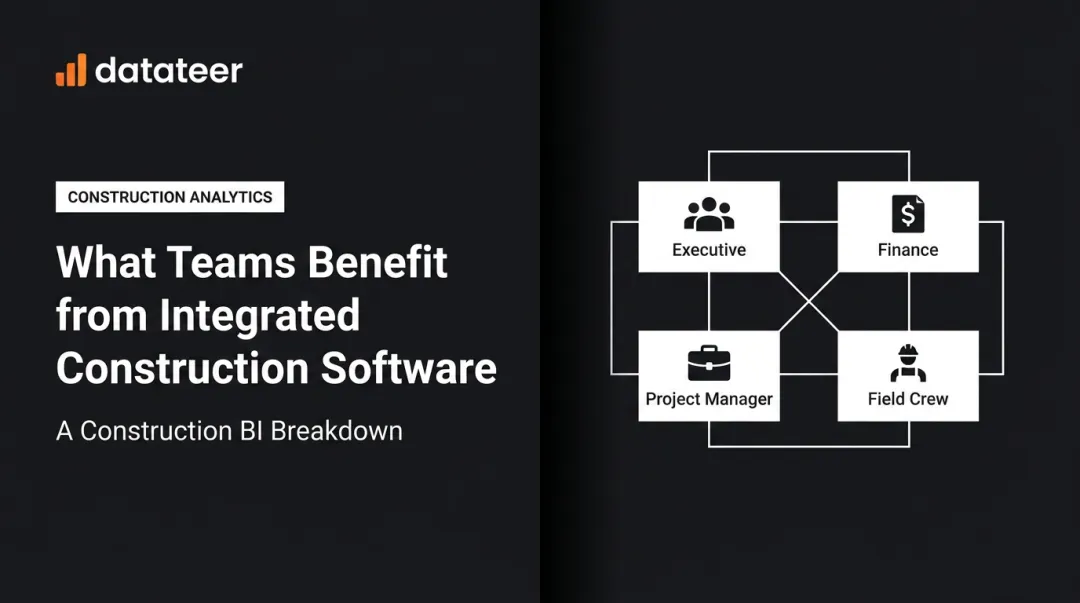
The actual goal is operational alignment: every stakeholder — field supervisor, project manager, CFO — working from the same verified, current data at all times.
What True Financial Integration Looks Like
A field labor entry recorded on Tuesday should appear in the job cost report by Wednesday morning. Subcontract commitments approved in Procore should reconcile automatically against the Sage invoice without anyone running a VLOOKUP. WIP schedules should reflect today's numbers, not last month's close.
Platforms like Datateer are built specifically for this level of financial integration — connecting directly to 12+ construction ERPs including Sage, Viewpoint Vista, Acumatica, CMiC, and Foundation Software, then automatically standardizing cost codes, catching broken entries, and mapping each firm's data logic into a unified structure. The result is financial data every stakeholder can act on — without waiting for month-end close or a manual reconciliation cycle. For ERPs outside the standard list, custom integrations connect legacy platforms, so firms don't have to replace their system to gain financial visibility.
Key Advantages of Integrated Construction Software
The advantages below are grounded in operational outcomes — job cost accuracy, margin health, reporting speed, and decision quality. Not theoretical efficiency claims.
Real-Time Financial Visibility Across Every Project
In most construction firms, financial data lives in the ERP. Getting it into a usable format requires manual extraction, spreadsheet manipulation, and formatting work that can stretch across days. By the time leadership sees the report, the data is already stale.
Integration changes this equation directly. When software connects to the ERP and standardizes cost codes automatically, financial reports — including WIP schedules — can be generated in minutes rather than days. According to a 2021 study by Autodesk and FMI, bad data cost the global construction industry $1.85 trillion in 2020, with decisions based on poor data driving an estimated $88.69 billion in rework alone.
The core advantage: A margin problem caught three weeks after it appears is a forensic exercise. Caught as it emerges, it's still fixable.
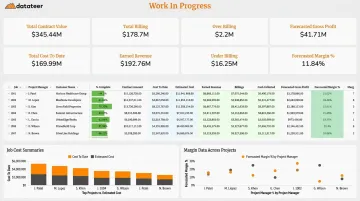
Datateer eliminates the typical 10–20 day WIP reporting lag by syncing directly with 20+ construction ERPs and refreshing dashboards overnight. One client from Double L Management put it plainly: "The very first time we accessed our data through a Datateer analytics dashboard, that one click replaced two weeks worth of prior work."
KPIs this affects:
- WIP report cycle time
- Cost-to-complete accuracy
- Margin fade detection speed
- Monthly close duration
- Budget variance response time
When it matters most: Firms managing multiple concurrent projects — typically $10M+ in annual revenue — where a single job running over budget can erode overall profitability if it isn't caught until month-end close.
Eliminating the Field-Office Data Gap
One of the most persistent inefficiencies in construction operations is the disconnect between what's happening on the job site and what the office is working with. Field labor entries, daily logs, and cost updates often flow into the system on a delay — sometimes never.
The result: two versions of project reality running simultaneously, with project managers and finance teams working from different numbers.
Research from PlanGrid and FMI found that US construction professionals spent roughly 14.1 hours per week on non-productive activities — including 5.5 hours looking for project data and 4.7 hours resolving conflict from disconnected information (2018 data).
The coordination burden hasn't disappeared since. The 2024 AGC/Sage survey of 1,293 US firms still found 33% citing field-to-office communication as a major IT challenge.
A connected platform eliminates this entirely: field data feeds into job cost tracking automatically, subcontract commitments update without manual intervention, and no one is reconciling competing spreadsheets or chasing status updates.
For firms using both Procore and Sage, for example, Datateer automatically reconciles project commits against invoices — eliminating the VLOOKUP marathons that otherwise precede every board meeting.
KPIs this affects:
- Labor cost accuracy
- Subcontract variance
- Billing cycle time
- Administrative hours per project
- Data reconciliation touchpoints per week
When it matters most: Firms with large field workforces, multiple active sites, or complex subcontractor structures where coordination overhead is already a recognized pain point.
Proactive Decision-Making Instead of Reactive Reporting
When data is fragmented and delayed, finance leaders spend most of their time assembling reports rather than analyzing them. The CFO defaults to data gatherer — pulling numbers together for the Wednesday leadership meeting — rather than functioning as a strategic advisor.
Automated dashboards shift that dynamic. When the data is always current, financial leaders spend their time on interpretation, pattern recognition, and risk flagging — not extraction.
Construction margins leave little room for error. CFMA's 2025 Construction Financial Benchmarker reports net income before tax margins of 6.7% across the industry — thin enough that a single job running over budget meaningfully impacts company-level profitability.
Best-in-class contractors report 11.9% net income before tax according to the 2024 Benchmarker. That gap reflects, in part, the quality of financial oversight.
A finance team that can answer "which of our active jobs is at risk this month?" without running a two-day reporting cycle is positioned to protect margins proactively.
Datateer's Margin Protection module is built for exactly this: it monitors original estimated margin versus current projected margin per job, flags negative variance drivers (labor overrun, material escalation, subcontractor cost increases, change order denials), and surfaces the specific cost codes driving the problem — before month-end close locks the WIP.
KPIs this affects:
- Job profitability trend accuracy
- Early warning rate for at-risk projects
- Time spent in data preparation vs. analysis
- Leadership decision response time
When it matters most: During high project volume, economic uncertainty, or scaling — when leadership needs fast, reliable financial intelligence across many simultaneous variables.
What Happens When Integration Is Missing
Disconnected tools and manual processes compound quietly — and most firms don't see the full cost until the damage is already done. Here's what that typically looks like across a construction firm's operations:
- Siloed spreadsheets no single person fully controls — version conflicts are routine, and the "current" WIP report is only as accurate as the last person who touched it
- Project managers and finance teams working from different numbers, creating avoidable disputes and slow decisions that stall projects
- Billing errors and WIP inaccuracies introduced during manual data handoffs, which can mislead bonding decisions and owner reporting
- Issues surfacing after the damage is done, not while there's still time to adjust labor allocation or renegotiate scope
- Rising administrative costs as headcount grows to compensate for tool inefficiency rather than to drive revenue
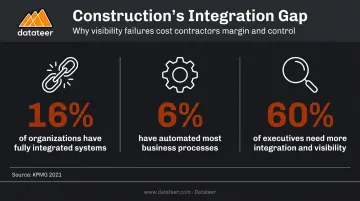
The integration gap is wider than most firms realize. A 2021 KPMG global construction survey found that only 16% of organizations had fully integrated construction technology systems — and only 6% had automated all or most business processes. The same survey found 60% of executives said they needed more integration and visibility across enterprise, portfolio, and project risk.
Scaling without integration just amplifies the problem. Every new project and new team member added to a disconnected system creates more reconciliation work, more version conflicts, and more administrative overhead. Growth without integration doesn't compound your revenue — it compounds your coordination costs.
How to Get the Most Value from Integrated Construction Software
Firms that integrate project management while leaving the financial layer disconnected still suffer from reporting lag where it hurts most. Selective integration produces selective results — the financial layer has to be in scope.
Apply Integration to the Financial Layer First
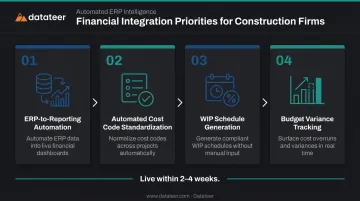
The highest-ROI integration targets for construction finance teams are:
- ERP-to-reporting automation — financial reports pull directly from the ERP without manual exports or formatting
- Automated cost code standardization — so data from multiple systems maps consistently, without manual reconciliation
- WIP schedule generation — automated calculations for percentage complete, over/under billings, and projected margin per job
- Budget variance tracking — real-time comparison of actual vs. budget at job, phase, and cost code level
Use the Data on a Defined Cadence
Real-time data only creates value when it's actually used in real-time decisions. Firms that get the most from integrated software review financial dashboards on a weekly cadence — not monthly — so that anomalies surface while there's still time to act.
Let Dashboards Drive Conversations, Not Just Compliance
Dashboards should surface anomalies — margin fade, labor slippage, cost code variance — that trigger specific conversations and adjustments. If a dashboard is only consulted after a problem has already been escalated, the integration is working but the operating cadence isn't.
Datateer is built around this workflow: direct ERP sync with 20+ construction systems, automated cost code standardization, and a full dashboard suite covering WIP, cash flow, job costing, margin protection, and PM scorecards — live within 2–4 weeks of implementation.
Frequently Asked Questions
What is the most popular construction software?
The most useful answer depends on your primary workflow gap. Procore and Autodesk Construction Cloud dominate project management. Sage, Viewpoint Vista, Acumatica, and CMiC are widely used construction ERPs for accounting and job costing. Financial intelligence layers sit above the ERP to automate executive reporting and WIP visibility — connecting the financial back-end to the dashboards leadership actually uses.
Is CMiC an ERP system?
Yes. CMiC is a construction-specific ERP covering project management, job costing, accounting, and HR in a single database. Most firms pair it with a reporting layer to surface that data for leadership without manual exports.
What is the difference between construction management software and construction ERP?
Construction management software (Procore, Autodesk) focuses on project execution: scheduling, documents, RFIs, and field workflows. A construction ERP (Sage, Vista, Acumatica) manages the financial and operational back-end: job costing, payroll, and accounts payable. Integrated firms connect both layers so financial data flows automatically from project execution into accounting.
What integrations matter most for construction financial management?
For financial leaders, ERP-to-reporting integrations deliver the highest impact. Direct connections that automate WIP schedules, cost code standardization, and budget-vs-actual tracking eliminate the manual export-and-reconcile cycle that consumes the most time each month.
How long does it take to implement integrated construction software?
It depends on what's being implemented. Full ERP deployments can take six to eighteen months. Financial intelligence layers that connect to an existing ERP — like Datateer — typically go live in 2–4 weeks, with dashboards live from day one.
How does integrated construction software reduce manual data entry?
True integration eliminates re-entry by syncing data directly between systems. A cost code update in the ERP flows automatically to job cost reports, dashboards, and WIP schedules — no manual copying, reformatting, or reconciliation required. The result is clean, consistent data across every report without the spreadsheet grind.