Introduction
Construction is a project-based business with some of the most complex financials in any industry—yet most firms still manage them through spreadsheets, email approvals, and disconnected data sources. According to JBKnowledge's Construction Technology Report, 51% of construction companies still use spreadsheets for accounting and ERP workflows, even among firms that have dedicated software.
The consequences go beyond inefficiency. Budget overruns get spotted weeks after the damage is done. WIP reports reflect last month's reality. Controllers spend most of their time gathering data rather than acting on it.
This guide is built for finance teams ready to change that. It covers:
- What financial workflow automation actually means in construction
- Which workflows deliver the fastest ROI
- How to implement automation step by step
- The mistakes that derail most projects
Key Takeaways
- Automation has two distinct layers: transaction processing (AP, invoicing, billing) and reporting/analytics (WIP, job costing, cash flow) — most firms stop at one
- The highest-ROI workflows to automate first are AP processing, WIP reporting, and job cost tracking
- Clean cost codes and ERP readiness must come before software selection
- The most common failure mode is poor data quality and low user adoption—not technology
- Firms that automate both layers shift finance from reactive data gathering to proactive decision-making
What Financial Workflow Automation Actually Means in Construction
Financial workflow automation in construction means using technology to replace rule-based, repetitive steps—invoice routing, budget updates, report generation—so data flows from source systems to decision-makers without manual intervention.
Every project carries its own cost codes, contract structure, retention schedule, and billing format. There's no single repeatable formula across jobs—which means generic automation tools fall short every time. Construction-specific tools are a prerequisite, not a preference.
Two Distinct Layers
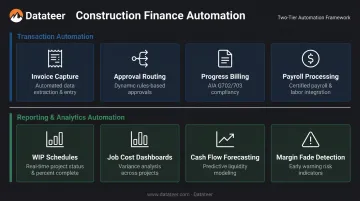
Construction financial automation operates at two separate layers, and they require different tools:
Transaction automation handles individual financial events:
- Invoice capture and three-way matching
- Approval routing by job and cost code
- Progress billing and AIA draw packages
- Payroll processing
Reporting and analytics automation aggregates data from ERPs and field tools into decision-ready outputs:
- Real-time WIP schedules and over/under-billing positions
- Job cost dashboards and cost-to-complete analysis
- 13-week cash flow forecasting
- Margin fade detection
Firms that select one tool expecting it to handle both layers consistently find blind spots in whichever layer they underinvested in. Understanding the distinction upfront determines which gaps you're solving for—and which vendors actually belong in the conversation.
Which Construction Financial Workflows Deliver the Most Value When Automated
Not every workflow is an equal automation candidate. Priority belongs to the processes where manual handling creates the most financial risk and time loss.
Accounts Payable and Invoice Processing
Manual AP is one of the highest-cost processes in construction. Each invoice requires:
- Three-way matching (invoice, PO, receipt)
- Job cost allocation by cost code
- Lien waiver coordination
- Multi-level approval routing
The cost gap is measurable. According to the Ardent Partners' 2024 AP Metrics report:
| Metric | Industry Average | Best-in-Class (Automated) |
|---|---|---|
| Cost per invoice | $9.87 | $2.81 |
| Processing time | 10.1 days | 3.4 days |
| Invoice exception rate | 20.7% | — |
In construction, where a mid-size contractor may process thousands of subcontractor invoices per year, that cost and error differential compounds fast.
WIP Reporting and Job Cost Tracking
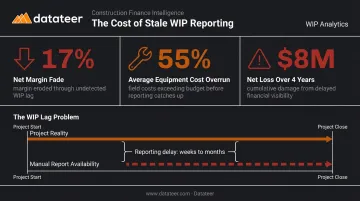
The WIP lag problem is one of the most damaging in construction finance. Manual WIP reports require data gathering from multiple systems, spreadsheet formatting, and review cycles—meaning project financial health is routinely evaluated on data that's weeks stale.
Automated WIP reporting pulls directly from the ERP, calculates percent complete, over/under-billing positions, and margin fade in real time. Datateer's platform reduces this to a 2-minute refresh by syncing directly with 12+ construction ERPs including Procore, Sage, Viewpoint Vista, and Acumatica—replacing what previously took a Double L Management analyst two full weeks of manual work.
FMI's construction data analytics research documented a large MEP contractor that discovered one client produced 17% net margin fade and equipment costs that exceeded budget by 55% on average—resulting in an $8M net loss over four years. Stale data made the problem invisible until it was too late.
Progress Billing, Retainage, and Cash Flow
These three areas share a common thread: structured, repeatable processes where manual errors directly compress cash flow.
- AIA G702/G703 draw packages, schedule of values management, and retainage calculations follow fixed rules — making them strong automation candidates where errors have immediate cash flow consequences
- Levelset's research found 66% of contractors wait more than 30 days to collect retainage, with 60% identifying retainage withholding as a significant cash flow problem
- Automated budget tracking updates committed costs in real time as invoices are processed, enabling proactive margin protection rather than after-the-fact forensic accounting
How to Automate Construction Financial Workflows: Step-by-Step
Automation implementation should be phased and pragmatic. Start with the highest-pain workflow, not a complete overhaul. The five steps below walk through that process — from auditing what you have to rolling out automation across the portfolio.
Step 1: Audit Your Current Financial Processes
Map each financial process end-to-end. Document:
- Where data is manually entered more than once
- Where approvals consistently get stuck
- Which reports require the most manual assembly time
This audit produces a ranked list of automation candidates based on time cost and error frequency — AP processing, WIP reporting, and job cost tracking typically sit at the top.
Step 2: Assess Your ERP and Data Foundation
Automation is only as clean as the underlying data. Before connecting any automation layer, confirm:
- Cost code framework: Consistent, structured, and used uniformly across projects
- Vendor records: Clean, deduplicated, and properly linked to jobs
- Job data: Organized by project inside the ERP, not managed externally in spreadsheets
Also verify that your ERP supports direct integration with automation tools — not just data exports. Incomplete or inconsistent ERP data will propagate errors downstream into dashboards and reports. Tools like Datateer's free ERP Compatibility Check can map your data connections against your existing technology stack before any commitment is made.
Step 3: Select the Right Tools for Each Layer
Transaction tools and reporting tools serve different functions. Evaluate them separately:
| Layer | What It Does | Example Tools |
|---|---|---|
| Transaction automation | Invoice processing, AP routing, AIA billing | AP automation platforms, progress billing software |
| Reporting and analytics | WIP dashboards, job cost tracking, cash flow forecasting | Construction intelligence platforms |
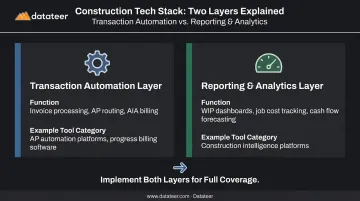
For the reporting and analytics layer, purpose-built platforms like Datateer automate the financial data flow from ERP to executive dashboards — covering WIP, job costing, cash flow forecasting, and more — without requiring custom BI development.
Step 4: Configure Integrations and Test Data Flow
Before going live, work through these validation steps:
- Connect automation tools to the ERP and map cost codes
- Run data through a representative sample of transactions
- Run parallel manual processes alongside automated outputs to verify accuracy
Skipping validation is one of the most common causes of data integrity failures after launch — especially when cost code structures are inconsistent across projects.
Step 5: Train Your Team and Roll Out in Phases
User adoption is the most critical non-technical factor in automation success. Teams need to see the time savings demonstrated before rollout — not described. Start with one workflow or one project, validate the results, then scale across the portfolio.
What You Need Before You Start Automating
Skip these foundations and automation doesn't fail slowly — it fails immediately, with bad data, broken integrations, and teams that revert to spreadsheets within 60 days.
ERP and System Readiness
Minimum prerequisites before connecting any automation layer:
- A structured, consistent cost code framework applied uniformly across all jobs
- Clean vendor and subcontractor records (no duplicates, linked to correct jobs)
- Project data organized within the ERP—not managed externally in spreadsheets
Data Governance and Process Documentation
Automation locks your existing processes into rules — so inconsistent or undocumented processes produce inconsistent outputs at scale. Before any system is configured, define:
- Approval hierarchies for invoices, change orders, and cost adjustments
- Cost allocation rules across job types, phases, and cost codes
- Reporting definitions (what counts as committed cost, earned revenue, over-billing)
Team Alignment and Change Management
Finance teams accustomed to manual workflows often resist automation — concerns about accuracy and job scope are real and valid. AGC's technology adoption guidance is direct on this point: for small to mid-sized firms, adoption doesn't happen without active leadership support and a named internal champion.
Before go-live, draft a brief communication plan that distinguishes what the system handles automatically from where human review and judgment remain required. That clarity removes most of the early resistance.
Common Mistakes When Automating Construction Financial Workflows
Most automation failures in construction finance aren't caused by technology. They stem from implementation decisions and organizational readiness gaps.
Automating a Broken Process Without Fixing It First
Automating an inefficient manual process speeds up the production of bad data. Teams must map, clean, and standardize financial processes before encoding them into software. If invoices are routinely miscoded manually, automation will misallocate them faster.
Poor Cost Code Structure Going Into Automation
Inconsistent or overly granular cost code structures cause cascading issues in automated job costing and reporting. Invoices get miscoded, WIP statements become unreliable, and job cost dashboards show figures that don't match reality. Cleaning up the cost code framework before automating is non-negotiable — not optional cleanup for later.
Datateer's automated data extraction handles cost code standardization as part of implementation, but firms with severely inconsistent structures still need to address the underlying framework before expecting clean outputs.
Treating Both Layers as a Single Problem
Selecting one tool expecting it to handle both transaction automation (AP, billing) and reporting automation (WIP, dashboards) almost always leaves significant gaps. Each layer requires purpose-built tools.
Underestimating Change Management
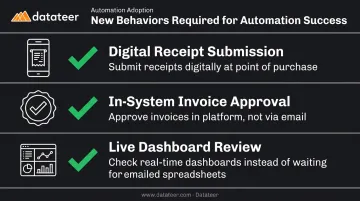
Automation requires new behaviors from project managers. Without active change management, adoption stalls and teams run manual workarounds alongside the new system, doubling the work rather than eliminating it.
New behaviors to plan for include:
- Submitting receipts digitally at the point of purchase
- Approving invoices directly in the system rather than via email chains
- Reviewing live dashboards instead of waiting for emailed spreadsheets
Skipping Parallel Testing
Most teams skip parallel testing — running automated and manual processes side-by-side before going fully live. Validate three things before cutover:
- That automated outputs match manual reports on historical data
- That cost code allocations are accurate across a representative job sample
- That approval routing triggers correctly for different invoice types
Conclusion
Automating construction financial workflows is fundamentally a data and process discipline — the technology only works when the foundation underneath it does. When done correctly, it transforms financial visibility from lagging and manual to real-time and strategic.
The firms seeing the strongest results are those that addressed both layers—transaction processing and financial reporting—and invested in ERP data quality and change management before implementation. Platforms like Datateer can connect to your existing ERP and deliver pre-built construction dashboards in 2–4 weeks — but only firms that've cleaned up their data and aligned their teams actually use that visibility to act.
Frequently Asked Questions
What does automation mean in the context of financial workflows in construction?
In construction finance, automation means using software to replace manual, rule-based steps — invoice routing, budget updates, report generation — so data flows from source systems to decision-makers without human intervention. The goal is eliminating manual data entry, approval bottlenecks, and spreadsheet compilation cycles.
How do I know if my construction company is ready to automate financial workflows?
If your team spends more than a few days each month compiling WIP reports, reconciling job cost data, or chasing down invoice approvals, you're a strong candidate. Most firms are ready once they have a functioning ERP — the automation layer sits on top of existing systems, not in place of them.
Which financial workflows should construction companies automate first?
Accounts payable processing and WIP reporting offer the highest-priority starting points. Both carry high manual labor costs and directly affect cash flow visibility and project profitability. Job cost tracking is a close third given its downstream impact on billing accuracy and margin protection.
What ERP systems are compatible with construction financial workflow automation tools?
Most platforms support the major construction ERPs: Procore, Sage 100/300, Viewpoint Vista, Acumatica Construction, and QuickBooks. Datateer connects to 12+ construction ERPs as a standard offering, with custom integrations available for legacy systems. Confirm direct sync capability — not just CSV export — before committing to any tool.
How long does it take to implement financial workflow automation in construction?
Timelines vary by scope. AP automation add-ons can be operational in weeks. Full ERP implementations typically take months. Reporting and analytics platforms with direct ERP sync, such as Datateer, typically have data flowing within 2–4 weeks, with the yearly subscription starting only once data is live.
What is the difference between automating transaction workflows and automating financial reporting?
Transaction automation handles individual financial events: invoice processing, approval routing, and progress billing. Reporting automation aggregates that ERP data into real-time dashboards covering WIP, job cost, and cash flow. Both are necessary, but they solve different problems and require different tools.