Introduction
Procore has become the operational backbone for thousands of construction firms. It manages projects, RFIs, submittals, and field communications — and it handles those workflows well. But it was never designed to be a financial intelligence system, and that gap creates real problems for the teams who depend on it most.
Three types of people typically feel this pain most:
- Construction CFOs and finance managers — manually reconciling Procore data against their ERP for the first two weeks of every month
- Project managers — making cost decisions from reports that are already weeks out of date
- Executives — asking for one number and getting three different answers from three different systems
What follows covers the major categories of software that integrate with Procore, where Procore's native financial capabilities fall short, and how to evaluate integrations before you commit to one.
Key Takeaways
- Procore's App Marketplace has featured over 200 integrations across dozens of categories — accounting ERPs, compliance tools, document management, and analytics platforms among them.
- The biggest gap for construction finance teams isn't project data — it's that Procore doesn't produce consolidated WIP schedules, over/under billing reports, or portfolio-level margin analytics.
- Key integration categories worth evaluating: accounting/ERP, financial analytics and BI, compliance and risk, document management, and time tracking.
- The best integrations eliminate manual work entirely — the worst ones just move it to a different tool.
- Datateer connects directly to Procore and 20+ construction ERPs to automate WIP reports, job cost dashboards, and executive financials with overnight automated syncs.
Why Procore Users Rely on Third-Party Integrations
Procore is purpose-built for project management and field operations. That narrow focus is intentional — but it also means the platform was never designed to cover the full range of financial, compliance, and analytical needs of a modern construction firm.
The result is a data isolation problem. Project data lives in Procore. Financial and accounting data lives in Sage, Vista, Acumatica, or QuickBooks. The two rarely sync automatically, which means someone on your team manually bridges the gap — usually at month-end, usually under deadline pressure.
That manual bridging creates a structural bottleneck:
- Project managers work in Procore
- Accountants work in the ERP
- Finance teams manually reconcile both — exporting CSVs, running VLOOKUPs, and mapping cost codes until the numbers finally agree
By the time those reports are ready, they reflect last month's reality. According to research from Autodesk and FMI, bad data and disconnected systems cost the global construction industry approximately $1.8 trillion in 2020 alone — and FMI estimates that roughly 96% of data generated in engineering and construction goes unused.
Procore's App Marketplace was built to close these gaps, allowing third-party tools to connect directly into Procore's data layer. With hundreds of available apps spanning dozens of workflow categories, though, the harder question isn't whether to integrate — it's knowing which integrations your firm actually needs.
The Major Categories of Software That Integrate With Procore
Not all integrations are created equal. The right stack depends entirely on which workflow gap is costing your firm the most time and money. Here's a map of the major categories.
Accounting and ERP Integrations
Accounting integrations are among the most commonly sought Procore connections. Tools like Sage 300 CRE, Sage Intacct Construction, Acumatica, Viewpoint Vista, and QuickBooks connect Procore project data with job cost accounting, eliminating double entry of purchase orders, subcontracts, change orders, and committed costs.
Procore has built native connectors for several of these platforms. The Acumatica and Vista connectors push and pull data directly through each system's API. The Sage 300 CRE connector lets users create commitments and change orders in Procore using Sage cost codes, then push approved items directly to Sage.
One important caveat: integration depth varies significantly by vendor. Some are true bi-directional syncs; others are one-way flows that still require manual reconciliation steps on the accounting side. Always confirm the sync direction before buying.
Compliance and Risk Management Integrations
Subcontractor compliance is a major integration category that's easy to underestimate until it creates a problem. Tools in this space — including Billy Insurance Compliance, Trimble Pay, and EBIX COI Tracking — pull vendor and project data from Procore's directory and commitments, then automate:
- Certificate of insurance (COI) tracking and expiration alerts
- Lien waiver collection and status updates
- Subcontractor prequalification workflows
This category protects GCs from liability and prevents payment delays caused by expired or missing compliance documents.
Document Management Integrations
SharePoint, Google Drive, Dropbox, Box, and OneDrive all have two-way sync integrations available through the Procore App Marketplace (primarily via SyncEzy). These tools sync drawings, submittals, and project documents automatically to cloud storage, so field and office teams always work from the same version without manual uploads.
Time Tracking and Scheduling Integrations
Time tracking tools sync labor hours captured in the field directly to Procore project budgets, enabling more accurate job costing and reducing payroll processing time. SmartBarrel, for example, uses biometric facial verification to auto-fill Procore timesheets and daily logs with verified headcount data. This category is especially valuable for specialty contractors running labor-heavy projects where small productivity variances add up fast.
Estimating and Preconstruction Integrations
Estimating platforms push awarded bid data directly into Procore at project setup, so the original estimate becomes the baseline budget from day one. Key data transferred typically includes:
- Budget line items and cost codes
- Subcontractor commitments
- Scope breakdowns tied to Procore cost structure
This eliminates re-keying and prevents the common problem of budgets being manually rebuilt — and often distorted — after award.
The Financial Analytics Gap: What Procore Doesn't Do Natively
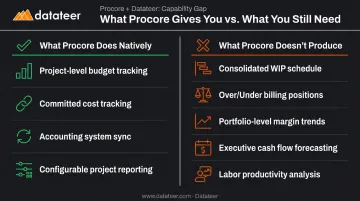
Procore includes budget tracking, cost tracking, forecasting tools, and accounting sync. Those capabilities are genuinely useful. But Procore is not a financial analytics platform — and there's a meaningful difference between the two.
What Procore does natively:
- Project-level budget tracking and forecasting
- Committed cost tracking (purchase orders, subcontracts, change orders)
- Integration with accounting systems for data sync
- Configurable budget reporting at the project level
What Procore does not produce natively:
- A consolidated WIP schedule across all jobs
- Automated over/under billing positions
- Portfolio-level margin trend reports
- Executive-level cash flow forecasting
- Labor productivity analysis across the portfolio
The consequence for finance teams is predictable. Even firms that use Procore religiously still export raw data into Excel, manually map cost codes, and build WIP schedules by hand. The first 10–20 days of every month get consumed by the reconciliation process. By the time reports are shared, they're already stale.
This is a structural problem, not a process one. Procore wasn't designed to be a BI platform. Without an analytics layer that connects to it and transforms that data into executive-ready dashboards, the CFO is making decisions based on last month's numbers.
The financial stakes are real. McKinsey's analysis of over 500 large capital projects found average cost overruns of at least 79% relative to initial budgets. And Construction Executive notes that a one- or two-percentage-point change in profit margin per quarter makes a measurable difference at project close — with less than 5% margin fade from project start to completion considered a reasonable target.
You cannot catch margin fade in real time if your financial reports are always three weeks behind.
How Financial Intelligence Tools Like Datateer Connect With Procore
Financial analytics and BI tools built specifically for construction close the gap that accounting ERPs and Procore leave open. Rather than managing transactions or project workflows, these tools connect to Procore and the ERP simultaneously, extract and standardize financial data, and surface it in pre-built dashboards — no manual exports required.
What Datateer Does With Procore Data
Datateer integrates directly with Procore and 20+ construction ERPs, including:
- Sage 100, 300, and Intacct
- Viewpoint Vista and Spectrum
- Acumatica Construction, Foundation Software, CMiC, and Jonas
- QuickBooks and NetSuite
The platform pulls project financials, committed costs, change orders, billing data, and cost codes through automated extraction, cleans and standardizes the data (including cross-system cost code mapping), and refreshes dashboards on an overnight sync schedule.
The standard refresh is an overnight batch sync, which means dashboards reflect the prior day's data each morning. For firms where "real-time" has historically meant "last month's spreadsheet," that shift from a 10–20 day reporting lag to next-morning data changes how finance teams operate.
One business analyst at Double L Management put it plainly: "The very first time we accessed our data through a Datateer analytics dashboard, that one click replaced two weeks worth of prior work."
What Finance Teams See Once Connected
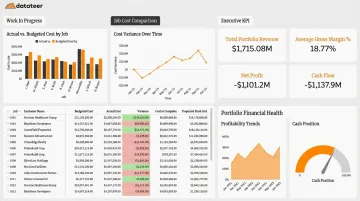
Once Datateer is live with both Procore and an ERP connection, construction finance teams get access to 12 pre-built dashboards organized across four strategic suites:
- Executive Strategy & Solvency — portfolio-level margin trends, liquidity risk, and executive KPIs
- Financial Operations & Cash Management — 13-week cash flow forecasting, AR/AP health, DSO and DPO
- Project Excellence & Field Operations — WIP schedules, over/under billing positions, job cost vs. budget
- Resource Productivity — labor productivity, PM scorecards, subcontractor performance
Setup takes 2–4 weeks, with data flowing before the annual subscription begins. Pricing starts at $10,000/year per data source with unlimited users — no per-seat fees, no per-module charges.
The Role Shift This Creates
The dashboards matter less than what finance managers can do once they stop spending 10–20 days building reports manually. CFOs and controllers shift from forensic accounting — explaining what happened last month — to genuine strategic partnership. That means catching margin fade while there's still time to act, identifying at-risk projects before the monthly close, and walking into leadership meetings with live data.
How to Evaluate Any Procore Integration Before You Buy
Before committing to any Procore integration, three questions cut through most of the noise:
Does it eliminate the manual work, or just move it? Some integrations automate the data flow end-to-end; others just replace one manual step with a different one. Pin down exactly which tasks disappear — not just which software connects.
How deep is the data sync? Procore supports three integration types — data connection apps (push/pull data), side panel apps (display external data inside Procore), and embedded apps (allow users to take actions from within Procore). The deeper the integration, the less context-switching your team has to do. Match the integration type to the problem you're solving.
What does "live" actually mean for your team? Setup timelines vary considerably. Simple document sync tools can connect in hours. Deeper financial analytics integrations typically take 2–4 weeks to configure data mappings, validate outputs, and go live with accurate dashboards. Clarify who owns cost code mapping and data cleaning — vendor or your team — before you sign.
Those go-live complexities connect directly to the real cost of ownership. Beyond the license fee, factor in:
- Setup and data mapping time (often unbilled but real)
- Ongoing maintenance when your ERP data structure changes
- Per-user or per-module charges that compound as headcount grows
Flat-rate pricing models (like Datateer's per-data-source structure) scale cleanly — adding users doesn't add cost.
The AGC's Selecting Construction Technology guidance makes a similar point: technology selection should account for both the cost of the technology and the time spent implementing and maintaining it — not just the license fee on the proposal.
Frequently Asked Questions
What types of software integrate with Procore?
Procore's App Marketplace covers integrations across accounting and ERP, compliance and risk management, document management, time tracking, estimating, and financial analytics. The Marketplace now lists 300+ integrations, with new tools added regularly.
Does Procore have built-in financial reporting for construction?
Procore includes project-level budget tracking, cost tracking, forecasting, and accounting sync — but it does not produce consolidated WIP schedules, over/under billing reports, or portfolio-level margin analytics. Construction firms that need those outputs typically add a dedicated financial analytics tool alongside Procore.
How does Procore integrate with accounting software like Sage or QuickBooks?
Procore offers native connectors for several major accounting systems, including Sage 300 CRE, Sage Intacct, Acumatica, Viewpoint Vista, and QuickBooks. These integrations sync job cost data, purchase orders, change orders, and subcontracts between systems, though sync direction and depth vary by vendor — some offer full bi-directional flow, others push data one way only.
What is the Procore App Marketplace?
The Procore App Marketplace is Procore's official directory of vetted third-party integrations. Construction firms can browse and install apps that connect to their Procore account across workflow categories including accounting, compliance, analytics, and document management.
Can Procore data be used to generate real-time WIP reports?
Procore does not generate WIP reports natively. Financial analytics tools like Datateer connect directly to Procore's data, clean and standardize it alongside ERP data, and produce automated WIP schedules, with dashboards refreshing on an overnight sync cycle and eliminating the manual spreadsheet process entirely.
How long does it take to set up a Procore integration?
Setup time varies by integration type. Simple document sync tools can connect in a matter of hours. Deeper financial analytics integrations — where cost code mapping, data cleaning, and dashboard configuration are involved — typically take 2–4 weeks to configure and validate before going live with accurate data.