Introduction
Construction firms are deploying cloud ERP at a faster pace than ever — and for good reason. Managing job costs across 15 active projects, reconciling subcontractor commitments, running union payroll, and closing the month without a single source of truth is genuinely painful. Cloud ERP promises to fix that.
But going live is not the same as going live well.
Construction ERP deployments carry risks that generic implementation guides don't address: cost codes that mean different things on different job sites, field teams who revert to spreadsheets under project pressure, and financial reporting that still lags weeks behind reality even after go-live.
According to ERP failure research, more than half of ERP implementations run over budget or miss their core objectives — and construction firms, with their complex job cost structures and distributed field operations, face more deployment risk than most.
This guide covers the exact phases of a construction ERP deployment, what must be in place before you begin, the variables that most determine success, and the mistakes that most reliably derail implementations.
Key Takeaways
- Cloud ERP deployment follows five phases (preparation, configuration, data migration, rollout, and stabilization) — skipping any one creates costly downstream problems.
- Clean, standardized cost codes must exist before data migration, not after.
- Field teams and finance teams need fundamentally different training and interfaces; deploying the same program to both reduces adoption across the board.
- Timing go-live around project cycles and payroll calendars prevents the operational disruptions that undermine adoption.
- ERP deployment is step one; without automated reporting layered on top, most firms still spend weeks producing WIP schedules by hand.
How to Deploy Cloud ERP in Construction: A Phase-by-Phase Breakdown
Phase 1: Define Requirements and Build Your Deployment Team
Most deployment failures start here — not in the technology, but in the team composition and requirements documentation.
Your deployment team needs more than IT and finance. It needs:
- Project managers who understand how committed costs flow through a job
- Field supervisors who will actually enter data from the site
- Payroll leads who manage union rules, certified payroll, and exception handling
- Executive sponsor with visible, active involvement — not just budget sign-off
Field operations leadership should have equal standing to finance in process design decisions. When they don't, the configured system works beautifully for the controller and creates friction for everyone on a job site.
Document construction-specific requirements before touching configuration settings:
- Job costing structure and cost code hierarchy
- Subcontractor billing workflows and AIA billing formats
- Union payroll rules and certified payroll compliance
- Lien waiver tracking and release workflows
- WIP reporting cadence and format
Phase 2: Configure the System Around Your Construction Workflows
Prioritize configuration over customization — this discipline matters more in construction ERP than almost anywhere else. Every customization adds upgrade complexity and maintenance burden. Where standard ERP workflows can accommodate your process, adapt internally rather than modifying the platform.
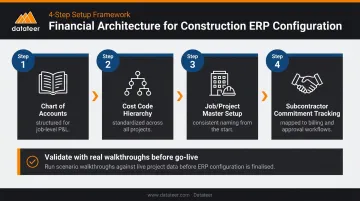
Get the financial data architecture right first:
- Chart of accounts — structured to support job-level P&L
- Cost code hierarchy — standardized across all projects before any data enters the system
- Job/project master setup — consistent naming and structure from the start
- Subcontractor commitment tracking — mapped to your billing and approval workflows
After configuration, run scenario-based design validation. Walk through realistic workflows in the actual configured system: a superintendent approving a material request, a PM reconciling committed costs mid-project, a controller closing the month with 12 active jobs, and a payroll lead processing a certified payroll run. These walkthroughs surface friction before it becomes a go-live crisis.
Phase 3: Clean Data and Execute a Staged Migration
Data migration is the most underestimated phase of construction ERP deployments. Legacy systems accumulate years of inconsistent cost codes, duplicate vendor records, unmapped subcontractor commitments, and incomplete WIP data. None of that cleans itself during import.
Priority data categories to clean before migration:
| Data Category | Common Issues in Construction Firms |
|---|---|
| Vendor master | Duplicates, inconsistent naming, missing payment terms |
| Job master | Inactive jobs mixed with active, inconsistent status codes |
| Cost code structure | Different codes used for same work across projects |
| Open subcontractor commitments | Unmapped or partially posted commitments |
| Active project budgets | Misaligned to current cost code structure |
| Payroll records | Employee classification errors, outdated union rates |
Run multiple test migrations with parallel validation — not a single cutover attempt. And time your final cutover carefully: avoid go-live during month-end close, active project mobilization, or peak payroll processing.
Phase 4: Go Live with a Phased Rollout and a Stabilization Plan
The big bang vs. phased rollout decision carries real tradeoffs in construction:
- Big bang creates a clean system break and eliminates parallel-tracking complexity, but exposes every job site simultaneously to risk
- Phased rollout by region or project type limits exposure but requires defined parallel-tracking protocols and a firm timeline for full consolidation
Given those tradeoffs, most mid-market construction firms with active project portfolios find phased rollout is the safer path — particularly when multiple job sites are running simultaneously.
Regardless of approach, three non-negotiable go-live practices:
- Change freeze 2–4 weeks before go-live — no new configurations or scope additions
- Role-specific training close to go-live — not months before, when it's forgotten; field teams need short, scenario-based mobile training, not classroom instruction
- Funded stabilization period — 4–6 weeks of dedicated support, a clear help desk escalation path, and weekly exception dashboards reviewed by operations leadership
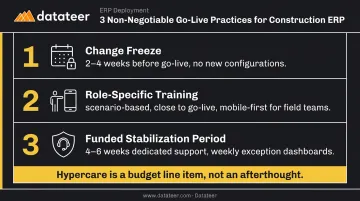
Hypercare is a budget line item, not an afterthought. Budget it explicitly — teams that skip this step typically spend the first quarter post-go-live fighting fires instead of optimizing the system.
What You Need Before Deploying Cloud ERP in Construction
Preparation quality is the single biggest predictor of deployment success. Firms that rush to go-live without completing readiness work spend more in post-launch remediation than they saved by compressing the timeline.
Data and Process Readiness
Inconsistent cost codes are the leading cause of reporting failures in construction ERP deployments. Cost codes drive how labor, materials, subcontracts, and equipment are categorized across every job. When codes differ by project, superintendent, or legacy system, cross-project analysis becomes impossible and WIP reporting becomes unreliable from day one.
Standardization means:
- Defining a single hierarchy that applies to all active and future projects
- Mapping legacy codes to the new structure before migration
- Getting sign-off from field operations, not just finance
Map your financial workflows end-to-end before configuring anything. Every gap or approval ambiguity gets amplified by the ERP, not resolved by it. The full chain to validate:
- Estimate
- Purchase order
- Subcontract commitment
- Invoice approval
- Billing
- WIP
Organizational and Reporting Readiness
Define data ownership before deployment begins. Someone must own the vendor master, job master, cost codes, and subcontractor records — and those owners need to be available and committed at 25%+ of their time during the deployment period.
Deploying a cloud ERP gives you a system of record. It does not automatically give you real-time financial dashboards. Construction firms routinely discover post-go-live that they're still manually exporting data into Excel to build WIP schedules and job cost reports.
Double L Management captured this exactly — their Business Analyst noted that before connecting to Datateer, two full weeks of manual work were consumed building reports that "one click" now replaces. That manual layer persists after ERP go-live unless you plan specifically to eliminate it.
Datateer connects directly to 20+ construction ERPs (Sage, Procore, Vista, Acumatica, Foundation Software, CMiC, and others) to deliver automated WIP, job costing, and financial dashboards.
The data extraction and cleaning engine standardizes cost codes, reconciles Procore project commits to Sage invoices, and maps data logic into a unified structure. It doesn't require clean ERP data before connecting. Setup takes 2–4 weeks, and all 12 pre-built dashboards are available on day one.
Use Datateer's free ERP Compatibility Check to assess your integration readiness during ERP planning, before you go live.
Key Variables That Affect Cloud ERP Deployment Success in Construction
Deployment outcomes depend less on which ERP platform you select and more on how well you manage a small number of controllable variables.
Cost Code Architecture
Cost codes are the backbone of job cost reporting. They determine how labor, materials, subcontracts, and equipment expenses are categorized and compared to budgets. A poorly designed hierarchy makes cross-project analysis impossible.
Firms that standardize cost codes before go-live see clean committed cost reporting from day one. Firms that migrate inconsistent legacy codes inherit months of manual reclassification work and corrupted WIP reporting that can take a year or more to fully remediate.
Rollout Sequencing and Timing
Construction projects run on tight payroll and billing cycles. Deploying ERP during peak project mobilization or mid-close creates immediate operational stress that directly reduces adoption and generates exceptions that take weeks to clear.
Firms that align go-live to lower-activity periods (between major project phases, after a financial close, or at fiscal year start) report significantly smoother stabilization. The timing decision is operational, not just logistical.
Change Management Depth: Field vs. Office
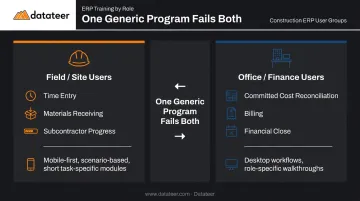
Field teams and office teams use ERP for fundamentally different tasks:
| User Group | Primary ERP Tasks |
|---|---|
| Field / Site | Time entry, materials receiving, subcontractor progress |
| Office / Finance | Committed cost reconciliation, billing, financial close |
One generic training program fails both groups. Deployments that use role-specific, scenario-based training, with mobile-first interfaces for field users and desktop workflows for finance, see consistently higher adoption rates. When field teams revert to spreadsheets under project pressure, job cost data flowing to the office becomes incomplete and WIP reporting breaks down.
Post-Deployment Reporting Infrastructure
This is where most deployment plans fall short. Even a successfully deployed cloud ERP does not replace the manual financial reporting process most construction finance teams rely on. WIP schedules, margin reports, and cash flow forecasts often remain spreadsheet-built for months, sometimes years, after go-live.
Firms that plan for a reporting layer on top of the ERP realize the full value of their deployment faster. Datateer's analytics platform syncs directly with construction ERPs overnight, replacing manual extraction with automated dashboards across key metrics:
- Percentage complete and earned revenue per job
- Over/under-billings and projected margin
- WIP schedules and cash flow forecasts
The platform starts at $10,000/year per data source with unlimited users. Implementation takes 2–4 weeks, and the annual subscription only begins once data is actively flowing.
Common Mistakes When Deploying Cloud ERP in Construction
Migrating Dirty Data Without Remediation
Importing legacy cost codes, vendor records, and job data without cleanup causes corrupt reporting from day one. No ERP compensates for bad input data. This is the most common and most expensive mistake construction firms make — and the fix is straightforward: audit and remediate records before migration, not after.
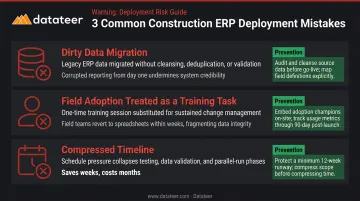
Treating Field Adoption as a Training Task
A one-time training session before go-live does not produce sustained adoption. When site supervisors revert to spreadsheets under project pressure, job cost data becomes unreliable and the business case for the ERP collapses.
Adoption requires more than a webinar. It needs:
- Accountability structures tied to project reporting
- Role-specific interfaces that reduce friction at the point of entry
- Ongoing reinforcement from operations leadership, not just IT
Compressing the Timeline to Hit a Deadline
Rushing to go-live to satisfy a fiscal year start or an executive deadline consistently shifts cost from the implementation budget into post-launch problems: payroll errors, project reporting delays, and broken approval workflows. Those issues take months to resolve. The compressed timeline saves weeks and costs months.
Frequently Asked Questions
How long does cloud ERP deployment typically take for a construction firm?
Most mid-market construction firms complete deployment in 3–9 months, depending on firm size, data complexity, and rollout strategy. Phased rollouts take longer, but they reduce risk for firms with active project portfolios and give teams time to absorb change without disrupting live jobs.
Should construction companies use a big-bang or phased rollout for cloud ERP?
Big bang creates a clean system break but exposes all job sites simultaneously. For most construction firms with active projects, phased rollout by region or project type is safer and more practical. The key requirements: clear parallel-tracking protocols and a non-negotiable consolidation deadline.
What data needs to be cleaned before deploying a construction ERP?
Start with cost codes. They're the most construction-specific data category, the most commonly neglected, and the most likely to corrupt reporting if migrated inconsistently. Remaining priorities: vendor master, job master, open subcontractor commitments, active project budgets, and payroll records.
How do you get field teams to actually adopt a new cloud ERP system?
Deliver role-specific, scenario-based training close to go-live, not months before. Field users need mobile-first interfaces and short task-specific instruction backed by accountability mechanisms like daily submission requirements. Generic classroom training produces short-term retention and long-term reversion to spreadsheets.
What are the most common reasons construction ERP deployments fail?
The top three: dirty data migration, insufficient field adoption, and compressed timelines that sacrifice readiness. Each one is preventable with proper preparation. Each one is also consistently underestimated until projects are already off the rails.
How do you measure ROI after deploying cloud ERP in a construction firm?
Track construction-specific metrics: WIP report cycle time, financial close duration, committed cost visibility, payroll exception rates, and manual data entry hours eliminated. Establish these baselines before go-live. Without them, before/after comparison is impossible and any ROI claim is a guess.